1. Introducción
The Hama MW-650 is a versatile 6-button optical wireless mouse designed for multi-device use. It offers flexible connectivity options via a 2.4 GHz USB-A receiver and Bluetooth, allowing seamless switching between up to three devices. The optical sensor provides precise cursor control, and adjustable DPI settings cater to various user preferences. This manual provides detailed instructions for setup, operation, maintenance, and troubleshooting to ensure optimal performance of your device.
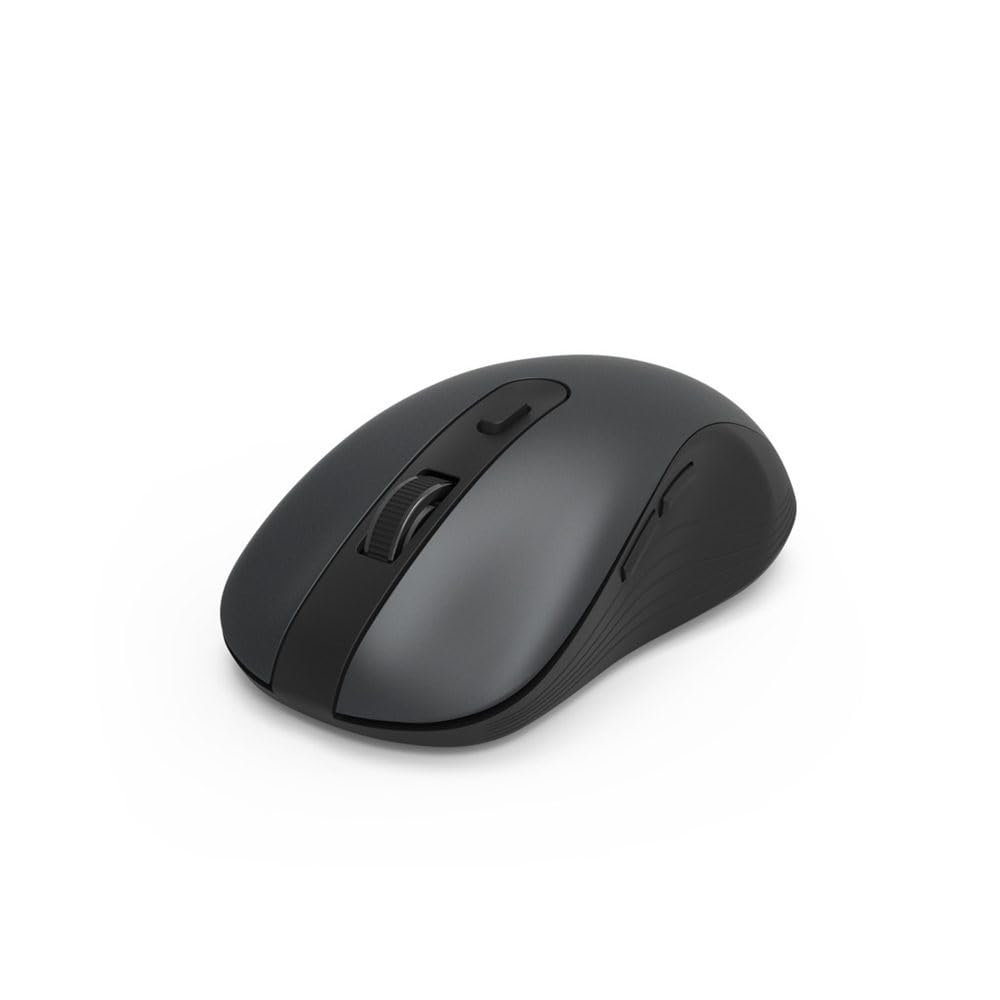
Image 1.1: Hama MW-650 Wireless Mouse (Top View)
2. Contenido del paquete
Por favor revise el paquete para ver los siguientes artículos:
- 1 x Hama MW-650 6-Button Optical Wireless Mouse
- 1 receptor USB-A
- 2 pilas AA Mignon
- 1 x Manual de instrucciones (este documento)

Image 2.1: Hama MW-650 Product Packaging
3. Configuración
3.1. Instalación de la batería
- Ubique el compartimiento de la batería en la parte inferior del mouse.
- Abra la tapa del compartimiento de la batería.
- Inserte las dos pilas AA Mignon, asegurándose de la polaridad correcta (+/-).
- Cierre bien la tapa del compartimento de la batería.
3.2. Encendido y apagado
On the underside of the mouse, slide the ON/OFF switch to the 'ON' position to power on the mouse. Slide it to 'OFF' when not in use to conserve battery life.

Image 3.1: Underside of Hama MW-650 Mouse with ON/OFF Switch and Receiver
3.3. Opciones de conectividad
The Hama MW-650 mouse supports two wireless connection methods: 2.4 GHz via USB-A receiver and Bluetooth.
3.3.1. 2.4 GHz USB-A Receiver Connection
- Remove the USB-A receiver from its storage slot on the underside of the mouse.
- Conecte el receptor USB-A a un puerto USB-A disponible en su computadora o computadora portátil.
- El sistema operativo debería detectar e instalar automáticamente los controladores necesarios.
- The mouse will connect automatically. The LED indicator for BT1/BT2 will not be lit when using the USB receiver.
3.3.2. Conexión Bluetooth
The mouse can connect to two separate Bluetooth devices (BT1 and BT2).
- Asegúrese de que el mouse esté encendido.
- Press the 'BT1' or 'BT2' button on the underside of the mouse to select the desired Bluetooth channel. The corresponding LED will flash slowly.
- To enter pairing mode, press and hold the selected 'BT1' or 'BT2' button for approximately 3 seconds until the LED flashes rapidly.
- En su dispositivo (PC, computadora portátil, tableta, teléfono inteligente), habilite Bluetooth y busque nuevos dispositivos.
- Select "Hama MW-650" from the list of available devices to pair.
- Once successfully paired, the LED will stop flashing and remain steadily lit for a few seconds before turning off.
4. Instrucciones de funcionamiento
4.1. Funciones básicas del ratón
The Hama MW-650 features 6 buttons and a scroll wheel:
- Botón de clic izquierdo: Primary function, typically for selecting items or opening links.
- Botón derecho del ratón: Función secundaria, normalmente para menús contextuales.
- Rueda de desplazamiento: For scrolling up and down documents or web páginas. También se puede presionar para una función de clic central.
- Botón PPP: Ubicado detrás de la rueda de desplazamiento, se utiliza para ajustar la sensibilidad del cursor.
- Botones de avance/retroceso: Located on the side of the mouse, typically used for navigating web páginas o carpetas.
4.2. Cambiar entre dispositivos
The MW-650 mouse allows you to switch between three connected devices (one via USB receiver, two via Bluetooth).
- To switch to a Bluetooth-connected device, press the 'BT1' or 'BT2' button on the underside of the mouse. The corresponding LED will light up briefly.
- To switch to the device connected via the USB receiver, press the 'USB' button (or the button without a BT label) on the underside of the mouse.

Image 4.1: Multi-Device Connectivity Example

Image 4.2: Multi-Device Setup with Monitor
4.3. Ajuste de sensibilidad de DPI
The mouse offers adjustable DPI (Dots Per Inch) settings to control cursor speed and sensitivity. Press the DPI button located behind the scroll wheel to cycle through the available sensitivities:
- 800 ppp
- 1200 ppp (predeterminado)
- 1600 ppp
- 2000 ppp
- 2400 ppp
Each press of the DPI button will change the sensitivity, allowing you to find the setting that best suits your task or preference.
5. Administración de energía
The Hama MW-650 mouse is designed with intelligent power management features to conserve battery life:
- Modo de espera automático: The mouse will automatically enter a standby mode after a period of inactivity. To wake it up, simply move the mouse or click any button.
- Interruptor de encendido/apagado: For extended periods of non-use, slide the ON/OFF switch on the underside of the mouse to the 'OFF' position to completely power down the device and maximize battery life.
6. Cuidado y mantenimiento
6.1. Limpieza
Para mantener el rendimiento y la apariencia de su mouse:
- Asegúrese de que el mouse esté apagado antes de limpiarlo.
- Utilice un paño suave, seco y sin pelusa para limpiar la superficie del mouse.
- Para suciedad difícil, ligeramente dampLave el paño con agua o una solución limpiadora suave. Evite productos químicos agresivos o materiales abrasivos.
- Limpie periódicamente el área del sensor óptico en la parte inferior del mouse con un hisopo de algodón para garantizar un seguimiento preciso.
6.2. Reemplazo de la batería
Cuando el rendimiento del mouse se degrada o deja de responder, puede ser el momento de reemplazar las baterías.
- Power off the mouse using the ON/OFF switch.
- Abra el compartimento de la batería en la parte inferior.
- Remove the old AA batteries and dispose of them according to local regulations.
- Insert new AA Mignon batteries, observing correct polarity.
- Cierre el compartimento de la batería.
7. Solución de problemas
If you encounter issues with your Hama MW-650 mouse, please refer to the following common solutions:
| Problema | Posible solución |
|---|---|
| Mouse does not respond. |
|
| El movimiento del cursor es errático o lento. |
|
| No se puede cambiar entre dispositivos. |
|
| El emparejamiento de Bluetooth falla. |
|
8. Especificaciones técnicas
| Número de modelo | 00182617 (MW-650) |
| Tecnología de conectividad | 2.4GHz RF (USB-A Receiver), Bluetooth 5.0 |
| Tecnología de detección de movimiento | Óptico |
| Sensibilidad PPP | 800 / 1200 / 1600 / 2000 / 2400 DPI (adjustable) |
| Número de botones | 6 (incluida la rueda de desplazamiento) |
| Factor de forma | Derecha |
| Fuente de poder | 2 x AA Mignon Batteries (included) |
| Duración de la batería | Hasta 288 días (dependiendo del uso) |
| Sistemas operativos compatibles | Windows 11/10/8/7, Android 4.3 or higher, macOS 10.10 or higher, iOS 13 or higher |
| Dimensiones del producto (L x An x Al) | 11.3 x 6.3 x 4 cm (4.41 x 2.48 x 1.57 pulgadas) |
| Peso del artículo | 3.62 onzas |
| Color | Negro |
9. Garantía y soporte
Para obtener información sobre la garantía y soporte técnico, consulte el sitio web oficial de Hama. webSitio web o contacte directamente con el servicio de atención al cliente. Conserve su comprobante de compra para cualquier reclamación de garantía.
- Fabricante: Hama GmbH & Co. KG (empresa)
- Websitio: www.hama.com


