1. Introducción
Gracias por la compraasing the Lenco SPR-100BK Splash-Proof Bluetooth Speaker. This portable speaker delivers powerful sound with strong bass and features FM radio, USB, SD card playback, and integrated light effects. Designed for durability, it is splash-proof, making it suitable for various environments. This manual provides essential information for safe and optimal use of your device.
2. Instrucciones de seguridad importantes
- No exponga el dispositivo a temperaturas extremas, luz solar directa o humedad alta.
- Ensure the charging port cover is securely closed when near water to maintain splash-proof integrity.
- No desmonte ni modifique el dispositivo. Encargue cualquier reparación a personal cualificado.
- Utilice únicamente el cable de carga especificado.
- Mantenga el dispositivo alejado de campos magnéticos fuertes.
- Evite dejar caer o someter el dispositivo a impactos fuertes.
3. Producto terminadoview
Familiarize yourself with the components of your Lenco SPR-100BK speaker.
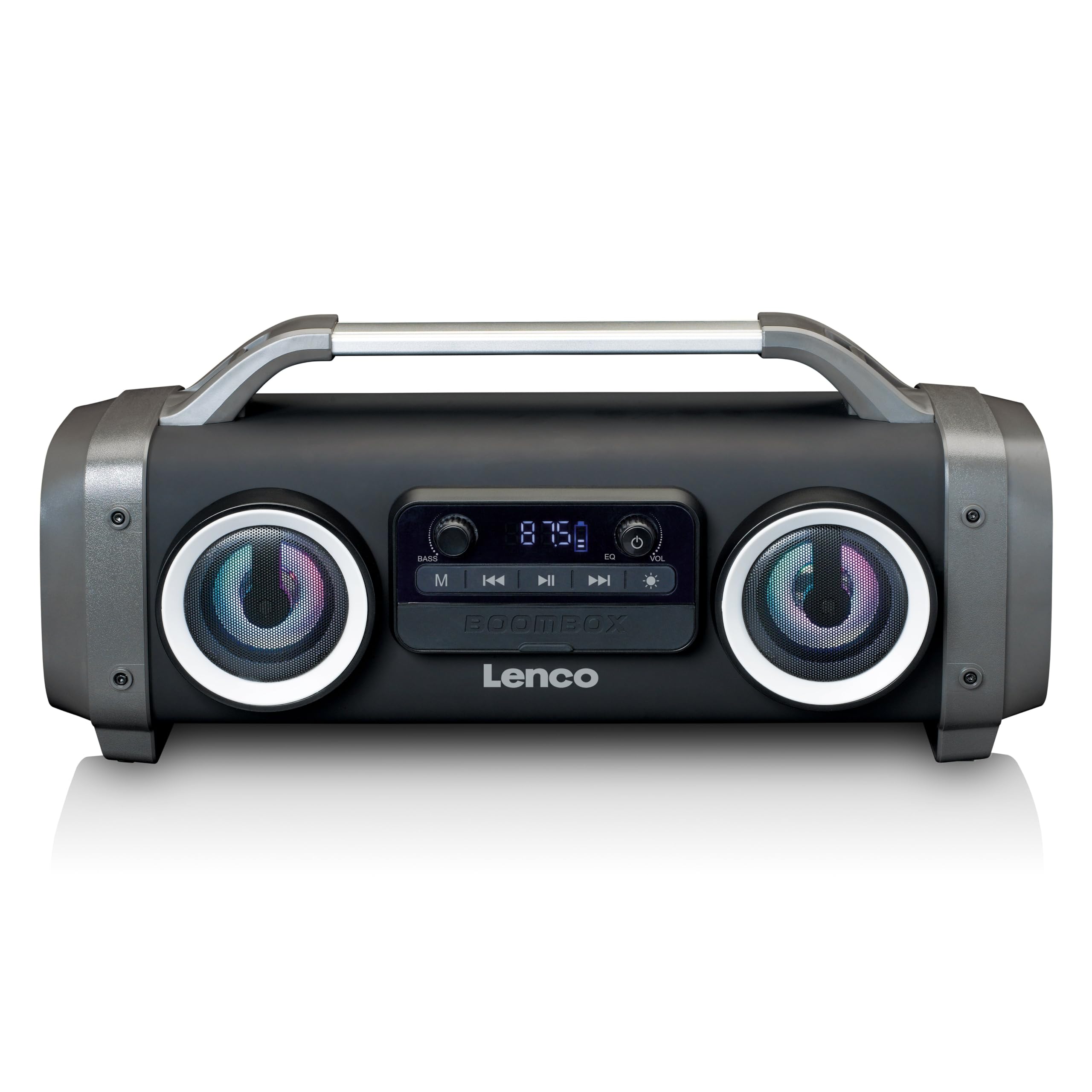
Figura 1: Frente view of the Lenco SPR-100BK speaker, showing the main speaker grille, control panel, and integrated light effects.
3.1 Controles y puertos
- Botón de encendido: Enciende o apaga el altavoz.
- Botón de modo: Cambia entre los modos Bluetooth, radio FM, USB, SD y AUX.
- Botón de reproducción/pausa: Reproduce o pausa el audio.
- Perilla de control de volumen: Ajusta el volumen principal.
- Perilla de refuerzo de graves: Ajusta el nivel de graves.
- Botón de efecto de luz: Cycles through or turns off light effects.
- Puerto USB: Para reproducción de unidad flash USB.
- Ranura para tarjeta SD: Para reproducción de tarjeta SD.
- Entrada AUX (3.5 mm): Para conectar dispositivos de audio externos.
- Charging Port (Mini USB): Para cargar la batería interna.
4. Configuración
4.1 Desembalaje
Carefully remove the speaker and all accessories from the packaging. Ensure the following items are present:
- Lenco SPR-100BK Bluetooth Speaker
- Cable de carga USB
- Cable de audio de 3.5 mm (cable auxiliar)
- Manual de usuario
4.2 Carga de la batería
- Locate the Mini USB charging port on the speaker.
- Conecte el cable de carga USB suministrado al puerto de carga del altavoz.
- Connect the other end of the USB cable to a compatible USB power adapter (5V/1A, not included) or a computer's USB port.
- La luz indicadora de carga se iluminará, generalmente en rojo, durante la carga. Se apagará o cambiará de color (por ejemplo, azul) cuando la carga esté completa.
- A full charge takes approximately 4-5 hours and provides up to 15 hours of playback (without light effects).
4.3 Encendido inicial
Mantenga pulsado el Botón de encendido for a few seconds until the speaker powers on and you hear an audible prompt or see the display light up.
5. Operación
5.1 Encendido y apagado
- Para encender: Mantenga presionado el botón Botón de encendido.
- Para apagar: Mantenga presionado el botón Botón de encendido de nuevo.
5.2 Conexión Bluetooth
- Encienda el altavoz. Entrará automáticamente en modo de emparejamiento Bluetooth, lo que se indicará mediante un LED parpadeante.
- Habilite Bluetooth en su dispositivo móvil (teléfono inteligente, tableta, etc.).
- Buscar dispositivos Bluetooth disponibles y seleccione "SPR-100BK" de la lista.
- Una vez emparejado, el altavoz emitirá un sonido de confirmación y el LED dejará de parpadear.
- Modo estéreo inalámbrico verdadero (TWS): If you have two SPR-100BK speakers, you can pair them for stereo sound.
- Asegúrese de que ambos altavoces estén encendidos y en modo Bluetooth.
- On one speaker (the master), press and hold the Botón de modo until you hear a TWS pairing prompt.
- The two speakers will automatically connect. Once connected, pair your device to the master speaker as described above.
5.3 Radio FM
- Presione el Botón de modo repeatedly until you select FM Radio mode.
- Para escanear y guardar estaciones automáticamente: Mantenga presionado el botón Botón de reproducción/pausa. The speaker will scan for available FM stations and save them automatically.
- To switch between saved stations: Use the Botones de pista anterior/siguiente (if available, otherwise it will cycle through automatically).
- Nota: For better FM reception, ensure the included 3.5mm audio cable is plugged into the AUX input, as it acts as an external antenna.
5.4 Reproducción de tarjeta USB/SD
- Insert a USB flash drive or an SD card (with supported audio files) en el puerto/ranura correspondiente.
- El altavoz cambiará automáticamente al modo USB o SD y comenzará la reproducción. De lo contrario, presione el botón Botón de modo para seleccionar la fuente correcta.
- Utilice el Botón de reproducción/pausa y Botones de pista anterior/siguiente para controlar la reproducción.
5.5 entrada auxiliar
- Connect one end of the supplied 3.5mm audio cable to the AUX input on the speaker.
- Conecte el otro extremo al conector de auriculares o a la salida de audio de su dispositivo externo.
- Presione el Botón de modo para seleccionar el modo AUX.
- Controle la reproducción y el volumen desde su dispositivo externo.
5.6 Efectos de luz
Presione el Botón de efecto de luz to cycle through different light modes or to turn the lights off. The speaker features 12 color light effects.
5.7 Ajuste de sonido
- Volumen: Girar el Perilla de control de volumen to increase or decrease the overall sound level.
- Bajo: Girar el Bass Boost Knob to adjust the intensity of the bass.
6. Mantenimiento
6.1 Limpieza
Wipe the speaker with a soft, dry cloth. Do not use abrasive cleaners, waxes, or solvents. For stubborn dirt, a slightly damp cloth can be used, ensuring all port covers are sealed.
6.2 Cuidado de la batería
- Para prolongar la vida útil de la batería, cargue completamente el altavoz antes del primer uso.
- Evite descargar completamente la batería con frecuencia.
- Si va a guardar el altavoz durante un período prolongado, cárguelo al 50 % aproximadamente cada pocos meses.
6.3 Almacenamiento
Guarde el altavoz en un lugar fresco y seco, alejado de la luz solar directa y de temperaturas extremas.
7. Solución de problemas
| Problema | Posible causa | Solución |
|---|---|---|
| El altavoz no se enciende. | La batería está agotada. | Cargue el altavoz utilizando el cable USB suministrado. |
| No hay sonido. | El volumen es demasiado bajo; modo incorrecto seleccionado; dispositivo no conectado. | Increase volume; press Mode button to select correct source; ensure Bluetooth device is paired or AUX cable is connected. |
| El emparejamiento de Bluetooth falla. | El altavoz no está en modo de emparejamiento; el dispositivo está demasiado lejos; hay interferencias. | Ensure speaker is in Bluetooth pairing mode (flashing LED); move device closer; turn off other Bluetooth devices. |
| Mala recepción de radio FM. | No external antenna; weak signal. | Plug in the 3.5mm AUX cable to act as an antenna; try moving the speaker to a different location. |
| La reproducción USB/SD no funciona. | Sin soporte file formato; tarjeta/unidad no insertada correctamente; dañada files. | Asegurar files are in a supported format (e.g., MP3); reinsert the USB drive/SD card; try a different drive/card. |
8. Especificaciones
| Número de modelo | SPR-100BK |
| Marca | Lenco |
| Potencia de salida | 25 vatios RMS |
| Conectividad | Bluetooth, USB, SD Card, 3.5mm AUX Input |
| Tipo de batería | Iones de litio (4400 mAh) |
| Tiempo de reproducción | Up to 15 hours (reduced with light effects) |
| Entrada de carga | 5V/1A (Mini USB) |
| Características especiales | Splash-proof design, Integrated light effects, FM Radio, TWS function |
| Dimensiones (L x An x Al) | 60 x 60 x 85 cm |
| Peso | 2 kilogramos |
Nota: Las especificaciones están sujetas a cambios sin previo aviso.
9. Garantía y soporte
9.1 Información de garantía
This Lenco product is covered by a warranty for a period of 2 años on parts from the date of purchase. This warranty covers manufacturing defects and workmanship under normal use. It does not cover damage caused by misuse, accidents, unauthorized modifications, or normal wear and tear.
9.2 Actualizaciones de software
Software updates for this product are guaranteed until 13 de abril de 2030.
9.3 Atención al cliente
For technical assistance, warranty claims, or product inquiries, please contact Lenco customer support through their official website or the retailer where the product was purchased. Please have your model number (SPR-100BK) and proof of purchase ready.
Lenco oficial Websitio: www.lenco.com