1. Introducción
Thank you for choosing the Hama EWS-3200 Wireless Weather Station. This device provides accurate indoor and outdoor temperature and humidity readings, weather forecasts, moon phase display, and a radio-controlled clock with alarm functions. Please read this manual carefully to ensure correct setup and operation.
2. Instrucciones de seguridad
- Proteja el producto de la suciedad, la humedad y el sobrecalentamiento.
- Do not use the product in the immediate vicinity of heaters or other heat sources.
- No deje caer el producto ni lo exponga a golpes fuertes.
- Do not open the product and do not operate it if it is damaged.
- Mantenga este producto, como todos los productos eléctricos, fuera del alcance de los niños.
- Deseche el material de embalaje inmediatamente de acuerdo con las regulaciones locales aplicables.
- Las pilas deben insertarse con la polaridad correcta.
- Retire las baterías del producto si no lo va a utilizar durante un período prolongado.
3. Contenido del paquete
- 1 Hama EWS-3200 Weather Station (Base Unit)
- 1 Sensor exterior inalámbrico
- 3 AA Mignon Batteries (for Base Unit)
- 2 AAA Micro Batteries (for Outdoor Sensor)
- 1 Manual de instrucciones
4. Características del producto
- Indoor and Outdoor Temperature/Humidity Display: Shows current conditions for both locations.
- DCF Radio Clock: Automatic time setting for the most accurate time display.
- Pronóstico del tiempo: Icons for sunny, partly cloudy, cloudy, rainy, and stormy conditions.
- Tendencia de la presión del aire: Displays rising, stable, or falling air pressure.
- Pantalla de fase lunar: Muestra la fase lunar actual.
- Función de alarma: Two adjustable alarms, including a weekday alarm.
- Alarma de temperatura: Individually adjustable alarm for outdoor temperature.
- Función de repetición: For temporary alarm interruption.
- Luz de fondo azul: For improved readability in low light.
- Max/Min Data Memory: Records highest and lowest temperature/humidity values.
- Visualización de capacidad de la batería: For both base station and outdoor sensor.
- Opciones de montaje: Can be wall-mounted or freestanding.
5. Configuración
5.1 Instalación de la batería
The base station and outdoor sensor require batteries for operation. Ensure correct polarity when inserting batteries.


- Sensor exterior: Open the battery compartment on the back of the outdoor sensor. Insert 2 AAA Micro batteries, observing the polarity markings (+/-). Close the compartment securely.
- Unidad base: Open the battery compartment on the back of the base unit. Insert 3 AA Mignon batteries, observing the polarity markings (+/-). Close the compartment securely.
5.2 Colocación de sensores
Place the outdoor sensor in a location protected from direct sunlight and rain to ensure accurate temperature and humidity readings. The maximum wireless range is 50 meters. Avoid placing the sensor near large metal objects or other electronic devices that may cause interference.
5.3 Sincronización inicial
After inserting batteries into both units, the base station will automatically search for the outdoor sensor and the DCF radio signal. This process may take a few minutes. Once synchronized, the outdoor temperature and humidity will appear on the base station display, and the time will be set automatically.

6. Instrucciones de funcionamiento
6.1 Visualización sobreview
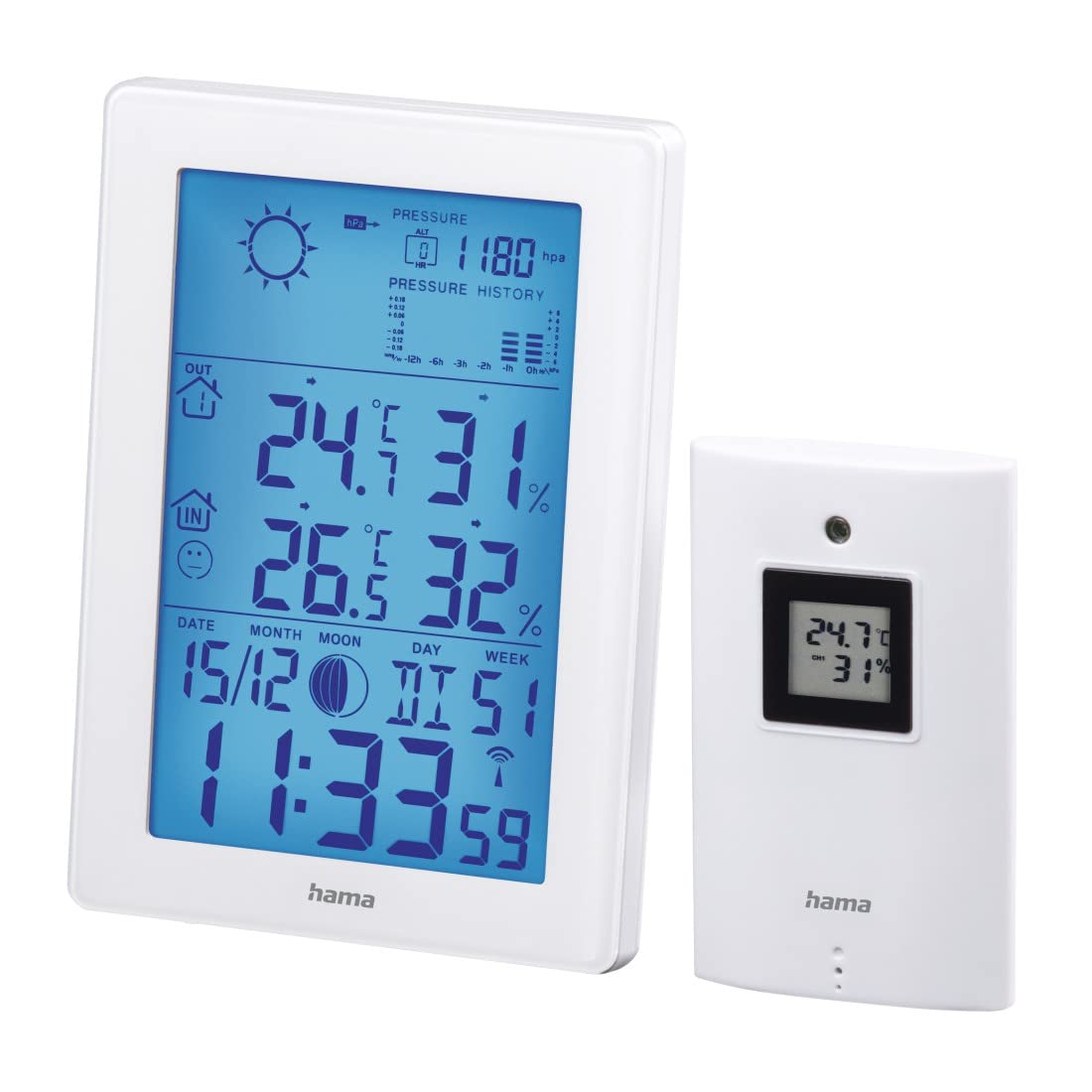
The main display of the base unit shows various information at a glance.

- Hora y fecha: Displays current time (12/24h format) and date.
- Temperatura y humedad interior: Lecturas actuales en el interior.
- Temperatura y humedad exterior: Lecturas actuales del sensor inalámbrico.
- Iconos de pronóstico del tiempo: Indicates predicted weather conditions.
- Air Pressure History: Bar graph showing pressure trends over the last 12 hours.
- Fase lunar: Graphic representation of the current moon phase.
- Indicadores de batería: Shows battery status for both units.
6.2 Configuración de fecha y hora
The weather station automatically sets the time via the DCF radio signal. If manual adjustment is needed (e.g., for different time zones):
- Mantenga pulsado el MODO para ingresar al modo de configuración de hora.
- Utilice el + y - Botones para ajustar los valores.
- Prensa MODO again to confirm and move to the next setting (e.g., 12/24h format, time zone, year, month, day, weekday language).
6.3 Visualización de temperatura y humedad
- Selección de unidad: Presione el - Botón para cambiar entre Celsius (°C) y Fahrenheit (°F) para la visualización de la temperatura.
- Valores máximos y mínimos: Presione el MODO button repeatedly to cycle through current, maximum (MAX), and minimum (MIN) temperature and humidity readings. To clear MAX/MIN records, press and hold the HISTORIA Botón mientras se muestran los valores MÁX/MÍN.
6.4 Pronóstico del tiempo
The weather station predicts weather conditions based on air pressure changes. The forecast icons (sunny, partly cloudy, cloudy, rainy, stormy) indicate the expected weather for the next 12-24 hours. The bar graph shows the air pressure trend over the last 12 hours.
6.5 funciones de alarma
- Configuración de alarmas: Presione el MODO button until the alarm time is displayed. Press and hold MODO to enter alarm setting mode. Use + y - to adjust the hour and minute, and MODO to confirm. You can set two separate alarms, including a weekday alarm (Monday-Friday).
- Función de repetición: Cuando suene una alarma, presione el DORMITOR / LUZ button to activate the snooze function. The alarm will sound again after a few minutes.
- Alarma de temperatura: An individually adjustable temperature alarm can be set to alert you when the outdoor temperature reaches a certain threshold (e.g., for frost warning). Refer to the manual for specific steps to set the temperature alarm.
6.6 Luz de fondo
Presione el DORMITOR / LUZ button to activate the blue backlight for a few seconds, improving display visibility in dark conditions.
7. Mantenimiento
- Limpie este producto sólo con un paño ligeramente d.amp, paño que no suelte pelusa y no utilice productos de limpieza agresivos.
- Asegúrese de que no entre agua en el producto.
- Reemplace las baterías cuando aparezca el indicador de batería baja en la pantalla.
8. Solución de problemas
| Problema | Posible causa | Solución |
|---|---|---|
| No display on base unit | Las baterías están agotadas o insertadas incorrectamente. | Verifique la polaridad de la batería y reemplácela si es necesario. |
| Lecturas al aire libre no mostradas | Sensor fuera de rango, interferencia o baterías agotadas. | Move sensor closer to base unit, check for interference, replace sensor batteries. Initiate manual synchronization if needed. |
| Visualización de hora incorrecta | DCF signal interference or manual time zone setting needed. | Relocate the base unit away from electronic devices. Manually set the time zone if the DCF signal is received but the time is incorrect. |
| Pronóstico del tiempo inexacto | Weather forecast is based on air pressure trends and is an estimation. | This is normal. The forecast is a prediction and may not always match actual conditions perfectly. |
9. Especificaciones
- Número de modelo: 00186307
- Tipo de pantalla: LCD, Digital
- Color: Blanco
- Material: Metal o plástico
- Fuente de energía: Funciona con pilas
- Base Unit Batteries: 3 x AA Mignon (incluida)
- Baterías para sensores exteriores: 2 pilas AAA Micro (incluidas)
- Rango de temperatura interior: 0 ° C a +50 ° C (32 ° F a 122 ° F)
- Rango de temperatura exterior: -20 °C a +60 °C
- Wireless Range (Outdoor Sensor): Hasta 50 metros
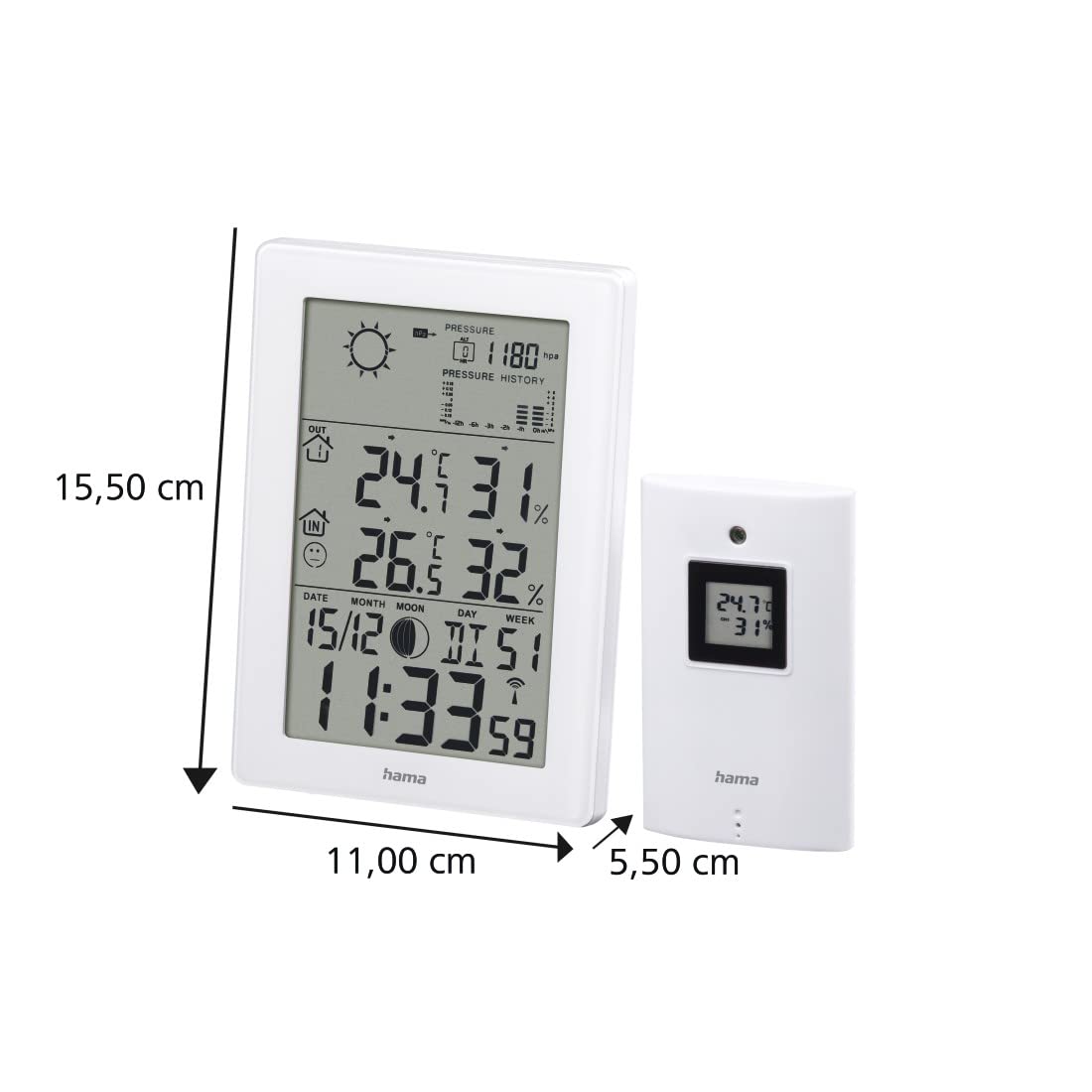
- Dimensiones de la unidad base (largo x ancho x alto): 15.5 x 11 x 5.5 cm
- Peso: 530 gramos
- Tecnología de conectividad: Radio Frequency
- Características especiales: Temperature Alarm, Snooze Function, Moon Phase Display, Backlight
10. Garantía
Hama GmbH & Co KG no asume ninguna responsabilidad y no ofrece garantía por daños resultantes de una instalación / montaje incorrectos, uso incorrecto del producto o por incumplimiento de las instrucciones de funcionamiento y / o notas de seguridad.
11. Soporte
For technical support or warranty claims, please contact your local Hama customer service or visit the official Hama websitio para más información.
Websitio: www.hama.com


