1. Introducción
This manual provides essential information for the safe and efficient operation of your InFocus IN112a SVGA DLP Projector. Please read it thoroughly before using the projector and retain it for future reference. The InFocus IN112a is designed to deliver clear and bright projections for various applications, featuring SVGA resolution, HDMI connectivity, and 3D support.
2. Información de seguridad
Tenga en cuenta las siguientes precauciones de seguridad para evitar daños al proyector y garantizar la seguridad del usuario:
- Do not look directly into the projector lens Cuando el lamp Está encendido. La luz intensa puede causar daños oculares.
- Asegúrese de que haya una ventilación adecuada. No bloquee las aberturas de ventilación.
- Only qualified service personnel should open the projector casing. No hay piezas que el usuario pueda reparar en el interior.
- Utilice únicamente el cable de alimentación suministrado con el proyector.
- Mantenga el proyector alejado del agua o de ambientes húmedos.
- El proyector lamp Contiene mercurio. Desechar lamps according to local regulations. Visit www.lampreciclar.org Para más información.

Imagen: Abajo view of the InFocus IN112a projector, displaying various warning labels, regulatory compliance marks (like CE, FCC), and information regarding the mercury content in the lamp and recycling instructions.
3. Producto terminadoview
3.1. Projector Dimensions

Imagen: Frente view of the InFocus IN112a projector, illustrating its physical dimensions. The projector measures approximately 292 mm in width, 220 mm in depth, and 108 mm in height.
3.2. Controles del panel superior
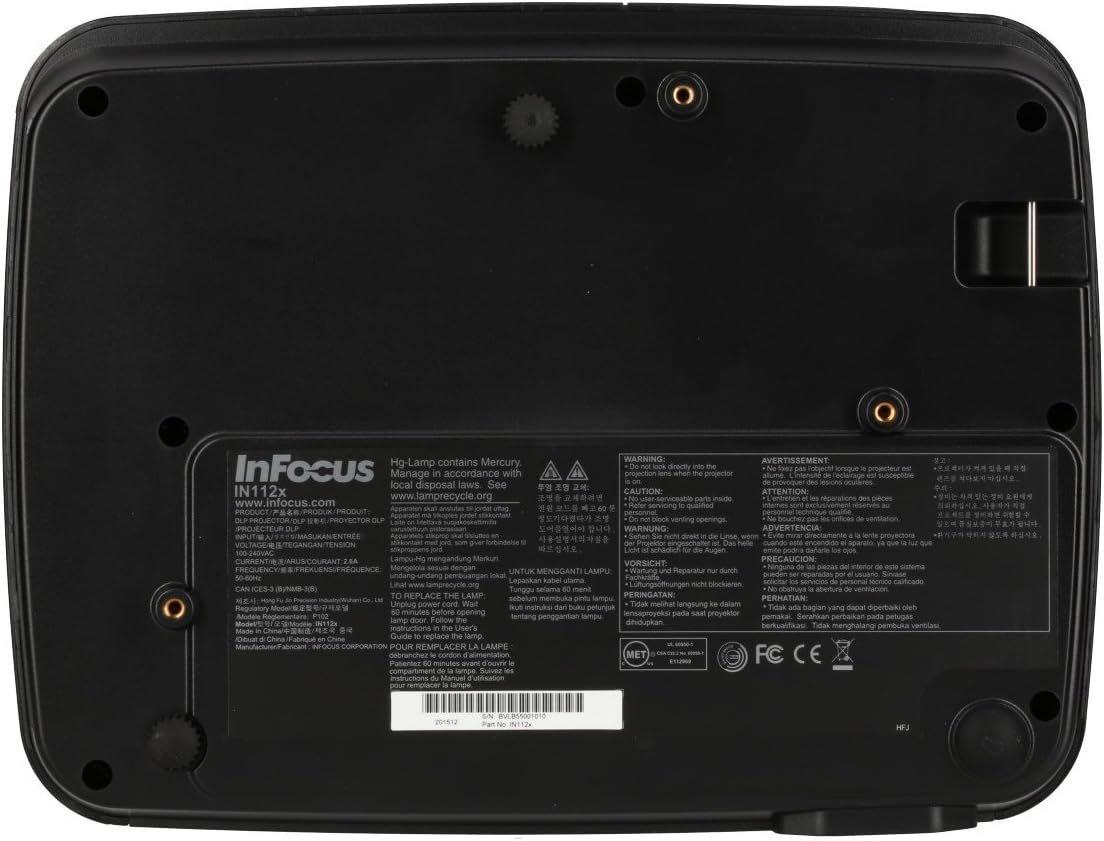
Imagen: Arriba view of the InFocus IN112a projector, highlighting the control panel. This panel includes buttons for power, menu access, source selection, and directional navigation for menu adjustments.
The top panel features buttons for power on/off, menu access, input source selection, and navigation arrows for adjusting settings within the on-screen display (OSD) menu. The focus and zoom rings are located near the lens.
3.3. Conexiones del panel trasero

Imagen: Trasera view of the InFocus IN112a projector, displaying its comprehensive array of connectivity ports. These include HDMI 1.4, two VGA inputs (Computer 1, Computer 2), a VGA monitor output, S-Video, Composite video, two 3.5mm stereo audio inputs, one 3.5mm stereo audio output, an RS232C control port, and a USB-B port.
The rear panel provides a variety of connection options:
- HDMI1.4: Para entrada de audio y vídeo digital.
- VGA (Computer 1, Computer 2): Two inputs for analog computer signals.
- VGA Monitor Out: Para conectar un monitor externo.
- Video compuesto: Para entrada de vídeo de definición estándar.
- S vídeo: For enhanced standard definition video input.
- Audio In (3.5mm x 2): Para entrada de audio estéreo.
- Salida de audio (3.5 mm): For stereo audio output to external speakers.
- RS232C: Para el control del proyector a través de una computadora o un sistema de control.
- USB-B: Para servicio o actualizaciones de firmware.
4. Configuración
4.1 Colocación
Position the projector on a stable, flat surface or mount it securely to a ceiling. Ensure there is adequate space around the projector for ventilation. The distance from the screen will determine the image size. Refer to the specifications section for throw ratio details.
4.2. Conexión de energía
Connect the supplied power cord to the projector's power inlet and then to a grounded electrical outlet. The power LED will illuminate, indicating standby mode.
4.3. Conexión de fuentes de vídeo
Connect your video source (e.g., computer, Blu-ray player, cable box) to the appropriate input port on the projector's rear panel using a compatible cable. For best quality, use the HDMI input.
- HDMI: Connect an HDMI cable from your source to the projector's HDMI port.
- VGA: Connect a VGA cable from your computer to either the Computer 1 or Computer 2 port.
- Composite/S-Video: Connect the respective cable for older video sources.
4.4. Conexión de audio
If using VGA, Composite, or S-Video inputs, connect an audio cable from your source's audio output to one of the projector's 3.5mm Audio In ports. HDMI carries both video and audio, so a separate audio connection is not typically needed for HDMI sources.
4.5. Ajuste del enfoque y el zoom
After powering on the projector and displaying an image, rotate the Anillo de enfoque around the lens until the image is sharp and clear. Use the Anillo de zoom to adjust the image size to fit your screen.
5. Operación
5.1. Encendido / apagado
- Para encender: Press the Power button on the projector's top panel or the remote control. The power indicator will turn green.
- Para apagar: Press the Power button twice. The projector will enter a cooling cycle, and the power indicator will turn red (standby) once complete.
5.2. Selección de la fuente de entrada
Press the "Source" button on the projector or remote control repeatedly to cycle through available input sources (HDMI, VGA1, VGA2, S-Video, Video). The projector will automatically detect an active signal if "Auto Source" is enabled in the menu.
5.3. Navegación por el menú
Press the "Menu" button to access the On-Screen Display (OSD) menu. Use the directional arrows to navigate through menu options and the "Enter" button to select. Press "Menu" again to exit.
5.4. 3D Content Playback
The IN112a supports 3D content from Blu-ray players, cable boxes, dish services (over HDMI), and PC-based 3D content at 120Hz. To view 3D content, you will need 144 Hz DLP Link 3D glasses (sold separately).
- Ensure your 3D source is connected via HDMI.
- Play 3D content from your source.
- Turn on your 144 Hz DLP Link 3D glasses. The projector should automatically detect the 3D signal.
6. Mantenimiento
6.1. Cleaning the Projector Lens
Gently wipe the lens with a soft, lint-free cloth specifically designed for optical surfaces. Do not use abrasive cleaners or excessive force, as this can scratch the lens.
6.2. Elamp Reemplazo
El proyector lamp Tiene una vida útil de hasta 10,000 horas. Cuando el lamp La vida se acerca a su fin, puede aparecer un mensaje de advertencia o la lamp indicator LED may illuminate. Refer to the full service manual for detailed lamp instrucciones de reemplazo. Advertencia: El lamp Contiene mercurio. Desechar el líquido usado.amps according to local environmental regulations.
6.3. Limpieza de filtros de aire
Regularly clean the air filters to ensure proper ventilation and prevent overheating. Dust and debris can accumulate, reducing cooling efficiency. Gently remove the filter cover and clean the filter with a soft brush or vacuum cleaner. Replace the filter cover securely.
7. Solución de problemas
| Problema | Posible causa | Solución |
|---|---|---|
| No se muestra ninguna imagen |
|
|
| La imagen es borrosa |
|
|
| Sin audio |
|
|
| El proyector se sobrecalienta y se apaga |
|
|
8. Especificaciones
| Característica | Detalle |
|---|---|
| Número de modelo | IN112X |
| Tecnología de visualización | DLP |
| Resolución nativa | SVGA (800 x 600) |
| Brillo | Hasta 3200 lúmenes |
| Relación de contraste | 15,000:1 |
| Lamp Vida | Hasta 10,000 horas |
| Conectividad | HDMI 1.4, VGA x 2, Composite video, S-Video, 3.5 mm stereo in x 2, 3.5mm stereo out, VGA monitor out, RS232C, USB-B |
| Soporte 3D | Yes (requires 144 Hz DLP Link 3D glasses) |
| Relación de proyección | 1.9 - 2.09 |
| Dimensiones del producto | 14.25 x 12 x 7.75 pulgadas (aprox. 36.2 x 30.5 x 19.7 cm) |
| Peso del artículo | 5.4 libras (aprox. 2.45 kg) |
| Uso recomendado | Interior/exterior |
| Característica especial | Altavoces incorporados |
9. Garantía y soporte
For warranty information and technical support, please refer to the documentation included with your purchase or visit the official InFocus webSitio. Conserve su comprobante de compra para reclamaciones de garantía.


