1. Másview
The JBL Professional SRX835P is a high-performance, portable 3-Way Bass Reflex Self-Powered Speaker System. It features a 15-inch woofer and premium JBL drivers, designed to deliver clear audio and deep bass. The SRX835P is powered by 2000W Crown amplification with Drivecore technology, providing robust sound output. It includes user-configurable DSP and HiQnet Network control options via iOS and Android applications for sound customization. The system is suitable for various applications, including PA systems and live performances, offering durable construction and portable design for ease of transport and setup.
Características principales
- Portable 3-Way Bass Reflex Self-Powered Speaker System with 15-inch woofer.
- 2000 Watt Drivecore Amplification by Crown.
- User-controllable DSP with 20 PEQs, 2 seconds of delay, signal generators, input mixing, amplifier monitoring, and 50 user presets.
- Integrated LCD screen for fast setup and configuration.
- Ergonomically designed handles for streamlined handling.
- M10 suspension points, indexed feet, and pole/tripod mounts for flexible configurations.
- Full HiQnet Network Integration for simplified configuration via Ethercon connector and third-party wireless router.
- Control options include Audio Architect, HiQnet Motion Control iOS app, and standalone applications for iOS and Android.
- Rugged design with JBL premium transducers and glow-in-the-dark ink on the back panel for low-light adjustments.
¿Qué hay en la caja?
- 1 x JBL Professional SRX835P 15-Inch Three-Way Bass Reflex Self-Powered System
2. Información de seguridad
Lea y comprenda todas las instrucciones de seguridad antes de utilizar este producto. Conserve estas instrucciones para futuras consultas.
- Seguridad eléctrica: Always connect the speaker to a grounded power outlet. Do not expose the unit to rain or moisture. Disconnect power during lightning storms or when unused for long periods.
- Protección auditiva: La exposición prolongada a niveles altos de presión sonora puede causar daño auditivo permanente. Tenga cuidado al ajustar el volumen.
- Lifting and Mounting: The SRX835P is heavy (85 lbs / 38.5 kg). Always use proper lifting techniques and seek assistance. When suspending the speaker, ensure all mounting hardware and structures are rated for the speaker's weight and installed by qualified personnel.
- Ventilación: Asegúrese de que haya suficiente ventilación alrededor del altavoz para evitar el sobrecalentamiento. No bloquee las aberturas de ventilación.
- Limpieza: Disconnect power before cleaning. Use a dry cloth. Do not use liquid cleaners or aerosols.
3. Configuración
3.1 Desembalaje
Carefully remove the speaker from its packaging. Inspect the unit for any signs of damage during transit. Retain the packaging for future transport or storage.
3.2 Colocación
The SRX835P offers versatile placement options:
- De pie en el suelo: Place the speaker on a stable, level surface. The indexed feet provide stability.
- Montaje en poste: Use the standard 35mm pole cup to mount the speaker on a subwoofer or tripod stand. Ensure the stand is rated for the speaker's weight.
- Suspensión: Utilize the M10 suspension points for flying applications. This should only be performed by qualified professionals using appropriate rigging hardware.

JBL SRX835P 15-inch 3-Way Powered Speaker System, side view.
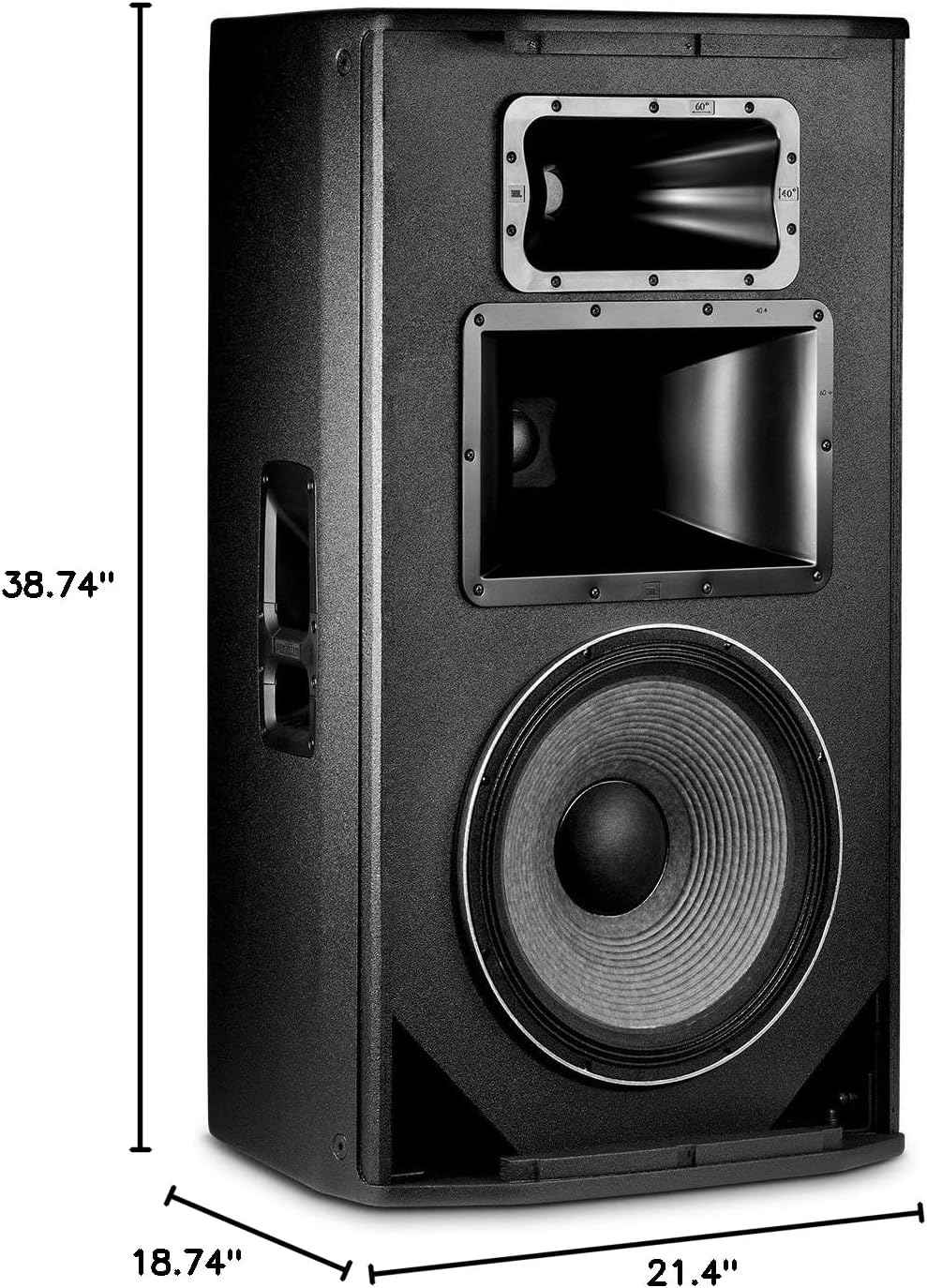
Dimensions of the JBL SRX835P speaker: 38.74 inches H x 21.4 inches W x 18.74 inches D.
3.3 Conexiones
Connect your audio sources and power to the rear panel of the SRX835P.
- Fuerza: Connect the supplied power cable to a suitable AC power outlet.
- Entrada de audio: Use Neutrik ¼-inch / XLR combo inputs for connecting mixers, microphones, or other audio devices.
- Salida de audio: Use the Neutrik XLR output to link multiple speakers or send the signal to other audio equipment.
- Control de red: Connect an Ethercon cable for HiQnet Network Integration. A third-party wireless router can be used for wireless control via mobile applications.
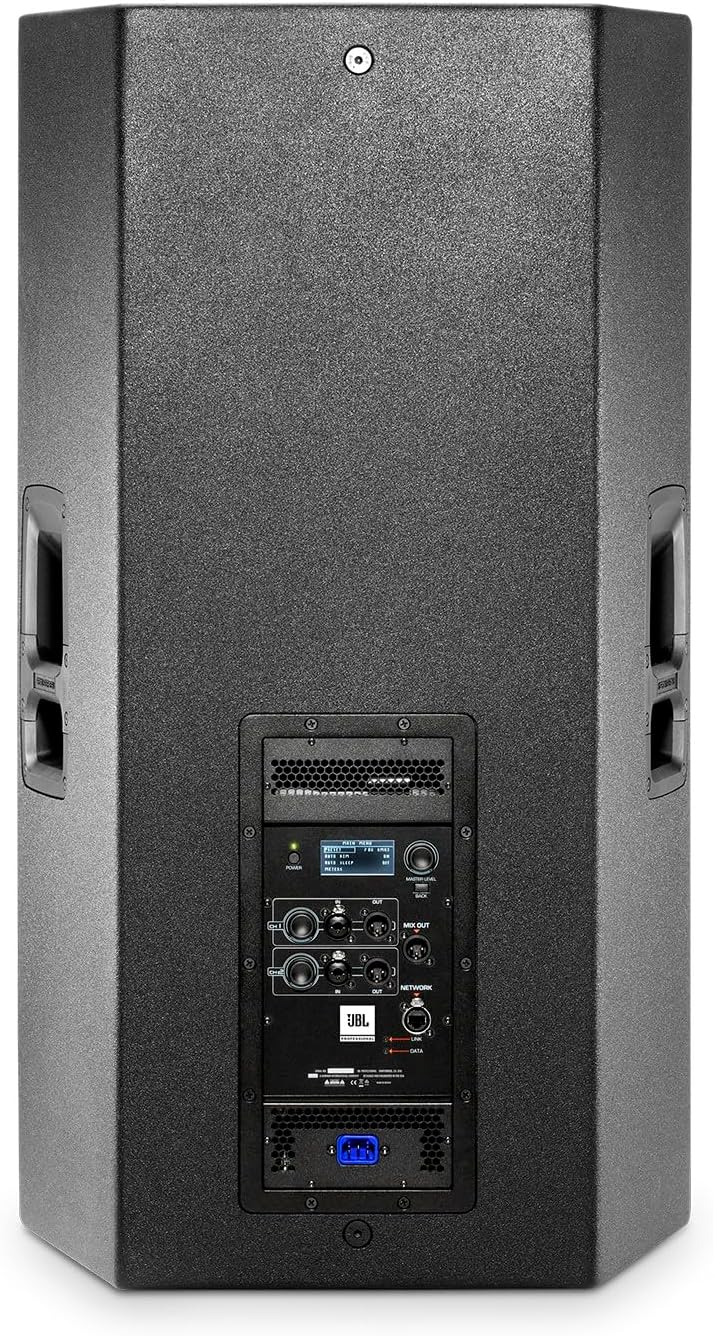
Trasero view of JBL SRX835P showing the control panel and connections.
4. Instrucciones de funcionamiento
4.1 Encendido y apagado
Locate the power switch on the rear panel. Press to turn the unit ON or OFF. The power indicator LED will illuminate when the unit is active.
4.2 Controls and DSP
The SRX835P features a comprehensive DSP (Digital Signal Processor) accessible via the integrated LCD screen and network control. This allows for precise sound shaping.
- Preajustes de ecualizador: Select from various EQ presets such as Music, Vocal, Speech, or Flat to optimize the sound for different applications.
- Refuerzo de graves: Engage the Bass Boost function for enhanced low-frequency response.
- Input Mixing: Adjust individual input gains for CH1 and CH2 using the dedicated knobs.
- Volumen principal: Control the overall output level of the speaker. The LIMIT indicator will light up if the signal is clipping, indicating potential distortion. Reduce the volume if the LIMIT light is consistently on.
- Ajustes de usuario: Store and recall up to 50 custom user presets for quick setup in different environments.
4.3 Control de red
The SRX835P supports HiQnet Network Integration, allowing for remote control and monitoring.
- Connect the speaker to a network via the Ethercon port.
- Use JBL's Audio Architect software or the HiQnet Motion Control iOS/Android apps to manage DSP settings, monitor amplifier status, and control multiple SRX800 series speakers from a single interface.
5. Mantenimiento
5.1 Limpieza
- Regularly wipe the exterior of the speaker with a soft, dry cloth.
- Use a soft brush or vacuum cleaner to gently remove dust from the grille and ventilation ports.
- No utilice limpiadores abrasivos, disolventes o ceras, ya que pueden dañar el acabado.
5.2 Almacenamiento
When not in use, store the speaker in a dry, temperature-controlled environment. If possible, use the original packaging or a protective cover to shield it from dust and physical damage.
6. Solución de problemas
If you encounter issues with your SRX835P speaker, refer to the table below for common problems and solutions.
| Problema | Posible causa | Solución |
|---|---|---|
| Sin salida de sonido | No power; input signal issue; volume too low; incorrect EQ preset. | Check power connection and switch. Verify audio source is active and connected correctly. Increase master volume. Select appropriate EQ preset. |
| Sonido distorsionado | Input signal too high; master volume too high (LIMIT LED on); damaged cable. | Reduce input gain from source. Lower master volume until LIMIT LED is off or flashes minimally. Replace audio cables. |
| No Network Control | Ethercon cable disconnected; incorrect network settings; app not connected. | Ensure Ethercon cable is securely connected. Verify network settings on speaker and control device. Restart control app and re-establish connection. |
| Speaker Overheating | Blocked ventilation; prolonged high-volume operation in hot environment. | Ensure adequate airflow around the speaker. Reduce volume. Allow speaker to cool down. |
7. Especificaciones
| Característica | Detalle |
|---|---|
| Nombre del modelo | SRX835P |
| Tipo de altavoz | Powered PA, 3-Way Bass Reflex |
| Diámetro del woofer | 15 pulgadas |
| Potencia máxima de salida del altavoz | 2000 vatios |
| Respuesta de frecuencia | Hasta 20 KHz |
| Tecnología de conectividad | Neutrik ¼ - XLR input; Neutrik XLR Output |
| Método de control | App (HiQnet Network Control) |
| Dimensiones del producto (Pr. x An. x Al.) | 18.7" x 21.4" x 38.7" |
| Peso del artículo | 85 libras (38.5 kg) |
| Fuente de poder | Eléctrico con cable |
| Color | Negro |
| Tipo de montaje | Floor Standing, Pole Mount, Suspension (M10 points) |
8. Garantía y soporte
8.1 Información de garantía
The JBL Professional SRX835P comes with a limited warranty. For specific details regarding warranty coverage, duration, and terms, please refer to the warranty card included with your product or visit the official JBL Professional websitio.
8.2 Atención al cliente
Para asistencia técnica, servicio técnico o cualquier otra consulta, contacte con el servicio de atención al cliente de JBL Professional. La información de contacto suele encontrarse en el sitio web de JBL Professional. websitio web o en la documentación de su producto.


