Enkonduko
This manual provides comprehensive instructions for the setup, operation, and maintenance of your Bluesound Pulse Flex 2i Portable Wireless Multi-Room Bluetooth Speaker. This bundle includes the BP100 battery pack and a charcoal gray protective skin, enhancing portability and durability. The Pulse Flex 2i is designed to deliver high-resolution audio with versatile connectivity options, including Wi-Fi, Bluetooth aptX HD, and AirPlay 2, integrated seamlessly into the BluOS multi-room ecosystem.
Kio estas en la Skatolo
Zorge malpaku la enhavon kaj certigu, ke ĉiuj eroj ĉeestas:
- Bluesound Pulse Flex 2i Speaker
- BP100 Battery Pack
- Charcoal Gray Protective Skin
- 120V & 230V AC Power Cord
- Toslink Optical to 3.5mm Mini & Adaptor

Image: Contents of the Bluesound Pulse Flex 2i bundle, showing the speaker, battery pack, and protective skin packaging.
Agorda Gvidilo
1. Installing the BP100 Battery Pack
The BP100 battery pack allows for portable operation. To install:
- Locate the battery compartment on the rear of the Pulse Flex 2i speaker.
- Align the BP100 battery pack with the compartment and gently slide it into place until it clicks securely.
- Ensure the battery pack is fully seated to establish proper electrical contact.
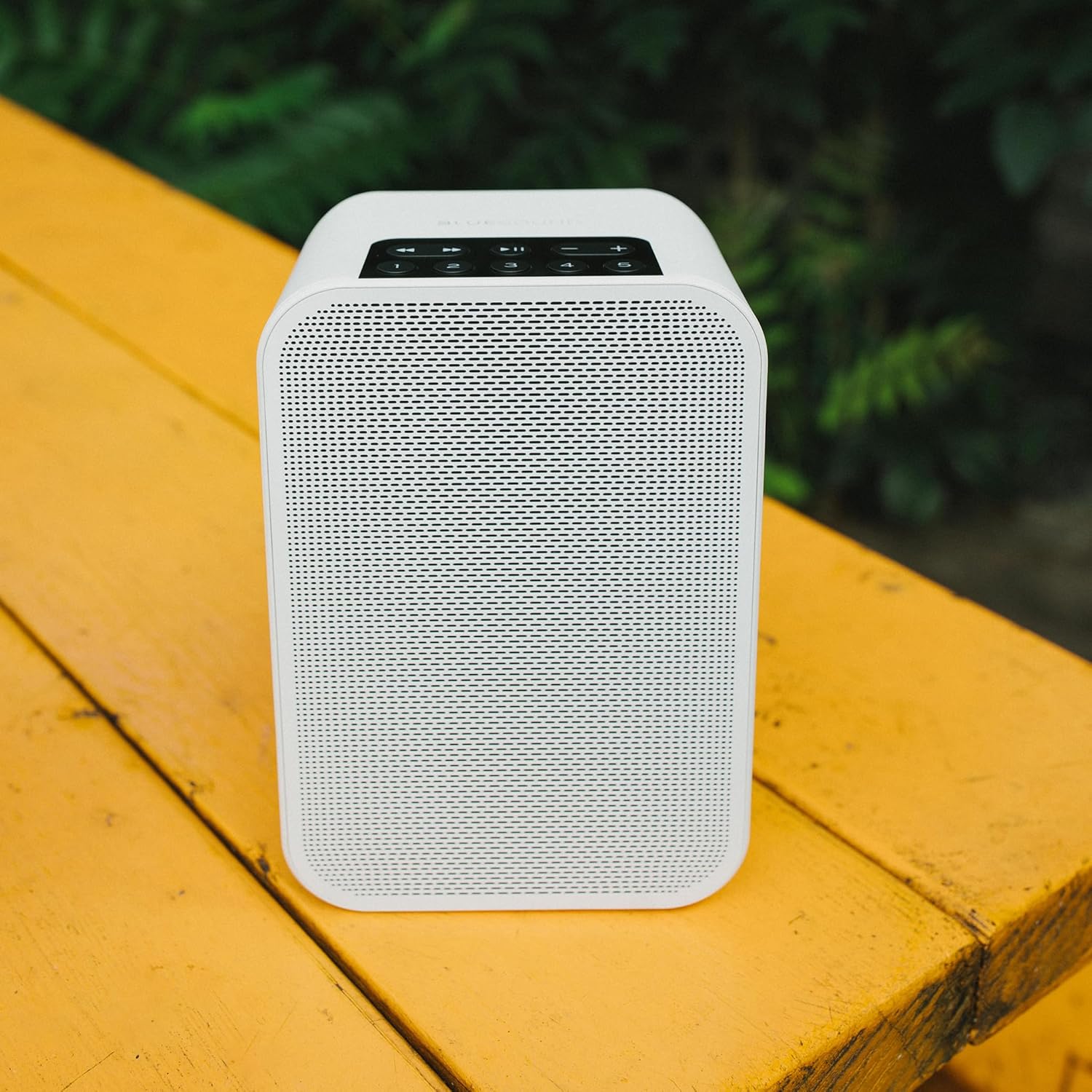
Image: The Bluesound BP100 battery pack, designed for the Pulse Flex 2i speaker.
2. Komenca Ŝaltado kaj Ŝargado
Before first use, it is recommended to fully charge the battery pack or connect the speaker to AC power.
- Konekti la provizitan AC-kablon al la elektra enigo de la laŭtparolilo kaj poste al la mura konektilo.
- The speaker will automatically power on. The LED indicator will show charging status.
3. Installing the Protective Skin
The charcoal gray protective skin provides an extra layer of defense for your speaker.
- Gently slide the Pulse Flex 2i speaker into the protective silicone skin, ensuring all ports and buttons align with the skin's openings.
- Smooth out any wrinkles to ensure a snug fit.
4. Connecting to Your Network (BluOS App)
For full functionality, including multi-room audio and high-resolution streaming, connect your Pulse Flex 2i to your home Wi-Fi network using the BluOS Controller app.
- Download the BluOS Controller app from your device's app store (iOS, Android, Windows, macOS).
- Open the app and follow the on-screen instructions to add your new Pulse Flex 2i to your network. This typically involves selecting the speaker from a list of available devices and entering your Wi-Fi password.
5. Bluetooth-Parigo
For direct wireless connection from a mobile device without a Wi-Fi network:
- Press and hold the Bluetooth button on the top panel of the Pulse Flex 2i until the LED indicator begins to flash blue.
- On your mobile device, go to Bluetooth settings and select "Pulse Flex 2i" from the list of available devices.
- Post kiam kunigita, la LED-indikilo fariĝos blua.

Image: Top panel of the Bluesound Pulse Flex 2i, showing the control buttons including Bluetooth, Play/Pause, Volume, and preset buttons.
Funkciaj Instrukcioj
Bazaj Kontroloj
The top panel of the Pulse Flex 2i features intuitive controls:
- Ludo/Paŭzo: Press the center button to play or pause current audio.
- Volumo supren/malsupren: Uzu la butonojn '+' kaj '-' por ĝustigi la laŭtecon.
- Trako Salti: Use the left and right arrow buttons to skip to the previous or next track.
- Antaŭagorditaj Butonoj (1-5): Assign your favorite radio stations, playlists, or music services to these buttons via the BluOS app for quick access.
Multi-Room Streaming with BluOS
The Bluesound Pulse Flex 2i is part of the BluOS ecosystem, allowing you to stream music to multiple Bluesound devices throughout your home.
- Grouping Players: Use the BluOS app to group your Pulse Flex 2i with other BluOS players for synchronized playback.
- Sendependa Reludigo: Each player can also play different music independently.
- Subtenataj Servoj: Access a wide range of streaming services (e.g., Spotify, Tidal, Qobuz) and internet radio directly through the BluOS app.
Voĉa Kontrolo
The Pulse Flex 2i is compatible with popular voice assistants for hands-free control:
- Amazon Alexa: Enable the BluOS skill in the Alexa app and link your Bluesound account.
- Asistanto de Google: Link your Bluesound account through the Google Home app.
- Apple Siri: Control via AirPlay 2 from Apple devices.
Note: A compatible voice assistant device (e.g., Amazon Echo, Google Home) is required for voice commands.
Konekteblecoj
- Wifi: Primary connection for high-resolution audio and multi-room functionality.
- Bluetooth aptX HD: High-quality Bluetooth streaming from compatible devices.
- Aera Ludo 2: Stream audio directly from Apple devices.
- Optika/Analoga Enigo: Use the included Toslink optical to 3.5mm mini adaptor for connecting external audio sources.
Prizorgado
Purigado
To maintain the appearance and performance of your Pulse Flex 2i:
- Wipe the speaker and protective skin with a soft, dry, lint-free cloth.
- Ne uzu abraziajn purigilojn, vaksojn aŭ solvilojn.
- Avoid spraying liquids directly onto the speaker.
Bateria Prizorgo
To maximize the lifespan of your BP100 battery pack:
- Evitu ofte plene malŝarĝi la baterion.
- Konservu la laŭtparolilon en malvarmeta, seka loko kiam ĝi ne estas uzata dum longaj periodoj.
- If storing for a long time, ensure the battery has a partial charge (around 50%).
Ĝisdatigoj de Firmware
Bluesound regularly releases firmware updates to improve performance and add new features. These updates are managed through the BluOS Controller app. Ensure your speaker is connected to Wi-Fi and follow the app's prompts for updates.
Solvado de problemoj
If you encounter issues with your Pulse Flex 2i, refer to the following common solutions:
| Problemo | Ebla Kaŭzo | Solvo |
|---|---|---|
| Neniu Sono | Volume too low; Muted; Incorrect source selected; Speaker not powered on. | Increase volume; Check mute status in app/on speaker; Select correct input source; Ensure power cable is connected or battery is charged. |
| Ne eblas konekti al Wi-Fi | Incorrect Wi-Fi password; Speaker too far from router; Router issues. | Verify Wi-Fi password; Move speaker closer to router; Restart router; Perform a factory reset (see below). |
| Bluetooth-Parigo Malsukcesas | Speaker not in pairing mode; Device already paired; Interference. | Ensure speaker LED is flashing blue; Forget device on your phone and re-pair; Move closer to speaker; Turn off other Bluetooth devices. |
| Mallonga Bateria Vivo | Battery not fully charged; High volume usage; Battery degradation over time. | Ensure full charge before use; Reduce volume; Battery lifespan is finite and may decrease with age. |
Fabriko Restarigi
A factory reset can resolve persistent issues by restoring the speaker to its original settings. Warning: This will erase all network settings and presets.
- Disconnect the speaker from power.
- Press and hold the Play/Pause button on the top panel.
- While holding the Play/Pause button, reconnect the power.
- Continue holding the Play/Pause button until the LED indicator turns red, then green, then back to red. Release the button.
- The speaker will restart and enter setup mode.
Specifoj
| Karakterizaĵo | Detalo |
|---|---|
| Tipo de parolanto | Portebla oratoro |
| Koloro | Blanka |
| Produktaj Dimensioj | 4.92" D x 3.9" W x 7.2" H |
| Parola Grandeco | 7.2 Coloj |
| Specifaj Uzoj | Portable, Home Entertainment, Multi-Room Streaming |
| Konekteca Teknologio | Bluetooth, Wi-Fi, Ethernet (via optional USB-to-Ethernet adapter) |
| Parolanto Maksimuma Eliga Potenco | 25 vatoj |
| Munta Tipo | Tabla Monto |
| Battery Life (BP100) | Ĝis 6 horoj |
| Subtenataj Audio Formatoj | MQA, FLAC, WAV, AIFF, MP3, AAC, WMA, OGG, ALAC |
| Sendrataj Protokoloj | Wi-Fi (802.11ac, dual-band), Bluetooth aptX HD, AirPlay 2 |
Garantio kaj Subteno
Informoj pri Garantio
Bluesound products are covered by a limited warranty. Please refer to the warranty card included with your product or visit the official Bluesound webretejon por detalaj garantiaj kondiĉoj specifaj por via regiono.
Note: The included BP100 battery pack and protective skin are subject to their own warranty terms, if applicable.
Klienta Subteno
For technical assistance, troubleshooting beyond this manual, or warranty claims, please contact Bluesound customer support:
- Interreta Subteno: Visit the official Bluesound support page for FAQs, knowledge base articles, and support tickets. www.bluesound.com/support
- Kontaktinformoj: Refer to the Bluesound website for regional contact numbers or email addresses.