1. Εισαγωγή
The Beafon Silverline ML10 LTE Desk Phone is designed for ease of use and reliability, offering essential communication features with enhanced safety options. This manual provides detailed instructions for setting up, operating, and maintaining your device.
Τα βασικά χαρακτηριστικά περιλαμβάνουν:
- 4G LTE Desk Phone connectivity
- Hearing Aid Compatible (HAC M4/T4)
- Programmable SOS emergency numbers with included SOS wristband/necklace (433 MHz range)
- Three quick dial keys for photos or symbols
- Digital announcement when pressing keys
- Extra-large XXL digits on display
- Extra loud ringer (90 dB) and earpiece volume (+40 dB)
- Hands-free function and Bluetooth LE
- SMS functionality and Audio Booster button

2. Σημαντικές πληροφορίες για την ασφάλεια
Please read all safety instructions before using the device to prevent injury or damage. Keep this manual for future reference.
- Μην εκθέτετε τη συσκευή σε ακραίες θερμοκρασίες, άμεσο ηλιακό φως ή υγρασία.
- Χρησιμοποιείτε μόνο εγκεκριμένα αξεσουάρ και τροφοδοτικά.
- Αποφύγετε την πτώση ή την έκθεση της συσκευής σε ισχυρές κρούσεις.
- Μην επιχειρήσετε να αποσυναρμολογήσετε ή να επισκευάσετε μόνοι σας τη συσκευή. Επικοινωνήστε με εξειδικευμένο προσωπικό σέρβις.
- Keep the device away from medical devices, such as pacemakers, to avoid interference.
3. Περιεχόμενα συσκευασίας
Βεβαιωθείτε ότι όλα τα στοιχεία υπάρχουν στη συσκευασία:
- Beafon Silverline ML10 LTE Desk Phone unit
- Ακουστικό και σπειροειδές καλώδιο
- Μετασχηματιστής ρεύματος
- USB charger cable (USB-C)
- SOS wristband
- SOS necklace
- Lithium-ion battery (pre-installed or separate)
- Εγχειρίδιο χρήστη (αυτό το έγγραφο)
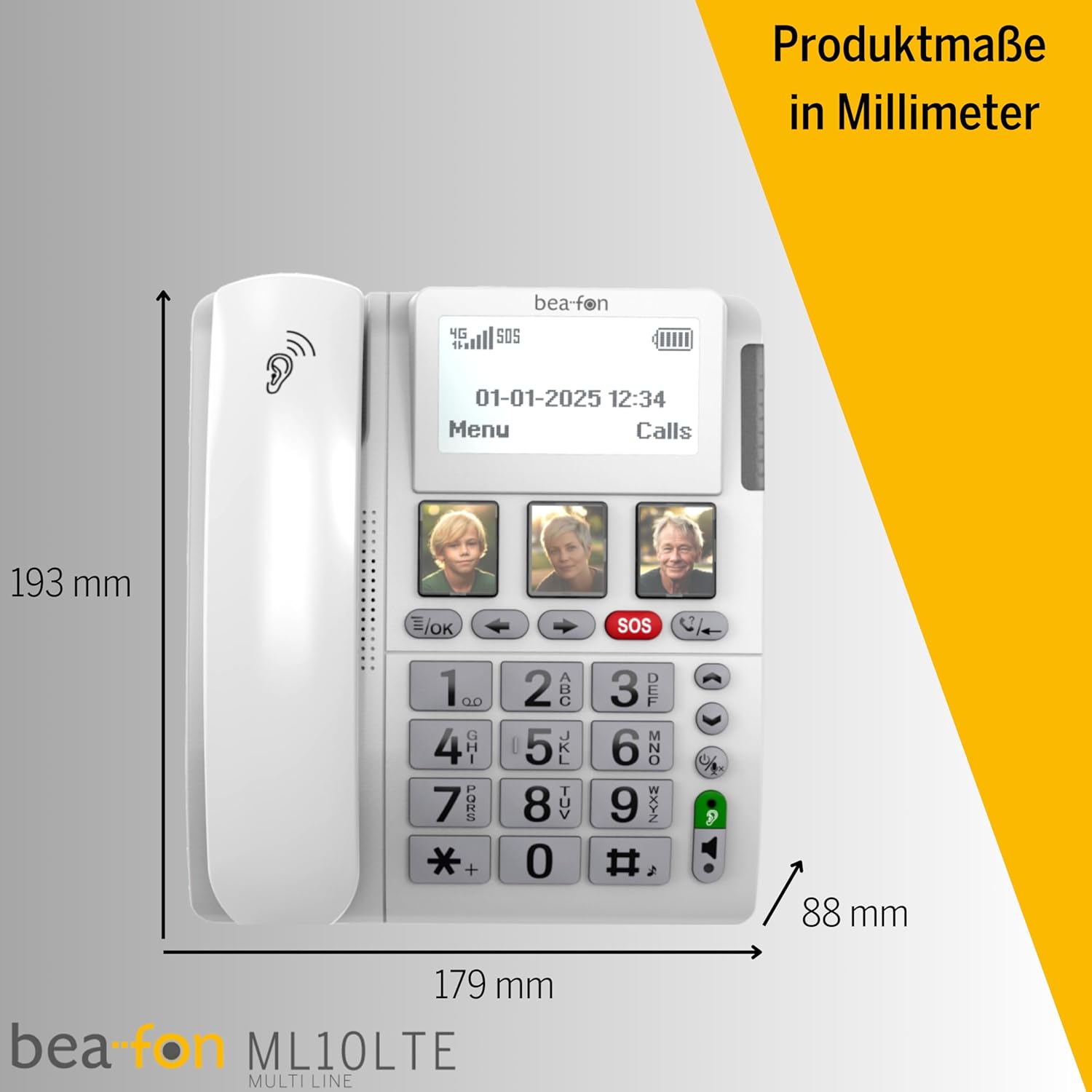
4. Το προϊόν τελείωσεview
Familiarize yourself with the various parts of your Beafon ML10 desk phone.


5. Ρύθμιση
5.1. Τοποθέτηση της κάρτας SIM
- Ensure the phone is powered off and disconnected from the power source.
- Locate the SIM card slot, usually on the back or side of the device.
- Insert a Nano SIM card into the designated slot, ensuring correct orientation.
- Κλείστε καλά το κάλυμμα της υποδοχής κάρτας SIM.
5.2. Ρεύμα σύνδεσης
- Connect the USB-C charger cable to the phone's charging port.
- Συνδέστε το τροφοδοτικό σε μια πρίζα τοίχου.
- The phone can operate on battery power via 4G LTE, eliminating the need for a fixed line connection.
5.3. Αρχική ενεργοποίηση και επιλογή γλώσσας
- Press and hold the Power button until the display turns on.
- Ακολουθήστε τις οδηγίες στην οθόνη για να επιλέξετε την προτιμώμενη γλώσσα σας.
- The phone will automatically search for a 4G LTE network.

6. Οδηγίες λειτουργίας
6.1. Πραγματοποίηση και λήψη κλήσεων
- Πραγματοποίηση κλήσης: Lift the handset, dial the number using the large keypad, and press the green call button.
- Λήψη κλήσης: When the phone rings (up to 90 dB), lift the handset or press the hands-free button to answer.
- Λειτουργία Hands-Free: Press the dedicated hands-free button to activate speakerphone during a call.
6.2. Quick Dial Keys
The phone features three programmable quick dial keys (I, II, III) that can be customized with photos or symbols for easy access to frequently called contacts.
- Προγραμματισμός: Navigate to the phone's menu, select 'Quick Dial Settings', and assign a contact number to each key. You can also associate a photo or symbol.
- Χρησιμοποιώντας: Simply press the desired quick dial key to call the assigned contact.
6.3. Λειτουργία έκτακτης ανάγκης SOS
The SOS function allows you to quickly contact pre-selected emergency numbers. It includes an SOS button on the phone and a separate SOS wristband/necklace.
- Προγραμματισμός αριθμών SOS: Access the 'SOS Settings' in the menu to program up to five emergency contact numbers.
- Activating SOS (Phone): Press and hold the red SOS button on the phone. The phone will automatically call the programmed numbers in sequence until an answer is received.
- Activating SOS (Wristband/Necklace): Press the button on the SOS wristband or necklace. This will trigger the phone to initiate the emergency call sequence. The wristband/necklace has a range of 433 MHz.


6.4. Άλλες Λειτουργίες
- SMS: The phone supports sending and receiving text messages. Access the 'Messages' menu to compose or read SMS.
- Audio Booster: Press the Audio Booster button during a call to temporarily increase the earpiece volume for clearer audio.
- Bluetooth LE: Use Bluetooth Low Energy to connect compatible wireless accessories.
- HAC Compatibility: The phone is certified HAC M4/T4, making it suitable for users with hearing aids.
7. Συντήρηση
7.1. Καθαρισμός της συσκευής
Για να διατηρήσετε το τηλέφωνό σας σε άριστη κατάσταση:
- Σκουπίστε την επιφάνεια του τηλεφώνου με ένα μαλακό,amp πανί.
- Μην χρησιμοποιείτε σκληρά χημικά ή λειαντικά καθαριστικά.
- Ensure no moisture enters openings such as the microphone or speaker.
7.2. Φροντίδα μπαταρίας
The phone is powered by a Lithium-ion battery. To prolong battery life:
- Αποφύγετε την συχνή πλήρη αποφόρτιση της μπαταρίας.
- Charge the phone regularly, especially if not in use for extended periods.
- Αποθηκεύστε τη συσκευή σε δροσερό, ξηρό μέρος όταν δεν τη χρησιμοποιείτε.
8. Αντιμετώπιση Προβλημάτων
If you encounter issues with your Beafon ML10, refer to the following common problems and solutions:
| Πρόβλημα | Πιθανή Λύση |
|---|---|
| Το τηλέφωνο δεν ενεργοποιείται | Check if the power adapter is correctly connected and the battery is charged. Ensure the battery is properly inserted. |
| Δεν είναι δυνατή η πραγματοποίηση ή η λήψη κλήσεων | Verify that the SIM card is correctly inserted and activated. Check for network signal strength on the display. Restart the phone. |
| Η λειτουργία SOS δεν λειτουργεί | Ensure SOS numbers are correctly programmed. Check the battery level of the SOS wristband/necklace. Verify the wristband/necklace is within range (433 MHz). |
| Κακή ποιότητα ήχου | Adjust the earpiece volume. Ensure the microphone is not blocked. If using hands-free, ensure you are close to the phone. |
| Η οθόνη είναι κενή ή παγωμένη | Try restarting the phone by holding the power button. If unresponsive, disconnect power and re-connect. |
9. Προδιαγραφές
Technical details of the Beafon Silverline ML10 LTE Desk Phone:
| Χαρακτηριστικό | Λεπτομέρεια |
|---|---|
| Μάρκα | Μπίφον |
| Αριθμός μοντέλου | 15031162187 |
| Λειτουργικό σύστημα | RTOS |
| Τύπος τηλεφώνου | Nano SIM |
| Συνδεσιμότητα | 4G LTE, Bluetooth LE |
| Σύνθεση μπαταρίας | Ιόν λιθίου (1 περιλαμβάνεται) |
| Πηγή ισχύος | Τροφοδοτείται από μπαταρία |
| Ένταση ήχου κλήσης | Έως 90 dB |
| Earpiece Volume | +40 dB |
| Συμβατότητα ακουστικών βαρηκοΐας | HAC M4/T4 |
| SOS Wristband/Necklace Range | 433 MHz |
| Βάρος | 210 γρ |
| Αναγνωριστικό καλούντος | Ναί |
| Λειτουργία πολλαπλών γραμμών | Λειτουργία μίας γραμμής |
10. Εγγύηση και υποστήριξη
Information regarding the specific warranty period and detailed support contact information for the Beafon Silverline ML10 LTE Desk Phone is not available in the provided product data. Please refer to the product packaging or the manufacturer's official website for the most current warranty terms and customer support details.


