Εισαγωγή
This manual provides essential information for setting up, operating, maintaining, and troubleshooting your HP 240 G7 Laptop, Model 1S5F1PA#ACJ. Please read this guide thoroughly to ensure proper use and to maximize the lifespan of your device.

Εικόνα: Μπροστά view of the HP 240 G7 Laptop with the screen displaying the Windows operating system desktop.
Περιεχόμενα συσκευασίας
Βεβαιωθείτε ότι τα ακόλουθα στοιχεία περιλαμβάνονται στη συσκευασία του προϊόντος σας:
- HP 240 G7 Laptop (Model 1S5F1PA#ACJ)
- Μετασχηματιστής εναλλασσόμενου ρεύματος και καλώδιο τροφοδοσίας
- Τεκμηρίωση (Οδηγός γρήγορης εκκίνησης, Πληροφορίες εγγύησης)
Προϊόν Πάνωview
Familiarize yourself with the physical features and ports of your HP 240 G7 Laptop.
Στοιχεία αριστερής πλευράς

Image: Left side of the laptop, illustrating the various ports and connectors.
- Υποδοχή AC: Για τη σύνδεση του μετασχηματιστή ρεύματος.
- RJ-45 (Ethernet) Port: Για ενσύρματες συνδέσεις δικτύου.
- Θύρα HDMI 1.4b: Για σύνδεση με εξωτερικές οθόνες ή προβολείς.
- Θύρες USB 3.1 1ης γενιάς (x2): Για τη σύνδεση συσκευών USB υψηλής ταχύτητας.
- Συνδυαστική υποδοχή ακουστικών/μικροφώνου: For connecting a headset or external audio devices.
Εξαρτήματα δεξιάς πλευράς
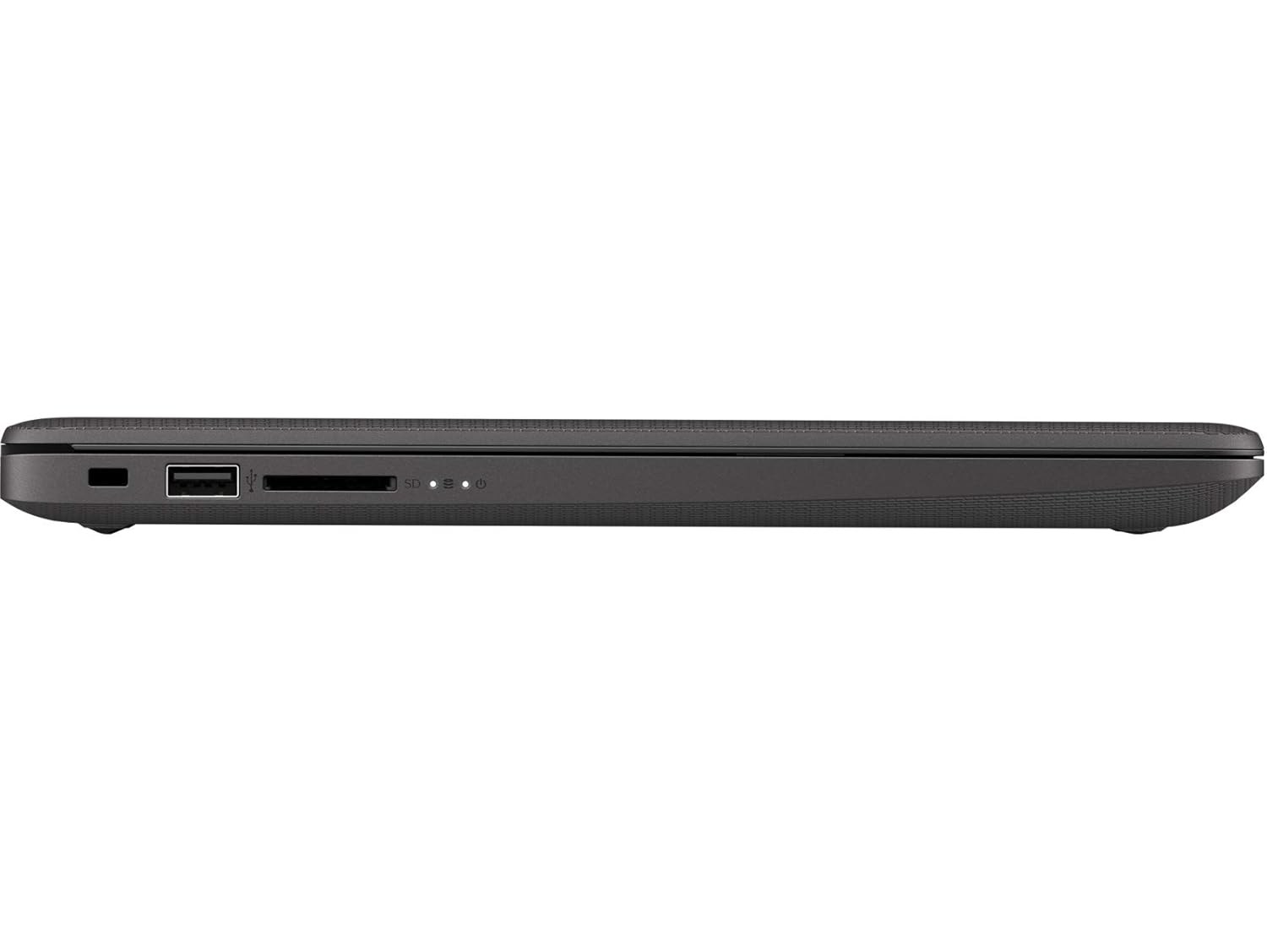
Image: Right side of the laptop, illustrating the USB port and media card reader.
- Υποδοχή κλειδαριάς ασφαλείας: Για τη σύνδεση καλωδίου ασφαλείας.
- Θύρα USB 2.0: Για τη σύνδεση τυπικών συσκευών USB.
- Multi-Format Digital Media Reader: Υποστηρίζει κάρτες μνήμης SD, SDHC και SDXC.
Πάνω και πίσω Views

Εικόνα: Από πάνω προς τα κάτω view of the laptop with the lid closed, showing the HP logo.

Εικόνα: Γωνιακή view of the laptop's back, highlighting the textured finish and HP logo.
The top cover features the HP logo. The back of the laptop is designed for durability and aesthetics.
Ρύθμιση
- Σύνδεση τροφοδοσίας: Plug the AC power adapter into the laptop's AC power connector and then into a wall outlet.
- Αρχική ενεργοποίηση: Open the laptop lid and press the power button. The laptop will begin its initial boot sequence.
- Ρύθμιση λειτουργικού συστήματος: Ακολουθήστε τις οδηγίες στην οθόνη για να ολοκληρώσετε την εγκατάσταση των Windows 10 Pro, συμπεριλαμβανομένης της επιλογής γλώσσας, της σύνδεσης δικτύου και της δημιουργίας λογαριασμού χρήστη.
Λειτουργικός
Διαχείριση ενέργειας
- Ενεργοποίηση: Πατήστε το κουμπί λειτουργίας που βρίσκεται στο πληκτρολόγιο.
- Κλείνω το εργοστάσιον: Κάντε κλικ στο κουμπί Έναρξη και, στη συνέχεια, επιλέξτε Τροφοδοσία > Τερματισμός λειτουργίας.
- Κατάσταση ύπνου: Κάντε κλικ στο κουμπί Έναρξη και, στη συνέχεια, επιλέξτε Τροφοδοσία > Ύπνος ή κλείστε το καπάκι του φορητού υπολογιστή.
Πληκτρολόγιο και επιφάνεια αφής
- Πληκτρολόγιο: Use the integrated keyboard for typing. Function keys (F1-F12) provide shortcuts for various system functions when pressed with the Fn key.
- Touchpad: The touchpad supports multi-touch gestures for navigation, scrolling, and zooming. Refer to Windows settings for customization.
Συνδεσιμότητα
- Wi-Fi: Connect to wireless networks via the Realtek RTL8822CE 802.11a/b/g/n/ac (2x2) Wi-Fi adapter. Access Wi-Fi settings through the Windows taskbar.
- Bluetooth: Pair Bluetooth 5 compatible devices such as headphones or mice. Manage Bluetooth devices in Windows settings.
- Εξωτερικές οθόνες: Connect an external monitor or projector using the HDMI 1.4b port. Press Πλήκτρο Windows + P για τη διαχείριση των λειτουργιών εμφάνισης.
Συντήρηση
- Καθάρισμα: Χρησιμοποιήστε ένα μαλακό πανί που δεν αφήνει χνούδι ελαφρώς dampened with water or a screen cleaner to clean the display and exterior surfaces. Avoid harsh chemicals.
- Φροντίδα μπαταρίας: To prolong battery life, avoid extreme temperatures. Periodically allow the battery to discharge partially before recharging.
- Ενημερώσεις λογισμικού: Regularly check for and install Windows updates and HP driver updates to ensure optimal performance and security.
- Δημιουργία αντιγράφων ασφαλείας δεδομένων: Δημιουργείτε τακτικά αντίγραφα ασφαλείας των σημαντικών δεδομένων σας σε εξωτερικό δίσκο ή σε χώρο αποθήκευσης στο cloud για να αποτρέψετε την απώλεια δεδομένων.
Αντιμετώπιση προβλημάτων
This section addresses common issues you might encounter with your HP 240 G7 Laptop.
Προβλήματα απόδοσης συστήματος
- Αργή απόδοση: If the system feels slow, check for background applications consuming resources. Ensure sufficient free space on the hard drive. Consider upgrading RAM if performance remains an issue for your usage.
- Laptop Not Booting: Ensure the power adapter is securely connected and the battery has sufficient charge. Try performing a hard reset by holding the power button for 15 seconds. If the issue persists, contact HP Support.
Οθόνη και γραφικά
- Whitish/Dull Screen: Adjust display brightness and contrast settings in Windows. Ensure display drivers are up to date. Note that the display resolution is 1366 x 768, which may appear less sharp compared to higher-resolution screens.
- Χωρίς εμφάνιση: If the screen is black, try connecting an external monitor to verify if the issue is with the laptop's internal display. Restart the laptop.
Υπερθέρμανση
- Υπερβολική θερμότητα: Ensure the laptop's vents are not obstructed. Use the laptop on a hard, flat surface to allow for proper airflow. Avoid operating in direct sunlight or hot environments. If a specific area, like the palm rest, feels excessively hot, this could indicate internal component heat. Ensure all system drivers and BIOS are updated.
For further assistance, refer to the HP support webιστοσελίδα ή επικοινωνήστε με την εξυπηρέτηση πελατών τους.
Προδιαγραφές
| Χαρακτηριστικό | Λεπτομέρεια |
|---|---|
| Όνομα μοντέλου | HP 240 G7 |
| Αριθμός μοντέλου είδους | 1S5F1PA#ACJ |
| Επεξεργαστής | Intel Core i3-1005G1 (1.2 GHz base, up to 3.4 GHz with Intel Turbo Boost, 4 MB L3 Cache, 2 Cores) |
| ΕΜΒΟΛΟ | 4 GB DDR4-2666 SDRAM (1 x 4 GB) |
| Αποθήκευση | 1 TB 5400 RPM SATA HDD |
| Επίδειξη | 14-inch Diagonal, HD (1366 x 768), Anti-glare, 220 Nits, 45% NTSC |
| Γραφικά | Γραφικά Intel UHD |
| Λειτουργικό σύστημα | Windows 10 Pro |
| Ασύρματη Συνδεσιμότητα | Realtek RTL8822CE 802.11a/b/g/n/ac (2x2) Wi-Fi and Bluetooth 5 Combo |
| λιμάνια | 2x USB 3.1 Gen 1, 1x USB 2.0, 1x HDMI 1.4b, 1x RJ-45, 1x Headphone/Microphone Combo, 1x AC Power, 1x Multi-Format Digital Media Reader |
| Διαστάσεις (Π x Β x Υ) | 33.5 x 23.4 x 1.99 εκ |
| Βάρος | 1.52 κιλά |
| Μπαταρία | Lithium Battery, 4.9 Watt Hours |
Εγγύηση και υποστήριξη
Your HP 240 G7 Laptop comes with a standard manufacturer's warranty. Please refer to the warranty documentation included in your package for specific terms and conditions.
For technical support, driver downloads, or service inquiries, please visit the official HP support website or contact HP customer service. You can find more information and resources on the Κατάστημα HP στο Amazon or the main HP webτοποθεσία.