Εισαγωγή
This manual provides essential instructions for the safe and efficient operation of your VisionTek Pitbull RockDoc Power Portable MP3 Speaker. Please read this manual thoroughly before using the device and retain it for future reference.
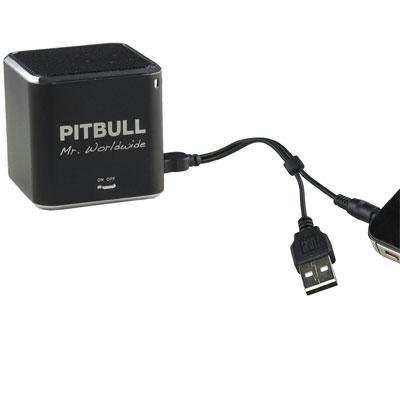
This image displays the compact, black cube-shaped Pitbull RockDoc Power Portable MP3 Speaker. The front face features the 'PITBULL Mr. Worldwide' logo and an 'ON OFF' switch. An integrated cable with a USB connector and a 3.5mm audio jack is shown connected to the speaker, ready for charging or audio input.
Χαρακτηριστικά προϊόντος
- Φορητό σχέδιο: Συμπαγές και ελαφρύ για εύκολη μεταφορά.
- Integrated MP3 Player: Features 4GB of internal memory for direct music playback.
- Ασύρματη συνδεσιμότητα: Supports Bluetooth for audio streaming from compatible devices.
- Wired Audio Input: Includes a 3.5 mm audio jack for connecting non-Bluetooth devices.
- Τροφοδοτείται από μπαταρία: Operates on an internal battery for cordless use.
- Σύστημα ηχείων 1 δρόμων: Προσφέρει καθαρή έξοδο ήχου.
Ρύθμιση
Φόρτιση του ηχείου
- Locate the integrated USB cable attached to the speaker.
- Connect the USB-A end of the cable to a powered USB port (e.g., computer, USB wall adapter).
- The speaker's indicator light will illuminate to show charging status. Refer to the device for specific light indications.
- Μόλις φορτιστεί πλήρως, αποσυνδέστε το καλώδιο USB.
Ενεργοποίηση/Απενεργοποίηση
- To power on, slide the 'ON OFF' switch to the 'ON' position.
- To power off, slide the 'ON OFF' switch to the 'OFF' position.
Σύνδεση πηγών ήχου
Your speaker supports three primary methods for audio input:
1. Using Internal 4GB Memory (MP3 Playback)
- To load music onto the internal 4GB memory, connect the speaker to a computer using the USB cable. The speaker should appear as a removable storage device.
- Drag and drop your MP3 audio files into the speaker's storage.
- Μια φορά files are transferred, safely eject the speaker from your computer.
- The speaker will automatically play files from its internal memory when powered on and no other audio source is connected.
2. Σύνδεση Bluetooth
- Βεβαιωθείτε ότι το ηχείο είναι ενεργοποιημένο.
- Ενεργοποιήστε το Bluetooth στο smartphone, το tablet ή άλλη συμβατή συσκευή σας.
- Αναζήτηση για available Bluetooth devices. The speaker should appear as "Pitbull RockDoc" or similar.
- Select the speaker from the list to pair. A confirmation sound or light indication may occur upon successful pairing.
3. 3.5 mm Audio Jack Connection
- Locate the integrated 3.5 mm audio jack on the speaker's cable.
- Connect this jack to the headphone output or audio-out port of your external audio device (e.g., MP3 player, phone, laptop).
- Ensure the speaker is powered on. Audio will be routed through this connection.
Οδηγίες Λειτουργίας
Βασικά στοιχεία ελέγχου αναπαραγωγής
The speaker features basic controls for media playback. These controls typically include:
- Αναπαραγωγή/Παύση: Press to start or pause audio playback.
- Επόμενο κομμάτι: Press to skip to the next audio file.
- Προηγούμενο κομμάτι: Πατήστε για να επιστρέψετε στην αρχή του τρέχοντος κομματιού ή στο προηγούμενο κομμάτι.
- Έλεγχος έντασης ήχου: Adjust the volume level. (Specific button layout not provided, assume standard controls).
Note: When connected via Bluetooth or 3.5mm audio jack, playback controls on the speaker may control the connected device, or you may need to control playback directly from the source device.
Συντήρηση
Καθάρισμα
- Σκουπίστε το εξωτερικό του ηχείου με ένα μαλακό, στεγνό πανί που δεν αφήνει χνούδι.
- Μην χρησιμοποιείτε λειαντικά καθαριστικά, διαλύτες ή ισχυρά χημικά.
- Αποφύγετε την εισχώρηση υγρασίας σε τυχόν ανοίγματα.
Αποθήκευση
- Αποθηκεύστε το ηχείο σε δροσερό και ξηρό μέρος, μακριά από το άμεσο ηλιακό φως και ακραίες θερμοκρασίες.
- Εάν αποθηκεύετε για μεγάλο χρονικό διάστημα, βεβαιωθείτε ότι η μπαταρία είναι μερικώς φορτισμένη (περίπου 50%) για να παρατείνετε τη διάρκεια ζωής της.
Αντιμετώπιση προβλημάτων
| Πρόβλημα | Πιθανή αιτία | Διάλυμα |
|---|---|---|
| Καμία δύναμη | Η μπαταρία έχει εξαντληθεί | Φορτίστε το ηχείο χρησιμοποιώντας το καλώδιο USB. |
| Δεν υπάρχει ήχος από το ηχείο | Volume too low; Incorrect input source; Device not paired (Bluetooth); Cable not connected (3.5mm) | Increase speaker volume; Ensure correct mode (internal MP3, Bluetooth, or AUX); Re-pair Bluetooth device; Check 3.5mm cable connection. |
| Η σύζευξη Bluetooth αποτυγχάνει | Το ηχείο δεν βρίσκεται σε λειτουργία σύζευξης. Η συσκευή είναι πολύ μακριά. Παρεμβολές | Ensure speaker is discoverable; Move device closer to speaker; Turn off other Bluetooth devices. |
| Δεν είναι δυνατή η μεταφορά files to 4GB memory | Incorrect USB connection; Driver issue; Memory full | Ensure speaker is connected to computer via USB; Try a different USB port/cable; Check available memory space. |
Προδιαγραφές
| Χαρακτηριστικό | Λεπτομέρεια |
|---|---|
| Αριθμός μοντέλου | 900584 |
| Τύπος ηχείου | 1-Way Portable Speaker |
| Εσωτερική μνήμη | 4GB (για αναπαραγωγή MP3) |
| Συνδεσιμότητα | Bluetooth, 3.5 mm Audio Jack |
| Πηγή ισχύος | Τροφοδοτείται από μπαταρία |
| Μέγιστη ισχύς εξόδου ηχείου | 3 Watt |
| Βάρος αντικειμένου | 159 γρ |
| Διαστάσεις προϊόντος (ΜxΠxΥ) | 5 x 5 x 4.9 εκ |
| Κατασκευαστής | VISIONTEK MASS STORAGE |
Πληροφορίες εγγύησης
For detailed warranty information regarding your VisionTek Pitbull RockDoc Power Portable MP3 Speaker, please refer to the warranty card included with your purchase or contact the manufacturer directly. Amazon's buying options mention a 'Warranty Policy', indicating manufacturer coverage.
Υποστήριξη
If you require technical assistance or have questions not covered in this manual, please contact VisionTek Mass Storage, the manufacturer of this product. Contact details can typically be found on their official webτοποθεσία ή συσκευασία προϊόντος.


