Εισαγωγή
This manual provides detailed instructions for the safe and effective use of your Canon EOS 7D Digital SLR camera body. Please read this manual thoroughly before using the camera and keep it for future reference.

Εμπρός view of the Canon EOS 7D Digital SLR camera body, showing the lens mount and grip.
Ρύθμιση
1. Τοποθέτηση μπαταρίας
The EOS 7D uses one Battery Pack LP-E6. A CR1616 lithium-ion battery is also used for date/time retention.
- Ανοίξτε το κάλυμμα της θήκης μπαταριών που βρίσκεται στο κάτω μέρος της κάμερας.
- Insert the LP-E6 battery pack with the electrical contacts facing inward, ensuring it clicks into place.
- Κλείστε καλά το κάλυμμα της θήκης μπαταριών.
- For the date/time battery, refer to the dedicated section in the full user manual for replacement instructions.
2. CF Card Installation
The camera records images directly to a CompactFlash (CF) card.
- Open the CF card slot cover on the side of the camera.
- Insert the CF card with the correct orientation until it is fully seated.
- Close the CF card slot cover securely.
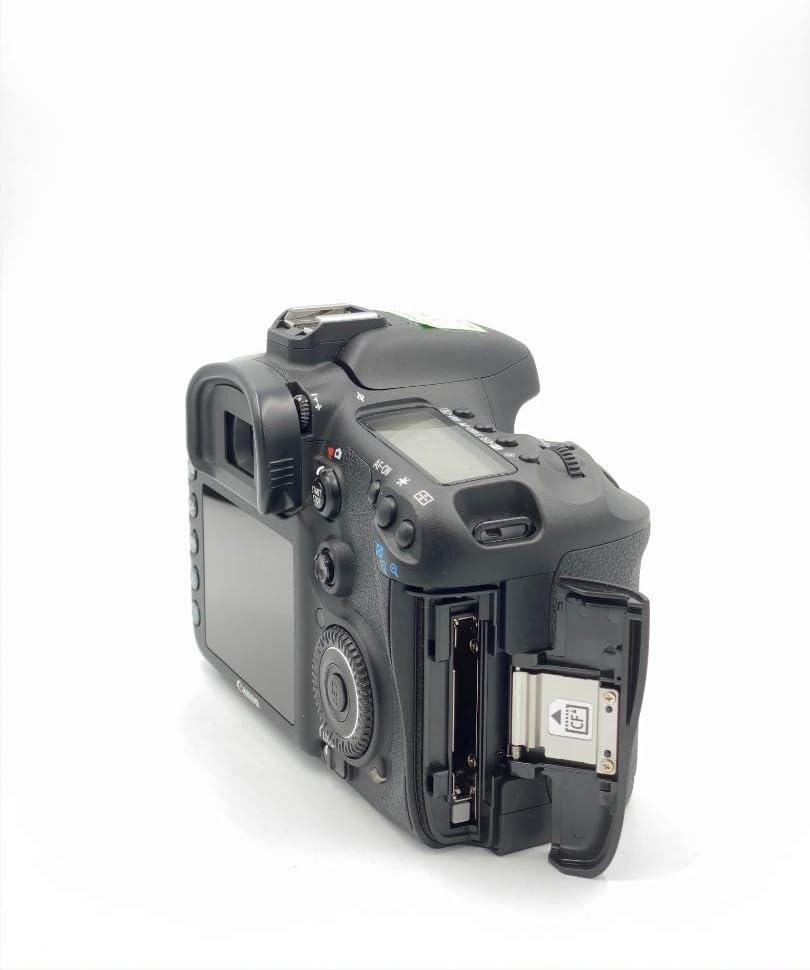
Πλευρά view of the Canon EOS 7D, showing the open CF card slot for media insertion.
3. Τοποθέτηση φακού
The EOS 7D is compatible with Canon EF and EF-S lenses.
- Αφαιρέστε το καπάκι του σώματος από την κάμερα και το πίσω καπάκι από τον φακό.
- Ευθυγραμμίστε το κόκκινο ή το λευκό σημάδι ευρετηρίου στον φακό με το αντίστοιχο σημάδι στο σώμα της φωτογραφικής μηχανής.
- Περιστρέψτε το φακό δεξιόστροφα μέχρι να ασφαλίσει στη θέση του.
4. Αρχικές ρυθμίσεις
Upon first power-on or after battery replacement, you may need to set the language and time zone.
- Ενεργοποιήστε την κάμερα χρησιμοποιώντας τον διακόπτη λειτουργίας.
- Ακολουθήστε τις οδηγίες στην οθόνη για να επιλέξετε την προτιμώμενη γλώσσα σας.
- Ρυθμίστε την ημερομηνία, την ώρα και τη ζώνη ώρας.
Οδηγίες Λειτουργίας
1. Βασική Λειτουργία
To power on the camera, slide the power switch to the "ON" position. To take a photo, press the shutter button halfway to focus, then press fully to capture the image.
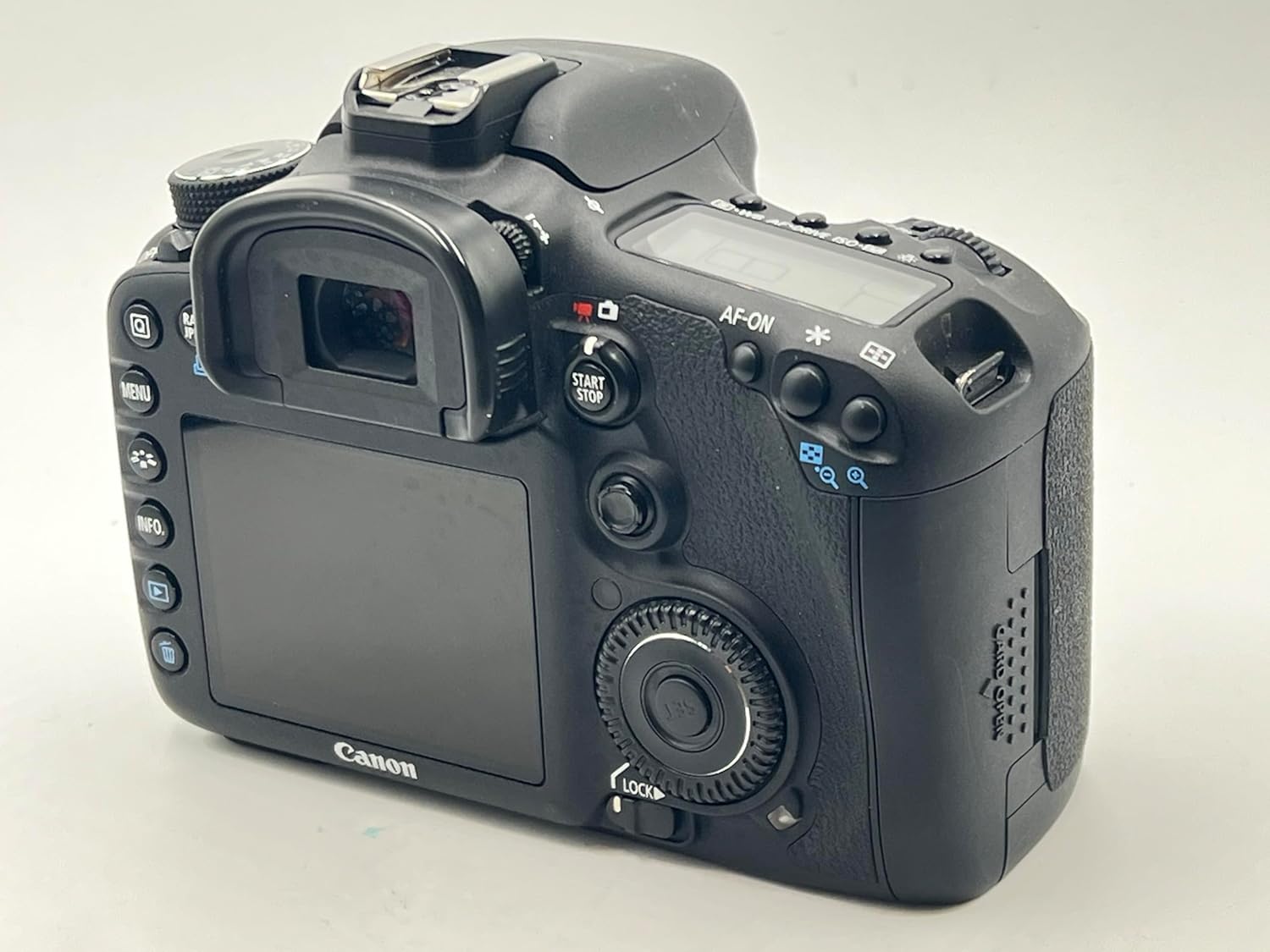
Οπισθεν view of the Canon EOS 7D, showing the LCD monitor and control buttons.
2. Image Capture Settings
- Αισθητήρας εικόνας: 18.0 Megapixel APS-C size CMOS sensor.
- Image Processors: Dual DIGIC 4 for high speed and quality.
- Ταχύτητα ISO: Range from 100 to 6400, expandable to 12800.
- Συνεχής Σκοποβολή: Έως 8.0 καρέ ανά δευτερόλεπτο (fps).
- Μορφές εγγραφής: JPEG, RAW (14-bit), M-RAW, S-RAW. Video in MOV (H.264).
- Στυλ εικόνας: Select from Standard, Portrait, Landscape, Neutral, Faithful, Monochrome, or User Defined settings.
- Ισορροπία λευκού: Auto, Daylight, Shade, Cloudy, Tungsten Light, White Fluorescent Light, Flash, Custom, Color Temperature setting.
3. Σύστημα αυτόματης εστίασης
The EOS 7D features a sophisticated 19-point all cross-type AF system for precise focusing.
- AF Points: 19-point all cross-type, with dual diagonal cross-type sensors at the center (f/2.8 and f/5.6).
- Λειτουργίες εστίασης: One-Shot AF (for still subjects), AI Servo AF (for moving subjects), AI Focus AF (automatic switching), and Manual Focus (MF).
- AF Point Selection: Manual selection (Single point, Spot AF, AF point expansion, Zone AF) or Automatic selection (19 point AF).
- AF Assist Beam: Emitted from an external Speedlite when necessary.
4. Έλεγχος έκθεσης
Accurate exposure is achieved through various metering modes and controls.
- Τρόποι μέτρησης: Evaluative (63 zones, linked to active AF point), Partial (approx. 9.4% of viewfinder), Spot (approx. 2.3% of viewfinder), and Center-weighted average.
- Exposure Control Systems: Program AE, Shutter-priority AE, Aperture-priority AE, Creative Auto, Full auto, Manual exposure, and E-TTL II autoflash.
- Αντιστάθμιση έκθεσης: Adjustable up to ±5 stops in 1/3- or 1/2-stop increments.
- Κλείδωμα AE: Available automatically in One-Shot AF with evaluative metering, or manually via the AE lock button.
5. Shutter and Flash
- Ταχύτητες κλείστρου: From 30 seconds to 1/8000th second, plus Bulb mode. X-sync at 1/250th second.
- Ενσωματωμένο Flash: Retractable, auto pop-up flash with a Guide Number of 12/39 (meters/feet at ISO 100).
- External Flash: Compatible with E-TTL II Speedlites, offering flash exposure compensation and FE Lock.
6. Ζωντανά View και Εγγραφή Βίντεο
The camera supports Live View for both still photos and video, with advanced video capabilities.
- Ζω View: Offers Quick mode, Live mode, Face detection Live mode, and Manual focusing with magnification.
- Εγγραφή βίντεο: Full HD (1920 x 1080) at 30p, 24p, 25p; HD (1280 x 720) at 60p, 50p; SD (640 x 480) at 60p, 50p.
- Ήχος: Linear PCM (monaural). Manual audio level adjustment is available with Firmware Version 2.0.X.
- Συνεχής ηχογράφηση: Approximately 12 minutes for Full HD/HD, 24 minutes for SD (with a 4GB card).
7. Playback and Customization
- Αναπαραγωγή: View single images, histograms, magnified views, and perform in-camera RAW processing, JPEG resizing, and image rating.
- Προσαρμοσμένες λειτουργίες: 27 customizable functions to tailor camera operation to your preferences.
- Custom Controls: Assign desired functions to various buttons and dials for personalized control.
- Ρυθμίσεις χρήστη: Register up to three sets of camera settings (C1, C2, C3) on the Mode Dial for quick recall.
Συντήρηση
1. Dust Deletion Feature
The EOS 7D includes features to manage dust on the image sensor:
- Automatic Sensor Cleaning: The low-pass filter is automatically cleaned when the power is turned on or off.
- Dust Delete Data: The camera can detect dust adhering to the low-pass filter and append its coordinates to captured images. This data can be used by provided software to automatically erase dust spots.
- Χειροκίνητος καθαρισμός: For persistent dust, manual cleaning of the sensor is possible. Refer to the full user manual for detailed instructions or consult a Canon service center.
2. Γενική καθαριότητα
- Σώμα κάμερας: Χρησιμοποιήστε ένα μαλακό, στεγνό πανί για να σκουπίσετε το σώμα της φωτογραφικής μηχανής. Για επίμονη βρωμιά, σκουπίστε ελαφρά.ampΞεπλύνετε το πανί με νερό. Αποφύγετε τη χρήση οργανικών διαλυτών.
- Φακός: Use a lens blower brush to remove dust. For smudges, use a lens cleaning solution and a clean lens cloth.
- Οθόνη LCD: Gently wipe with a soft cloth. Avoid pressing hard on the screen.
3. Φροντίδα μπαταρίας
- Always use the provided Canon Battery Charger LC-E6 to charge the LP-E6 battery pack.
- Αποθηκεύστε τις μπαταρίες σε δροσερό, ξηρό μέρος όταν δεν τις χρησιμοποιείτε.
- Αποφύγετε την πλήρη αποφόρτιση της μπαταρίας συχνά για να παρατείνετε τη διάρκεια ζωής της.
Αντιμετώπιση προβλημάτων
Αυτή η ενότητα εξετάζει συνηθισμένα προβλήματα που ενδέχεται να αντιμετωπίσετε με την EOS 7D σας.
1. Η κάμερα δεν ενεργοποιείται
- Ensure the battery pack LP-E6 is fully charged and correctly inserted.
- Ελέγξτε αν το κάλυμμα της θήκης της μπαταρίας είναι καλά κλεισμένο.
- If using an AC Adapter Kit ACK-E6, ensure it is properly connected to a power source.
2. Unable to Take Photos
- Check if a CF card is inserted and has sufficient free space.
- Ensure the lens is properly attached and the focus mode switch on the lens is set to AF (Autofocus) or MF (Manual Focus) as desired.
- If the shutter button is pressed halfway and the camera does not focus, check the AF mode and lighting conditions.
- If the built-in flash is used, ensure it has recycled (flash-ready icon is lit).
3. Οι εικόνες είναι θολές
- Βεβαιωθείτε ότι ο φακός είναι καθαρός και χωρίς λεκέδες.
- Ensure the camera is properly focused on the subject. In AF mode, confirm the AF point is on the desired area.
- Check the shutter speed. If it is too slow for the shooting conditions, use a faster shutter speed or a tripod to prevent camera shake.
- Consider using a higher ISO setting in low light to allow for faster shutter speeds.
4. Exposure Problems (Too Dark/Too Bright)
- Check the metering mode. Evaluative metering is generally suitable for most situations.
- Review the exposure compensation setting. Reset it to ±0 if unintended compensation was applied.
- In manual mode, adjust aperture, shutter speed, and ISO to achieve the desired exposure.
- If using flash, check flash exposure compensation settings.
5. Ενημέρωση υλικολογισμικού
Canon periodically releases firmware updates to enhance camera performance and add features. Refer to the official Canon website for the latest firmware and detailed update instructions. Firmware Version 2.0.X, for example, introduced features like manual audio level adjustment and improved burst rates.
Προδιαγραφές
| Χαρακτηριστικό | Λεπτομέρεια |
|---|---|
| Αισθητήρας εικόνας | APS-C CMOS 18.0 Megapixel |
| Επεξεργαστής εικόνας | Dual DIGIC 4 |
| Ευαισθησία ISO | 100-6400 (με δυνατότητα επέκτασης σε 12800) |
| Ταχύτητα κλείστρου | 30 seconds to 1/8000th second, Bulb |
| Συνεχής Σκοποβολή | Max. 8.0 shots/sec. |
| Σύστημα αυτόματης εστίασης | 19-point all cross-type AF |
| Μετρητικό Σύστημα | 63-zone dual-layer iFCL metering |
| Εγγραφή βίντεο | Full HD 1080p (30p/24p/25p) |
| Οθόνη LCD | 3.0-inch TFT color, approx. 920,000 dots |
| Viewευρίσκων | Eye-level pentaprism, approx. 100% coverage, 1.0x magnification |
| Μέσα αποθήκευσης | Κάρτα CompactFlash (CF). |
| Συνδεσιμότητα | USB 2.0 Hi-Speed, mini-HDMI OUT, Video OUT (NTSC/PAL) |
| Πηγή ισχύος | Μπαταρία LP-E6 |
| Διαστάσεις (Π x Υ x Β) | Approx. 5.8 x 4.4 x 2.9 in. (148.2 x 110.7 x 73.5mm) |
| Βάρος (Μόνο Σώμα) | Περίπου 28.9 oz. (820 g) |
| Λειτουργικό Περιβάλλον | Temperature: 32-104°F (0-40°C), Humidity: 85% or less |
Εγγύηση και σχέδια σέρβις
Standard warranty information is typically provided with the product at the time of purchase. Please refer to the documentation included in your product packaging for specific warranty terms and conditions.
Optional CarePAK PLUS Protection Plans
Canon offers optional CarePAK PLUS protection plans for extended coverage beyond the standard warranty. These plans provide protection from accidental damage (drops, spills, power surges) and normal wear and tear. Benefits may include Image Recovery, priority repair service, free return shipping, and genuine Canon factory service.
- CarePAK PLUS (2YR): 2-year protection plan.
- CarePAK PLUS (3YR): 3-year protection plan.
Για λεπτομέρειες σχετικά με την αγοράasing and registering for CarePAK PLUS, please visit the official Canon webτοποθεσία ή επικοινωνήστε με την υποστήριξη πελατών της Canon.
Υποστήριξη και Πόροι
For additional support, resources, and accessories, please refer to the following:
- Επίσημη Canon Webτοποθεσία: Επισκεφθείτε την Canon website for product information, driver downloads, firmware updates, and FAQs.
- Canon Developer Community: If you are a developer interested in controlling select Canon cameras within your application, the Canon EDSDK is available at developercommunity.usa.canon.com.
- Αξεσουάρ: A wide range of accessories, including batteries, chargers, cables, cases, and remote controllers, are available through authorized Canon retailers and the Canon Store.