Einführung
This manual provides detailed instructions for the AGPTEK A55PL USB C MP3 Player. It covers setup, operation, maintenance, and troubleshooting to ensure optimal use of your device. The A55PL is a versatile music player featuring USB-C connectivity, 64GB storage, FM radio, and voice recording capabilities, powered by a replaceable AAA battery.
Packungsinhalt
Bitte überprüfen Sie, ob alle unten aufgeführten Artikel in Ihrem Paket enthalten sind:
- AGPTEK A55PL MP3-Player
- 64 GB TF-Karte (vorinstalliert)
- Typ-C-zu-USB-Ladekabel
- Bedienungsanleitung

Image: Contents of the AGPTEK A55PL MP3 Player package, showing the player, USB-C cable, 64GB TF card, and user manual.
Produkt überview und Funktionen
The AGPTEK A55PL MP3 Player is designed for portability and ease of use, offering multiple functionalities in a compact form factor.
Hauptmerkmale:
- Direct Type-C & Universal USB Connectivity: Connects directly to Type-C phones for file transfer or to laptops/PCs using the included adapter/cable.
- Swappable AAA Batteries: Operates on a single AAA battery (not included), allowing for instant power replacement without needing charging outlets.
- Enormer Speicherplatz von 64 GB: Comes with a pre-loaded 64GB TF card, supporting over 13,000 songs and high-fidelity formats like FLAC, APE, and WAV. Functions as a U disk for data transfer.
- Crisp LED Display: Features an energy-efficient LED screen for clear navigation and song title display.
- Voice Recorder & FM Radio: Built-in voice recorder for capturing audio and an FM radio (requires wired headset as antenna) for broadcasts.

Bild: Ein überview of the AGPTEK A55PL MP3 Player's capabilities, including its Type-C port, music playback, recording, FM radio, and 64GB TF card storage.
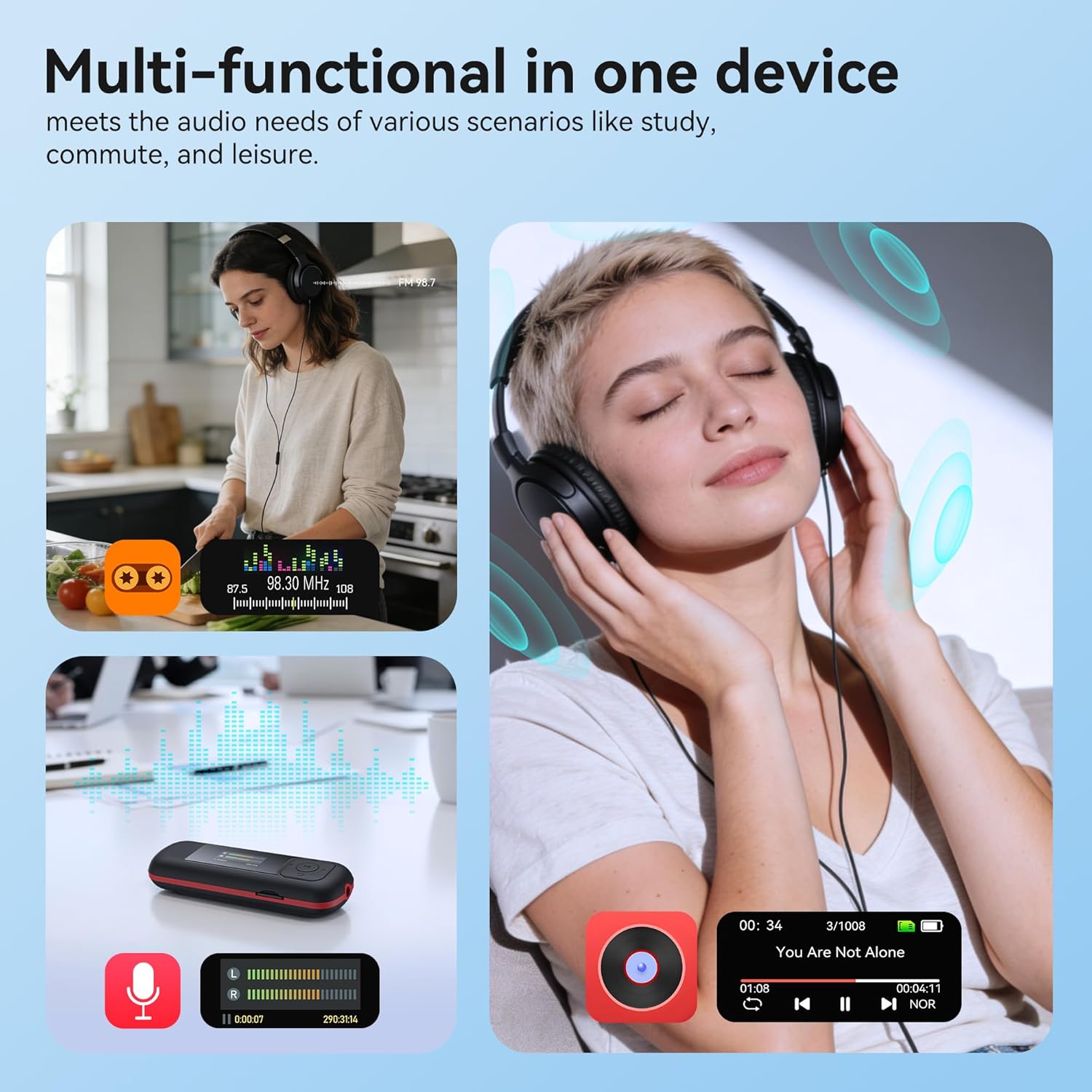
Image: The AGPTEK A55PL MP3 Player showcasing its multi-functional capabilities, including FM radio, voice recording, and music playback, suitable for various scenarios.
Aufstellen
1. Einlegen der Batterie
The AGPTEK A55PL uses one AAA battery (not included). Ensure correct polarity when inserting the battery.
- Suchen Sie die Abdeckung des Batteriefachs auf der Rückseite des Geräts.
- Press the center of the cover and slide it forward to unlock and remove.
- Legen Sie eine AAA-Batterie ein und achten Sie darauf, dass die positiven (+) und negativen (-) Anschlüsse mit den Markierungen im Batteriefach übereinstimmen.
- Schieben Sie die Abdeckung zurück, bis sie sicher einrastet.

Image: Step-by-step guide for removing the USB cap and installing the AAA battery into the AGPTEK A55PL MP3 Player.
Notiz: USB charging is not supported. The device relies solely on AAA battery power. The battery display on the screen is based on voltage changes at the battery terminal.
2. Initial Connection and File Überweisen
You can transfer music and other files to your MP3 player from a computer or a Type-C smartphone.
- Für Computer: Use the included Type-C to USB cable. Connect the Type-C end to the player and the USB-A end to your computer's USB port. The player will appear as a removable disk.
- For Type-C Phones: Plug the player's Type-C connector directly into your phone's Type-C port. The player will be recognized as external storage. (For iPhones, a Lightning-to-Type-C OTG adapter is needed, not included).

Image: Demonstrates connecting the AGPTEK A55PL MP3 Player to a computer via USB cable and directly to a Type-C smartphone for file Übertragung.
Bedienungsanleitung
Grundlegende Bedienelemente
The player features a simple interface with dedicated buttons for easy navigation.
- Netzschalter: Zum Ein-/Ausschalten gedrückt halten.
- Wiedergabe-/Pause-Taste: Drücken Sie diese Taste, um Musik abzuspielen oder anzuhalten.
- Navigationstasten (Auf/Ab/Links/Rechts): Dient zur Navigation in Menüs und zur Anpassung von Einstellungen.
- Lautstärketasten (+/-): Dedicated buttons on the side to adjust playback volume.
- Menütaste (M): Ermöglicht den Zugriff auf kontextsensitive Menüs.
- Zurück-/Return-Taste: Kehrt zum vorherigen Bildschirm oder Menü zurück.
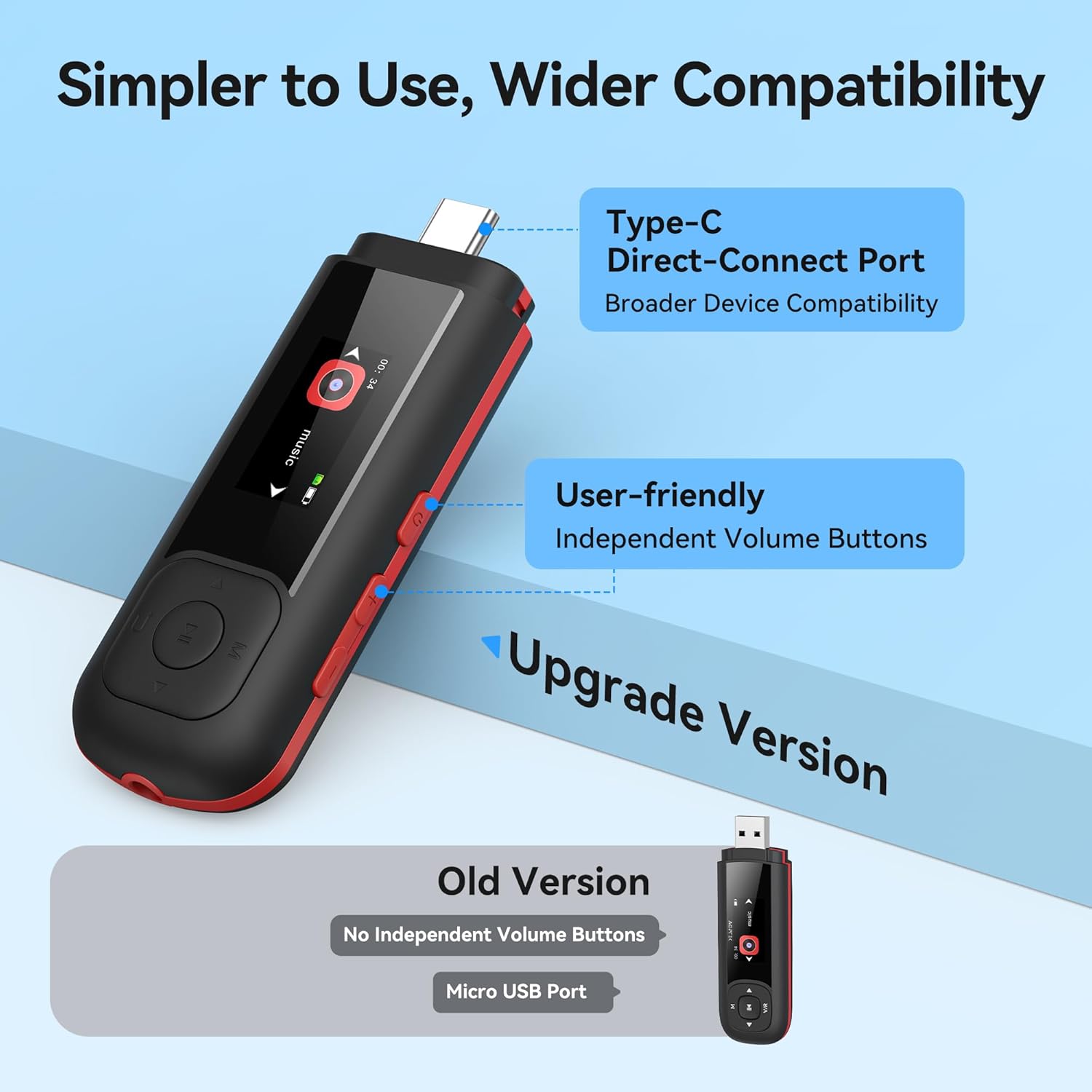
Image: Close-up of the AGPTEK A55PL MP3 Player, showing the Type-C direct-connect port and the independent volume buttons for user-friendly operation.
Musikwiedergabe
The player supports various audio formats including MP3, WMA, APE, FLAC, and WAV.
- Connect wired headphones to the 3.5mm audio jack.
- Navigate to the "Music" option on the main menu.
- Browse through your music library by artist, album, or folder.
- Wählen Sie einen Song aus, um die Wiedergabe zu starten.
- Use the Play/Pause button to control playback and the volume buttons to adjust sound levels.

Image: A person enjoying music through headphones, highlighting the AGPTEK A55PL MP3 Player's support for multi-format lossless audio quality.

Image: Illustrates the different playback modes available on the AGPTEK A55PL MP3 Player, including Folder Mode and Music Mode with options like repeat, shuffle, and play in order.
UKW-Radio
Für die Nutzung der FM-Radiofunktion muss ein kabelgebundenes Headset angeschlossen werden, da dieses als Antenne dient.
- Schließen Sie Ihre kabelgebundenen Kopfhörer an.
- Navigate to the "FM Radio" option from the main menu.
- Verwenden Sie die Navigationstasten, um nach Sendern zu suchen oder manuell eine Frequenz einzustellen.

Image: A user enjoying FM radio on the AGPTEK A55PL MP3 Player, emphasizing that wired headphones are required to function as an antenna.
Sprachrekorder
The built-in voice recorder allows you to capture audio on the go.
- Navigate to the "Recorder" option from the main menu.
- Wählen Sie „Aufnahme starten“, um zu beginnen.
- Press the Play/Pause button to stop and save the recording.
- Recordings can be accessed and played back from the "Recordings" list.

Image: The AGPTEK A55PL MP3 Player showing its portable recorder function, ready for effortless on-the-go audio capture.
Custom Playlists
You can create and manage custom playlists by connecting the player to a computer.
- Connect the MP3 player to your computer using the Type-C to USB cable.
- Access the player's storage as a removable disk.
- Organisieren Sie Ihre Musik files into folders or create M3U playlist files direkt auf dem Gerät.
- The player supports up to 3 built-in customizable playlists.

Image: Demonstrates how to create and edit custom playlists by connecting the AGPTEK A55PL MP3 Player to a computer via USB.
Wartung
- Reinigung: Verwenden Sie ein weiches, trockenes Tuch, um das Gerät zu reinigen. Vermeiden Sie flüssige Reiniger oder Lösungsmittel.
- Lagerung: Bewahren Sie den Player an einem kühlen, trockenen Ort fern von direkter Sonneneinstrahlung und extremen Temperaturen auf.
- Batteriepflege: Remove the AAA battery if the device will not be used for an extended period to prevent leakage.
- Datensicherung: Sichern Sie regelmäßig wichtige Daten files from the player to a computer to prevent data loss.
Fehlerbehebung
Gerät lässt sich nicht einschalten
- Ensure the AAA battery is inserted correctly with the correct polarity.
- Ersetzen Sie die AAA-Batterie durch eine neue.
- Halten Sie die Einschalttaste einige Sekunden lang gedrückt.
Übertragung nicht möglich Files
- Verify the Type-C to USB cable is securely connected to both the player and the computer/phone.
- Probieren Sie einen anderen USB-Anschluss an Ihrem Computer aus.
- Ensure your computer's operating system recognizes external storage devices.
- For phones, ensure the phone supports OTG (On-The-Go) functionality for external storage.
Kein Ton während der Wiedergabe
- Check if wired headphones are properly plugged into the 3.5mm audio jack.
- Stellen Sie sicher, dass die Lautstärke nicht auf Minimum eingestellt oder stummgeschaltet ist.
- Testen Sie es mit einem anderen Kopfhörerpaar, um Probleme mit den Kopfhörern auszuschließen.
- Überprüfen Sie die Audioqualität. files are not corrupted and are in a supported format (MP3, WMA, APE, FLAC, WAV).
UKW-Radio funktioniert nicht
- Confirm that wired headphones are connected, as they serve as the antenna.
- Try scanning for stations again in an open area.
Technische Daten
| Besonderheit | Detail |
|---|---|
| Modellname | A55PL |
| Marke | AGPTEK |
| Speicherkapazität | 64 GB (via TF Card) |
| Konnektivitätstechnologie | USB Type-C, Aux (3.5mm) |
| Besondere Merkmale | FM Radio, Voice Recorder, Replaceable AAA Battery |
| Farbe | Schwarz |
| Bildschirmgröße | 0.96 Inches (LED) |
| Kompatible Geräte | Headphones, Computers, Type-C Smartphones |
| Medientyp | Micro SD |
| Artikelgewicht | 3.87 Unzen |
| Verpackungsabmessungen | 6.57 x 5.12 x 0.94 Zoll |
Garantie und Support
Informationen zur Garantie und zum technischen Support finden Sie auf der offiziellen AGPTEK-Website. webBesuchen Sie die Website oder kontaktieren Sie den Kundenservice. Bewahren Sie Ihren Kaufbeleg als Kaufnachweis für eventuelle Garantieansprüche auf.
Online-Hilfe: Besuchen Sie die AGPTEK Store auf Amazon für Produktinformationen und Supportressourcen.