Einführung
Thank you for choosing the OUKITEL Smartwatch. This device is designed to enhance your daily life with smart features, comprehensive health monitoring, and various sports modes. This manual provides detailed instructions to help you set up, operate, and maintain your smartwatch effectively. Please read this manual thoroughly before use to ensure optimal performance and longevity of your device.
Lieferumfang
- OUKITEL Smartwatch
- Ladekabel
- Bedienungsanleitung
Installationshandbuch
1. Aufladen der Smartwatch
Laden Sie Ihre Smartwatch vor der ersten Verwendung vollständig auf. Verbinden Sie das magnetische Ladekabel mit den Ladekontakten auf der Rückseite der Uhr und stecken Sie das USB-Ende in ein Netzteil (nicht im Lieferumfang enthalten) oder einen USB-Anschluss Ihres Computers. Eine vollständige Ladung dauert in der Regel etwa 2.5 Stunden.

Image: The OUKITEL Smartwatch connected to its magnetic charging cable, displaying a charging icon on its screen.
A full charge provides approximately 5-10 days of normal usage and up to 30 days in standby mode.
2. App-Installation und -Kopplung
To unlock all features, download the companion app (e.g., "GloryFit" as mentioned in reviews) on your smartphone. The app is compatible with iOS 9.0+ and Android 6.0+ devices.
- Scan the QR code in the user manual or search for the app name in your phone's app store (Apple App Store for iOS, Google Play Store for Android).
- Installieren und öffnen Sie die App.
- Folgen Sie den Anweisungen auf dem Bildschirm, um ein Konto zu erstellen und Ihr Pro-Konto einzurichten.file.
- Aktivieren Sie Bluetooth auf Ihrem Smartphone.
- In the app, search for your OUKITEL Smartwatch and select it to pair. Confirm the pairing request on both your phone and the smartwatch.
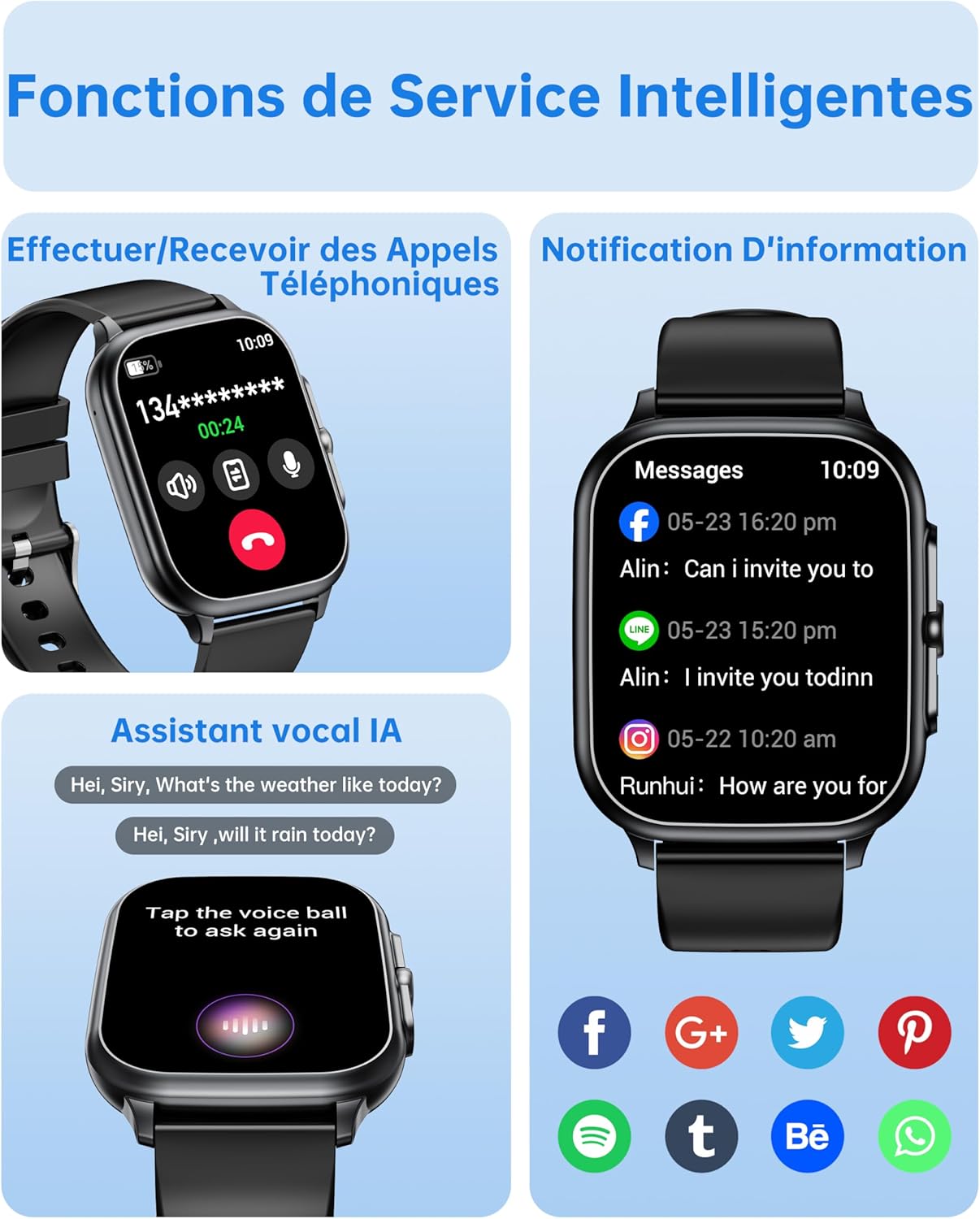
Image: The OUKITEL Smartwatch screen showing an incoming call interface, illustrating its Bluetooth call functionality and readiness for connection.
Bedienungsanleitung
Grundlegende Navigation
The OUKITEL Smartwatch features a 1.91-inch HD touchscreen for intuitive control. Swipe left, right, up, or down to navigate through menus and functions. Press the side button to return to the home screen or access the app list.
Intelligente Funktionen
- Bluetooth-Anrufe: Once paired with your phone, you can make and receive calls directly from your smartwatch. Access the dial pad, call history, or contacts on your watch.
- KI-Sprachassistent: Utilize the integrated AI voice assistant (e.g., Alexa) to perform voice commands such as asking questions, checking the weather, or initiating calls.
- Benachrichtigungen: Receive real-time notifications for calls, SMS, and various social media apps (WhatsApp, Facebook, etc.) directly on your wrist.
- Musiksteuerung: Steuern Sie die Musikwiedergabe auf Ihrem Smartphone (Wiedergabe, Pause, Titel überspringen) direkt von Ihrer Smartwatch aus.
- Weitere Funktionen: Includes weather forecasts, stopwatch, timer, alarm clock, remote camera control, and a "Find My Phone" feature.

Image: A composite image showing the smartwatch interface for making/receiving calls, displaying app notifications, and interacting with the AI voice assistant.
Gesundheitsüberwachung
The smartwatch provides 24/7 health tracking to help you monitor your well-being.
- Herzfrequenz-Überwachung: Erfasst kontinuierlich Ihre Herzfrequenz den ganzen Tag über. View Echtzeitdaten und historische Trends in der App.
- Überwachung des Blutsauerstoffs (SpO2): Misst Ihren Blutsauerstoffsättigungsgrad.
- Schlaf-Tracking: Analysiert Ihre Schlafmuster, einschließlich Tiefschlaf, Leichtschlaf und Wachphasen, um die Schlafqualität zu verbessern.
- Stressüberwachung: Überwacht Ihren Stresspegel.

Image: A composite image showing the smartwatch displaying heart rate, blood oxygen levels, and sleep duration data, alongside a person running outdoors.
Sportmodi und Aktivitätsverfolgung
The smartwatch offers over 100 indoor and outdoor sports modes, including walking, running, cycling, hiking, basketball, and football. It records exercise data such as steps, heart rate, and calories burned.

Image: A person on a bicycle, with the smartwatch displaying various sports modes and an activity analysis screen showing duration, heart rate, calories, and steps.
Anpassung
Personalize your smartwatch with over 100 built-in watch faces. You can also upload your favorite photos to create unique custom dials through the companion app. The watch supports 6 different menu styles.

Image: The OUKITEL Smartwatch showcasing different menu styles and customizable watch faces, including options to use personal photos.
Wartung
Wasserbeständigkeit (IP68)
The OUKITEL Smartwatch is IP68 waterproof, meaning it is resistant to splashes, rain, and sweat. It can withstand daily water exposure like hand washing. However, it is nicht geeignet for hot baths, saunas, diving, or exposure to corrosive liquids like seawater.

Image: The OUKITEL Smartwatch highlighting its IP68 water resistance with icons representing protection against rain, hand washing, and perspiration.
Reinigung und Pflege
- Reinigen Sie Uhr und Armband regelmäßig mit einem weichen, trockenen Tuch.
- Vermeiden Sie die Verwendung aggressiver Chemikalien oder Scheuermittel.
- Vor dem Laden sicherstellen, dass die Ladekontakte sauber und trocken sind.
Fehlerbehebung
| Problem | Mögliche Lösung |
|---|---|
| Die Smartwatch lässt sich nicht einschalten. | Stellen Sie sicher, dass die Uhr vollständig aufgeladen ist. Schließen Sie sie für mindestens 30 Minuten an das Ladegerät an. |
| Kopplung mit Smartphone nicht möglich. |
|
| Fehlerhafte Gesundheitsdaten. |
|
| Screen turns on too frequently (as noted in reviewS). | Check the watch settings for "Raise to Wake" or "Wrist Sense" features. You may be able to adjust sensitivity or disable it if it's causing unwanted screen activation. |
| Benachrichtigungen werden nicht angezeigt. |
|
Technische Daten
| Marke | OUKITEL |
| Modellnummer | B0FXGFXMT5 |
| Betriebssystem | iOS, Android |
| Bildschirmgröße | 1.91 Zoll |
| Konnektivitätstechnologie | Bluetooth |
| Besondere Merkmale | AI Voice Assistant & Notifications, 100+ Sports Modes, 1.91 Inch HD Screen |
| Kompatible Geräte | Smartphone |
| Wasserbeständigkeit | IP68 |
| GPS | Kein GPS |
| Form | Rechteckig |
| Zielgruppe | Frauen, Männer |
Garantie und Support
The OUKITEL Smartwatch comes with a 1 Jahr Herstellergarantie. Diese Garantie deckt Material- und Verarbeitungsfehler bei normalem Gebrauch ab.
Für technischen Support, Hilfe bei der Fehlerbehebung oder Garantieansprüche wenden Sie sich bitte über die offizielle Website an den OUKITEL-Kundendienst. website or the contact information provided with your purchase. Please have your model number (B0FXGFXMT5) and proof of purchase ready when contacting support.


