1. Produktüberschreitungview
The bmani T16 Wireless Earbuds are designed for active lifestyles, offering an ultra-long 80-hour playtime with their dual LED display charging case. They feature immersive stereo sound with 10mm dynamic drivers, clear calls with dual microphones, and seamless Bluetooth connectivity. The adjustable over-ear hooks ensure a secure and comfortable fit for various activities. Easy button controls provide intuitive management of music and calls.
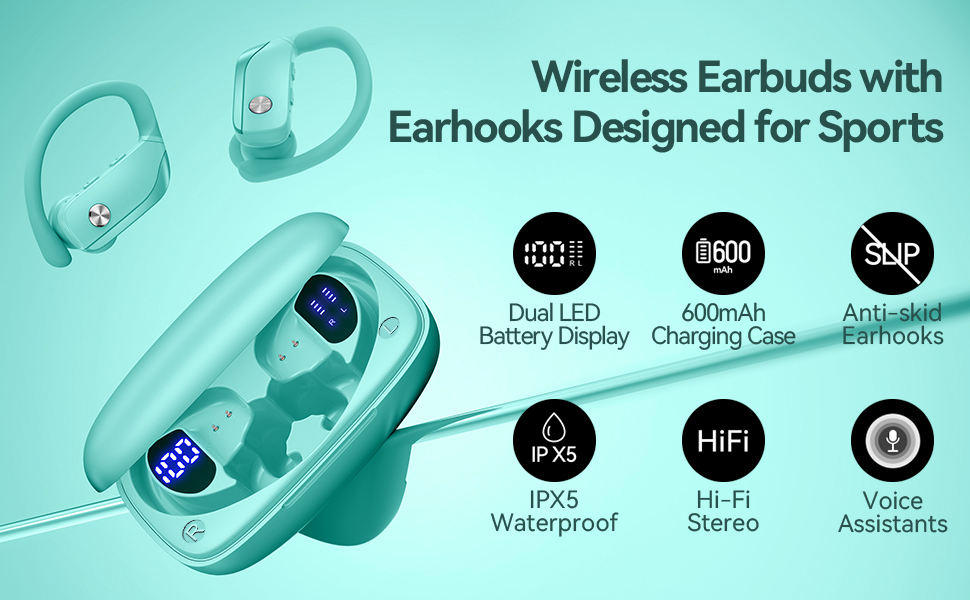
Image: bmani T16 Wireless Earbuds in their charging case, highlighting 80 hours of total playtime and the dual LED battery display.
2. Lieferumfang
- bmani T16 Wireless Earbuds (Left and Right)
- Ladecase mit LED-Anzeige
- Ohrstöpsel (Größen: Klein, Mittel, Groß)
- Typ C Ladekabel
- Benutzerhandbuch (dieses Dokument)

Image: The bmani T16 Wireless Earbuds, charging case, and various eartip sizes.
3. Einrichtung und Kopplung
The bmani T16 earbuds feature one-step pairing for quick and easy connection to your devices.
- Anfängliche Kopplung: Öffnen Sie das Ladecase. Die Ohrhörer schalten sich automatisch ein und wechseln in den Kopplungsmodus.
- Gehen Sie auf Ihrem Smartphone, Tablet oder einem anderen Bluetooth-fähigen Gerät zu den Bluetooth-Einstellungen.
- Suchen nach Verfügbare Geräte und wählen Sie "T16" aus der Liste aus.
- Sobald die Verbindung hergestellt ist, hören Sie eine Sprachaufforderung, die die erfolgreiche Kopplung bestätigt.
- Automatische Wiederverbindung: After the initial pairing, the earbuds will automatically reconnect to the last paired device when removed from the charging case.

Image: Illustration of the one-step pairing process for the bmani T16 earbuds with a smartphone and other compatible devices.
Video: An official seller video demonstrating the features and pairing process of the bmani T16 Wireless Earbuds.
4. Tragehinweise
For optimal sound quality and a secure fit, follow these steps to wear your bmani T16 earbuds:
- Choose the correct eartip size (S, M, L) that best fits your ear canal.
- Place the flexible ear hook over the back of your ear.
- Führen Sie den Ohrhörer vorsichtig in Ihren Gehörgang ein.
- Adjust the earbud and hook by twisting until you achieve a comfortable and secure fit. The ear hooks are designed to adapt to different ear shapes, minimizing slippage during movement.

Image: Visual guide demonstrating how to correctly position the bmani T16 earbuds with their flexible ear hooks for a secure fit.
5. Bedienelemente
The bmani T16 earbuds feature intuitive physical buttons for easy control of your audio and calls.
- Abspielen/Pause: Klicken Sie einmal auf einen der Ohrhörer.
- Nächster Titel: Quick double-click on the Right (R) earbud.
- Vorheriges Lied: Quick double-click on the Left (L) earbud.
- Lautstärke erhöhen: Press the "+" button on the earbud.
- Lautstärke runter: Press the "-" button on the earbud.
- Anruf annehmen/beenden: Klicken Sie einmal auf einen der Ohrhörer.
- Anruf ablehnen: Hold either earbud button.
- Sprachassistent aktivieren (Siri/Google Assistant): Quick triple-click on either earbud.
- Ein-/Ausschalten: Hold the button on either earbud.
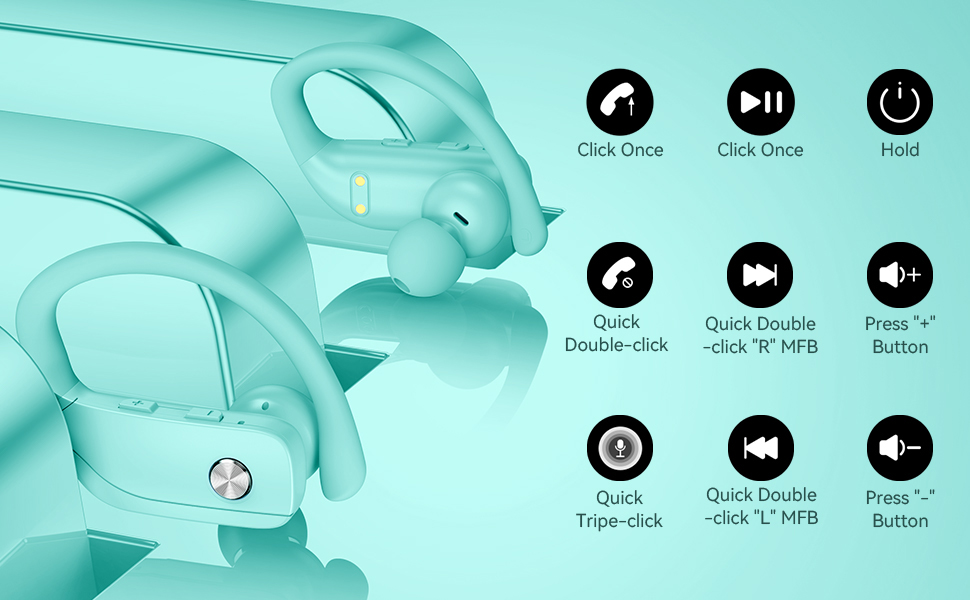
Image: Detailed diagram showing the various button controls on the bmani T16 earbuds for managing audio playback, calls, and voice assistant.
6. Aufladen
The bmani T16 earbuds and charging case provide an impressive 80 hours of total playtime.
- Aufladen der Ohrhörer: Place the earbuds back into the charging case. The LED indicators on the case will show the charging status of each earbud. Each earbud offers up to 8 hours of playtime per charge.
- Aufladung des Ladecase: Connect the provided Type-C charging cable to the charging port on the case and to a USB power source. The digital display on the left side of the case will show the remaining power percentage des Ladekoffers.
- The charging case can recharge the earbuds multiple times, extending total usage to 80 hours.
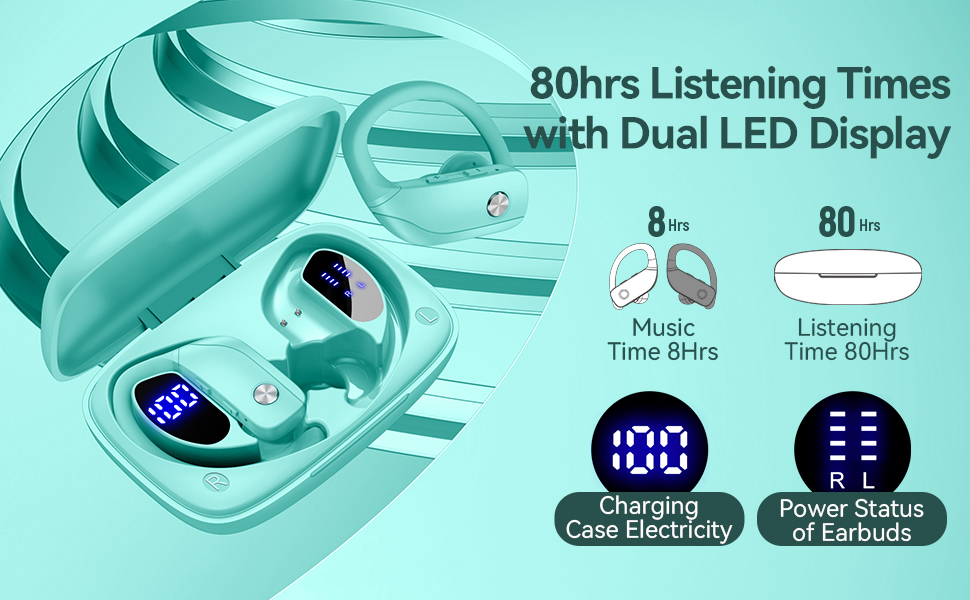
Image: The bmani T16 charging case with its dual LED digital display, indicating the battery percentage des Ladecase und des Ladestatus jedes Ohrhörers.
Video: Ein offizielles Verkäufervideo zeigtasing the 48-hour playback (note: product features state 80H) and LED display of the bmani T16 Sport Earphones.
7. Wartung
- Reinigen Sie die Ohrhörer und die Ladekontakte regelmäßig mit einem weichen, trockenen Tuch, um die Ansammlung von Staub und Schmutz zu verhindern.
- Vermeiden Sie es, die Ohrhörer über längere Zeit extremen Temperaturen oder direkter Sonneneinstrahlung auszusetzen.
- Bewahren Sie die Ohrhörer bei Nichtgebrauch im Ladecase auf, um sie zu schützen und sicherzustellen, dass sie geladen bleiben.
- The earbuds are sweat-resistant and dust-resistant, but avoid submerging them in water.
8. Fehlerbehebung
- Ohrhörer lassen sich nicht koppeln: Ensure both earbuds are removed from the case and are powered on. Turn off Bluetooth on your device and turn it back on. If issues persist, try resetting the earbuds (refer to the full user manual for specific reset instructions).
- Kein Ton: Überprüfen Sie die Lautstärke sowohl an Ihrem Gerät als auch an den Ohrhörern. Stellen Sie sicher, dass die Ohrhörer ordnungsgemäß per Bluetooth mit Ihrem Gerät verbunden sind.
- Probleme beim Aufladen: Vergewissern Sie sich, dass das Ladekabel fest mit dem Ladecase und der Stromquelle verbunden ist. Stellen Sie sicher, dass die Ladekontakte an den Ohrhörern und im Ladecase sauber und frei von Verunreinigungen sind.
- Instabile Verbindung: Ensure your device is within the Bluetooth range (approximately 33 feet/10 meters) and there are no significant obstacles between the earbuds and your device.
9. Spezifikationen
| Modellname | T16 |
| Konnektivitätstechnologie | Kabellos (Bluetooth 5.0) |
| Spielzeit (Ohrstöpsel) | Bis zu 8 Stunden pro Ladung |
| Gesamtspielzeit (mit Hülle) | Bis zu 80 Stunden |
| Audiotreibertyp | 10 mm dynamischer Treiber |
| Geräuschunterdrückungsmerkmale | Noise Cancellation (Dual Mics) |
| Wasserbeständigkeit | Sweat-resistant and Dust-resistant |
| Kontrollmethode | Tastensteuerung |
| Platzierung des Ohrs | Über dem Ohr |
| Artikelgewicht | 2 Unzen |
10. Garantie und Support
bmani offers a lifetime warranty for permanent replacement of damaged, defective, upgraded, or lost products. Please refer to the warranty card included in your package for activation details and terms. For further assistance, please contact bmani customer support.


