1. Einleitung
The SMSL AS400 is a versatile audio device combining a Digital-to-Analog Converter (DAC), a headphone amplifier (HPA), and a power ampReiniger (AMP) into a single unit. Designed for high-fidelity audio reproduction, it supports various input sources and offers powerful output for both speakers and headphones. This manual provides detailed instructions for the proper setup, operation, and maintenance of your AS400 unit.

Figure 1.1: The SMSL AS400 functions as a DAC, Headphone Amplifier, and Power Ampschwerer.
2. Sicherheitshinweise
- Stromversorgung: Verwenden Sie ausschließlich das mitgelieferte Netzteil. Stellen Sie sicher, dass die LautstärketagEs entspricht den Spezifikationen Ihrer örtlichen Stromversorgung.
- Belüftung: Blockieren Sie nicht die Lüftungsöffnungen. Sorgen Sie für ausreichende Luftzirkulation um das Gerät herum, um eine Überhitzung zu vermeiden.
- Feuchtigkeit: Halten Sie das Gerät von Wasser, Feuchtigkeit und Umgebungen mit hoher Luftfeuchtigkeit fern.
- Reinigung: Vor der Reinigung die Stromzufuhr unterbrechen. Ein trockenes, weiches Tuch verwenden. Keine flüssigen oder Aerosolreiniger verwenden.
- Wartung: Versuchen Sie nicht, dieses Produkt selbst zu warten. Überlassen Sie alle Wartungsarbeiten qualifiziertem Servicepersonal.
- Platzierung: Stellen Sie das Gerät auf eine stabile, ebene Fläche. Vermeiden Sie es, es in der Nähe von Wärmequellen oder in direktem Sonnenlicht aufzustellen.
3. Packungsinhalt
Bitte überprüfen Sie, ob alle Artikel im Paket vorhanden sind:
- SMSL AS400-Einheit
- Remote Control (RC-8A)
- Stromkabel
- USB-Kabel
- Bluetooth-Antenne
- Benutzerhandbuch (dieses Dokument)
4. Produktüberschreitungview
4.1 Frontplatte

Figure 4.1: Front Panel of the SMSL AS400 and included remote control.

Figure 4.2: Front Panel Component Identification.
- Bildschirm: Zeigt den aktuellen Eingang s an.ample rate, volume, and menu options.
- Remote-Fenster: Infrarot-Empfänger für die Fernbedienung.
- Funktionsknopf:
- Press: Enter menu / OK
- Hold: Exit menu
- Rotate: Change value / Volume control
- 4.4mm Kopfhörerbuchse: Symmetrischer Kopfhörerausgang.
- 6.35 mm Kopfhörerausgang: Unbalanced headphone output.
4.2 Rückseite

Figure 4.3: Rear Panel Component Identification.
- Erdungsklemme: Zum Anschließen eines Massekabels für einen Plattenspieler.
- PHONO-Eingang: RCA inputs for turntables with MM cartridges.
- LINE Input (AUX): RCA analog input for external audio sources.
- Koaxialer Eingang: Digitaler Audioeingang.
- SW Out (Preamp): Subwoofer pre-out.
- USB Input (PRE): USB-B input for connecting to a computer or other digital source.
- Optischer Eingang: Digitaler Audioeingang.
- HDMI (ARC) Eingang: Audio Return Channel for connecting to a TV.
- Bluetooth-Antenne: Für drahtlose Bluetooth-Verbindungen.
- Left/Right Channel Output: Lautsprecheranschlüsse für passive Lautsprecher.
- Wechselstromeingang: Schließen Sie hier das Netzkabel an.
4.3 Remote Control (RC-8A)
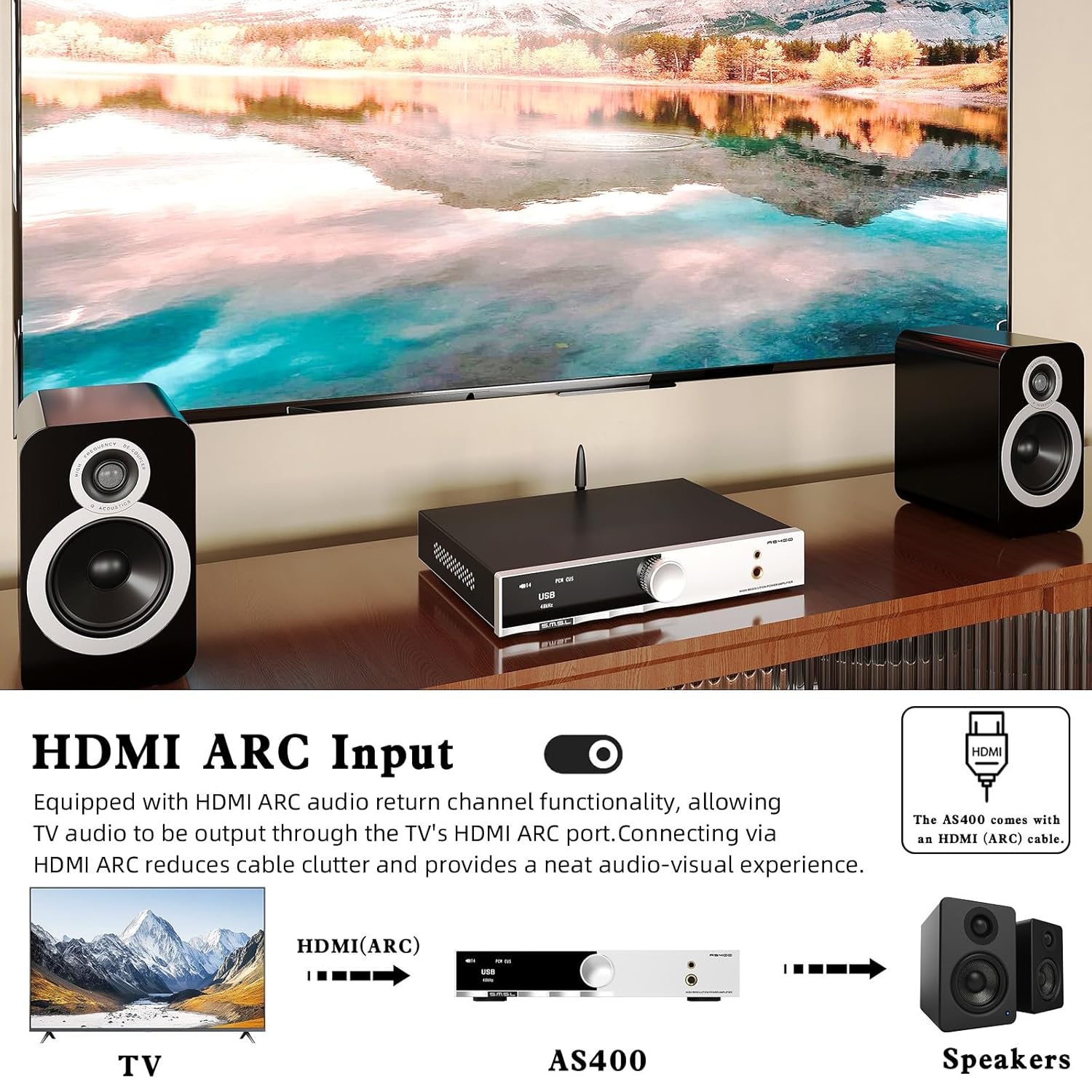
Abbildung 4.4: Funktionen der Fernbedienung.
- Ein-/Ausschalten: Schaltet das Gerät ein oder aus.
- Oben unten: Navigieren Sie durch die Menüoptionen oder passen Sie die Einstellungen an.
- MENU/OK: Ruft das Hauptmenü auf oder bestätigt eine Auswahl.
- FN (Funktion): Enters the secondary interface for additional settings.
- Eingangsauswahl: Durchläuft die verfügbaren Eingangsquellen.
- Stumm: Schaltet die Audioausgabe stumm oder hebt die Stummschaltung auf.
- Ausgangsumschaltung: Switches between speaker and headphone outputs.
- Lautstärke +/-: Passt die Ausgabelautstärke an.
5. Einrichtung
5.1 Anschließen von Lautsprechern
- Ensure the AS400 is powered off.
- Connect your passive speakers to the Left and Right Channel Output terminals on the rear panel. Ensure correct polarity (+ to + and - to -).
- If using a powered subwoofer, connect it to the SW Out (Preamp) port using an RCA cable.
5.2 Anschließen von Audioquellen
The AS400 supports multiple input types:
- USB: Connect a computer or other USB audio source to the USB Input (PRE) port using the provided USB cable.
- Optisch/Koaxial: Connect digital audio sources (e.g., CD player, game console) to the Optical or Coaxial Input ports.
- RCA (LINE): Connect analog audio sources (e.g., media player) to the LINE Input (AUX) ports.
- TELEFON: Connect a turntable with an MM cartridge to the PHONO Input ports. Ensure the turntable's ground wire is connected to the Grounding Terminal on the AS400.
- HDMI (ARC): Connect your TV's HDMI ARC port to the AS400's HDMI (ARC) Input for TV audio output.
- Bluetooth: Screw the Bluetooth antenna onto its designated port for wireless connectivity.

Figure 5.1: HDMI ARC and Bluetooth Connectivity.
5.3 Stromanschluss
- Connect the power cable to the AC Power Input on the rear panel of the AS400.
- Stecken Sie das andere Ende des Stromkabels in eine geeignete Wandsteckdose.
6. Bedienungsanleitung
6.1 Ein-/Ausschalten
Press the Power ON/OFF button on the remote control or the function knob to turn the unit on or off.
6.2 Eingangsauswahl
Use the 'Input Select' button on the remote or rotate the function knob to cycle through available inputs (USB, Optical, Coaxial, RCA, PHONO, HDMI ARC, Bluetooth).
6.3 Lautstärkeregelung
Adjust the volume using the 'Volume +/-' buttons on the remote or by rotating the function knob.
6.4 Menünavigation und Einstellungen
Press the function knob or the 'MENU/OK' button on the remote to enter the main menu. Use the 'Up/Down' buttons or rotate the knob to navigate. Press 'MENU/OK' to select an option. Hold the function knob or press the 'FN' button to exit the menu.
Key menu options include:
- Eingang: Selects the active audio input.
- Ausgabe: Switches between speaker and headphone outputs.
- EQ: Select from 8 preset EQ modes (Direct, Bass, Rock, etc.) to tailor sound.
- Bass Hochtöne: Adjust bass and treble levels for personalized sound.
- Filter: Select from 5 PCM digital filters.
- Farbe: Change the display screen color.
- BT Clear: Clears paired Bluetooth devices.

Figure 6.1: Setup Menu and Sound Customization Options.
6.5 Bluetooth-Kopplung
- Stellen Sie sicher, dass die Bluetooth-Antenne angeschlossen ist.
- Select 'Bluetooth' as the input source on the AS400.
- On your mobile device, search for Bluetooth devices and select 'SMSL AS400'.
- Once paired, audio from your device will stream to the AS400.
- To clear paired devices, navigate to 'BT Clear' in the menu.
6.6 MQA/MQA-CD Playback
The AS400 supports MQA and MQA-CD decoding. When playing MQA content via USB, Optical, or Coaxial inputs, the display will indicate MQA status, ensuring studio-quality audio reproduction.
7. Wartung
- Reinigung: Use a soft, dry cloth to wipe the exterior of the unit. Avoid abrasive cleaners or solvents.
- Staub: Regularly dust the unit, especially around ventilation areas, to prevent dust buildup.
- Verbindungen: Überprüfen Sie regelmäßig alle Kabelverbindungen, um sicherzustellen, dass sie fest sitzen.
- Lagerung: Wenn Sie das Gerät über einen längeren Zeitraum lagern, trennen Sie es vom Stromnetz und bewahren Sie es an einem kühlen, trockenen Ort auf.
8. Fehlerbehebung
If you encounter issues with your AS400, please refer to the following common problems and solutions:
| Problem | Mögliche Ursache | Lösung |
|---|---|---|
| Kein Strom | Stromkabel nicht angeschlossen; Steckdose defekt. | Überprüfen Sie den Netzanschluss; versuchen Sie es mit einer anderen Steckdose. |
| Keine Tonausgabe | Incorrect input selected; volume too low; speakers/headphones not connected; output mode incorrect. | Verify input source; increase volume; check speaker/headphone connections; ensure correct output mode (speaker/headphone) is selected in the menu. |
| Bluetooth-Verbindung instabil | Antenna not connected; interference; device too far. | Ensure Bluetooth antenna is securely attached; move device closer to AS400; clear paired devices via 'BT Clear' in menu and re-pair. |
| Subwoofer output is weak or not triggering. | Subwoofer sensitivity setting; AS400 subwoofer output level. | Adjust the gain/volume setting on your powered subwoofer. Ensure the subwoofer is powered on. Note that the AS400's subwoofer output is a pre-out and its level is tied to the main volume. |
| Verzerrter Ton | Input signal too high; faulty cable; speaker impedance mismatch. | Reduce input source volume; check/replace cables; ensure speaker impedance is within AS400's supported range. |
Sollte das Problem nach Anwendung dieser Lösungsansätze weiterhin bestehen, wenden Sie sich bitte an den Kundendienst.
9. Spezifikationen

Abbildung 9.1: Detaillierte Produktspezifikationen.
| Besonderheit | Spezifikation |
|---|---|
| Eingänge | RCA / BT / USB / Optical / Coaxial / Phono / I²S / HDMI (ARC) |
| Klirrfaktor | 0.003 % |
| Ausgangsleistung (RMS) | 165W x2 (4Ω), 85W x2 (8Ω) |
| Eingangsempfindlichkeit/Impedanz | 280mV/22kΩ |
| Abmessungen (BxHxT) | 210.4 x 46 x 254 mm |
| Gewicht | 1.57 kg |
| USB-Kompatibilität | Windows 7/8/8.1/10/11, Mac OSX, Linux |
| Bittiefe | USB: 1bit, 16-32bit; Optical/Coaxial: 1bit, 16-32bit |
| SNR | 107 dB |
| Kanaltrennung | 98 dB |
| USB-Übertragung | Asynchrone Übertragung |
| Energieaufnahme | 40 W (Normale Lautstärke) |
| MQA-Decoder | USB / Optisch / Koaxial |
| MQA-CD-Decoder | Optisch / Koaxial |
| SampDatenrate (USB) | PCM: 44.1-768kHz; DSD: 2.8224-11.2896MHz |
| SampDatenrate (optisch/koaxial) | PCM: 44.1-192kHz; DSD: DSD64 (DoP) |
10. Garantie und Support
The SMSL AS400 comes with a standard manufacturer's warranty. Please refer to the warranty card included in your package for specific terms and conditions, including warranty period and coverage.
For technical support, troubleshooting assistance beyond this manual, or warranty claims, please contact your authorized SMSL dealer or visit the official SMSL webWebsite für Kontaktinformationen.
Bitte bewahren Sie Ihren Kaufbeleg für Garantiezwecke auf.


