1. Einleitung
This manual provides detailed instructions for the setup, operation, and maintenance of your FIREBAT Mini PC A8. The FIREBAT A8 is a compact, high-performance mini computer equipped with an AMD Ryzen 8745HS processor, AMD Radeon 780M graphics, and an OCuLink port for external GPU expansion. It supports quad-screen display and offers versatile connectivity options. Please read this manual thoroughly to ensure proper use and to maximize the performance of your device.

Abbildung 1.1: Vorder- und Rückseite view of the FIREBAT Mini PC A8, showcasing dank seines kompakten Designs und der verschiedenen Anschlüsse.

Bild 1.2: Überview of the FIREBAT A8 Mini PC, highlighting its core features and design.
2. Packungsinhalt
Bitte prüfen Sie, ob alle unten aufgeführten Artikel in Ihrem Paket enthalten sind. Sollten Artikel fehlen oder beschädigt sein, kontaktieren Sie bitte unseren Kundenservice.
- 1 x FIREBAT A8 AMD Ryzen 7 8745HS Mini PC
- 1 x US Power Supply (19V 6.32A 120W)
- 1 x VESA-Halterung
- 1 x HDMI-Kabel
- 1 x Benutzerhandbuch (dieses Dokument)

Image 2.1: Visual representation of the items included in the FIREBAT A8 package.
3. Produktüberschreitungview
3.1 Hauptmerkmale
- Prozessor: AMD Ryzen 7 8745HS (8 Kerne/16 Threads, bis zu 4.9 GHz)
- Grafik: Integrierte AMD Radeon 780M
- Erinnerung: 32 GB DDR5 5600 MHz RAM (erweiterbar auf bis zu 64 GB)
- Lagerung: 1 TB PCIe 4.0 M.2 2280 SSD
- Konnektivität: WiFi 6 (802.11ax), Bluetooth 5.2, Dual 2.5Gbps RJ45 LAN
- Ausgabe anzeigen: Quad-screen support via 2x USB-C 4.0, 1x DP 1.4, 1x HDMI 2.1
- Erweiterung: OCuLink port for external graphics card support
- Leistungsmodi: One-click switch for Quiet (45W), Balanced (54W), and Performance (65W) modes
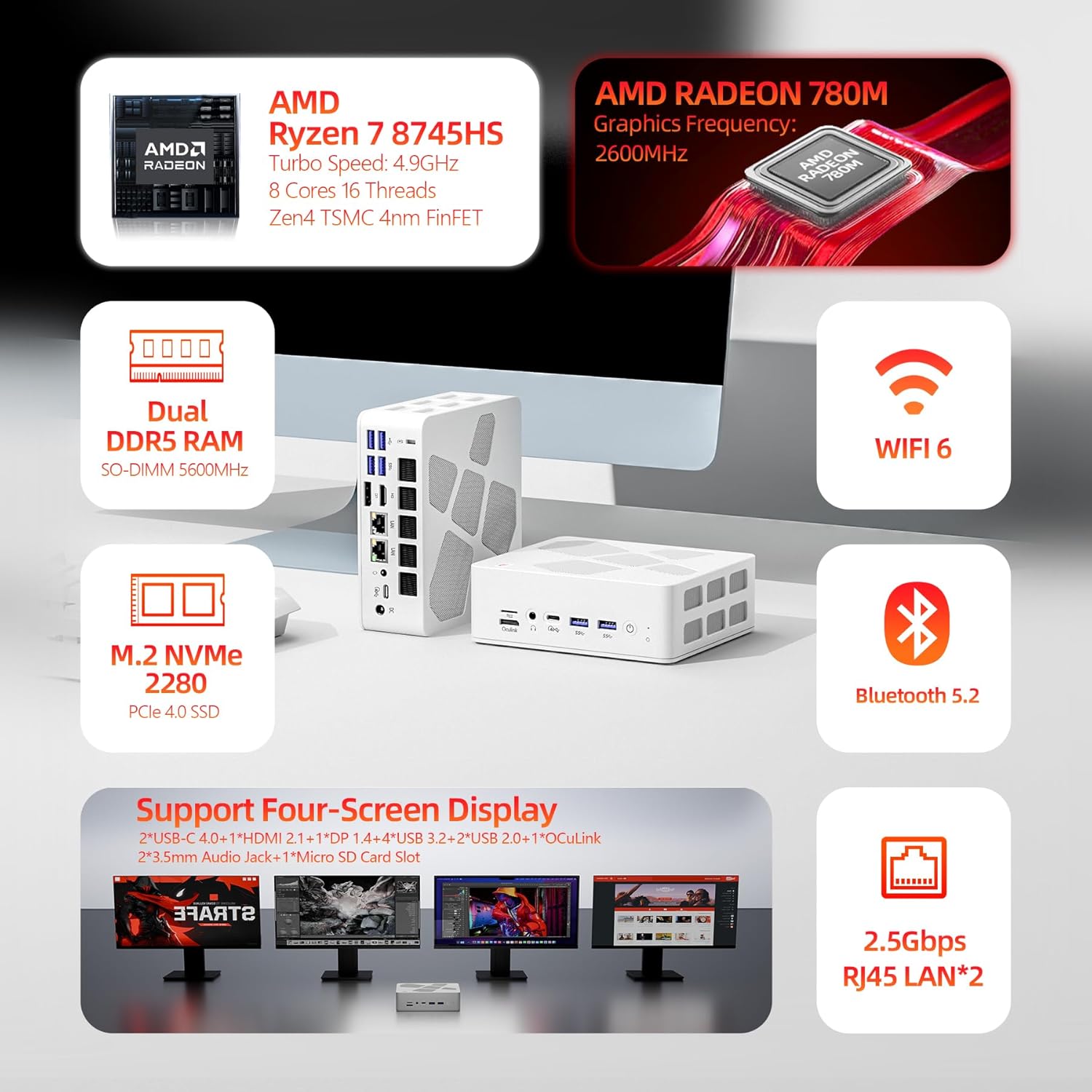
Image 3.1: Diagram highlighting the main components and features of the FIREBAT A8 Mini PC.
3.2 Anschlüsse und Schnittstellen
The FIREBAT A8 Mini PC offers a comprehensive set of ports for various peripherals and displays.
- 1x OCuLink port (for external graphics card)
- 1x TF-Kartensteckplatz
- 2x USB-C 4.0 (supports Power Delivery, DisplayPort, up to 40Gbps data transfer)
- 4x USB 3.2 Gen2 (up to 10Gbps data transfer)
- 2x USB 2.0 (up to 5Gbps data transfer)
- 1x Kensington Anti-theft Lock Hole
- 1x DisplayPort 1.4
- 1 x HDMI 2.1
- 2x 3.5mm Audio Jacks (Headphone & Microphone)
- 2x 2.5 Gbit/s RJ45 LAN-Anschlüsse
- 1x Gleichstromeingang
- 1x Einschaltknopf
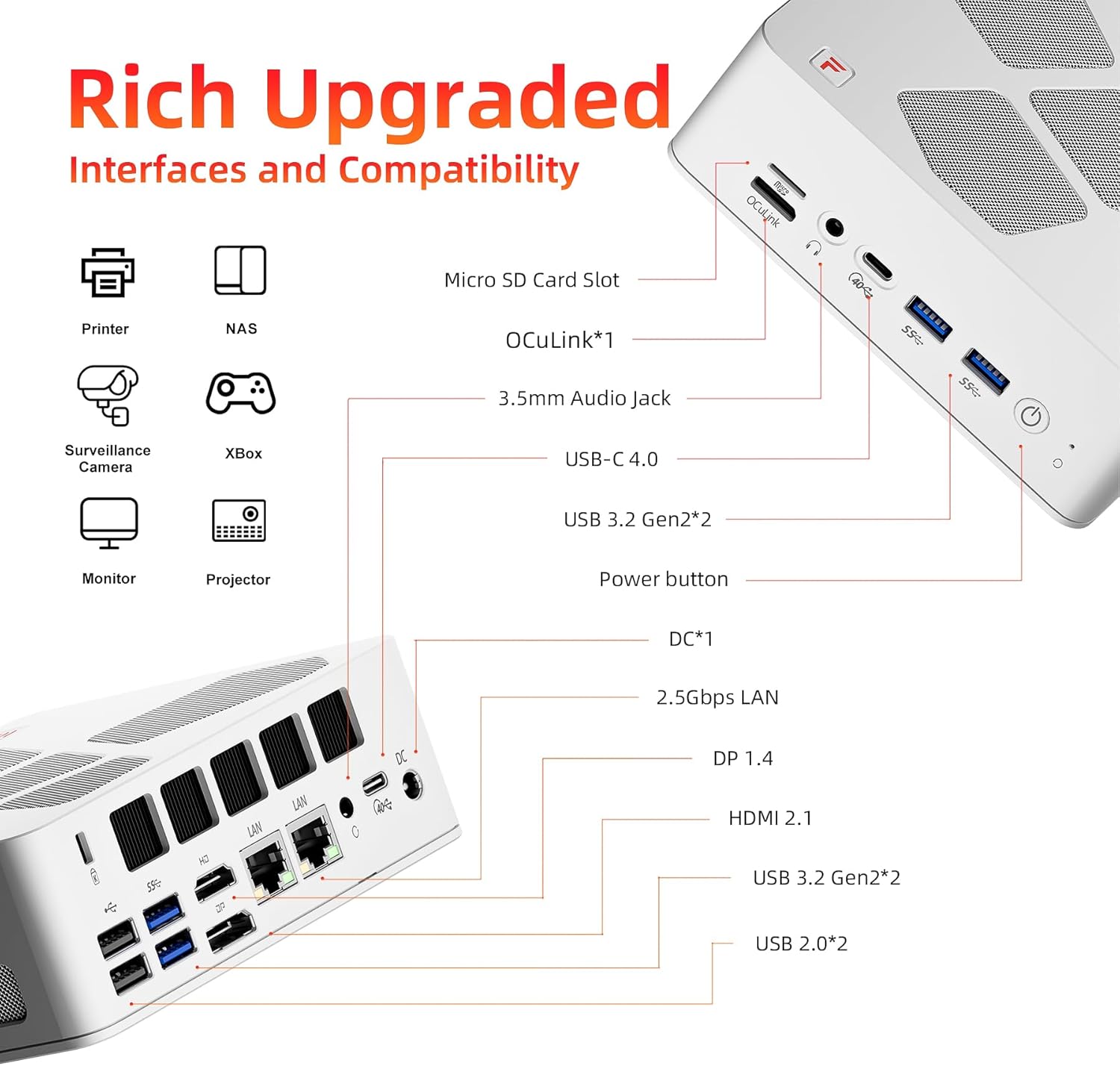
Image 3.2: Detailed diagram illustrating the location and type of all ports and interfaces on the FIREBAT A8 Mini PC.
4. Einrichtungsanweisungen
4.1 Erstverbindung
- Display anschließen: Connect your monitor(s) to the Mini PC using the HDMI, DisplayPort, or USB-C 4.0 ports. The device supports up to four displays simultaneously.
- Peripheriegeräte anschließen: Schließen Sie Ihre Tastatur, Maus und andere USB-Geräte an die verfügbaren USB-Anschlüsse an.
- Netzwerk verbinden: For a wired connection, connect an Ethernet cable to one of the 2.5Gbps RJ45 LAN ports. For wireless, ensure your WiFi network is available.
- Strom anschließen: Schließen Sie das mitgelieferte Netzteil an den DC-Stromeingang des Mini-PCs an und stecken Sie das Netzteil anschließend in eine Steckdose.
- Einschalten: Press the power button located on the front of the Mini PC to turn on the device.
4.2 VESA-Halterungsinstallation
The included VESA mount allows you to attach the Mini PC to the back of a compatible monitor or to a wall mount, saving desk space.
- Secure the VESA mount bracket to the back of your monitor or desired surface using appropriate screws.
- Schieben Sie den Mini-PC auf die montierte Halterung, bis er sicher einrastet.
5. Bedienungsanleitung
5.1 Leistungsmodi
The FIREBAT A8 features a one-click performance mode switch, allowing you to adjust power consumption and performance based on your needs. The LED indicator on the device will change color to reflect the current mode.
- Green (Quiet Mode - 45W): Ideal for office tasks, web browsing, and light applications where low noise and power efficiency are prioritized.
- Blue (Balanced Mode - 54W): Suitable for medium workloads, general computing, and moderate applications.
- Red (Performance Mode - 65W): Provides maximum performance for demanding tasks such as gaming, video editing, and other high-load applications.

Image 5.1: The performance mode switch button and its corresponding LED indicators.

Image 5.2: Visual representation of the 65W Performance Mode in action.
5.2 Multi-Screen-Display
The FIREBAT A8 supports simultaneous output to up to four screens, enhancing productivity and immersive experiences.
- HDMI 2.1 port supports up to 8K@60Hz resolution.
- USB-C 4.0 ports support up to 4K@144Hz resolution.
- DisplayPort 1.4 also supports high-resolution output.
Connect your displays to the available video output ports and configure your display settings within the operating system.
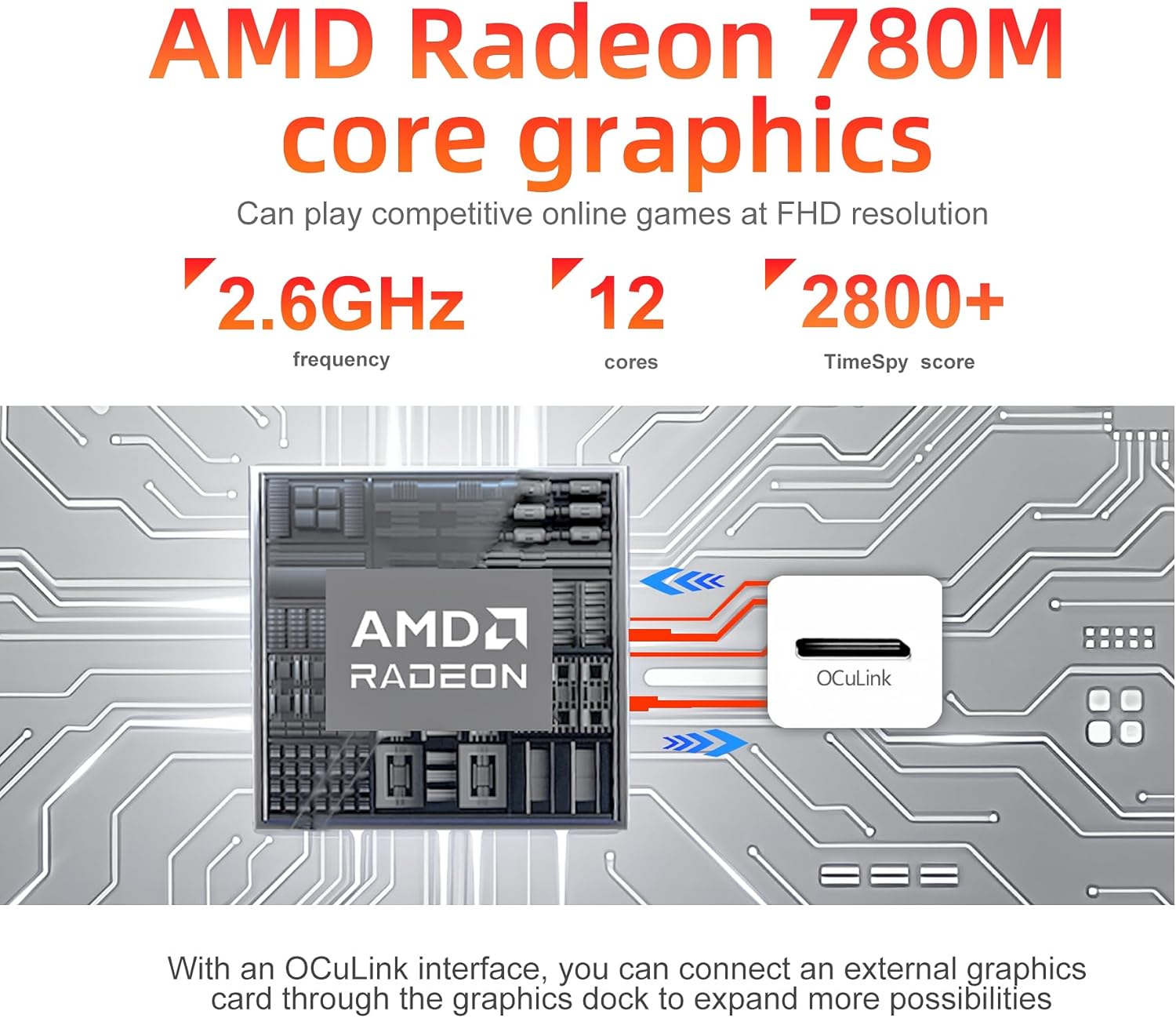
Abbildung 5.3: Beispielample setup demonstrating the quad-screen display capability of the Mini PC.
6. Speicher- und Speichererweiterung
The FIREBAT A8 allows for easy upgrades of both RAM and SSD storage to meet future demands.
- Erinnerung: The device comes with 32GB DDR5 5600MHz RAM (2x16GB SO-DIMM). It supports dual-channel memory and can be expanded up to 64GB.
- Lagerung: It includes a 1TB PCIe 4.0 M.2 2280 SSD. There is an additional slot for another M.2 2280 SSD, allowing for further storage expansion.
To access the internal components for upgrade, carefully remove the bottom cover of the Mini PC. Consult a professional if you are unsure about the upgrade process.

Abbildung 6.1: Intern view of the FIREBAT A8, highlighting the DDR5 SO-DIMM memory slots and the M.2 2280 SSD slot.

Image 6.2: Close-up of the internal layout, showing the M.2 SSD and DDR5 RAM modules for potential upgrades.
7. Cooling and Noise Management
The FIREBAT A8 is designed with an efficient dual-fan cooling system, incorporating thermal grease and three heat pipes to maintain optimal operating temperatures and minimize noise.
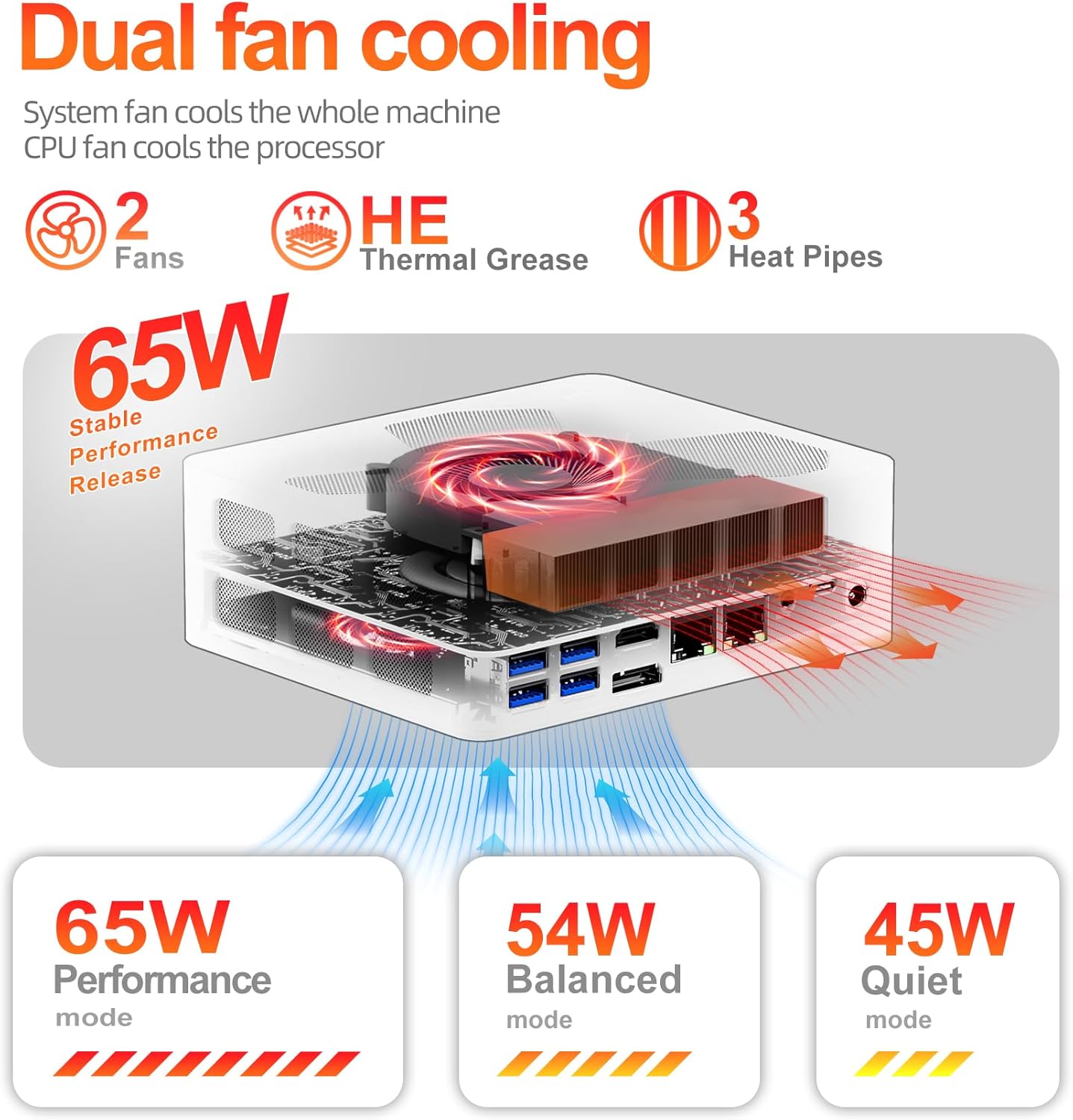
Image 7.1: Diagram illustrating the dual-fan cooling system and heat dissipation within the Mini PC.

Image 7.2: Information on the low noise levels of the FIREBAT A8 during operation.
8. Technische Daten
| Besonderheit | Spezifikation |
|---|---|
| Prozessor | AMD Ryzen 7 8745HS (3.8 GHz base, up to 4.9 GHz turbo, 8 Cores/16 Threads, 16MB L3 Cache) |
| Grafik | AMD Radeon 780M (integriert) |
| RAM | 32GB DDR5 5600MHz (SODIMM, expandable to 64GB) |
| Lagerung | 1TB PCIe 4.0 M.2 2280 SSD (with additional M.2 slot) |
| Betriebssystem | Default (typically Windows 11 Pro) |
| Kabellose Konnektivität | WiFi 6 (802.11ax), Bluetooth 5.2 |
| LAN | 2x 2.5Gbps RJ45 Ethernet |
| Videoausgang | 2x USB-C 4.0 (4K@144Hz), 1x DisplayPort 1.4, 1x HDMI 2.1 (8K@60Hz) |
| USB-Anschlüsse | 2x USB-C 4.0, 4x USB 3.2 Gen2, 2x USB 2.0 |
| Andere Häfen | 1x OCuLink, 1x TF Card Slot, 2x 3.5mm Audio Jack (HP&MIC), 1x Kensington Lock |
| Abmessungen (LxBxH) | 5.7 x 5 x 2 Zoll (14.6 x 12.6 x 5 cm) |
| Gewicht | 1.5 Pfund (0.68 kg) |
| Stromversorgung | 19V 6.32A (120W) |

Image 8.1: The compact dimensions of the FIREBAT A8 Mini PC.
9. Fehlerbehebung
9.1 Kein Strom
- Stellen Sie sicher, dass das Netzteil sowohl mit dem Mini-PC als auch mit einer funktionierenden Steckdose fest verbunden ist.
- Überprüfen Sie die Funktionsfähigkeit der Steckdose, indem Sie ein anderes Gerät anschließen.
- Check if the power adapter's LED indicator (if any) is lit.
9.2 Keine Displayausgabe
- Confirm that the display cable (HDMI, DP, USB-C) is firmly connected to both the Mini PC and the monitor.
- Stellen Sie sicher, dass der Monitor eingeschaltet und auf die richtige Eingangsquelle eingestellt ist.
- Try a different display cable or port on the Mini PC.
- Wenn Sie mehrere Bildschirme verwenden, versuchen Sie, jeweils nur einen Bildschirm anzuschließen, um das Problem einzugrenzen.
9.3 Probleme mit der Netzwerkverbindung
- Verdrahtet: Überprüfen Sie die Ethernet-Kabelverbindung sowohl zum Mini-PC als auch zu Ihrem Router/Modem. Überprüfen Sie den Status des Routers/Modems.
- Kabellos: Ensure WiFi is enabled in the operating system. Check if the correct WiFi network is selected and the password is entered correctly. Restart your router/modem.
9.4 Systemleistungsprobleme
- Ensure the Mini PC is set to an appropriate performance mode (Balanced or Performance) for demanding tasks.
- Prüfen Sie, ob im Hintergrund laufende Anwendungen übermäßig viele Ressourcen verbrauchen.
- Sorgen Sie für ausreichende Belüftung rund um den Mini-PC, um eine Überhitzung zu vermeiden.
- Aktualisieren Sie Treiber und Betriebssystem.
10. Garantie und Support
FIREBAT is committed to providing quality products and customer satisfaction. For warranty information, technical support, or any inquiries regarding your FIREBAT Mini PC A8, please contact us through the following channels:
- E-Mail-Support: support@firebatpc.com
- Offiziell WebWebsite: www.firebatpc.com
Bitte halten Sie Ihr Produktmodell (A8) und die Kaufdetails bereit, wenn Sie sich an den Support wenden.


