1. Einleitung
Vielen Dank für Ihren Einkauf.asing the YABER U11 Smart Projector. This manual provides essential information for setting up, operating, and maintaining your device. Please read it thoroughly before use to ensure optimal performance and safety.
2. Lieferumfang
- YABER U11 Smart Projector
- HDMI-Kabel
- Fernbedienung
- Bedienungsanleitung
- Netzkabel
- Projektorobjektivabdeckung
3. Produktmerkmale
- 4K Support with Auto Setup Pro: Enjoy instant clarity with automatic focus and keystone correction. Project flawlessly from various angles (40"-150" screen).
- Smart Hub with Built-in Apps: Stream content from Prime Video, YouTube, MAX, and other apps via the integrated smart projector OS.
- Theater Sound & Bluetooth 5.0: Features 15W stereo speakers for rich audio. Expand sound via Bluetooth 5.0 or wired HDMI/audio-out. Wi-Fi 6 ensures stable 4K streaming.
- Dustproof Cinema Engine: Exclusive sealed optical system protects against dust, extending lifespan and maintaining visual quality.
- Pro Connectivity: Connect gaming consoles, Fire Stick, and Bluetooth speakers via 2x HDMI, 2x USB, and Ethernet ports. Versatile 1.33:1 throw ratio.
4. Installationsanleitung
4.1 Physische Einrichtung
1. Place the projector on a stable, flat surface or mount it securely. Ensure proper ventilation around the device.
2. Connect the power cord to the projector and then to a power outlet.
3. Remove the lens cover before powering on the projector.

Image: YABER U11 Smart Projector with its lens cover removed, ready for use.
4.2 Erstkonfiguration
1. Power on the projector using the power button on the device or the remote control.
2. The projector will automatically perform autofocus and keystone correction for a clear, rectangular image. Manual adjustments can be made via the settings menu if needed.

Image: The YABER U11 Projector showcasing its auto-adjust features, including auto focus, keystone correction, and digital zoom, ensuring a perfectly aligned and clear image.
4.3 Geräte anschließen
The YABER U11 offers multiple connectivity options:
- HDMI: Connect gaming consoles, laptops, or streaming devices using an HDMI cable.
- USB: Schließen Sie USB-Laufwerke an, um Medien abzuspielen. files direkt.
- Bluetooth 5.0: Für ein besseres Klangerlebnis können Sie externe Bluetooth-Lautsprecher oder -Kopfhörer anschließen.
- WLAN 6: Connect to your home network for high-speed streaming and access to built-in apps.
- Ethernet: Für eine stabile kabelgebundene Internetverbindung.

Bild: Rückseite view of the YABER U11 Smart Projector, highlighting its array of input ports for versatile connectivity.
5. Bedienungsanleitung
5.1-Fernbedienung
The included remote control allows full navigation of the projector's interface. It features dedicated buttons for popular streaming apps like Netflix, YouTube, and Prime Video, as well as controls for volume, focus, and keystone correction.
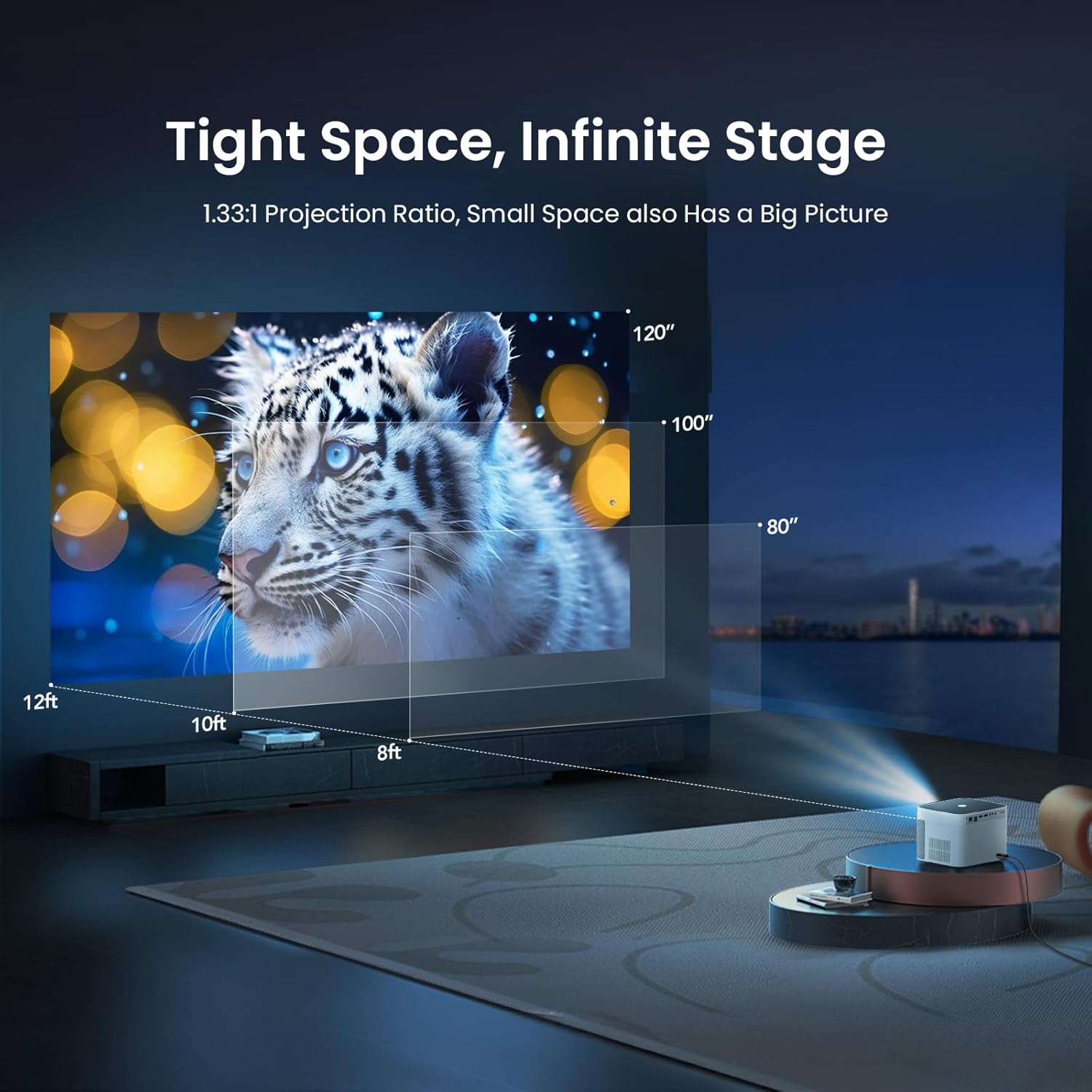
Image: The remote control for the YABER U11 Smart Projector, featuring dedicated buttons for quick access to streaming services and essential functions.
5.2 Navigation und Apps
The YABER U11 runs on a smart OS with a user-friendly interface. Navigate through the home screen to access installed applications, media inputs, and settings. You can download additional apps from the integrated app store.

Image: The YABER U11 Smart Projector's home screen, showcasing its built-in apps and smart interface for easy content access.
5.3 Projektionseinstellungen
Access the 'Projection Settings' menu to fine-tune your display. Options include:
- Autofokus/Trapezkorrektur: Enable or disable automatic adjustments.
- Manueller Schlussstein: Adjust the corners of the image manually for perfect alignment.
- Digitalzoom: Adjust the size of the projected image without moving the projector.
5.4 Bildschirmspiegelung
The YABER U11 supports screen mirroring from compatible devices. Refer to the on-screen instructions within the projector's interface for detailed steps on connecting your smartphone or tablet.
6. Wartung
The YABER U11 features a Dustproof Cinema Engine with a sealed optical system to prevent dust accumulation and extend its lifespan. To maintain optimal performance:
- Reinigen Sie die Außenseite des Projektors regelmäßig mit einem weichen, trockenen Tuch.
- Use the provided cleaning tools to gently clean the lens if necessary. Avoid abrasive materials.
- Ensure the projector's vents are clear of obstructions to prevent overheating.

Image: A diagram highlighting the sealed dust-proof optical engine of the YABER U11 Smart Projector, designed for lifelong clarity.
7. Fehlerbehebung
- Kein Strom: Vergewissern Sie sich, dass das Netzkabel fest angeschlossen und die Steckdose funktionsfähig ist.
- Kein Bild: Check the input source selection. Verify that connected devices are powered on and sending a signal.
- Verschwommenes Bild: Allow the auto-focus to complete. If needed, manually adjust focus and keystone in the settings.
- Kein Ton: Check the volume level on the projector and any connected audio devices. Ensure the correct audio output is selected.
- Fernbedienung funktioniert nicht: Tauschen Sie die AAA-Batterien in der Fernbedienung aus. Stellen Sie sicher, dass sich keine Hindernisse zwischen Fernbedienung und Projektor befinden.
8. Spezifikationen
| Besonderheit | Detail |
|---|---|
| Technische Daten | 8.32 x 7.25 x 6.28 Zoll |
| Artikelgewicht | 5.84 Pfund |
| Bildschirmauflösung | 1920 x 1080 (Full HD) |
| 4K-Unterstützung | Ja |
| Konnektivitätstechnologie | 3.5mm Jack, Bluetooth 5.0, HDMI (2x), USB (2x), Wi-Fi 6, Ethernet |
| Besondere Merkmale | 280 ISO Lumens, Auto Focus, Auto Screen Alignment, Digital Keystone Correction, Dust-Proof Sealed Optical System |
| Empfohlene Verwendung | Home Cinema, Outdoor Movies |
9. Garantie und Support
YABER offers lifetime technical support for the U11 Smart Projector. For any inquiries or assistance, please contact service@yaber.com. They provide 24-hour customer support and 30-day hassle-free returns.


