1. Einleitung
This manual provides detailed instructions for the installation, operation, and maintenance of your NICREW NavaReef 135 Reef LED Light. Please read this manual thoroughly before use to ensure proper function and longevity of your product. This lighting system is designed to provide optimal light spectrum for LPS/SPS corals and saltwater fish tanks.
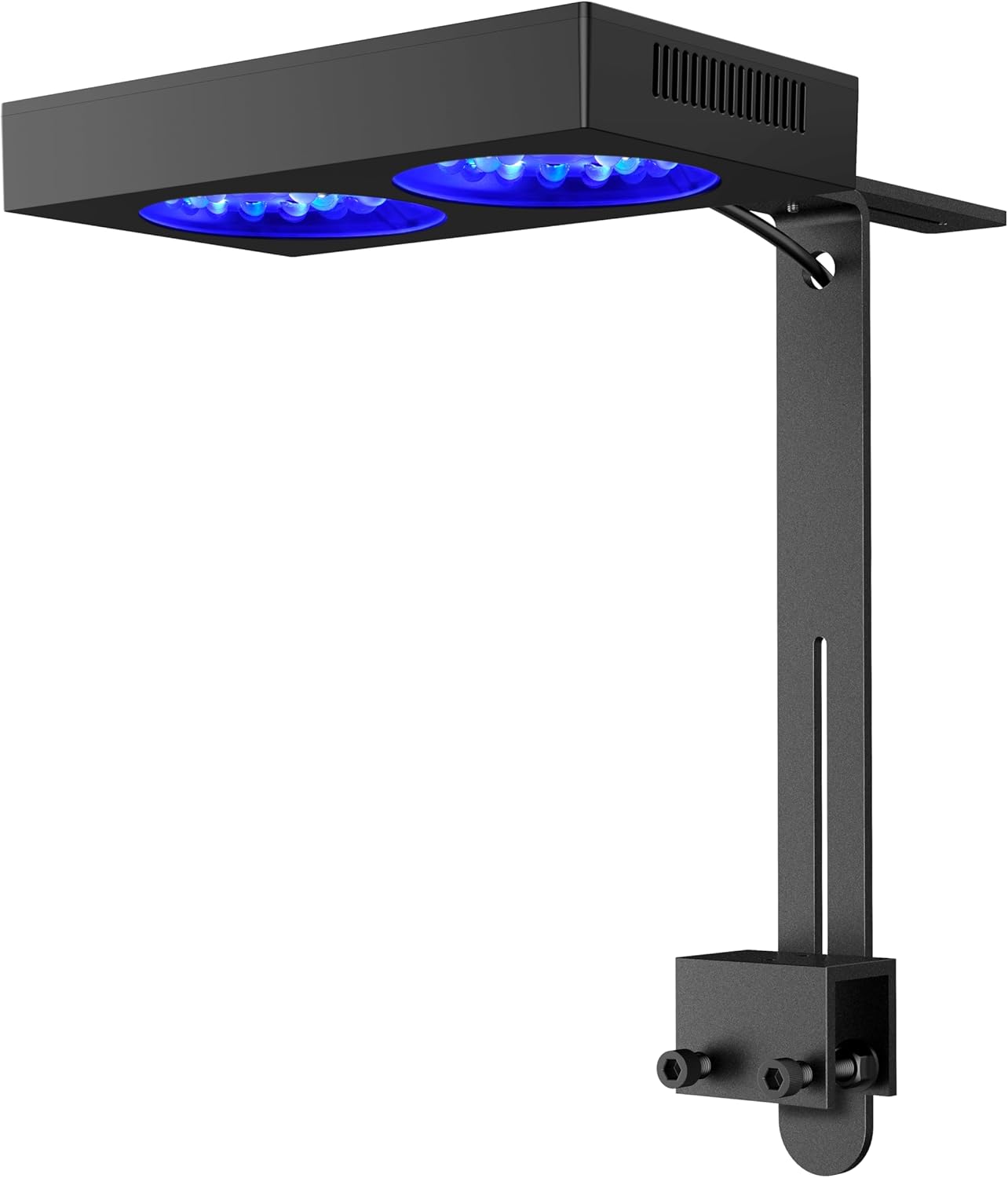
Image 1: NICREW NavaReef 135 Reef LED Light, showcasing its sleek design and mounting bracket.
Video 1: Ein überview of the NICREW NavaReef 135 Reef LED Light, highlighting its features and vibrant coral illumination.
2. Produktmerkmale
- Blue-Focused Spectrum: Concentrates most power at 440-480nm wavelengths to enhance coral fluorescence and boost growth with minimal energy waste.
- Optimized Optics: Custom 90° beam-angle lens optics deliver concentrated PAR output while ensuring optimal coverage in deeper aquariums.
- Leises Kühlsystem: Features a removable dust-resistant mesh, operating near-silently while maintaining exceptional heat dissipation efficiency.
- Flexible Steuerung: Effortlessly control the NavaReef through the built-in timer setting or external controller connectivity (controller sold separately).
- Vielseitige Montage: Compatible with the included standard Tank Mount for rimmed/rimless tanks, and an optional Hanging Kit (sold separately) for open-top installations.

Image 2: Key features of the NavaReef 135, highlighting its performance and design elements.
3. Lieferumfang
The NICREW NavaReef 135 Reef LED Light package includes the following components:
- NavaReef 135 LED Light Fixture
- Netzteil
- Standard Tank Mount Bracket
- Mounting Screws and Allen Key
- Bedienungsanleitung

Image 3: All components included in the NavaReef 135 light kit.
4. Einrichtung und Installation
Follow these steps to properly install your NavaReef 135 LED Light using the included tank mount.
- Montieren Sie die Halterung: Attach the two sliding rail pieces to the clamp using the provided screws and Allen key. Adjust the height as needed.
- Verlegen Sie das Kabel: Pass the power cable through the designated hole in the sliding rail.
- Attach Light to Mount: Secure the LED light fixture to the assembled mount using the screws on the top of the light.
- Montage am Panzer: Positionieren Sie dieamp onto the rim of your aquarium (suitable for rimmed or rimless tanks up to 1 3/16 inches thick). Tighten the screws on the clamp to secure the light firmly.
- Strom anschließen: Plug the power adapter into the light and then into a power outlet.
Video 2: Detailed instructions for installing the NICREW NavaReef Tank Mount.
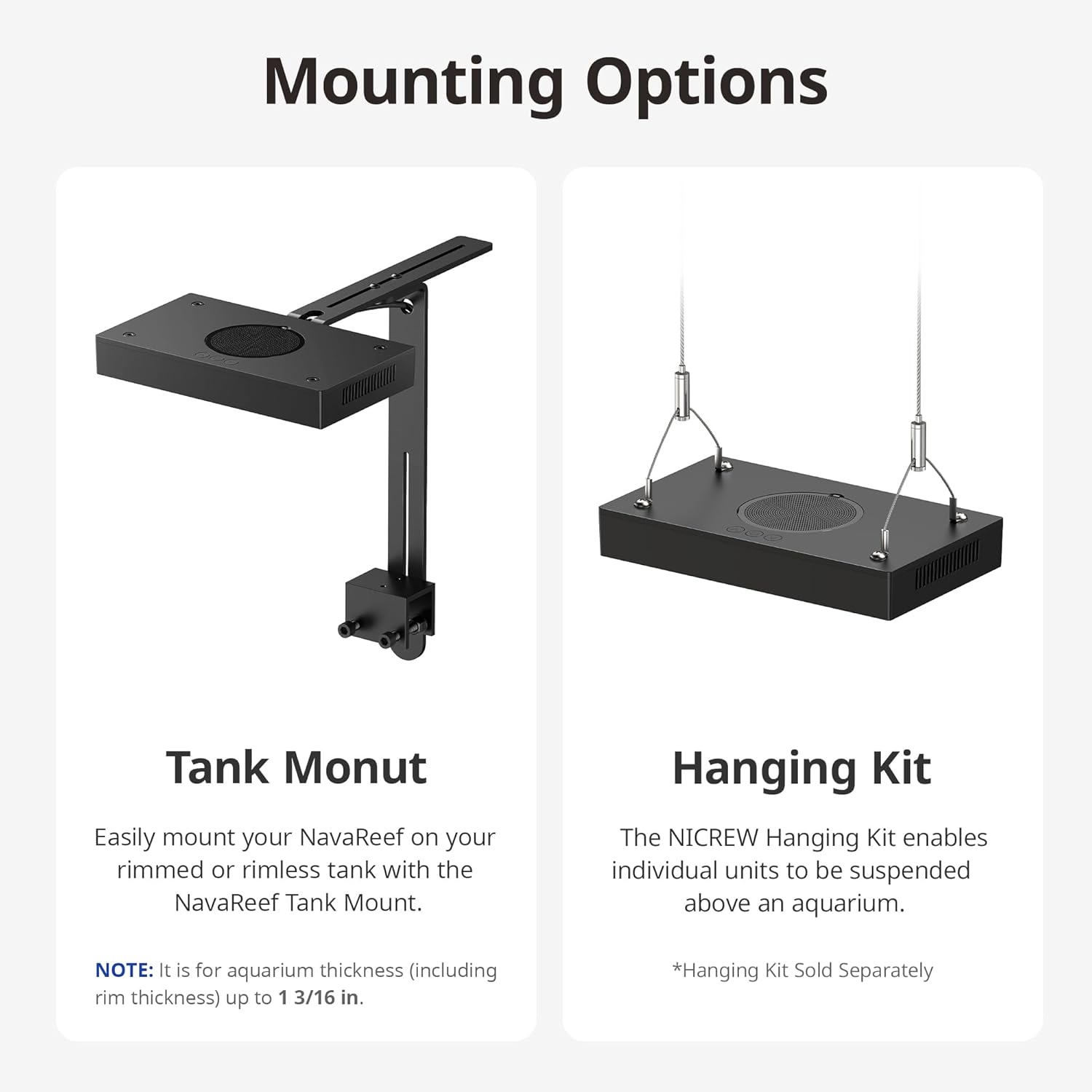
Image 4: Illustration of the Tank Mount and optional Hanging Kit installation.
5. Bedienungsanleitung
The NavaReef 135 features intuitive button controls for managing light settings and the built-in timer.
Grundlegende Steuerungsfunktionen:
- Ein-/Ausschalter (U):
- Press: Turn on the NavaReef or cycle through 7 preset color settings.
- Hold: Turn off the NavaReef.
- Up Arrow (^) Button:
- Press: Increase light intensity by 5%.
- Hold: Increase light intensity rapidly.
- Down Arrow (v) Button:
- Press: Decrease light intensity by 5%.
- Hold: Decrease light intensity rapidly.
- Werkseinstellungen zurückgesetzt: Hold Power (U) + Up Arrow (^) + Down Arrow (v) simultaneously.
Timer-Funktion:
The NavaReef 135 includes a built-in timer with 4 modes (6H, 8H, 10H, 12H) and a 30-minute sunrise/sunset ramp-up/dim-down period.
- Enter Timer Function: Hold Up Arrow (^) + Down Arrow (v) simultaneously.
- Scroll Timer Modes: Press Up Arrow (^) or Down Arrow (v) to cycle through available timer modes (6H, 8H, 10H, 12H).
- Speichern und beenden: Press the Power (U) button or wait 20 seconds without any key press to save and exit the settings.
Notiz: When in timer mode, preset color settings can be switched and intensities adjusted. However, there will be no Dim-down period that day, and the normal timer cycle will resume the following day.
Video 3: Demonstration of the NavaReef button controls and timer function.

Image 5: Built-in timer features and control buttons.
6. Wartung
Regular maintenance ensures optimal performance and longevity of your NavaReef 135 LED Light.
- Reinigung der Leuchte: Gently wipe the exterior of the light with a soft, damp Tuch. Vermeiden Sie die Verwendung von Scheuermitteln oder Lösungsmitteln.
- Dust Protection Mesh: The light features a removable dust-resistant mesh. Periodically remove and clean this mesh to maintain efficient cooling and prevent dust buildup.
- Linsenreinigung: Ensure the lenses are free from salt creep or debris. Use a soft cloth and distilled water to clean the lenses if necessary.

Image 6: Removable dust protection for easy cleaning.

Image 7: The efficient cooling system with micro-fins for heat dissipation.
7. Fehlerbehebung
This section addresses common issues you might encounter with your NavaReef 135 LED Light.
| Problem | Mögliche Ursache | Lösung |
|---|---|---|
| Licht geht nicht an. | Kein Strom, Wackelkontakt, defekter Adapter. | Check power outlet, ensure all connections are secure, try a different power outlet. |
| Die Lichtintensität ist zu niedrig/zu hoch. | Falsche Intensitätseinstellung. | Adjust intensity using the Up/Down arrow buttons. |
| Die Timer-Funktion funktioniert nicht wie erwartet. | Incorrect timer setting, temporary override. | Re-enter timer function (Hold ^+v) and verify settings. Note that manual adjustments override the dim-down period for that day. |
| Das Gerät verursacht übermäßige Geräusche. | Dust buildup in fan/mesh. | Clean the dust protection mesh and ensure fan is clear of obstructions. |
8. Spezifikationen
| Besonderheit | Detail |
|---|---|
| Modell | NavaReef 135 (Item model number: 86013) |
| Material | Aluminium |
| Energieaufnahme | 135W bei voller Leistung |
| Produktabmessungen (L x B x H) | 15.8" x 11.5" x 3.8" |
| Artikelgewicht | 5.19 Pfund |
| Anzahl der Lichtquellen | 1 |
| Maximum Coverage (SPS dominant) | 24 x 24 Zoll |
| Maximum Coverage (Mixed reef) | 30 x 30 Zoll |
| LED Colors & Quantity | Cool White (4), Royal Blue (16), Blue (14), Violet (6), UV (4), Green (2), Red (2) |
| Built-in Timer Modes | 6H, 8H, 10H, 12H (with 30-min ramp-up/dim-down) |

Image 8: Detailed specifications and LED configuration of the NavaReef 135.

Image 9: Combined spectrum of the NavaReef 135 at 100% output.
9. Garantie und Support
For warranty information and customer support, please refer to the official NICREW webBesuchen Sie die Website oder kontaktieren Sie direkt den Kundenservice. Bewahren Sie Ihren Kaufbeleg für Garantieansprüche auf.
Offiziell WebWebsite: www.nicrew.com


