Einführung
The 1Mii SafeFly Pro is a versatile Bluetooth 5.3 audio adapter designed to transmit and receive audio wirelessly. It features an OLED screen for clear status display and supports advanced audio codecs for high-quality sound. This device allows you to connect your wireless headphones to non-Bluetooth audio sources or stream audio from your Bluetooth-enabled devices to wired audio systems.
Lieferumfang

This image displays all items included in the 1Mii SafeFly Pro package. You will find the SafeFly Pro Bluetooth Audio Adapter, a USB-C Charging Cable, a 3.5mm Female to Female Audio Adapter, and a Keychain.
- SafeFly Pro Bluetooth Audio Adapter
- USB-C-Ladekabel
- 3.5mm Female to Female Audio Adapter
- Schlüsselanhänger
- Benutzerhandbuch (dieses Dokument)
Produkt überview

Dieses Bild liefert eine detaillierte Ansicht. view of the 1Mii SafeFly Pro, highlighting its key components. These include the flexible audio cable with a 3.5mm audio connection, an audio plug protector, the OLED display screen, the 'M' key, the 'OK' key, the TX/RX sliding switch, a one-click reset button, and the USB-C charging port.
Komponenten und Funktionen:
- 3.5-mm-Audioanschluss: Verbindet sich mit einer Audioquelle (TX-Modus) oder einem Audioempfänger (RX-Modus).
- Audiosteckerschutz: Protects the 3.5mm audio plug when not in use.
- OLED-Display: Shows battery level, volume, paired device names, and active audio codecs.
- 'M'-Taste: In pairing mode, press once to select the connected device. In TX mode, press twice to switch the Bluetooth decoding format.
- 'OK' Key: Power ON/OFF (long press for 1 second). Long press for 2 seconds to enter pairing mode. Also functions as Play/Pause.
- TX/RX Sliding Switch: Wählt den Sendermodus (TX) oder den Empfängermodus (RX) aus.
- Reset-Taste: Um das Gerät zurückzusetzen, drücken Sie 3 Sekunden lang.
- USB-C-Ladeanschluss: Zum Laden des internen Akkus.
Aufstellen
1. Aufladen des Geräts
Before first use, fully charge the SafeFly Pro using the provided USB-C charging cable. Connect the cable to the USB-C port on the device and a standard USB power adapter (not included). The OLED screen will indicate charging status.
2. Ein-/Ausschalten
- So schalten Sie das Gerät ein: Long press the 'OK' button for 1 second.
- So schalten Sie das Gerät aus: Long press the 'OK' button for 1 second.
3. Auswahl des Betriebsmodus (TX/RX)
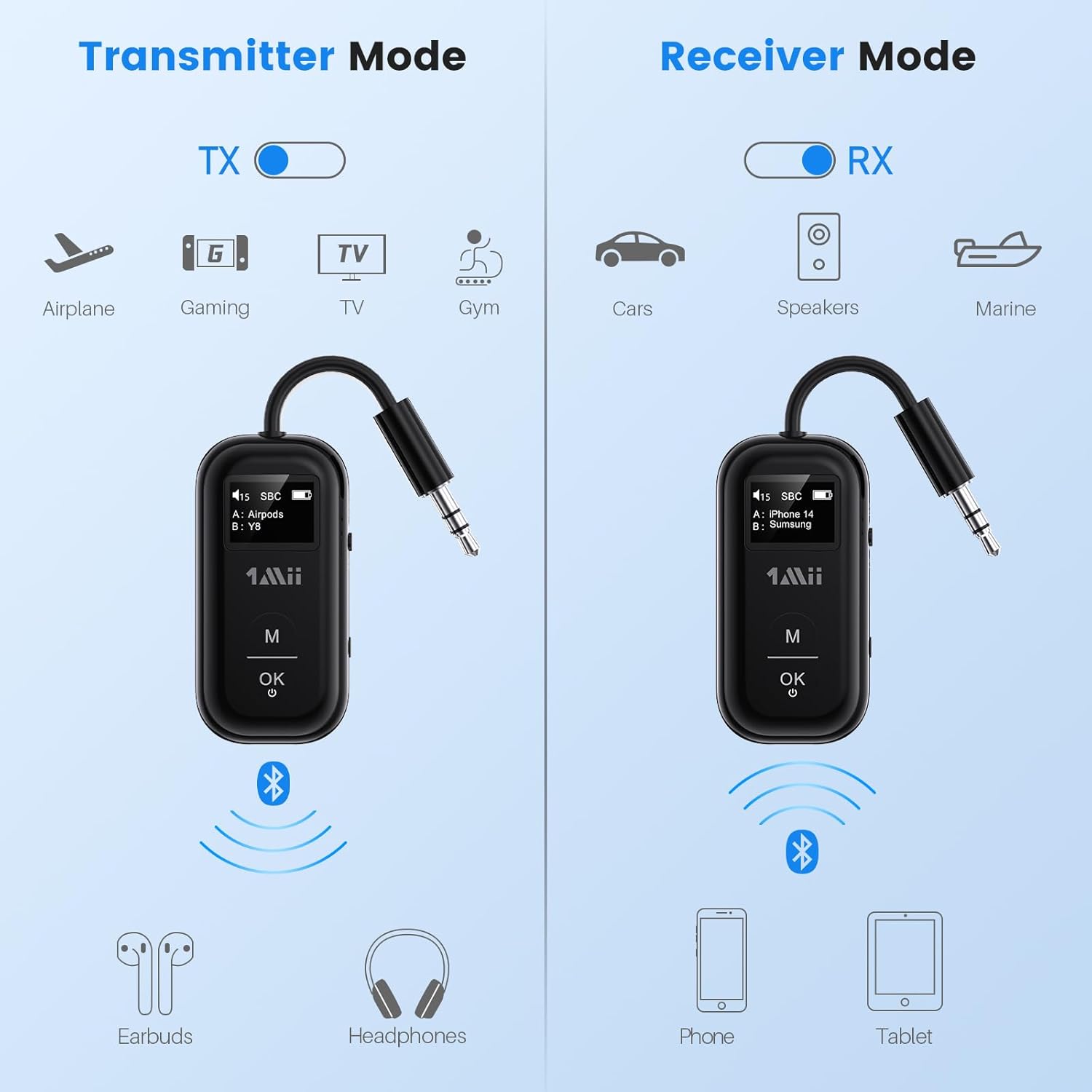
This image illustrates the two operating modes: Transmitter (TX) and Receiver (RX). TX mode is used for devices like airplanes, gaming consoles, TVs, and gym equipment to transmit audio to earbuds or headphones. RX mode is used for cars, speakers, and marine systems to receive audio from phones or tablets.
Use the TX/RX sliding switch on the side of the device to select the desired mode:
- TX-Modus (Sender): For sending audio from non-Bluetooth devices (e.g., airplane entertainment, TV, gym equipment) to Bluetooth headphones or speakers.
- RX-Modus (Empfänger): For receiving audio from Bluetooth-enabled devices (e.g., smartphones, tablets) to wired audio systems (e.g., car stereo, home speakers).
4. Pairing in TX Mode (Connecting to Headphones)

- Set the SafeFly Pro to TX mode using the sliding switch.
- Plug the 3.5mm audio connection into your audio source (e.g., airplane entertainment system, TV headphone jack). If needed, use the dual-prong airplane adapter.
- Long press the 'OK' button on the SafeFly Pro for 2 seconds to enter pairing mode. The screen will display "Searching".
- Put your Bluetooth headphones or speakers into pairing mode. Refer to your headphone's manual for specific instructions.
- The SafeFly Pro will automatically search for and connect to nearby Bluetooth devices. Once connected, the device name will appear on the OLED screen.
- To connect a second pair of headphones: After the first device is connected, long press the 'OK' button again for 2 seconds to enter pairing mode for the second device. Put the second pair of headphones into pairing mode. Both devices will then be connected simultaneously.

This image shows the 1Mii SafeFly Pro connected to an airplane's in-flight entertainment system, enabling wireless audio streaming to a user's Bluetooth headphones.
5. Pairing in RX Mode (Connecting to Smartphones/Tablets)
- Set the SafeFly Pro to RX mode using the sliding switch.
- Plug the 3.5mm audio connection into your wired audio system's AUX input (e.g., car stereo, home speaker).
- Long press the 'OK' button on the SafeFly Pro for 2 seconds to enter pairing mode. The screen will display "Searching".
- On your smartphone or tablet, go to Bluetooth settings and select "1Mii SafeFly Pro" from the list of available devices to connect.
- Once connected, the device name will appear on the OLED screen.
- To connect a second smartphone/tablet: After the first device is connected, long press the 'OK' button again for 2 seconds to enter pairing mode for the second device. Connect the second smartphone/tablet via its Bluetooth settings.

This image shows the 1Mii SafeFly Pro in RX mode, connected to a car's audio system, receiving audio wirelessly from a smartphone.
Bedienungsanleitung
OLED-Bildschirmanzeige

Dieses Bild zeigt eine Nahaufnahme. view of the OLED screen, indicating the power status, audio format (e.g., SBC), volume level, battery level, and the names of the two currently paired devices (A and B).
The OLED screen provides real-time information:
- Batteriestand: Zeigt den verbleibenden Ladezustand des Akkus an.
- Lautstärke: Displays the current audio output volume.
- Gekoppeltes Gerät: Shows the name(s) of the connected Bluetooth headphones or smartphones.
- Audio-Codec: Displays the active audio codec (e.g., aptX LL, aptX HD, aptX Adaptive, aptX, AAC, SBC).
Tastenfunktionen
- 'OK'-Schaltfläche: Kurzes Drücken zum Abspielen/Pausieren der Audiowiedergabe.
- 'M'-Taste: In TX mode, press twice to cycle through available audio codecs (aptX LL, aptX HD, aptX Adaptive, AAC, SBC) if supported by your connected headphones.
Wartung
To ensure the longevity and optimal performance of your 1Mii SafeFly Pro, follow these maintenance guidelines:
- Reinigung: Wischen Sie das Gerät mit einem weichen, trockenen Tuch ab. Verwenden Sie keine flüssigen Reinigungsmittel oder Scheuermittel.
- Lagerung: Bewahren Sie das Gerät an einem kühlen, trockenen Ort fern von direkter Sonneneinstrahlung und extremen Temperaturen auf.
- Batteriepflege: Vermeiden Sie häufiges vollständiges Entladen des Akkus. Laden Sie das Gerät regelmäßig auf, auch wenn es nicht benutzt wird, um die Akkuleistung zu erhalten.
- Handhabung: Behandeln Sie das Gerät mit Sorgfalt. Vermeiden Sie es, es fallen zu lassen oder starken Stößen auszusetzen.
Fehlerbehebung
If you encounter issues with your SafeFly Pro, try the following steps:
- Gerät lässt sich nicht einschalten: Stellen Sie sicher, dass das Gerät vollständig aufgeladen ist. Verbinden Sie es mit dem USB-C-Kabel mit einer Stromquelle.
- Kopplung fehlgeschlagen:
- Ensure the SafeFly Pro is in the correct TX or RX mode.
- Make sure both the SafeFly Pro and your target Bluetooth device are in pairing mode.
- Bringen Sie die Geräte näher zusammen.
- Schalten Sie beide Geräte aus und wieder ein und versuchen Sie dann erneut, sie zu koppeln.
- Kein Ton/Schlechte Tonqualität:
- Check that the 3.5mm audio cable is securely connected to both the SafeFly Pro and the audio source/receiver.
- Ensure the volume on both the SafeFly Pro and the connected device is turned up.
- Verify that the correct audio codec is selected (in TX mode, press 'M' twice to cycle).
- Test with a different audio cable or source/receiver if possible.
- Device Frozen/Unresponsive: Long press the Reset Button (small hole on the side) for 3 seconds using a thin object (e.g., paperclip) to restart the device.
Technische Daten
| Technische Daten | 2.24 x 1.18 x 0.51 Zoll |
| Artikelgewicht | 0.64 Unzen |
| Artikelmodellnummer | SafeFly Pro |
| Batterien | 1 Lithium-Polymer-Akku (im Lieferumfang enthalten) |
| Konnektivitätstechnologie | AUX-Anschluss, Bluetooth 5.3 |
| Stromquelle | Batteriebetrieben |
| Material | Acrylnitril-Butadien-Styrol (ABS) |
| Besondere Merkmale | AptX LL/HD/Adaptive, Bluetooth Transmitter & Receiver, Built-in Battery, Connect 2 Devices, with Screen |
Sicherheitshinweise
Bitte lesen und befolgen Sie diese Sicherheitsrichtlinien, um Schäden am Gerät oder Verletzungen zu vermeiden:
- Vermeiden Sie den Kontakt mit extremen Temperaturen (Hitze oder Kälte).
- Handle the battery with care. Do not puncture, disassemble, or expose to fire.
- Achten Sie auf mögliche Störungen mit anderen drahtlosen Geräten.
- Halten Sie das Gerät von Wasser und anderen Flüssigkeiten fern.
- Versuchen Sie nicht, das Gerät selbst zu reparieren oder zu modifizieren. Wenden Sie sich an den Kundendienst, um Unterstützung zu erhalten.
Garantie und Support
1Mii products are designed for reliability and performance. For warranty information, technical support, or customer service inquiries, please refer to the official 1Mii webBesuchen Sie die Website oder kontaktieren Sie direkt deren Kundendienst. Bewahren Sie Ihren Kaufbeleg als Kaufnachweis für Garantieansprüche auf.