Einführung
Thank you for choosing the bmani Wireless Bluetooth Earbuds. These earbuds are designed to provide an immersive music experience with enhanced bass and effective noise cancellation. This manual will guide you through the setup, operation, and maintenance of your new earbuds.

Image: The bmani Wireless Bluetooth Earbuds in their charcoal charging case, displaying a digital battery percentage.
Video: Ein Beamter überview of the bmani S13 Wireless Bluetooth Earbuds, highlighting key features, design, and compatibility. This video provides a visual introduction to the product.
Lieferumfang
Beim Öffnen Ihres Pakets sollten Sie folgende Artikel vorfinden:
- bmani Wireless Bluetooth Earbuds (in-the-ear-headphones)
- Ladeetui
- Benutzerhandbuch (dieses Dokument)
- USB-C-Ladekabel
- Ohrstöpsel in verschiedenen Größen
Hauptmerkmale
The bmani S13 Earbuds are equipped with advanced features for a superior audio experience:
- Enhanced Bass & Hi-Fi Stereo Sound: Features 13mm dynamic drivers for deep bass and crystal-clear treble.
- Aktive Geräuschunterdrückung: Provides an isolated listening environment by reducing ambient noise.
- Bluetooth 5.3-Konnektivität: Ensures faster and more stable wireless connection.
- Lange Akkulaufzeit: Up to 8 hours of playback on a single charge for earbuds, and 48 hours total with the charging case.
- Duale Ladeoptionen: Supports both USB-C wired charging and wireless Qi charging.
- Leichtes und ergonomisches Design: Designed for comfortable and secure fit during extended use.
- IPX7 Wasserdicht: Resistant to sweat, rain, and splashing, making them suitable for various activities.
- Digitale LED-Batterieanzeige: Clear indication of charging case and earbud battery status.
- Smart Button Control: Intuitive touch controls for music playback, calls, and voice assistant.
- Monaural/Binaural Mode: Use one or both earbuds as needed.

Image: Illustration of the earbuds' internal components, emphasizing the 13mm dynamic driver for deep bass and crystal treble, delivering HiFi Stereo Sound.

Abbildung: Eine Explosionszeichnung zeigtasing the intricate components of the earbud's audio driver, designed for deep bass and high-fidelity stereo sound.
Design und Komfort
The bmani S13 earbuds are engineered for maximum comfort and a secure fit, making them ideal for prolonged use.
- Leicht: Each earbud is designed to be extremely light, minimizing ear fatigue.
- Ergonomische Passform: The rounded tips and in-ear design conform naturally to the ear canal, ensuring stability during movement.
- Kompakte Abmessungen: The earbuds and case are designed for portability.

Image: A woman wearing a bmani earbud, highlighting its lightweight nature and ergonomic design for comfortable wear.
Einrichtung und Kopplung
Follow these steps to pair your bmani S13 Earbuds with your device:
- Grundgebühr: Before first time use, please ensure both the earbuds and the charging case are fully charged.
- Power On & Pairing Mode: Öffnen Sie den Deckel des Ladegehäuses. Die Ohrhörer schalten sich automatisch ein und wechseln in den Kopplungsmodus.
- Per Bluetooth verbinden: On your device (smartphone, tablet, etc.), go to Bluetooth settings and select "S13" from the list of available devices.
- Bestätigung: Sobald die Verbindung hergestellt ist, hören Sie eine akustische Benachrichtigung, und die Ohrhörer sind einsatzbereit.

Image: A smartphone screen displaying a successful Bluetooth connection to the "S13" earbuds, demonstrating the one-step pairing process.
Bedienungsanleitung
The bmani S13 Earbuds feature intuitive touch controls for easy management of your audio and calls.
Touch-Steuerung:
- Abspielen/Pause: Tap L/R earbud 1 time.
- Lautstärke +/-: Tippe zweimal auf den linken/rechten Ohrhörer.
- Vorheriger/Nächster Titel: Tap L/R earbud for 2 seconds.
- Anruf annehmen/auflegen: Tap L/R earbud 1 time.
- Anruf ablehnen: Tap L/R earbud for 2 seconds.
- Sprachassistent: Tippe zweimal auf den linken/rechten Ohrhörer.

Image: A visual guide detailing the smart button controls on the earbuds for various functions like play/pause, volume adjustment, track skipping, call management, and voice assistant activation.
Monaural/Binaural Mode:
You can use either a single earbud (Monaural Mode) or both earbuds together (Binaural Mode) depending on your preference and situation. Simply take one or both earbuds out of the case to activate the desired mode.

Image: A couple enjoying music, illustrating the flexibility of using the earbuds in either monaural (single earbud) or binaural (both earbuds) mode.
Laden
Keep your bmani S13 Earbuds powered up with convenient charging options:
- USB-C-Aufladung: Verbinden Sie das mitgelieferte USB-C-Kabel mit dem Ladecase und einer Stromquelle.
- Kabelloses Laden: Platzieren Sie das Ladecase auf einem Qi-kompatiblen kabellosen Ladepad.
- Batterieanzeige: The LED digital display on the charging case shows the battery percentage des Ladecase und des Ladestatus jedes Ohrhörers.

Image: The bmani earbud charging case being charged via a USB-C cable and simultaneously on a wireless charging pad, demonstrating both charging methods.
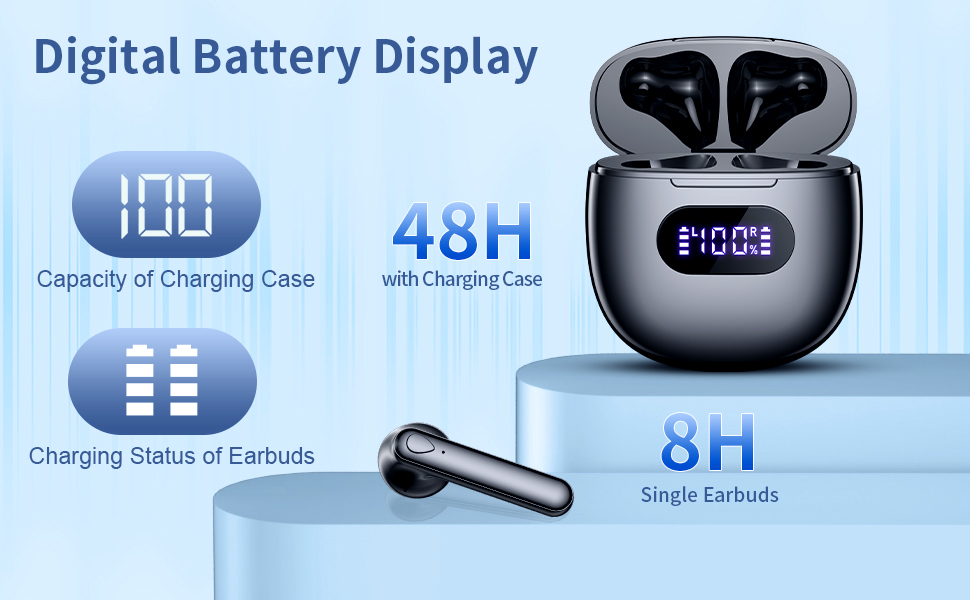
Image: A close-up of the charging case's LED digital display, indicating the charging case capacity and the individual charging status of the earbuds.
Wasserbeständigkeit (IPX7)
Your bmani S13 Earbuds are rated IPX7 waterproof, meaning they can withstand:
- Raining conditions
- Schwitzen beim Training
- Splashing from water
Note: IPX7 rating means the earbuds can be submerged in up to 1 meter of water for 30 minutes. However, it is not recommended for swimming or showering. The charging case is NOT waterproof.

Image: A man wearing the earbuds while engaging in an activity, demonstrating their IPX7 waterproof capability against rain, sweat, and splashing.
Kompatibilität
The bmani S13 Earbuds are designed for wide compatibility with various Bluetooth-enabled devices, including:
- Smartphones (iOS und Android)
- Tablets
- Laptops und PCs
- Other Bluetooth audio devices
They also support voice assistant integration for convenient hands-free control.

Abbildung: Eine Illustration zeigtasing the wide compatibility of the earbuds with various Bluetooth-enabled devices, including smartphones and tablets, along with features like voice assistant support and portability.
Technische Daten
| Besonderheit | Detail |
|---|---|
| Modellname | Staffel 13 |
| Konnektivitätstechnologie | Kabellos (Bluetooth 5.3) |
| Platzierung des Ohrs | Im Ohr |
| Formfaktor | Im Ohr |
| Lärmschutz | Aktive Geräuschunterdrückung |
| Audiotreibertyp | Dynamischer Treiber |
| Frequenzbereich | 20 Hz – 20,000 Hz |
| Artikelgewicht | 3.2 Unzen |
| Verpackungsabmessungen | 3.7 x 3.27 x 1.54 Zoll |
| Batterien | 1 Lithium-Polymer-Akku (im Lieferumfang enthalten) |
| Wasserdichtigkeit | IPX7 |
Wartung
To ensure the longevity and optimal performance of your bmani S13 Earbuds, follow these maintenance tips:
- Reinigung: Wischen Sie die Ohrhörer und das Ladecase regelmäßig mit einem weichen, trockenen und fusselfreien Tuch ab. Die Ohrstöpsel sollten Sie abnehmen, mit milder Seife und Wasser reinigen und anschließend gründlich trocknen lassen, bevor Sie sie wieder anbringen.
- Lagerung: Bewahren Sie die Ohrhörer bei Nichtgebrauch im Ladecase auf, um sie vor Staub und Beschädigungen zu schützen.
- Vermeiden Sie extreme Bedingungen: Die Ohrhörer und das Ladecase dürfen keinen extremen Temperaturen, hoher Luftfeuchtigkeit oder ätzenden Flüssigkeiten ausgesetzt werden.
- Ladepraktiken: Avoid overcharging. Disconnect the charger once the battery is full.
Fehlerbehebung
If you encounter any issues with your bmani S13 Earbuds, try the following solutions:
- Kein Ton/Schlechte Tonqualität:
- Stellen Sie sicher, dass die Ohrhörer vollständig aufgeladen sind.
- Check if the earbuds are properly connected to your device via Bluetooth. Try re-pairing.
- Entfernen Sie jeglichen Schmutz von den Lautsprechern und Ohrstöpseln der Ohrhörer.
- Passen Sie die Lautstärke sowohl an Ihrem Gerät als auch an den Ohrhörern an.
- Ohrhörer lassen sich nicht koppeln:
- Stellen Sie sicher, dass Bluetooth auf Ihrem Gerät aktiviert ist.
- Ensure the earbuds are in pairing mode (open the case lid).
- Entfernen Sie „S13“ aus der Bluetooth-Liste Ihres Geräts und versuchen Sie es erneut mit einer Kopplung.
- Ensure the earbuds and device are within the effective Bluetooth range.
- Ladeprobleme:
- Prüfen Sie das USB-C-Kabel und das Netzteil auf Beschädigungen.
- Stellen Sie sicher, dass die Ladekontakte an den Ohrhörern und im Inneren des Ladecase sauber und trocken sind.
- Wenn Sie kabelloses Laden verwenden, stellen Sie sicher, dass die Hülle richtig auf dem Ladepad platziert ist.
- Earbuds Not Fitting Comfortably:
- Try different sizes of ear tips (if included) to find the best fit for your ears.
- Adjust the angle of the earbuds in your ear until they feel secure and comfortable.
Garantie und Support
For information regarding warranty coverage, technical support, or replacement parts, please refer to the product's official listing page on Amazon or contact bmani customer service directly. Keep your purchase receipt as proof of purchase.
You can visit the bmani Store for more information: bmani Store on Amazon


