Einführung
This manual provides detailed instructions for the installation, operation, and maintenance of your darkFlash DB330M Micro-ATX PC Case. Please read this manual thoroughly before beginning assembly to ensure proper setup and safe usage. The DB330M case features a 270° panoramic tempered glass panel, pre-installed PWM ARGB fans, and a high-speed I/O panel.
Sicherheitshinweise
- Vor dem Einbau oder der Wartung von Komponenten im PC-Gehäuse muss immer die Stromversorgung von der Steckdose getrennt werden.
- Handle tempered glass panels with care to prevent breakage. Avoid impacts or sharp objects.
- Um Schäden an empfindlichen Bauteilen durch elektrostatische Entladung (ESD) zu vermeiden, sollten Sie antistatische Handschuhe tragen oder ein antistatisches Armband verwenden.
- Kleinteile und Schrauben von Kindern fernhalten.
- Sorgen Sie für ausreichende Belüftung rund um das PC-Gehäuse, um eine Überhitzung zu vermeiden.
Packungsinhalt
Überprüfen Sie, ob alle Artikel im Paket vorhanden sind:
- darkFlash DB330M Micro-ATX PC Case
- 3 vorinstallierte PWM-ARGB-Lüfter
- Accessory Box (screws, cable ties, etc.)
- Benutzerhandbuch (dieses Dokument)
Funktionen überview
- 270° Panoramic Tempered Glass: Bietet eine umfassende view von internen Komponenten und RGB-Beleuchtung.
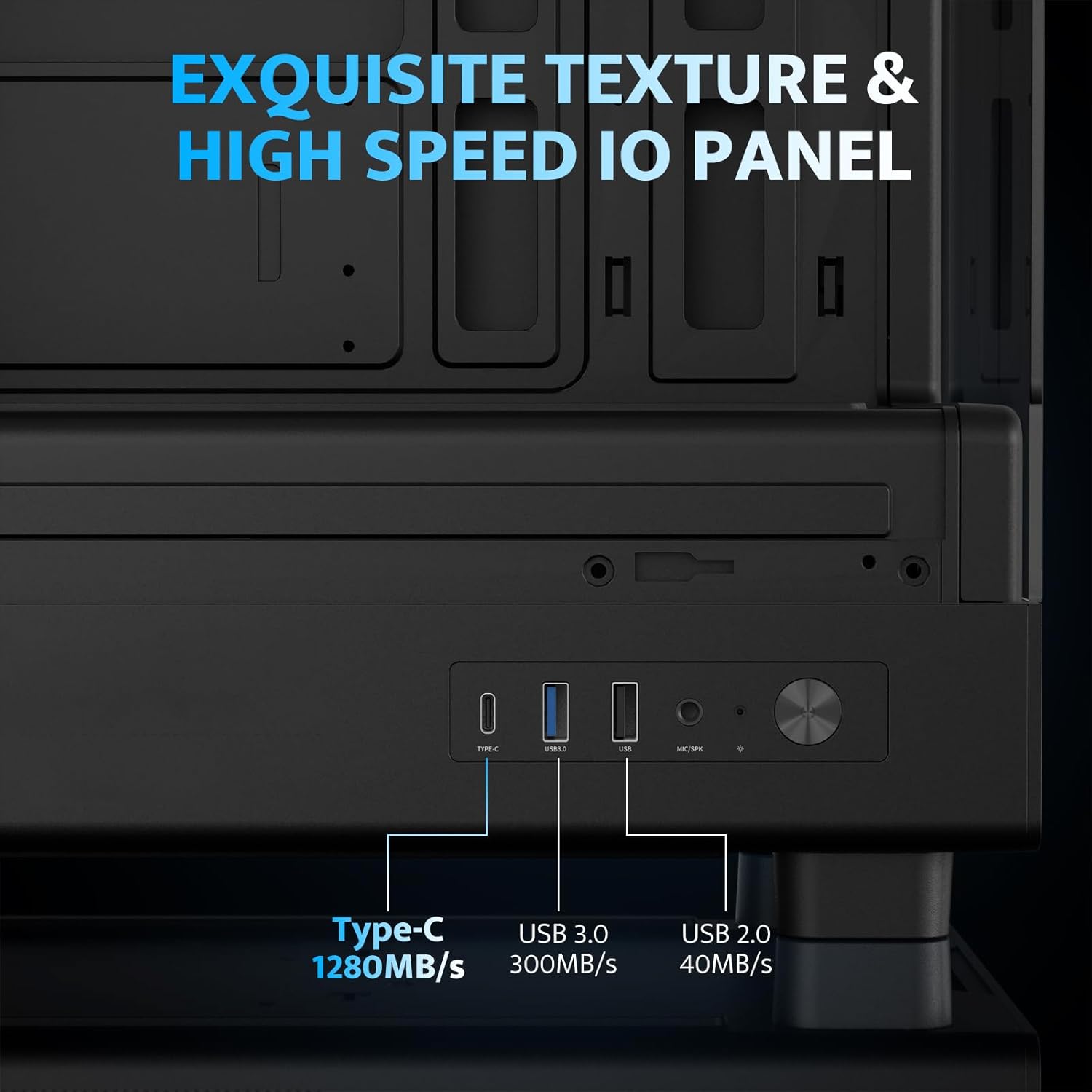
- Hochgeschwindigkeits-E/A-Panel: Includes USB 3.0 and Type-C ports for fast data transfer.
- Vertical Airflow Cooling: Optimized design with pre-installed fans for efficient heat dissipation.
- Magnetische Staubfilter: Located on top and bottom to keep components clean.
- Einfache Installation: User-friendly design for hassle-free assembly and maintenance.
Technische Daten
| Besonderheit | Spezifikation |
|---|---|
| Modellname | DB330M PC CASE |
| Abmessungen (LxBxH) | 8.58"T x 13.11"B x 15.75"H (218 mm x 333 mm x 400 mm) |
| Motherboard-Kompatibilität | Micro ATX, ITX |
| Gehäusetyp | Midi-Tower |
| Material | Kunststoff, gehärtetes Glas |
| Vorinstallierte Lüfter | 3 x 120-mm-PWM-ARGB-Lüfter |
| Maximale Höhe des CPU-Kühlers | 180 mm |
| Maximaler GPU-Freiraum | 305 mm |
| Kühlerhalterung (oben) | Bis zu 240 mm |
| Montageart des Netzteils | Bottom Mount (Max 140mm PSU length) |
| E/A-Anschlüsse | 1 x USB 3.0, 1 x Type-C, Audio In/Out |
Setup und Installation
1. Accessing the Interior (Quick Release Design)
The darkFlash DB330M features a quick-release design for easy access to internal components. The tempered glass panels can be removed by gently pulling them away from the chassis. The top panel also detaches for fan/radiator installation.

2. Motherboard-Installation
Install your Micro-ATX or ITX motherboard into the designated area. Ensure standoffs are correctly aligned and secured. The case supports CPU coolers up to 180mm in height and GPUs up to 305mm in length.

3. Fan and Cooling System Installation
The case comes with three pre-installed 120mm PWM ARGB fans. Two fans are located at the top, and one at the rear. Additional fan mounts are available at the bottom (up to 2 x 120mm) for enhanced airflow. The case supports a 240mm AIO radiator on the top panel.
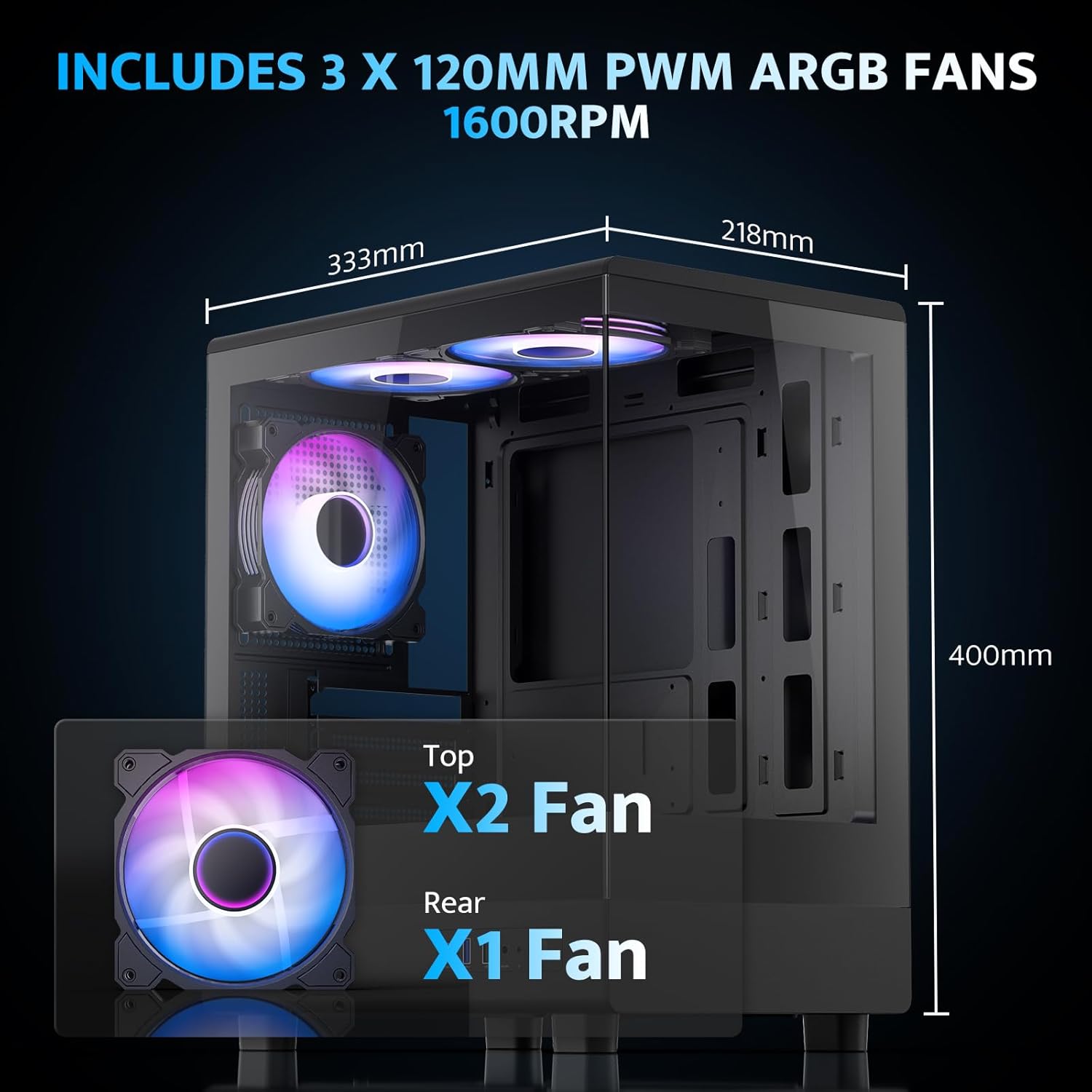
The pre-installed fans are PWM ARGB type, offering speed adjustment and rich lighting modes with motherboard synchronization. Note: An RGB hub controller is not included.

4. Stromversorgung und Speicherinstallation
Install your power supply unit (PSU) in the bottom mount. The case supports PSUs up to 140mm in length. Utilize the standard hard drive cage for storage devices.
5. Anschließen des Front-I/O-Panels
Connect the front I/O panel cables to your motherboard. The panel includes a Type-C port, USB 3.0 port, and USB 2.0 port for various connectivity needs.
6. Kabelmanagement
Utilize the cable routing options and tie-downs behind the motherboard tray to ensure clean cable management. This improves airflow and aesthetics.
Bedienungsanleitung
1. Einschalten
After all components are securely installed and connected, plug in the power cable to your PSU and press the power button on the front I/O panel to start your system.
2. ARGB-Lüftersteuerung
The pre-installed ARGB fans can be controlled via compatible motherboard software (if connected to an ARGB header) to customize lighting effects and fan speeds. Refer to your motherboard manual for specific software instructions.
3. Airflow Configuration
The DB330M is designed with optimized airflow channels. The pre-installed fans facilitate vertical airflow, with the fan above the PSU directing air towards the graphics card. Ensure no obstructions block the airflow paths.


Wartung
1. Reinigung des Staubfilters
Regularly clean the magnetic dust filters located on the top and bottom of the case. Gently remove the filters and clean them with compressed air or a soft brush. Reattach them securely after cleaning.
2. Allgemeine Reinigung
Wischen Sie die Außenseite des Gehäuses mit einem weichen, trockenen Tuch ab. Für Seitenwände aus gehärtetem Glas verwenden Sie Glasreiniger und ein Mikrofasertuch. Vermeiden Sie Scheuermittel und Lösungsmittel.
Fehlerbehebung
- PC lässt sich nicht einschalten:
- Ensure the power supply is properly connected to the wall and the PSU switch is in the 'ON' position.
- Prüfen Sie, ob alle Stromkabel vom Netzteil fest mit dem Motherboard und den Komponenten verbunden sind.
- Überprüfen Sie die Verbindung des Netzschalters an der Vorderseite mit dem Motherboard.
- Lüfter drehen sich nicht/RGB funktioniert nicht:
- Confirm fan power cables are connected to the motherboard or fan controller.
- Ensure ARGB cables are connected to a compatible ARGB header on the motherboard or an ARGB controller.
- Check motherboard software settings for fan speed and RGB control.
- USB-Anschlüsse funktionieren nicht:
- Verify the front panel USB 3.0 and Type-C cables are correctly plugged into the corresponding headers on your motherboard.
- Stellen Sie sicher, dass die Treiber des Motherboards auf dem neuesten Stand sind.
Garantie und Support
darkFlash bietet eine 1-Jahres-Garantie for this computer case. For technical support, warranty claims, or further assistance, please contact darkFlash customer service through their official webBitte wenden Sie sich an die Website oder den Händler, bei dem Sie das Produkt gekauft haben. Bewahren Sie Ihren Kaufbeleg zur Inanspruchnahme der Garantie auf.
Official darkFlash WebWebsite: www.darkflash.com


