1. Einleitung
Vielen Dank für Ihren Einkauf.asing the Bobtot K701S 5.1/2.1 Channel Surround Sound System. This system is designed to provide a powerful and immersive audio experience for your home entertainment. With 800W peak power and a 6.5-inch subwoofer, it delivers clear, dynamic sound. This manual will guide you through the setup, operation, and maintenance of your new sound system.

Image 1.1: Bobtot K701S 5.1/2.1 Channel Surround Sound System with subwoofer, satellite speakers, and remote control.
2. Wichtige Sicherheitshinweise
Please read and follow these safety instructions carefully before operating the system to prevent electric shock, fire, or damage to the unit.
- Setzen Sie dieses Gerät weder Regen noch Feuchtigkeit aus.
- Die Lüftungsöffnungen dürfen nicht blockiert werden. Die Installation muss gemäß den Anweisungen des Herstellers erfolgen.
- Installieren Sie das Gerät nicht in der Nähe von Wärmequellen wie Heizkörpern, Heizregistern, Öfen oder anderen Geräten (einschließlich ampKonverter (Lüfter), die Wärme erzeugen.
- Schützen Sie das Netzkabel vor Beschädigungen oder Beschädigungen durch Fußgänger, insbesondere an den Steckern, Steckdosen und an der Stelle, an der es aus dem Gerät austritt.
- Verwenden Sie nur vom Hersteller angegebene Zusatzgeräte/Zubehör.
- Trennen Sie das Gerät bei Gewitter oder längerer Nichtbenutzung vom Stromnetz.
- Überlassen Sie alle Wartungsarbeiten qualifiziertem Servicepersonal. Eine Wartung ist erforderlich, wenn das Gerät in irgendeiner Weise beschädigt wurde.
3. Packungsinhalt
Bitte packen Sie den Karton vorsichtig aus und vergewissern Sie sich, dass alle Artikel vorhanden und unbeschädigt sind. Sollten Artikel fehlen oder beschädigt sein, kontaktieren Sie bitte unseren Kundenservice.
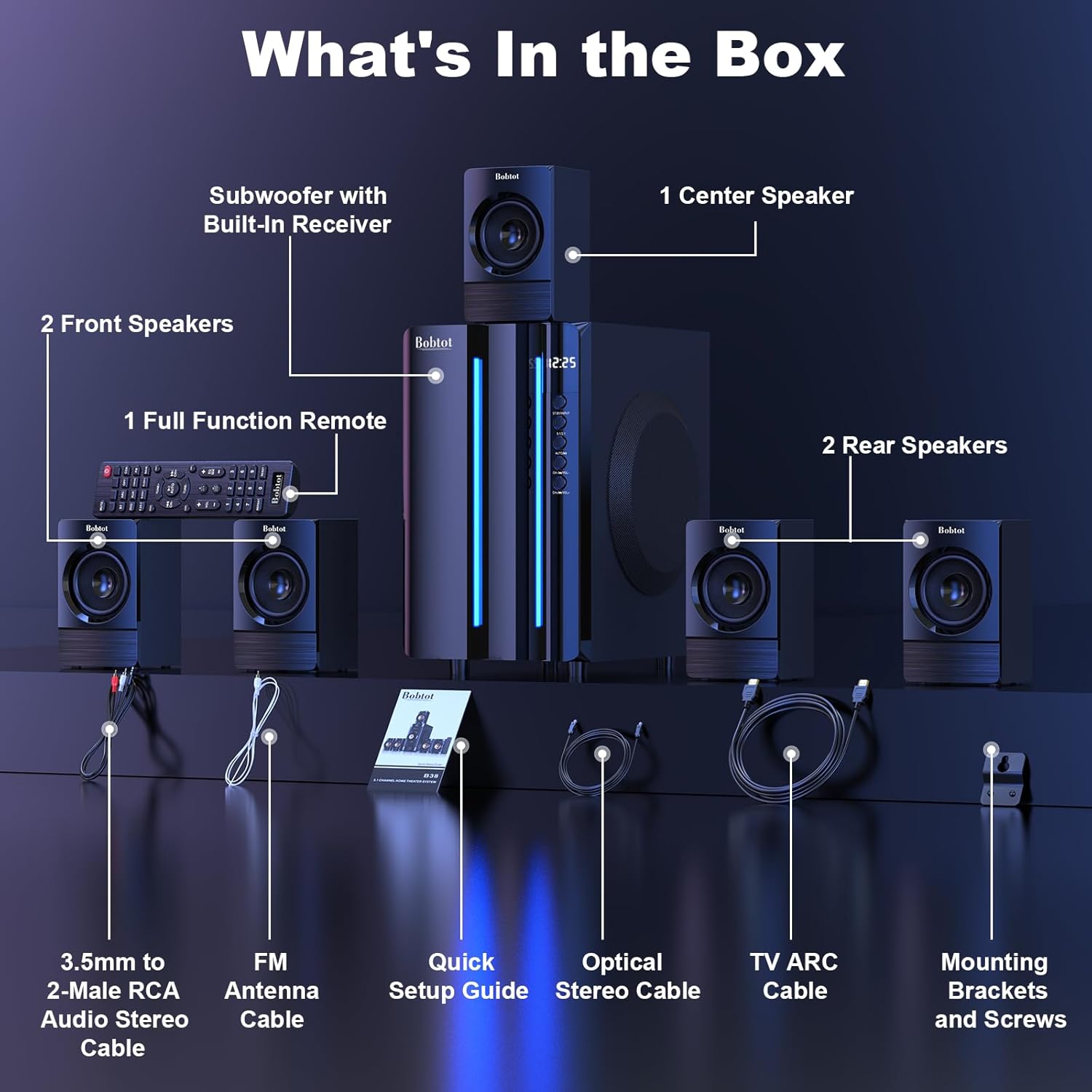
Image 3.1: Visual representation of all items included in the Bobtot K701S package.
- 1 x Subwoofer with Built-in Receiver
- 1 x Center Speaker
- 2 x Front Speakers
- 2 x Rear Speakers
- 1 x Full Function Remote Control
- 1 x 3.5mm to 2-Male RCA Audio Stereo Cable
- 1 x FM Antenna Cable
- 1 x Kurzanleitung zur Einrichtung
- 1 x Optical Stereo Cable
- 1 x TV ARC Cable (HDMI)
- 1 x Koaxialkabel
- 1 x AUX-Kabel
- 1 x RCA Kabel
- Montagehalterungen und Schrauben
- Benutzerhandbuch (dieses Dokument)
4. Komponenten vorbeiview
4.1 Subwoofer (Main Unit)
The subwoofer houses the main receiver and amplifier for the entire system. It features a 6.5-inch driver for deep bass and includes all input/output ports.

Abbildung 4.1: Detailansicht view of the 6.5-inch subwoofer, highlighting its internal components.
4.2 Satellitenlautsprecher
The system includes five satellite speakers: one center, two front (left/right), and two rear (left/right). These speakers are wired and connect directly to the subwoofer unit.
4.3-Fernbedienung
The full-function remote control allows you to manage power, input modes, volume, channel selection, and other settings from a distance.
5. Systemeinrichtung
Follow these steps to set up your Bobtot K701S surround sound system.
5.1 Lautsprecheranschluss
The five satellite speakers come with integrated cables. Connect each speaker to the corresponding "Audio Output" slot on the rear of the subwoofer unit. The cables are color-coded or labeled for easy identification (e.g., FL for Front Left, FR for Front Right, CEN for Center, SL for Surround Left, SR for Surround Right).
- Front Center and L/R speakers: Cables are approximately 13 feet long.
- Rear L/R speakers: Cables are approximately 31 feet long.
Place all speakers in the same room for optimal surround sound performance.

Image 5.1: Recommended speaker placement for a 5.1 channel surround sound experience.
5.2 Power On and Initial Test
- Connect the subwoofer to a power outlet using the provided power cable.
- Schalten Sie den Subwoofer mit dem Netzschalter ein.
- Drücken Sie den Ein-/Ausschalter auf der Fernbedienung oder am Bedienfeld.
- Testen Sie die Funktionalität der Fernbedienung.
- Switch to "BT" (Bluetooth) mode and connect your mobile device to "B701D" via Bluetooth to ensure audio playback.
5.3 Externe Geräte anschließen
Choose the appropriate input mode and connect your external device (e.g., TV, projector, DVD player, game console) to the subwoofer using the corresponding audio cables provided.
- Ensure the cable is securely plugged into the correct input slot on the subwoofer.
- Select the matching input mode on the system (e.g., HDMI ARC, OPT, COA, AUX, USB, DVD).

Bild 5.2: Überview of the rear panel connections and supported multimedia inputs.
6. Bedienungsanleitung
6.1 Fernbedienungsfunktionen
The remote control provides full command over your sound system. Always press the power button before selecting an input mode when turning on the unit.

Image 6.1: Detailed diagram of the remote control buttons and their functions.
- Ein-/Ausschalten: Schaltet das System ein oder aus.
- Input Mode Select: Buttons for BT, ARC, OPT, COA, DVD, AUX, USB/SD, FM to switch between audio sources.
- 5.1/2.1 Channel Select: Toggles between 5.1 surround sound and 2.1 stereo mode (in 2.1 mode, only the two front speakers play).
- Lautstärkeregelung (VOL +/-): Passt die Gesamtsystemlautstärke an.
- Mic Volume Adjustment (MIC +/-): Adjusts the volume for connected microphones (supports wireless/wired microphones).
- Echo Control (ECHO +/-): Passt den Echoeffekt für Mikrofone an.
- TUNE +/-: For FM radio tuning.
- CH +/-: For FM radio channel selection.
- STUMM: Schaltet die Audioausgabe stumm oder hebt die Stummschaltung auf.
6.2 Eingangsmodi
The Bobtot K701S supports various input methods:
- Bluetooth (BT): Für die drahtlose Verbindung mit Smartphones, Tablets und anderen Bluetooth-fähigen Geräten.
- HDMI-ARC: Connects to your TV's HDMI ARC port for high-quality audio transmission and TV remote control integration.
- Optisch (OPT): Digital audio input for TVs, game consoles, and other devices with an optical output.
- Koaxial (COA): Digital audio input, similar to optical, for compatible devices.
- AUX: Analog audio input using a 3.5mm or RCA cable for a wide range of devices.
- USB/SD: Audio wiedergeben files direkt von USB-Laufwerken oder SD-Karten.
- FM Radio: Built-in FM tuner for listening to radio stations.
- DVD: Dedicated input for DVD players.
6.3 Channel Configuration (5.1 / 2.1)
The system offers two channel modes: 5.1 and 2.1. You can switch between these modes using the remote control or the front panel. In 5.1 mode, all five satellite speakers and the subwoofer are active, providing a full surround sound experience. In 2.1 mode, only the two front speakers and the subwoofer are active, suitable for stereo audio.
7. Connectivity Guide
This section details how to connect various devices to your sound system.
7.1 Bluetooth-Verbindung
- Press the "BT" button on the remote control or front panel to select Bluetooth mode. The display will show "BT".
- Aktivieren Sie auf Ihrem Mobilgerät Bluetooth und suchen Sie nach verfügbaren Geräten.
- Select "B701D" from the list to pair. Once connected, you will hear a confirmation sound.
7.2 HDMI-ARC-Anschluss
- Connect one end of the HDMI ARC cable to the "HDMI ARC" port on the subwoofer.
- Connect the other end to the "HDMI ARC" port on your TV.
- Select "ARC" input mode on the sound system.
- Stellen Sie sicher, dass der Audioausgang Ihres Fernsehers auf HDMI ARC oder externe Lautsprecher eingestellt ist.
7.3 Optical/Coaxial Connection
- Connect an optical or coaxial cable from your device's digital audio output to the corresponding "OPT" or "COA" input on the subwoofer.
- Select "OPT" or "COA" input mode on the sound system.
- Ensure your device's audio output is set to PCM (Pulse-code modulation) for optical/coaxial connections, as some devices may default to other formats not supported by the system.
7.4 AUX-Verbindung
- Use the provided 3.5mm to 2-Male RCA cable or a standard RCA cable.
- Connect the cable from your device's audio output (e.g., headphone jack, RCA L/R output) to the "AUX" input on the subwoofer.
- Select "AUX" input mode on the sound system.
7.5 USB/SD-Wiedergabe
- Insert a USB flash drive or SD card containing audio files into the respective port on the subwoofer.
- Select "USB/SD" input mode. The system will automatically begin playing compatible audio files.
7.6 UKW-Radio
- Connect the FM antenna cable to the "FM ANTENNA" port on the subwoofer. Extend the antenna for better reception.
- Select "FM" input mode.
- Use the "TUNE +/-" or "CH +/-" buttons on the remote to scan for and select radio stations.
8. Spezifikationen
| Besonderheit | Spezifikation |
|---|---|
| Modellnummer | K701S |
| Lautsprechertyp | Satellit |
| Surround Sound-Kanalkonfiguration | 5.1 |
| Spitzenleistung | 800 Watt |
| Subwoofer-Durchmesser | 6.5 Zoll |
| Frequenzgang | 20 KHz |
| Drahtlose Kommunikationstechnologie | Bluetooth 5.0 |
| Konnektivitätstechnologie | Bluetooth, HDMI ARC, Optical, Coaxial, AUX, USB, DVD, FM |
| Kontrollmethode | Fernbedienung |
| Stromquelle | Kabelgebundene Elektrik |
| Eingangslautstärketage | 120 Volt |
| Produktabmessungen (L x B x H) | 31.8 x 19.8 x 33 cm |
| Artikelgewicht | 6.56 Kilogramm |
| Material | Wood (MDF), Acrylonitrile Butadiene Styrene (ABS) |
| Besonderheit | Bass Amplifizierung |
9. Fehlerbehebung
If you encounter issues with your Bobtot K701S system, refer to the following common problems and solutions:
9.1 Kein Ton
- Überprüfen Sie die Leistung: Ensure the system is powered on and the power cable is securely connected.
- Lautstärke: Increase the master volume on the system and your connected device.
- Eingabemodus: Verify that the correct input mode is selected on the system (e.g., BT, ARC, OPT).
- Kabelverbindungen: Ensure all audio cables are securely connected to both the system and the source device.
- Quellgeräteausgang: Check the audio output settings on your source device (e.g., TV, DVD player) to ensure it's sending audio to the correct output port and format (e.g., PCM for optical/coaxial).
9.2 Schlechte Klangqualität / Verzerrung
- Lautstärke: Reduce the volume if it's too high, causing distortion.
- Kabelintegrität: Überprüfen Sie die Audiokabel auf Beschädigungen oder lose Verbindungen.
- Lautsprecherplatzierung: Stellen Sie sicher, dass die Lautsprecher richtig positioniert und nicht verdeckt sind.
- Quellqualität: Testen Sie es mit einer anderen Audioquelle oder file to rule out issues with the original content.
9.3 Fernbedienung funktioniert nicht
- Batterien: Ersetzen Sie die Batterien in der Fernbedienung.
- Sichtlinie: Ensure there is a clear line of sight between the remote and the system's IR receiver.
- Distanz: Bedienen Sie die Fernbedienung innerhalb ihrer Reichweite.
9.4 Bluetooth-Verbindungsprobleme
- Verbindungsmodus: Stellen Sie sicher, dass sich das System im Bluetooth-Kopplungsmodus befindet.
- Gerätenähe: Keep your Bluetooth device within a few meters of the system.
- Interferenz: Entfernen Sie sich von anderen drahtlosen Geräten, die Störungen verursachen könnten.
- Gerät vergessen: On your mobile device, "forget" or "unpair" the "B701D" and attempt to reconnect.
10. Pflege und Wartung
- Reinigung: Use a soft, dry cloth to clean the surfaces of the system. Do not use liquid cleaners or aerosols.
- Belüftung: Ensure the subwoofer has adequate ventilation and is not placed in an enclosed space that could restrict airflow.
- Platzierung: Avoid placing the system in direct sunlight, near heat sources, or in areas with high humidity.
- Ausschalten: Turn off and unplug the system when not in use for extended periods.
11. Garantie und Kundendienst
Bobtot is committed to providing a positive customer experience. If you encounter any issues with your B701D Home Surround Sound System, please refer to this user manual for initial troubleshooting.
For further assistance, please contact Bobtot customer support through the Amazon buyer-seller messaging service. Our support team is available to help you with any questions or concerns you may have.


