1. Einleitung
Thank you for choosing the AROEVE MK08W Air Purifier Fan. This 2-in-1 device combines advanced air purification with powerful air circulation to provide a healthier and more comfortable indoor environment. This manual provides essential information for the safe and efficient operation and maintenance of your new appliance. Please read it thoroughly before use and retain it for future reference.
2. Wichtige Sicherheitshinweise
- Stellen Sie den Luftreiniger immer auf eine feste, ebene Oberfläche.
- Halten Sie das Gerät von Wärmequellen, direkter Sonneneinstrahlung und Feuchtigkeit fern.
- Do not block air inlets or outlets. Maintain at least 8 inches (20 cm) clearance from walls and other objects.
- Stellen Sie sicher, dass die Lautstärketage of your power supply matches the appliance's rating.
- Unplug the appliance before cleaning, performing any maintenance, or when not in use.
- Betreiben Sie das Gerät nicht mit beschädigtem Kabel oder Stecker.
- Außerhalb der Reichweite von Kindern und Haustieren aufbewahren.
- Do not use the appliance in areas with flammable or combustible gases.
- Only use AROEVE genuine replacement filters.
3. Packungsinhalt
- AROEVE MK08W Air Purifier Fan Unit
- Washable Pre-Filter (pre-installed)
- HEPA-Filter (vorinstalliert)
- Bedienungsanleitung
4. Produktüberschreitungview
The AROEVE MK08W features a sleek, cylindrical design with a rotatable fan head for optimal air circulation. The control panel is located on the front of the unit, providing easy access to all functions.

Figure 1: AROEVE MK08W Air Purifier Fan
Funktionen der Systemsteuerung:
- Netzschalter: Schaltet das Gerät ein/aus.
- Fan Speed/Mode Button: Cycles through fan speeds (Low, High, Turbo) and modes (Auto, Sleep).
- Timer-Taste: Sets the operating time (1-24 hours).
- Oszillationstaste: Activates 3D wide-angle oscillation (90° up/down, 90° left/right).
- Anzeige der Luftqualität: Shows real-time PM values (PM1.0, PM2.5, PM10) and changes color based on air quality (Blue: Very Good, Green: Good, Yellow: Moderate, Red: Poor).
- Filter-Reset-Anzeige: Leuchtet auf, wenn ein Filterwechsel erforderlich ist.
- Lichttaste: Controls the ambient lighting.
5. Einrichtung
5.1 Auspacken und Filtervorbereitung
- Nehmen Sie den Luftreiniger vorsichtig aus der Verpackung.
- Locate the filter compartment on the back of the unit. Open the cover.
- Remove the pre-installed filter. Ensure all plastic packaging is removed from the filter before use.
- Re-insert the filter into the unit, ensuring the washable pre-filter is on the outermost layer. Close the filter compartment cover securely.
5.2 Stromanschluss
- Place the air purifier on a stable, flat surface.
- Stecken Sie das Netzkabel in eine normale Steckdose.
5.3 Smart-WLAN-Einrichtung
The AROEVE MK08W supports Smart WiFi control via a dedicated app. Refer to the separate Quick Start Guide for detailed instructions on connecting your device to your home WiFi network and setting up app control.
6. Bedienungsanleitung
6.1 Ein-/Ausschalten
Drücken Sie die Netzschalter über das Bedienfeld, um das Gerät ein- oder auszuschalten.
6.2 Lüftergeschwindigkeit und Modi
Drücken Sie die Fan Speed/Mode Button um die folgenden Einstellungen durchzuschalten:
- Niedrig: Quiet operation for continuous purification.
- Hoch: Increased airflow for faster purification.
- Turbo: Maximum fan speed for rapid air circulation and purification.
- Automatikmodus: The purifier automatically adjusts fan speed based on real-time air quality detected by the millisecond air detector.
- Schlafmodus: Operates at the lowest fan speed (approx. 27 dB) with minimal display light for undisturbed rest.
6.3 Schwingung
Drücken Sie die Oszillationstaste to activate the 3D wide-angle fan swing. The fan head will oscillate 90 degrees up/down and 90 degrees left/right to distribute purified air evenly throughout the room.
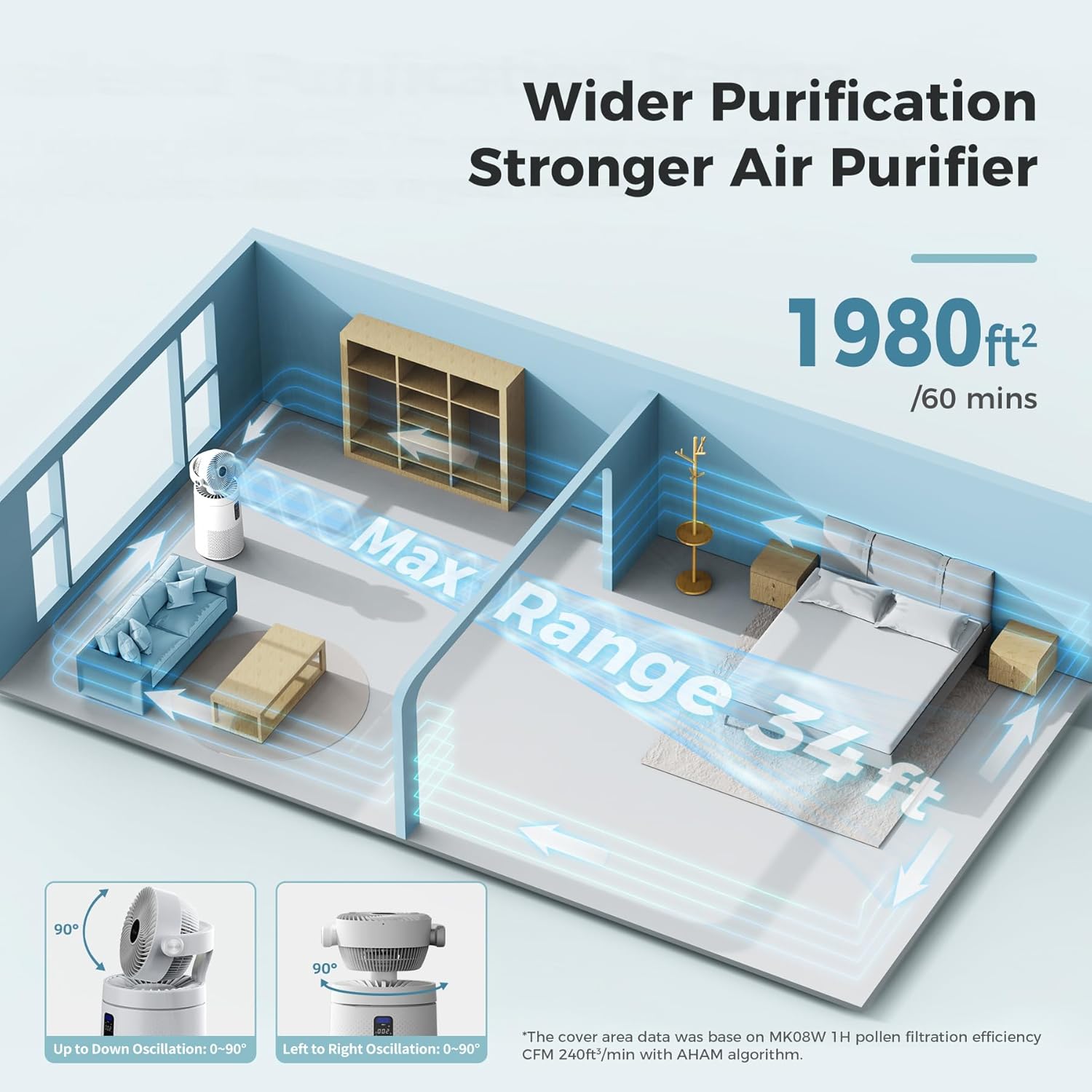
Figure 2: 3D Wide-Angle Oscillation
6.4 Timer-Funktion
Drücken Sie die Timer-Taste repeatedly to set the desired operating time in 1-hour increments, up to 24 hours. The unit will automatically turn off once the set time expires.
6.5 Luftqualitätsanzeige
The integrated millisecond air detector provides real-time air quality readings (PM1.0, PM2.5, PM10) on the digital display. The display color changes to indicate air quality levels:
- Blau: Sehr gute Luftqualität
- Grün: Gute Luftqualität
- Gelb: Moderate Luftqualität
- Rot: Schlechte Luftqualität

Figure 3: Millisecond Laser Sensors and Air Quality Display
6.6 Umgebungslichtsteuerung
Drücken Sie die Lichttaste to turn the ambient light on/off or adjust its brightness. This feature is particularly useful in bedrooms to avoid bright lights during sleep.
6.7 Aromatherapie-Funktion
The unit includes a hidden aroma box. Open the aroma box, add a few drops of your preferred essential oil to the sponge, and close the box. The fan will then disperse the scent throughout the room.

Figure 4: Aromatherapy Box
7. Wartung
Regular maintenance ensures optimal performance and extends the lifespan of your AROEVE Air Purifier Fan.
7.1 Filterwechsel
The filter replacement indicator light will illuminate when it's time to replace the HEPA filter (approximately every 6-8 months, depending on usage and air quality).
- Trennen Sie den Luftreiniger von der Steckdose.
- Open the filter compartment cover on the back of the unit.
- Nehmen Sie den alten Filter heraus. Entsorgen Sie ihn fachgerecht.
- Insert a new AROEVE genuine replacement filter, ensuring the washable pre-filter is correctly positioned.
- Schließen Sie den Filterfachdeckel.
- Schließen Sie das Gerät wieder an.
- To reset the filter indicator, press and hold the Filter-Reset-Taste (usually combined with the Air Info button) for 3-5 seconds until the light turns off.
7.2 Reinigung des waschbaren Vorfilters
The outermost layer of the filter is a washable pre-filter designed to capture larger particles like hair and dander. Clean it regularly to maintain efficiency.
- Remove the filter as described in section 7.1.
- Carefully detach the washable pre-filter from the main HEPA filter.
- Spülen Sie den Vorfilter unter fließendem Wasser ab, bis er sauber ist.
- Allow the pre-filter to air dry completely before reattaching it to the HEPA filter and re-inserting it into the unit.

Figure 5: Cleaning the Washable Pre-Filter
7.3 Außenreinigung
Wischen Sie die Außenseite des Luftreinigers mit einem weichen, trockenen Tuch ab. Verwenden Sie keine Scheuermittel oder Lösungsmittel.
8. Fehlerbehebung
| Problem | Mögliche Ursache | Lösung |
|---|---|---|
| Das Gerät lässt sich nicht einschalten | No power; filter not installed correctly | Check power connection; ensure filter is correctly installed and cover is closed. |
| Poor air quality reading despite operation | Dirty filter; blocked air inlets/outlets | Clean/replace filter; ensure proper clearance around the unit. |
| Filter replacement indicator light is on | Filter muss ausgetauscht werden | Replace the HEPA filter and reset the indicator as per Section 7.1. |
| WLAN-Verbindungsprobleme | Incorrect setup; router issues | Refer to the Smart WiFi Setup Guide; ensure you are using a 2.4GHz network. |
9. Spezifikationen
| Besonderheit | Detail |
|---|---|
| Modellnummer | MK08W |
| Marke | AROEVE |
| Farbe | Weiß |
| Technische Daten | 12.4"T x 12.4"B x 25.6"H |
| Artikelgewicht | 15.65 Pfund |
| Bodenflächenabdeckung | 1980 Quadratfuß |
| Geräuschpegel | 27 Dezibel (Schlafmodus) |
| Wastage | 53 Watt |
| Filterklasse | HEPA |
| Contaminant Filtration | Solid and Gaseous Pollutants |
| Controllertyp | Touch Panel, Smart WIFI (Amazon Alexa, Google Assistant) |
| Besonderheit | Programmable Timer, 3D Oscillation, Aromatherapy |
| Zertifizierung | CARB zertifiziert |
10. Garantie und Support
AROEVE products come with a standard manufacturer's warranty. For specific warranty details, product support, or to purchase replacement filters, please visit the official AROEVE webBesuchen Sie die Website oder kontaktieren Sie den Kundendienst über Ihren Händler.
For further assistance, please refer to the contact information provided with your purchase or on the AROEVE brand store page.


