Einführung
This user manual provides comprehensive instructions for the AUN 4K Android TV Stick (Model: M98 Y9). It covers product features, setup, operation, maintenance, and troubleshooting to ensure optimal performance and user experience. The AUN TV Stick transforms any compatible display into a smart TV, offering access to a vast array of streaming content and applications.
Lieferumfang
Bitte überprüfen Sie nach dem Auspacken, ob alle folgenden Artikel enthalten sind:
- 1 x 4K Android TV Stick (AUN M98 Y9)
- 1 x Fernbedienung
- 1 x Netzteil
- 1 x Typ-C-Kabel.
- 1 x IR Cable
- 1 x HDMI Extender Cable
- 1 x Benutzerhandbuch

Image: All components included in the AUN 4K Android TV Stick package, laid out for clear viewing. This includes the TV stick, its remote control, power adapter, Type-C cable, IR cable, HDMI extender cable, and the user manual.
Produkt überview
The AUN M98 Y9 Android TV Stick is a compact device designed to provide smart TV functionalities to any display with an HDMI input. It features a sleek design and intuitive controls.
Gerätekomponenten
- HDMI-Anschluss: Plugs directly into your TV's HDMI port.
- USB-Schnittstelle: Zum Anschluss externer Speichergeräte oder Peripheriegeräte.
- Stromanschluss (Typ-C): Zum Anschluss des Netzteils.
- Pilot lamp: Zeigt den Gerätestatus an.

Image: The AUN 4K Android TV Stick and its accompanying remote control. The stick is a compact, black rectangular device, and the remote is an ergonomic black controller with various buttons for navigation and voice control.
Fernbedienung
The included remote control allows for easy navigation and interaction with the TV Stick. It supports voice search for quick content discovery.
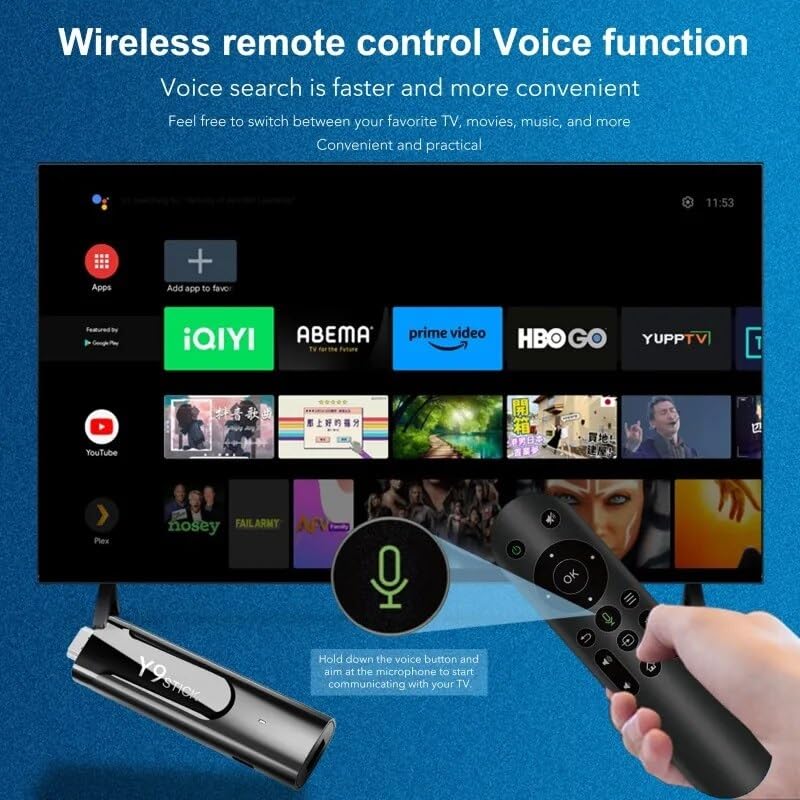
Image: A hand holding the AUN TV Stick remote control, with a visual overlay indicating the voice search button and microphone icon. The image illustrates the ease of using voice commands to interact with the TV stick's interface, which is displayed on a television screen in the background.
Installationshandbuch
Follow these steps to set up your AUN 4K Android TV Stick:
- Connect the TV Stick: Plug the AUN TV Stick directly into an available HDMI port on your television or projector. If space is limited, use the provided HDMI extender cable.
- Strom anschließen: Connect the Type-C cable to the "Power Hole" on the TV Stick and the other end to the provided power adapter. Plug the power adapter into a wall outlet.
- Connect IR Cable (Optional): If the TV Stick is hidden behind the TV or in a cabinet, connect the IR cable to the TV Stick and position the IR receiver in a location where it has a clear line of sight to your remote control.
- HDMI-Eingang auswählen: Turn on your TV or projector and select the corresponding HDMI input source to which the TV Stick is connected.
- Ersteinrichtung: Follow the on-screen instructions to complete the initial setup, including language selection, Wi-Fi network connection, and Google account login.
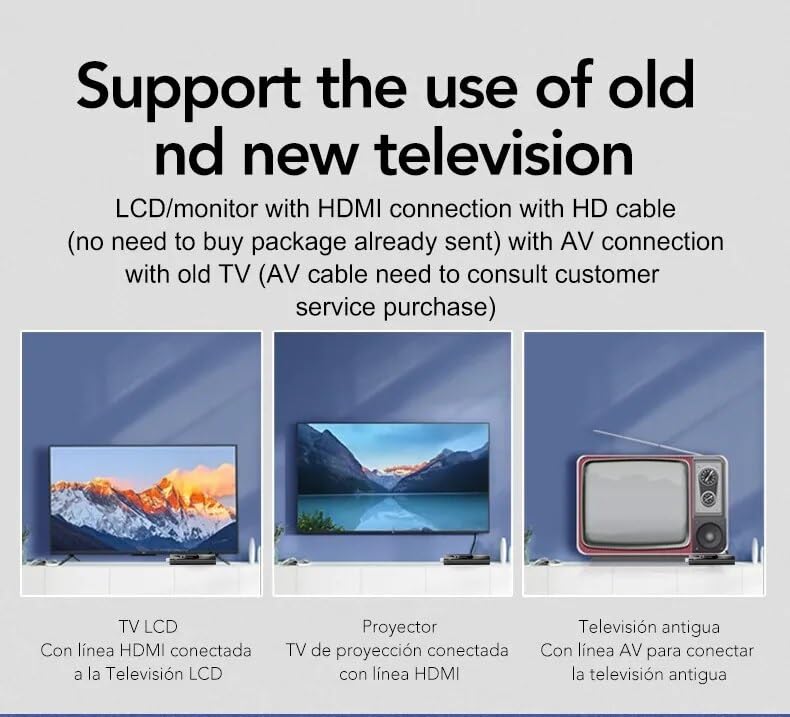
Image: This diagram illustrates the versatility of the AUN TV Stick, showing its compatibility with modern LCD TVs and projectors via HDMI, and older televisions using an AV connection (AV cable sold separately). It highlights the ease of connecting the device to various display types.
Bedienungsanleitung
Navigieren in der Benutzeroberfläche
Use the directional pad and "OK" button on the remote control to navigate through the Android TV interface. The "Back" button returns to the previous screen, and the "Home" button takes you to the main home screen.
Mit WLAN verbinden
- Vom Startbildschirm aus navigieren Sie zu Einstellungen.
- Wählen Netzwerk & Internet.
- Wählen Sie das gewünschte WLAN-Netzwerk aus der Liste aus.
- Enter the Wi-Fi password using the on-screen keyboard and select Verbinden.
The AUN TV Stick supports dual-band Wi-Fi (2.4G/5G) for stable and fast wireless connectivity.

Image: This visual demonstrates the AUN TV Stick's support for both 2.4G and 5G dual-band Wi-Fi, ensuring smooth high-speed graphics and streaming. It also shows the capability to mirror content from a mobile phone to the TV screen, enhancing the viewErfahrung.
Anwendungen installieren
Access the Google Play Store from the home screen to download and install your favorite streaming apps (e.g., Netflix, Prime Video, Disney+ Hotstar) and games. A Google account is required for Play Store access.
Using Voice Search
Press the dedicated voice button on your remote control and speak into the microphone to search for content, open apps, or get information. Voice search is faster and more convenient.
Hauptmerkmale
- 4K-Ultra-HD-Auflösung: Supports stunning 4K resolution for crisp, clear visuals and an immersive viewErfahrung.
- HDR 10+ Support: Enhanced dynamic range for vibrant colors and greater contrast.
- Widevine L1-zertifiziert: Enables streaming of high-definition content from premium services like Netflix and Prime Video.
- Betriebssystem Android 13: Provides a smooth, user-friendly interface with access to a vast ecosystem of apps.
- Amlogic S905Y4 Quad A35 CPU: High-performance processor for seamless streaming and gaming.
- 2GB RAM & 16GB Storage: Sufficient memory for smooth operation and ampPlatz für Apps und Medien.
- Dualband-WLAN (2.4G/5G): Ensures stable and fast internet connectivity.
- Bluetooth 5: For connecting wireless headphones, game controllers, and other Bluetooth accessories.
- Dolby Audio & DTS Digital Support: Bietet eine satte, immersive Klangqualität.
- USB & Memory Card Ports: Allows for external storage expansion and media playback.
- Miracast-Unterstützung: Enables screen mirroring from compatible devices.

Image: This image highlights the superior image quality of the AUN TV Stick, emphasizing its 4K Ultra HD and HDR capabilities. The vibrant colors and sharp details demonstrate the immersive visual experience provided by the device.

Image: This image emphasizes the generous memory configuration of the AUN TV Stick, featuring 2GB of DDR3 RAM and 16GB of eMMC storage. This combination ensures smooth operation and ample space for applications and media content.
Fehlerbehebung
If you encounter issues with your AUN 4K Android TV Stick, refer to the following common problems and solutions:
- Kein Strom/Gerät schaltet sich nicht ein:
- Stellen Sie sicher, dass das Netzteil fest mit dem TV-Stick und einer funktionierenden Steckdose verbunden ist.
- Versuchen Sie es mit einer anderen Steckdose.
- No Signal on TV Screen:
- Verify the TV Stick is firmly plugged into the HDMI port.
- Prüfen Sie, ob Ihr Fernseher auf die richtige HDMI-Eingangsquelle eingestellt ist.
- Versuchen Sie einen anderen HDMI-Anschluss an Ihrem Fernseher.
- If using the HDMI extender, ensure it is properly connected.
- Fernbedienung reagiert nicht:
- Ensure there are no obstructions between the remote and the TV Stick (or IR receiver).
- Prüfen Sie, ob die Batterien der Fernbedienung ausgetauscht werden müssen.
- If using the IR cable, ensure it is properly connected and positioned.
- Probleme mit der Wi-Fi-Verbindung:
- Starten Sie Ihren WLAN-Router neu.
- Stellen Sie sicher, dass sich der TV-Stick in Reichweite Ihres WLAN-Routers befindet.
- Geben Sie das WLAN-Passwort erneut ein, um sicherzustellen, dass es korrekt ist.
- Try connecting to the 2.4GHz band if you are on 5GHz, or vice-versa.
- App Crashing/Slow Performance:
- Schließen Sie Hintergrundanwendungen.
- Clear the cache of the problematic app via Settings > Apps.
- Starten Sie den TV-Stick neu, indem Sie ihn vom Stromnetz trennen und wieder anschließen.
- Stellen Sie sicher, dass Sie über ausreichend freien Speicherplatz verfügen.
Technische Daten
| Besonderheit | Detail |
|---|---|
| Marke | AUN |
| Modell | AUN M98 Y9 |
| Betriebssystem | Android 13 |
| Prozessor | Amlogic S905Y4 Quad A35 |
| RAM | 2 GB |
| Lagerung | 16 GB |
| Auflösung | 4K |
| Besondere Merkmale | Widevine L1, HDR 10+, AV1, Dolby Audio, DTS Digital, Miracast |
| Konnektivität | 2.4-GHz-/5-GHz-Dual-WLAN, Bluetooth 5 |
| Häfen | USB, Memory Card, HDMI, Type-C Power |
| Kompatible Geräte | Television, Projectors |
| Technische Daten | 8 x 3 x 2 cm |
| Artikelgewicht | 300 g |

Image: This graphic illustrates the core technical specifications of the AUN TV Stick, highlighting its Amlogic S905Y4 Quad A35 CPU, OpenGL ES 3.2 GPU, H.265 video decoder supporting up to 4K@60fps, and HDMI 2.0 output for 4K@60fps display.
Wartung
To ensure the longevity and optimal performance of your AUN 4K Android TV Stick, follow these maintenance guidelines:
- Reinigung: Reinigen Sie das Gerät mit einem weichen, trockenen Tuch. Verwenden Sie keine flüssigen Reiniger oder Sprays.
- Belüftung: Stellen Sie sicher, dass das Gerät an einem gut belüfteten Ort aufgestellt wird, um eine Überhitzung zu vermeiden. Decken Sie die Lüftungsöffnungen nicht ab.
- Lagerung: Bei längerer Nichtbenutzung sollte das Gerät an einem kühlen, trockenen Ort, vor direkter Sonneneinstrahlung und extremen Temperaturen geschützt aufbewahrt werden.
- Software-Updates: Regularly check for and install system updates to ensure the device has the latest features and security patches.
Garantie und Support
The AUN 4K Android TV Stick comes with a 6 Monate Garantie Diese Garantie gilt ab Kaufdatum und deckt Herstellungsfehler sowie Funktionsstörungen bei normalem Gebrauch ab. Bitte bewahren Sie Ihren Kaufbeleg als Kaufnachweis auf.
For technical support, warranty claims, or any other inquiries, please contact Megaa Electronics using the following details:
- E-Mail: support@megaaelectronics.com or megaaelectronics@gmail.com
- WhatsApp: 8328671337
Please provide your product model (AUN M98 Y9) and a detailed description of the issue when contacting support.


