1. Einleitung
The darkFlash DS900 ATX Mid-Tower PC Case is designed to provide an optimal building and gaming experience with its full view tempered glass panels and efficient cooling capabilities. This manual provides detailed instructions for setup, operation, maintenance, and troubleshooting to ensure you get the most out of your PC case.
Hauptmerkmale:
- Ungehindert View: Experience this PC case's awe-inspiring 270° panoramic tempered glass panel. This exceptional design provides an expansive and clear view of your hardware and RGB lighting. The high-strength tempered glass ensures excellent clarity and durability.
- Upgrade High-Speed IO Panel: Upgrade PC case with a high-speed IO panel that offers USB 3.0 ports and a Type-C interface, providing lightning-fast connectivity options for seamless data transfer and device compatibility.
- Stay Cool, Stay Powerful: Equipped with four PWM ARGB fans, this computer case ensures optimal airflow and heat dissipation. It supports up to 10 fans and a 360MM RAD for efficient cooling. Keep your components cool even during intense gaming sessions and unleash the full potential of your PC.
- Thoughtful Design for Science: Obsessive detail design, magnetic dust filter at the top of the pc case and panel dust filter to reduce dust for keeping your components free from dust, also anti-slip bottom structure to prevent slipping or sliding on various surfaces.
- Einfache Installation: With its user-friendly design, this darkFlash PC case makes installation a breeze. Enjoy hassle-free cable management and quick access to your components, making upgrades and maintenance effortless.
2. Produktüberschreitungview & Komponenten
Familiarize yourself with the main features and components of your darkFlash DS900 PC case.
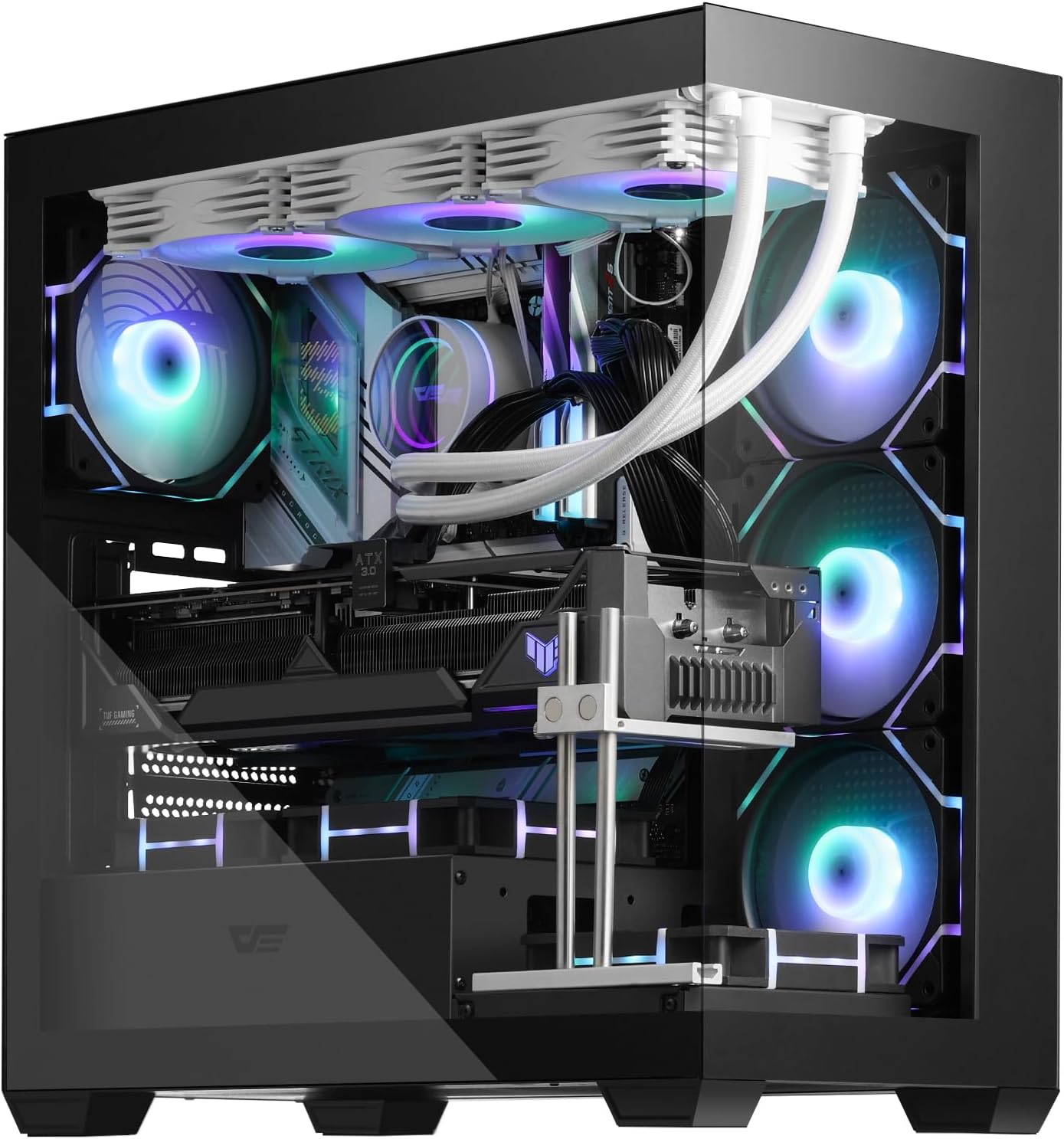
Abbildung 2.1: Insgesamt view of the darkFlash DS900 PC Case, showcasing its spacious interior and pre-installed ARGB fans.

Figure 2.2: Internal layout and component compatibility, including support for up to 360mm radiators, CPU coolers up to 170mm, and GPUs up to 425mm.
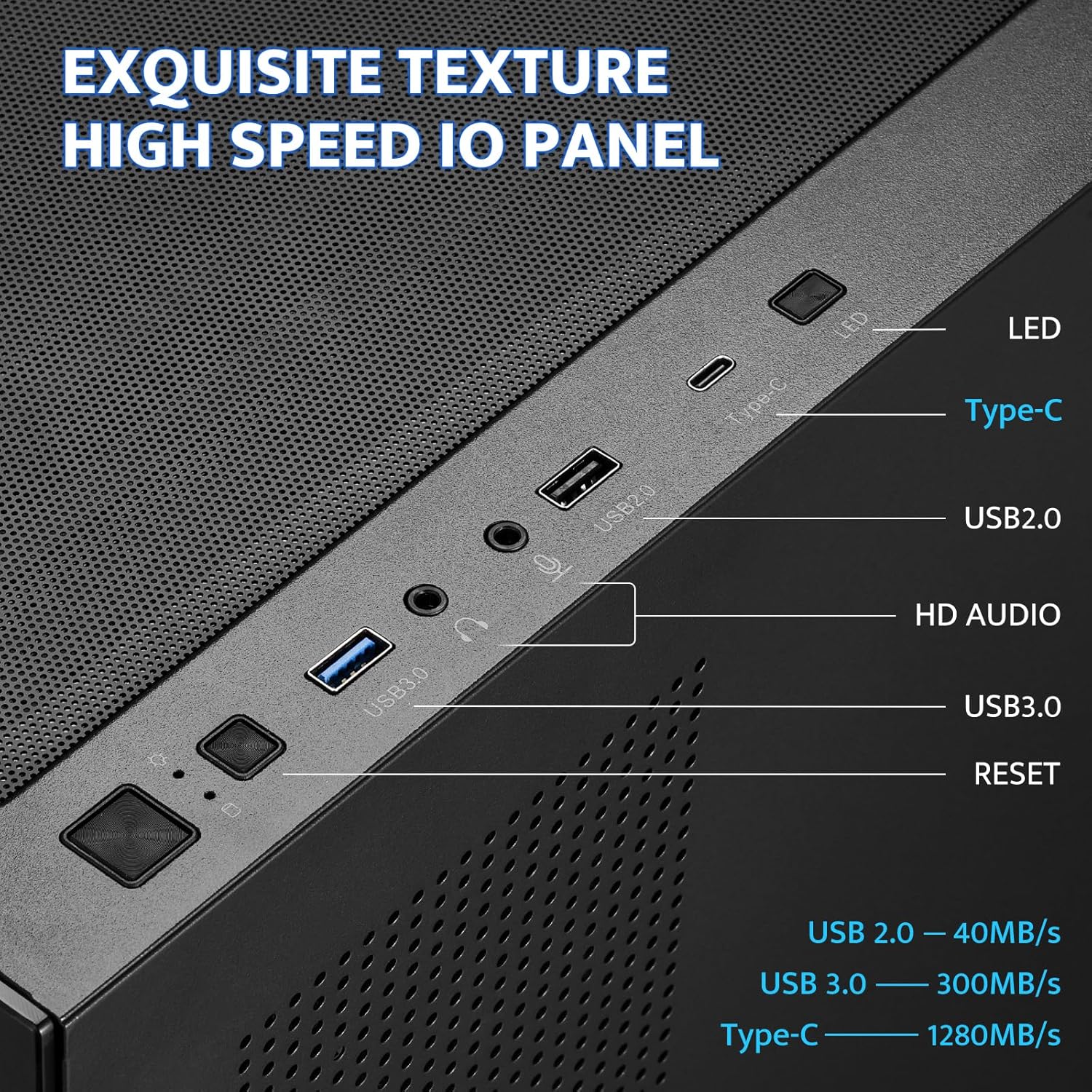
Figure 2.3: High-Speed I/O Panel featuring USB 3.0, USB 2.0, Type-C ports, and HD Audio jacks for convenient connectivity.

Figure 2.4: The 270° full view tempered glass design provides an expansive view of your internal components without an A-pillar obstruction.
3. Einrichtung und Installation
Follow these general guidelines for installing your PC components into the darkFlash DS900 case.
3.1 Vorbereitung des Falls
- Carefully remove the tempered glass side panels. The panels feature a quick-remove snap-on design, held by magnets. Gently pull the panel slightly forward and then lift straight up to detach.
- Ensure all internal packaging materials are removed from the case.
3.2 Komponenteninstallation
- Motherboard-Installation: Align your ATX, M-ATX, or ITX motherboard with the pre-installed standoffs. Secure the motherboard using appropriate screws.
- Installation des Netzteils (PSU): Install your PSU (up to 220mm max) into the dedicated bottom mount compartment. Ensure proper cable routing through the provided cutouts.
- GPU-Installation: Install your graphics card into the PCI-E slot on your motherboard. The case supports GPUs up to 425mm in length. Utilize the GPU support screw mounts if needed for larger cards.
- Installation des Speicherlaufwerks: Install 2.5" SSDs and 3.5" HDDs in their designated locations, typically behind the motherboard tray or within the PSU shroud area.
- Installation des Kühlsystems: The case supports up to 10 fans and a 360mm liquid cooling radiator. Install your CPU cooler and additional fans as desired for optimal airflow.
3.3 Kabelmanagement
The darkFlash DS900 is designed for hassle-free cable management. Utilize the numerous slots and tie-down points behind the motherboard tray to route and secure cables, ensuring a clean and organized interior for improved airflow and aesthetics.

Figure 3.1: Optimized cable routing options behind the motherboard tray for a clean build.
4. Bedienung
Operating your darkFlash DS900 PC case involves managing its integrated features for optimal performance and aesthetics.
4.1 ARGB-Lüftersteuerung
The case comes with four pre-installed PWM ARGB fans. These fans can be controlled via your motherboard's RGB software (if compatible) to synchronize lighting effects with other components. Note that an RGB Hub Controller is not included with the case.

Figure 4.1: The four pre-installed ARGB fans provide vibrant lighting and efficient cooling.
4.2 Using the High-Speed I/O Panel
The top-mounted I/O panel provides convenient access to various ports:
- USB 3.0-Anschluss: Für Hochgeschwindigkeits-Datenübertragung.
- USB 2.0-Anschluss: Für Standard-Peripherieanschlüsse.
- Typ C-Anschluss: Offers lightning-fast connectivity with speeds up to 1280MB/s.
- HD-Audioanschlüsse: Zum Anschließen von Kopfhörern und Mikrofonen.
- LED-Taste: To cycle through various ARGB lighting modes for the pre-installed fans.
- Reset-Taste: Um Ihr System neu zu starten.
5. Wartung
Regelmäßige Wartung trägt dazu bei, die Langlebigkeit und optimale Leistung Ihrer PC-Komponenten zu gewährleisten.
5.1 Reinigung des Staubfilters
The darkFlash DS900 features magnetic dust filters on the top and a panel dust filter to minimize dust accumulation. Regularly clean these filters to maintain optimal airflow and prevent dust buildup inside the case.
- Heben Sie den magnetischen Staubfilter vorsichtig von der oberen Abdeckung ab.
- Remove any accumulated dust using a soft brush or vacuum cleaner.
- Reattach the magnetic dust filter.

Figure 5.1: The easily removable magnetic dust filter on the top panel for convenient cleaning.
5.2 Reinigung von gehärtetem Glas
To clean the tempered glass panels, use a microfiber cloth and a glass cleaner. Avoid abrasive materials that could scratch the glass.
6. Fehlerbehebung
This section addresses common issues you might encounter with your darkFlash DS900 PC case.
6.1 Fan/RGB Lighting Issues
- Fans not spinning or RGB not lighting up: Ensure all fan power cables and ARGB cables are securely connected to the motherboard or an RGB controller. Verify that your motherboard's RGB software is correctly configured.
- LED button not working: Check the connection of the LED button cable to your motherboard's front panel headers. Some motherboards may require specific software or a separate ARGB controller for full functionality.
6.2 Front Panel Audio Issues
- Static or no audio from front panel jacks: Ensure the HD Audio cable from the front panel is correctly and securely connected to the corresponding header on your motherboard. Verify audio drivers are up-to-date. If issues persist, consider using an external DAC for audio output.
6.3 Panel Removal/Installation
- Difficulty removing/installing side panels: The tempered glass panels are held by magnets. To remove, gently pull the panel slightly forward from the top edge and then lift straight up. When reinstalling, align the bottom edge first and then gently push the top edge until the magnets engage.
- Thumb screws for rear panel: Some users may experience minor issues with the threading of the thumb screws for the rear panel. Ensure they are aligned perfectly before tightening to avoid cross-threading.
Video 6.1: Official darkFlash video showcasing the Dual Tempered Glass Gaming PC Case, providing a visual guide to its features and design.
7. Spezifikationen
| Besonderheit | Spezifikation |
|---|---|
| Marke | darkFlash |
| Serie | DS900 |
| Artikelmodellnummer | DS900 |
| Gehäusetyp | Mittlerer Turm |
| Motherboard-Kompatibilität | ATX, M-ATX, ITX |
| Material | Gehärtetes Glas, Metall |
| Farbe | Schwarz |
| Artikelgewicht | 15 Pfund |
| Produktabmessungen (L x B x H) | 8.6 x 17.8 x 17 Zoll |
| Anzahl der USB 2.0-Anschlüsse | 1 |
| Anzahl der USB 3.0-Anschlüsse | 1 |
| Kühlmethode | Wasser, Luft |
| Lichtfarbe | RGB |
| Maximale Höhe des CPU-Kühlers | 170 mm |
| Maximale GPU-Länge | 425 mm |
| Maximale Netzteillänge | 220 mm |
| Vorinstallierte Lüfter | 4 PWM ARGB-Lüfter |
| Maximale Lüfterunterstützung | Bis zu 10 Fans |
| Kühlerhalterung | Bis zu 360 mm |
8. Garantie und Support
For detailed warranty information and further support, please refer to the official darkFlash resources.
- Offizielles Benutzerhandbuch (PDF): Download PDF-Handbuch
- darkFlash Brand Store: Visit darkFlash Store on Amazon


