Einführung
This manual provides essential instructions for the safe and efficient operation of your JVC 40W Portable Party Speaker, Model XS-N5223PB. Please read this manual thoroughly before using the device and retain it for future reference.
The JVC 40W Portable Party Speaker features integrated Bluetooth technology for wireless audio streaming, a built-in USB port for multimedia file playback (MP3, picture, video), TF card support, Karaoke function, and an LED light show. It delivers 40W output through two 8-inch speakers and is powered by a 4000mAh battery.
Wichtige Sicherheitsinformationen
- Der Lautsprecher darf weder Wasser noch übermäßiger Feuchtigkeit ausgesetzt werden.
- Vermeiden Sie es, den Lautsprecher in der Nähe von Wärmequellen oder in direktem Sonnenlicht aufzustellen.
- Versuchen Sie nicht, den Lautsprecher zu zerlegen oder zu verändern. Überlassen Sie alle Wartungsarbeiten qualifiziertem Fachpersonal.
- Use only the specified charging adapter.
- Außerhalb der Reichweite von Kindern aufbewahren.
- Sorgen Sie während des Betriebs für ausreichende Belüftung rund um den Lautsprecher.
Packungsinhalt
Bitte überprüfen Sie, ob alle Artikel im Paket vorhanden sind:
- 1 x JVC 40W Portable Party Speaker (Model XS-N5223PB)
- 1 x Ladekabel
- 1 x Benutzerhandbuch (dieses Dokument)
Produkt überview
Familiarize yourself with the main components and controls of your JVC Portable Party Speaker.
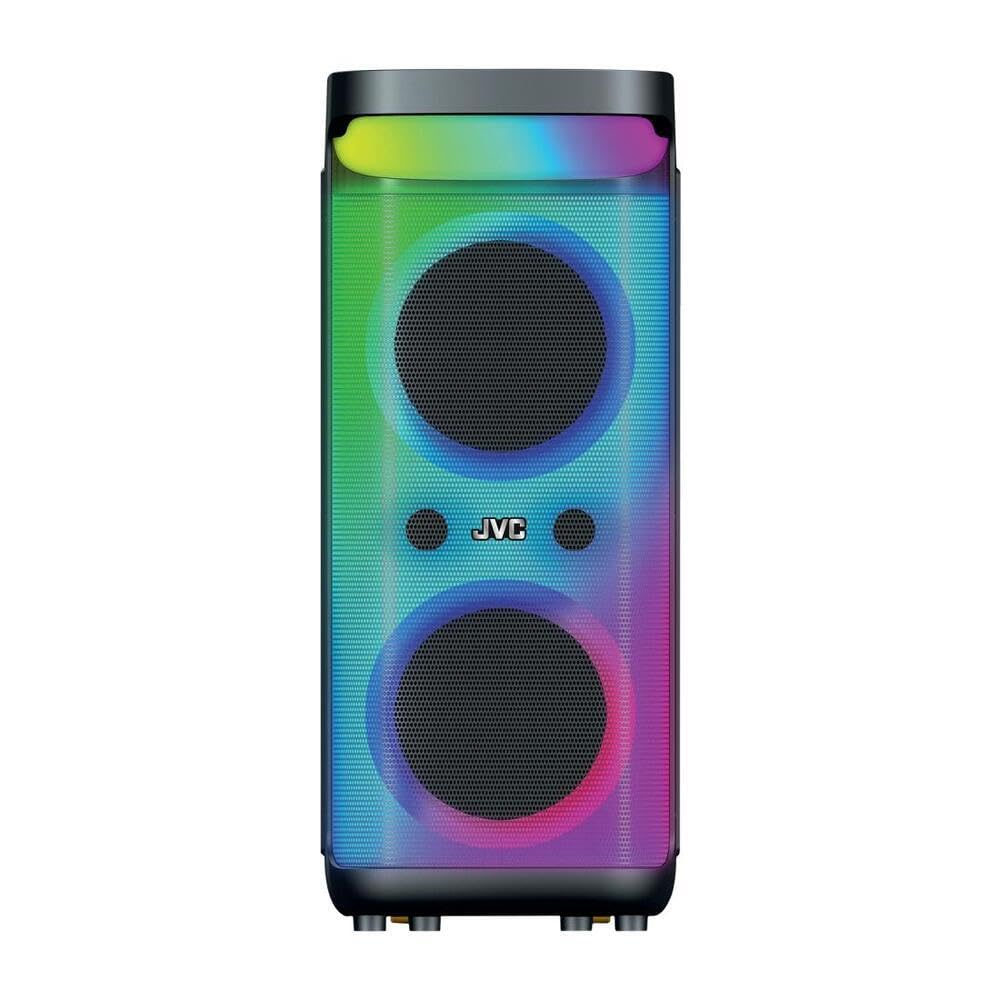
Bild 1: Vorne und oben view of the JVC 40W Portable Party Speaker, showing the control panel, LED lights, and speaker grille.

Bild 2: Detaillierte view of the speaker's top control panel, highlighting buttons for mode selection, volume, playback, and input ports.
Funktionen des Bedienfelds:
- Netzschalter: Schaltet den Lautsprecher ein/aus.
- Modus-Taste: Schaltet zwischen Bluetooth-, USB-, TF-Karten- und AUX-Eingangsmodi um.
- Lautstärkeregler: Adjusts master volume and microphone volume (if applicable).
- Wiedergabe-/Pause-Taste: Steuert die Medienwiedergabe.
- Schaltflächen für vorherigen/nächsten Titel: Navigiert durch die Musiktitel.
- LED-Lichttaste: Toggles or changes LED light show patterns.
- USB-Anschluss: For USB drive playback of MP3, picture, and video files.
- TF-Karten-Slot: For TF (MicroSD) card playback of MP3, picture, and video files.
- AUX-Eingang: Zum Anschluss externer Audiogeräte über ein 3.5-mm-Kabel.
- Mikrofoneingang: For karaoke function.
Aufstellen
Aufladen des Lautsprechers
- Schließen Sie das Ladekabel an den Ladeanschluss des Lautsprechers an.
- Plug the other end of the charging cable into a suitable power adapter (9 Volts input) and then into a wall outlet.
- The charging indicator light will illuminate, typically red, during charging. It will change color or turn off when fully charged.
- Laden Sie den Lautsprecher vor dem ersten Gebrauch etwa 4-6 Stunden lang vollständig auf.
Erstplatzierung
Place the speaker on a stable, flat surface. Ensure there is adequate space around the speaker for optimal sound dispersion and ventilation. The speaker is designed for floorstanding placement.
Bedienungsanleitung
Ein-/Ausschalten
- To turn on: Press and hold the Power button until the display illuminates.
- To turn off: Press and hold the Power button again until the display turns off.
Bluetooth-Verbindung
- Turn on the speaker. It will automatically enter Bluetooth pairing mode, indicated by a flashing "BLUE" on the display or an audible prompt.
- Aktivieren Sie auf Ihrem Mobilgerät (Smartphone, Tablet usw.) Bluetooth und suchen Sie nach verfügbaren Geräten.
- Select "JVC XS-N5223PB" (or similar name) from the list of devices.
- Once paired, the speaker will confirm the connection with an audible sound, and "BLUE" on the display will stop flashing.
- Sie können jetzt Audio drahtlos von Ihrem Gerät an den Lautsprecher streamen.
USB/TF-Kartenwiedergabe
- Insert a USB flash drive or TF (MicroSD) card into the respective port/slot on the speaker.
- The speaker will automatically switch to USB or TF card mode and begin playing supported audio, picture, or video files. If it does not switch automatically, press the Mode button to select the correct input.
- Verwenden Sie die Wiedergabe-/Pause-Taste und die Tasten „Vorheriger/Nächster Titel“, um die Wiedergabe zu steuern.
AUX-Eingang
- Verbinden Sie ein Ende eines 3.5-mm-Audiokabels (nicht im Lieferumfang enthalten) mit dem AUX-Eingang des Lautsprechers.
- Verbinden Sie das andere Ende des Kabels mit der Audioausgangsbuchse Ihres externen Geräts (z. B. MP3-Player, Laptop).
- Press the Mode button on the speaker until "AUX" mode is selected.
- Steuern Sie Wiedergabe und Lautstärke über Ihr externes Gerät.
Karaoke-Funktion
- Connect a microphone (not included) to the Microphone Input port.
- Die Mikrofonlautstärke kann mit dem dafür vorgesehenen Drehknopf am Bedienfeld eingestellt werden.
- Play music via Bluetooth, USB, TF card, or AUX, and sing along.
LED-Lichtshow
Press the LED Light button to cycle through different light patterns or to turn the LED lights on/off.
True Wireless Stereo (TWS)-Funktion
The TWS function allows you to pair two JVC XS-N5223PB speakers together for a stereo sound experience.
- Stellen Sie sicher, dass beide Lautsprecher eingeschaltet und im Bluetooth-Modus sind, aber nicht mit einem Gerät verbunden sind.
- On one speaker (this will be the primary speaker), press and hold the TWS button (refer to your speaker's specific button layout if not explicitly labeled).
- Der Hauptlautsprecher sucht nach dem Nebenlautsprecher. Sobald die Verbindung hergestellt ist, geben beide Lautsprecher einen Bestätigungston aus.
- Verbinden Sie nun Ihr Mobilgerät wie oben beschrieben per Bluetooth mit dem Hauptlautsprecher. Der Ton wird über beide Lautsprecher in Stereo wiedergegeben.
Wartung
- Reinigung: Reinigen Sie die Außenseite des Lautsprechers mit einem weichen, trockenen Tuch. Verwenden Sie keine flüssigen Reinigungsmittel oder Scheuermittel.
- Lagerung: When not in use for extended periods, store the speaker in a cool, dry place. It is recommended to charge the battery every 3-6 months to maintain its lifespan.
- Batteriepflege: Avoid fully discharging the battery frequently. Charge the speaker when the low battery indicator appears.
Fehlerbehebung
| Problem | Mögliche Ursache | Lösung |
|---|---|---|
| Der Lautsprecher lässt sich nicht einschalten. | Batterie ist entladen. | Schließen Sie den Lautsprecher an eine Stromquelle an und laden Sie ihn auf. |
| Kein Ton. | Die Lautstärke ist zu niedrig; falscher Eingangsmodus; Gerät nicht angeschlossen. | Increase volume on speaker and connected device. Ensure correct input mode is selected. Reconnect Bluetooth or check cable connections. |
| Die Bluetooth-Kopplung schlägt fehl. | Der Lautsprecher befindet sich nicht im Kopplungsmodus; das Gerät ist zu weit entfernt; es liegen Störungen vor. | Stellen Sie sicher, dass sich der Lautsprecher im Bluetooth-Kopplungsmodus befindet. Bringen Sie Ihr Gerät näher an den Lautsprecher heran. Vermeiden Sie starke elektromagnetische Störungen. Versuchen Sie, beide Geräte neu zu starten. |
| USB-/TF-Karte wird nicht wiedergegeben. | Nicht unterstützt file Formatierung; Karte/Laufwerk nicht korrekt eingesetzt; beschädigt files. | Sicherstellen files are in supported formats (e.g., MP3). Reinsert the USB drive/TF card. Try with a different USB drive/TF card or different files. |
| Die LED-Leuchten funktionieren nicht. | Die LED-Leuchten sind ausgeschaltet. | Press the LED Light button to turn them on or change patterns. |
Technische Daten
| Modellnummer | XS-N5223PB |
| Ausgangsleistung | 40 W |
| Lautsprechergröße | 8 Zoll x 2 |
| Konnektivität | Bluetooth, USB, TF-Karte, AUX |
| Batteriekapazität | 4000 mAh |
| Eingangslautstärketage | 9 Volt |
| Abmessungen (T x B x H) | 33 cm x 28.5 cm x 66 cm |
| Material | Plastik |
| Montagetyp | Bodenständig |
| Zusätzliche Merkmale | TWS Function, Karaoke, LED Light Show |
Garantieinformationen
This JVC Portable Party Speaker (Model XS-N5223PB) comes with a 1 Jahre Herstellergarantie Diese Garantie gilt ab Kaufdatum und deckt Herstellungsfehler in Material und Verarbeitung bei normalem Gebrauch ab.
Von der Garantie ausgeschlossen sind:
- Schäden, die durch Unfall, Missbrauch, Missbrauch, Überschwemmung, Feuer, Erdbeben oder andere äußere Ursachen verursacht wurden.
- Damage caused by operating the product outside the permitted or intended uses described by JVC.
- Damage caused by service performed by anyone who is not an authorized service provider of JVC.
- Products or parts that have been modified to alter functionality or capability without the written permission of JVC.
Bitte bewahren Sie Ihren Kaufbeleg für Garantieansprüche auf.
Support- und Kontaktinformationen
For technical support, warranty claims, or further assistance, please contact JVC customer service.
- WebWebsite: www.jvc.com (Please check your regional JVC website for local support details)
- E-Mail: Siehe JVC webWebsite für spezifische Kontakt-E-Mail-Adressen.
- Telefon: Siehe JVC webWebsite für spezifische Telefonnummern.
When contacting support, please have your product model number (XS-N5223PB) and proof of purchase readily available.


