Einführung
This manual provides detailed instructions for the setup, operation, and maintenance of your Zenwire USB-C Hub 10-in-1 Adapter. Please read this manual thoroughly before using the device to ensure optimal performance and longevity.

Image: The Zenwire USB-C Hub, a compact gray device, is shown connected to various cables and accessories, including HDMI, USB, Ethernet, and SD cards, illustrating its multi-functionality.
Produkt überview
The Zenwire USB-C Hub is a versatile 10-in-1 adapter designed to expand the connectivity of your USB-C enabled devices. It features a durable aluminum alloy shell for efficient heat dissipation.
Hauptmerkmale und Anschlüsse:
- HDMI 2.1-Anschluss: Supports resolutions up to 8K@30Hz or 4K@120Hz, with backward compatibility for lower resolutions.
- DisplayPort 1.4: Supports resolutions up to 8K@30Hz or 4K@120Hz, with backward compatibility for lower resolutions.
- USB-C Power Delivery (PD) 100W Port: Allows fast charging of your host device while using the hub, providing up to 100W power.
- 2x USB 3.0-Anschlüsse: Offers data transfer speeds up to 5 Gbps, 10 times faster than USB 2.0.
- SD-Kartenleser: Supports SD cards up to 2TB.
- MicroSD-Kartenleser: Unterstützt MicroSD-Karten bis zu 2 TB.
- RJ-45 Gigabit Ethernet Port: Provides a stable wired internet connection with speeds up to 1000 Mbps.
- 3.5-mm-Audiobuchse: For connecting headphones, microphones, or external speakers.
- USB-C 3.1 / Thunderbolt 3.0 Host Connection: Connects the hub to your laptop or compatible device.

Bild: Eine detaillierte view of the Zenwire USB-C Hub, highlighting its 10 ports including 3.5mm audio, Type-C PD100W, DP1.6, HDMI2.1, Gigabit Ethernet, USB3.0 5Gbps, SD, and MicroSD slots.

Image: A close-up of the Zenwire USB-C Hub, emphasizing its aluminum alloy shell designed for effective heat dissipation, ensuring the device remains cool during operation.
Aufstellen
- Verbindung zum Hostgerät herstellen: Plug the integrated USB-C cable of the Zenwire Hub into a compatible USB-C or Thunderbolt 3.0/4.0 port on your laptop, tablet, or smartphone. The hub is Plug & Play and typically requires no driver installation.
- Stromversorgung (optional): If your host device requires charging or if you are connecting power-intensive peripherals, connect your original USB-C power adapter to the USB-C PD 100W port on the hub.
- Peripheriegeräte anschließen: Connect your desired devices (monitors, USB drives, Ethernet cable, SD/MicroSD cards, audio devices) to the corresponding ports on the hub.
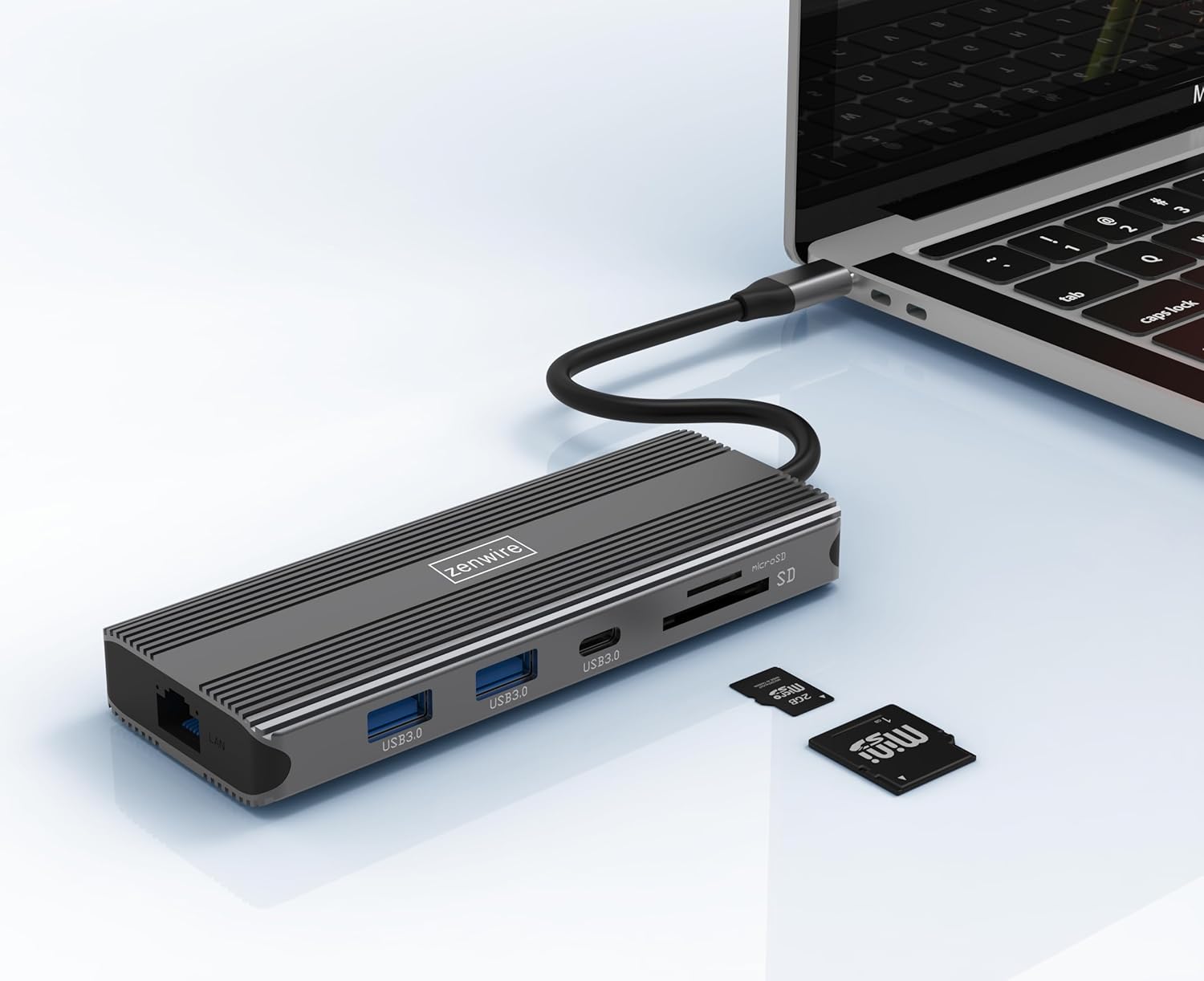
Image: The Zenwire USB-C Hub is shown connected to a laptop via its integrated USB-C cable, with SD and MicroSD cards placed nearby, illustrating a typical setup scenario.
Bedienungsanleitung
Display-Konnektivität:
The hub supports connecting up to two external monitors simultaneously via its HDMI 2.1 and DisplayPort 1.4 interfaces. Both can display video in 4K@60Hz concurrently.
- Einzelmonitor: Connect your monitor to either the HDMI or DisplayPort.
- Zwei Monitore: Connect one monitor to the HDMI port and another to the DisplayPort.

Image: A laptop is displayed connected to two larger external monitors, demonstrating the multi-display capability of the Zenwire USB-C Hub.
Multi-Display Modes (MacOS vs. Windows):
The behavior of multiple external displays can vary between operating systems.
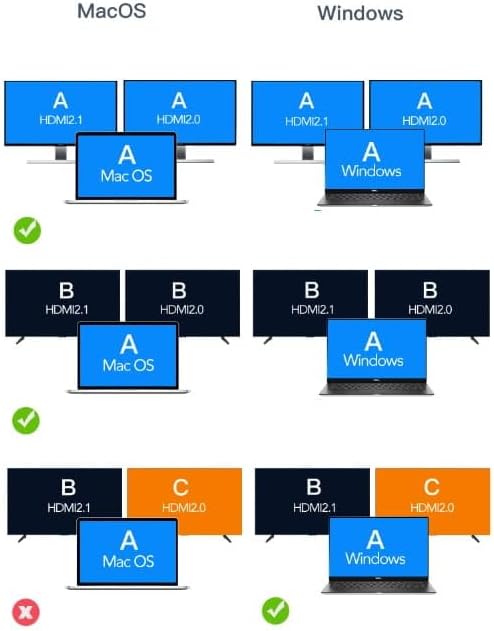
Image: A diagram illustrating different multi-display configurations for MacOS and Windows. It shows that MacOS typically supports extended desktop across two external monitors (A, B) and the laptop screen (A), while Windows can support extended desktop across three screens (A, B, C) or mirrored displays.
- MacOS: Typically supports extended desktop across two external monitors (A, B) and the laptop screen (A). Mirroring is also supported.
- Windows: Supports extended desktop across three screens (A, B, C) or mirrored displays, offering more flexibility for multi-monitor setups.
HDMI 2.1 and DisplayPort 1.4 Advanced Features:
These ports offer higher refresh rates and advanced features for an enhanced visual experience:
- Hohe Übertragungsgeschwindigkeiten: Up to 48 Gbps for HDMI 2.1, ensuring high data throughput.
- eARC (Enhanced Audio Return Channel): For higher audio quality and support for object-based audio formats like Dolby Atmos and DTS-X.
- VRR (variable Aktualisierungsrate): Useful for gaming, where refresh rates are not constant.
- ALLM (Auto Low Latency Mode): Automatically detects content like games and switches the device to a low-latency mode.
- QMS (Quick Media Switching): The image on the screen changes immediately when switching between content.
- QFT (Quick Frame Transport): Reduces input lag further.
- Dynamisches HDR: Adjusts the image parameters during content transmission for higher quality visuals. Supports HDR 10 and 10+.
Audio-Konnektivität:
The 3.5mm audio jack allows connection of various audio devices:
- Mikrofone
- Kopfhörer
- Headphones with integrated microphone
- Externe Lautsprecher
Wartung
- Reinigung: Reinigen Sie die Nabe mit einem weichen, trockenen Tuch. Vermeiden Sie flüssige Reinigungsmittel oder Scheuermittel.
- Lagerung: Lagern Sie den Nabenkörper an einem kühlen, trockenen Ort, geschützt vor direkter Sonneneinstrahlung und extremen Temperaturen.
- Handhabung: Vermeiden Sie es, das Gerät fallen zu lassen oder starken Stößen auszusetzen.
- Wärmeableitung: The aluminum alloy shell is designed for effective heat dissipation. Ensure the hub is placed in a well-ventilated area during prolonged use.
Fehlerbehebung
- Keine Anzeigeausgabe:
- Stellen Sie sicher, dass das USB-C-Kabel vom Hub fest mit Ihrem Host-Gerät verbunden ist.
- Verify that the HDMI/DisplayPort cable is firmly connected to both the hub and the monitor.
- Check your host device's display settings to ensure the external monitor is detected and configured correctly (e.g., extended, mirrored).
- Try a different HDMI/DisplayPort cable or monitor to rule out cable/monitor issues.
- Keine Stromversorgung:
- Stellen Sie sicher, dass Ihr USB-C-Netzteil an den PD-Anschluss des Hubs angeschlossen ist und ordnungsgemäß funktioniert.
- Vergewissern Sie sich, dass Ihr Hostgerät USB-C Power Delivery unterstützt.
- USB-Geräte werden nicht erkannt:
- Reconnect the USB device to a different USB 3.0 port on the hub.
- Ensure the USB device is functioning correctly by connecting it directly to your host device.
- Some high-power USB devices may require external power if the hub's PD port is not utilized.
- Probleme mit der Ethernet-Verbindung:
- Prüfen Sie, ob das Ethernet-Kabel sowohl mit dem Hub als auch mit Ihrem Router/Modem fest verbunden ist.
- Überprüfen Sie die Netzwerkeinstellungen auf Ihrem Hostgerät.
- Ensure your router/modem is working correctly.
- SD/MicroSD Card Not Detected:
- Stellen Sie sicher, dass die Karte vollständig in den richtigen Schlitz eingeführt ist.
- Check if the card is formatted correctly and readable by your operating system.
- Um Kartenprobleme auszuschließen, versuchen Sie es bitte mit einer anderen Karte.
Technische Daten
| Marke | Zenwire |
| Modell | Zenwire USB-C Hub |
| Konnektivität | USB-C 3.1 / Thunderbolt 3.0 (Host) |
| Häfen |
|
| Datenübertragungsgeschwindigkeit | USB 3.0: 5 Gbps; Ethernet: 1000 Mbps |
| Stromversorgung | Bis zu 100 W |
| Material | Aluminiumlegierung Shell |
| Abmessungen (L x B x H) | 118 x 48 x 15 mm |
| Gewicht | 109 g |
| Kabellänge | Ungefähr 15cm |
| Betriebssystemkompatibilität | Windows 11/10/8/7, Apple macOS, Linux, Android, iPad Pro iOS (USB-C models) |

Bild: Ein schräger view of the Zenwire USB-C Hub, showcasing its compact design and the integrated USB-C host cable.
Garantie und Support
Zenwire products are designed for reliability and performance. For warranty information and technical support, please refer to the official Zenwire webBesuchen Sie unsere Website oder wenden Sie sich an Ihren Händler. Bewahren Sie Ihren Kaufbeleg für Garantieansprüche auf.
For the latest software updates or driver information (if applicable), please visit the Zenwire support page. This device is designed to be Plug & Play, generally not requiring additional drivers.


