Einführung
The Marcato Atlas 150 Pasta Machine is a versatile manual pasta maker designed for home use. It allows you to create fresh pasta sheets for lasagna, as well as cut fettuccine and tagliolini. Constructed with anodized aluminum rollers, this machine is designed to prevent the release of harmful heavy metals, ensuring safe food preparation. Its robust design ensures durability and long-lasting performance.

Image of the Marcato Atlas 150 Pasta Machine in pastel pink, positioned on a kitchen counter next to a bowl of eggs, illustrating its compact design and readiness for use.
Aufstellen
- Auspacken: Carefully remove all components from the packaging. Ensure you have the main pasta machine unit, the hand crank, and the table clamp.
- Sichern Sie die Maschine: Place the pasta machine on a stable, flat countertop or table. Use the provided table clamp to firmly secure the machine to the surface. Tighten the clamp until the machine is stable and does not move during operation.
- Insert the Hand Crank: Insert the hand crank into the designated opening on the side of the machine. This opening is typically used for rolling out pasta sheets.
- Prepare the Cutters: The Atlas 150 comes with integrated cutters for fettuccine and tagliolini. These are part of the main unit.
- Dicke anpassen: The machine features a dial on the side to adjust the thickness of your pasta sheets. Pull the dial outwards and rotate it to select your desired thickness setting (from 0.5mm to 4.8mm). Start with a wider setting for initial dough flattening and gradually decrease for thinner sheets.
Bedienungsanleitung
- Teig zubereiten: Ensure your pasta dough is well-kneaded and rested. Divide the dough into manageable portions.
- Flatten Dough (Lasagna Sheets):
- Set the thickness dial to the widest setting (e.g., '0' or '1').
- Lightly flour a portion of dough and feed it through the smooth rollers while turning the hand crank.
- Fold the dough in half, lightly flour again, and pass it through the rollers. Repeat this process several times until the dough is smooth and elastic.
- Gradually decrease the thickness setting, passing the dough through each setting until you reach your desired pasta sheet thickness.
- Cut Pasta (Fettuccine/Tagliolini):
- Once you have a thin pasta sheet, transfer the hand crank to the desired cutting roller (fettuccine or tagliolini).
- Feed the pasta sheet through the cutting rollers while turning the hand crank. The machine will cut the sheet into individual pasta strands.
- Catch the freshly cut pasta as it emerges and place it on a pasta drying rack or a lightly floured surface to prevent sticking.
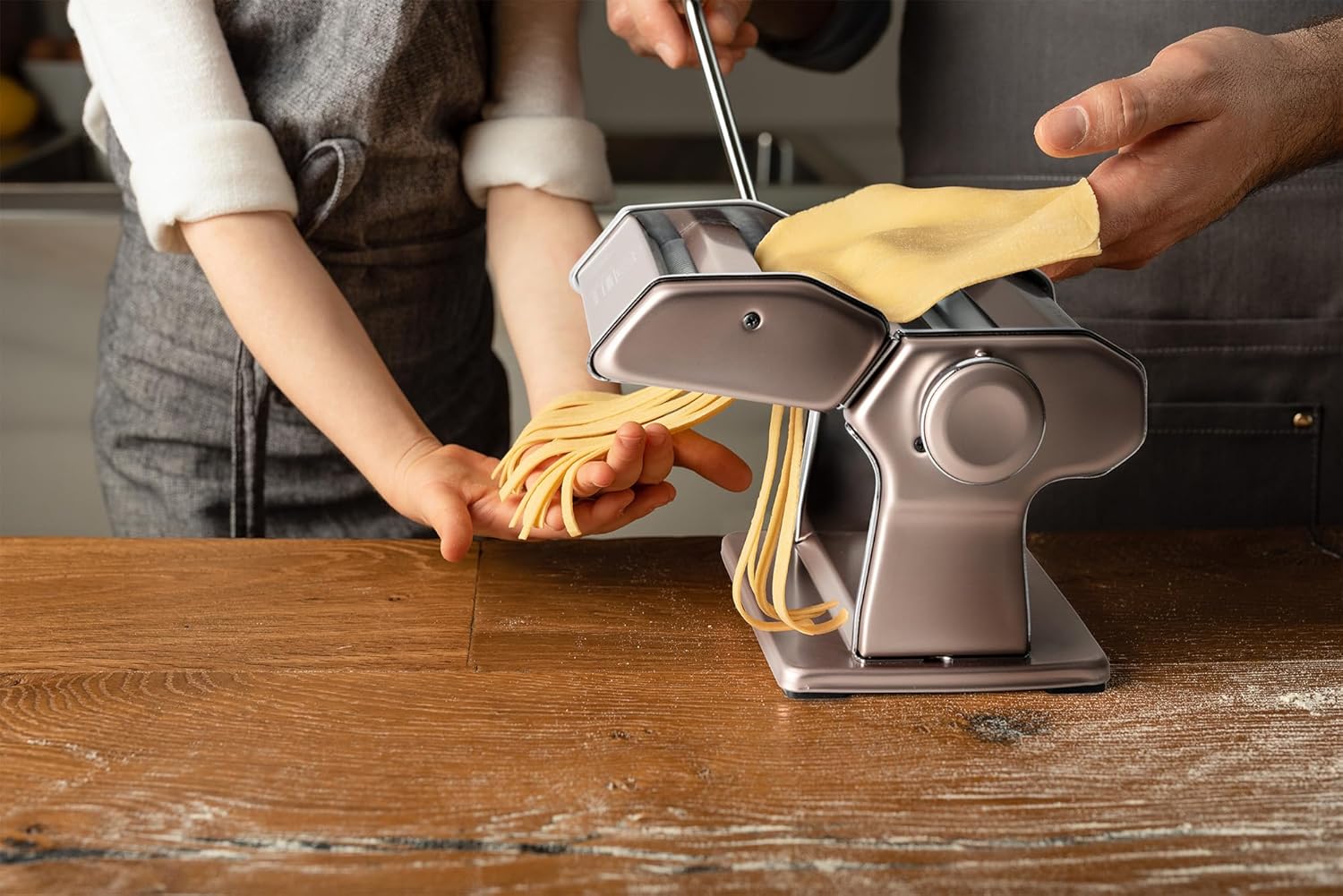
Image showing the Marcato Atlas 150 Pasta Machine in operation, with a person feeding pasta dough through the rollers to create fresh fettuccine, highlighting the manual cranking mechanism.
Offizielle Produktvideos
No official seller videos are available for this product in the provided data. The following videos are from influencers and may offer additional insights into product usage:
How to use the Marcato Atlas 150 Pasta Machine
This video demonstrates the basic operation of the Marcato Atlas 150 Pasta Machine, including attaching the handle and using the different pasta cutting attachments for various pasta types.
Making Pasta with Marcato Atlas 150
This video provides a detailed walkthrough of making pasta using the Marcato Atlas 150, showing how to roll out dough and cut it into noodles.
Wartung
Proper maintenance ensures the longevity and optimal performance of your Marcato Atlas 150 Pasta Machine.
- Reinigung: After each use, clean the machine with a dry cloth or a soft brush. Do NOT use water or dishwashers, as this can damage the anodized aluminum rollers and internal mechanisms, leading to rust.
- Removing Dough Residue: If dough gets stuck in the rollers or cutters, allow it to dry completely. Once dry, it can be easily removed with a brush or by gently tapping the machine.
- Lagerung: Store the machine in a dry place. It is recommended to keep it in its original packaging or a protective cover to prevent dust accumulation.
Fehlerbehebung
Specific troubleshooting steps are not provided in the product data. However, common issues with manual pasta machines often include:
- Dough sticking: Ensure your dough is not too wet and is adequately floured.
- Uneven sheets: Ensure dough portions are uniform and fed straight into the rollers.
- Difficulty cranking: Check for dough buildup in the rollers or ensure the machine is securely clampHrsg.
If you encounter persistent issues, please refer to the manufacturer's official support channels.
Technische Daten
| Besonderheit | Detail |
|---|---|
| Material | Aluminium |
| Marke | MARCATO |
| Artikelgewicht | 2.3 Kilogramm |
| Technische Daten | 8.11 Zoll L x 8.27 Zoll B |
| Ausführung | Glänzend |
| Modellname | Atlas 150 |
| Farbe | Pastellrosa |
| Anzahl der Artikel | 1 |
| Stil | Traditionell |
| Größe | Medium |

Image illustrating the dimensions of a pasta machine, showing a height of 15.5 cm (6.1 inches), providing a visual scale for the product.
Garantie und Support
Specific warranty details and direct support contact information are not provided in the available product data. For warranty claims or technical assistance, please refer to the documentation included with your product or visit the official MARCATO webWebsite.


