Einführung
Welcome to your new Inkbird Air Quality Monitor. This device is designed to provide comprehensive real-time monitoring of various air quality parameters in your environment. This manual will guide you through the setup, operation, and maintenance of your device, ensuring you get the most accurate and reliable readings.
Packungsinhalt
Bitte kreuzen Sie das Kästchen für die folgenden Elemente an:
- 1x Inkbird Air Quality Monitor
- 1x Benutzerhandbuch
- 1x USB Typ-C Ladekabel

Image: Contents of the Inkbird Air Quality Monitor package, showing the device, user manual, and USB charging cable.
Produkt überview
Familiarize yourself with the components of your air quality monitor:

Bild: Vorderseite view of the Inkbird Air Quality Monitor with key components labeled for easy identification.
- Detection Port: Located at the top, this is where air samples are drawn for analysis. Keep it clear of obstructions.
- LCD Bildschirm: A 2.8-inch HD display showing all measurement data and menu options.
- Funktionstasten (A, B, C, D): These buttons provide quick access to specific features like Real-time (RT), Record, Calibrate (Calib), and Settings (Set) as indicated on the display.
- Direction Buttons (<, ^, v, >): Used for navigating through menus and adjusting settings.
- Return Button (ESC): Dient dazu, zum vorherigen Bildschirm zurückzukehren oder ein Menü zu verlassen.
- Bestätigungsschaltfläche (OK): Used to confirm selections or enter sub-menus.
Aufstellen
Aufladen des Geräts
The Inkbird Air Quality Monitor is equipped with a built-in 1200mAh lithium battery. For optimal performance, it is recommended to fully charge the device before its first use.
- Suchen Sie den USB-Typ-C-Ladeanschluss am Gerät.
- Schließen Sie das mitgelieferte USB-Typ-C-Kabel an den Ladeanschluss des Geräts an.
- Connect the other end of the USB cable to a compatible USB power adapter (e.g., a phone charger, computer USB port) or a power bank.
- Das Gerät zeigt den Ladestatus auf dem Bildschirm an. Eine vollständige Aufladung dauert in der Regel etwa 3 Stunden.
The device can operate for 4 to 8 hours on a full charge, depending on usage. It can also be used continuously while connected to a power source.

Image: The Inkbird Air Quality Monitor being charged via its USB Type-C port, illustrating the connection and battery indicator.
Bedienungsanleitung
Ein-/Ausschalten
So schalten Sie das Gerät ein oder aus:
- Locate the ON/OFF switch, typically found at the bottom or side of the device.
- Slide the switch to the "ON" position to power on the monitor.
- Slide the switch to the "OFF" position to power off the monitor.
Die Anzeige verstehen
The 2.8-inch HD LCD screen provides a clear overview of current air quality. Key indicators include:
- HCHO (Formaldehyd): Measurement in mg/m³.
- TVOC (Gesamtmenge flüchtiger organischer Verbindungen): Measurement in mg/m³.
- PM2.5, PM1.0, PM10 (Particulate Matter): Measurements in µg/m³.
- Temperatur: Current ambient temperature in °C.
- Luftfeuchtigkeit: Current relative humidity in %RH.
- Overall Air Pollution Level (AQI): A qualitative indicator with six levels: Fresh, Normal, Poor, Harmful, Serious, and Danger, often accompanied by a visual emoji for quick assessment.

Bild: Eine detaillierte view of the monitor's display, illustrating the various air quality parameters and their readings.
Navigation und Einstellungen
Use the control buttons to interact with the device:
- Verwenden Sie die Richtungstasten (Up, Down, Left, Right) to move the cursor or scroll through options in menus.
- Drücken Sie die OK-Taste to confirm a selection, enter a sub-menu, or acknowledge a prompt.
- Drücken Sie die ESC-Taste to return to the previous screen or exit the current menu.
- Der Function Buttons (A, B, C, D) located below the screen may correspond to on-screen labels such as "RT" (Real-time), "Record", "Calib" (Calibrate), and "Set" (Settings), allowing direct access to these functions.
Hauptmerkmale
8-in-1 Air Quality Monitoring
The Inkbird Air Quality Monitor provides comprehensive environmental analysis by simultaneously detecting eight critical air quality parameters:
- HCHO (Formaldehyd): Range 0.000~1.999 mg/m³
- TVOC (Gesamtmenge flüchtiger organischer Verbindungen): Range 0.000~9.999 mg/m³
- PM2.5, PM1.0, PM10 (Particulate Matter): Range 0~999 µg/m³
- Temperatur: Range 0°C ~ 50°C
- Luftfeuchtigkeit: Range 20~99% RH
- Overall Air Pollution Level (AQI): Categorized into Fresh, Normal, Poor, Harmful, Serious, and Danger.
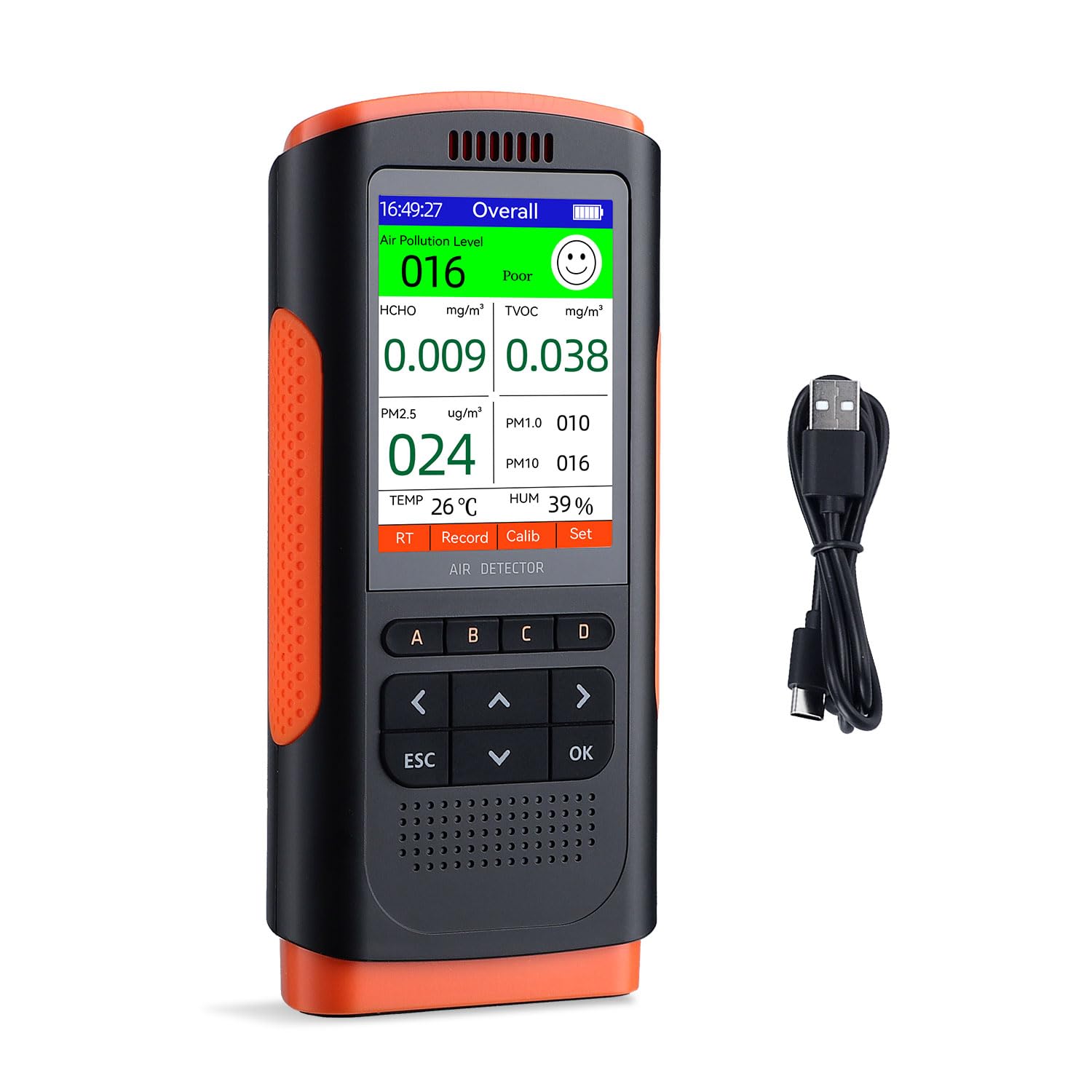
Image: Visual representation of the eight air quality parameters monitored by the device.
Real-time Monitoring and Accuracy
The monitor utilizes a high-precision sensor and a built-in high-performance chip to accurately capture and process data. This ensures reliable, real-time readings, with data updates occurring every 5 seconds by default.

Image: The monitor in use, demonstrating its real-time display of air quality data.
Historical Data Record
The device features a historical data recording function, allowing you to track changes in air quality over time. This is useful for identifying trends and understanding environmental shifts.
- The data record interval can be adjusted to 5s, 10s, 20s, 30s, 45s, 60s, 90s, or 120s.
- The device can store up to 500 data points, which can be reviewed in graphical charts on the display.

Image: The monitor showing its historical data recording capability, useful for long-term monitoring.
Wartung
Reinigung
To ensure the longevity and accuracy of your Inkbird Air Quality Monitor:
- Wischen Sie die Außenseite des Geräts mit einem weichen, trockenen Tuch ab.
- Do not use abrasive cleaners, solvents, or strong chemicals, as these can damage the device's casing oder interne Komponenten.
- Ensure the detection port at the top of the device remains clear of dust, lint, and other debris. Obstructions can lead to inaccurate readings.
Lagerung
Bei längerer Nichtbenutzung:
- Lagern Sie das Gerät an einem kühlen, trockenen Ort.
- Avoid storing it in direct sunlight or environments with extreme temperatures or high humidity.
Fehlerbehebung
Gerät lässt sich nicht einschalten
- Netzschalter prüfen: Stellen Sie sicher, dass sich der EIN/AUS-Schalter in der Position „EIN“ befindet.
- Batterie prüfen: The battery might be depleted. Connect the device to a power source using the USB Type-C cable and allow it to charge for at least 30 minutes before attempting to power it on again.
Ungenaue Messwerte
- Detection Port Obstruction: Verify that the detection port at the top of the device is not blocked by dust, debris, or your hand.
- Umweltfaktoren: Avoid using the device immediately after opening in environments with strong air currents, or near sources of high concentrations of pollutants (e.g., fresh paint, cleaning products, cooking fumes). These can temporarily skew readings.
- Stabilisierungszeit: Allow the device to stabilize for a few minutes after powering on, especially when moving it to a new environment.
- Kalibrierung: If available in the device settings, consider performing a calibration. Refer to the "Calib" option on the screen and follow the on-screen instructions.
Kurze Akkulaufzeit
- Volle Ladung: Ensure the device is fully charged. A complete charge takes approximately 3 hours.
- Nutzungsmuster: Battery life can vary based on continuous usage and specific environmental conditions.
- Kontinuierliche Leistung: The device can be used while connected to a power source via the USB Type-C cable for extended operation.
Technische Daten
| Parameter | Wert |
|---|---|
| Marke | Tintenvogel |
| Modell | INKBIRD Air Quality Monitor |
| Sensortyp | TVOC |
| HCHO-Messbereich | 0.000~1.999 mg/m³ |
| TVOC-Messbereich | 0.000~9.999 mg/m³ |
| PM2.5/1.0/10 Range | 0~999 µg/m³ |
| Temperaturbereich | 0°C ~ 50°C |
| Feuchtigkeitsbereich | 20 – 99 % relative Luftfeuchtigkeit |
| Batterie | 1200mAh Lithiumbatterie |
| Ladeanschluss | USB Typ C |
| Artikelgewicht | 454 g |
| Verpackungsabmessungen | 24.3 x 18.6 x 6.9 cm |
Garantie und Support
Inkbird provides official after-sales service exclusively for products purchased directly from authorized INKBIRD stores. This ensures you receive genuine products and dedicated support.
For any questions, technical assistance, or warranty claims, please refer to the contact information provided with your original purchase documentation or visit the official Inkbird webWebsite mit den aktuellsten Support-Ressourcen.


