1. Einleitung
This manual provides comprehensive instructions for the installation, operation, and maintenance of your COUGAR Archon 2 RGB Mid Tower Case. Please read this manual carefully before beginning installation to ensure proper setup and to maximize the performance and longevity of your product.

Abbildung 1.1: Schräg view of the COUGAR Archon 2 RGB Mid Tower Case, showcasing the tempered glass side panel and front RGB fans.
2. Produktmerkmale
The COUGAR Archon 2 RGB Mid Tower Case is designed for PC enthusiasts seeking a balance of aesthetics, airflow, and functionality. Key features include:
- Elegant Design with Tempered Glass: A sleek black finish combined with a tempered glass side panel allows for a clear view von internen Komponenten und RGB-Beleuchtung.
- Optimierter Luftstrom: Supports multiple fan configurations and includes three pre-installed 120mm ARGB fans at the front for efficient cooling.
- Umfangreiche Kompatibilität: Accommodates Mini ITX, Micro ATX, and ATX motherboards.
- AmpSpeichermöglichkeiten: Provides bays for both 3.5" HDDs and 2.5" SSDs.
- Praktische Front-I/O-Anschlüsse: Features USB 3.0 and USB 2.0 ports for easy peripheral connectivity.
- RGB-Lichtsteuerung: Integrated ARGB fans offer customizable lighting effects.

Abbildung 2.1: Vorderseite view of the COUGAR Archon 2 RGB case, highlighting the three pre-installed ARGB fans.
3. Installationsanleitung
Follow these steps to properly install your components into the COUGAR Archon 2 RGB case.
3.1. Checkliste vor der Installation
- Ensure you have all necessary components: motherboard, CPU, RAM, GPU, power supply, storage drives, and appropriate tools (screwdriver, zip ties).
- Arbeiten Sie auf einer sauberen, antistatischen Oberfläche. Erwägen Sie die Verwendung eines antistatischen Armbands.
3.2. Öffnen des Gehäuses
- Carefully remove the tempered glass side panel by unscrewing the thumbscrews located at the rear of the case. Set the panel aside on a soft, flat surface to prevent scratches.
- Remove the opposite metal side panel by unscrewing its thumbscrews and sliding it backward.
3.3. Motherboard-Installation
- Installieren Sie die I/O-Blende (falls sie nicht bereits an Ihrem Motherboard befestigt ist) in die hintere Öffnung des Gehäuses.
- Align your motherboard with the standoffs inside the case. Ensure all standoffs match the screw holes on your motherboard.
- Befestigen Sie das Motherboard mit den mitgelieferten Schrauben. Ziehen Sie die Schrauben nicht zu fest an.
3.4. Installation des Netzteils (PSU)
- Suchen Sie den Montagebereich für das Netzteil unten hinten am Gehäuse.
- Slide your PSU into the designated bay from the rear of the case, ensuring the fan faces downwards for optimal cooling (if the case has a bottom vent).
- Befestigen Sie das Netzteil mit Schrauben von der Rückseite des Gehäuses.
3.5. Installation des Speicherlaufwerks
The Archon 2 RGB supports both 3.5" HDDs and 2.5" SSDs.
- Für 3.5"-Festplatten: Locate the drive cage usually beneath the PSU shroud. Slide the HDD into the drive bay and secure it with screws.
- Für 2.5"-SSDs: Mount SSDs to the designated mounting points on the back of the motherboard tray or within the drive cage, securing them with screws.
3.6. Expansion Card (GPU) Installation
- Entfernen Sie die erforderlichen PCIe-Steckplatzabdeckungen von der Rückseite des Gehäuses.
- Insert your graphics card or other expansion cards into the appropriate PCIe slot on the motherboard.
- Secure the card with screws to the case.
3.7. Kabelmanagement und Anschlüsse an der Vorderseite
Route all power and data cables neatly behind the motherboard tray. Connect the front panel I/O cables (USB, audio, power switch, reset switch, LED indicators) to their respective headers on the motherboard according to your motherboard manual.

Figure 3.1: Dimensions of the COUGAR Archon 2 RGB case, useful for planning component fit and space.
4. Bedienungsanleitung
4.1. Einschalten
Once all components are installed and cables are connected, replace both side panels. Connect your monitor, keyboard, mouse, and power cable to the PSU. Press the power button on the top panel of the case to start your system.
4.2. RGB-Beleuchtungssteuerung
The pre-installed ARGB fans are typically controlled via a dedicated button on the case's front I/O panel or through your motherboard's RGB software (if connected to an ARGB header). Refer to your motherboard manual for software-based control options.
5. Wartung
Regelmäßige Wartung trägt dazu bei, die optimale Leistung und Langlebigkeit Ihrer PC-Komponenten zu gewährleisten.
- Staubreinigung: Reinigen Sie regelmäßig Staubfilter (falls vorhanden) und interne Bauteile mit Druckluft. Stellen Sie sicher, dass das System vor der Reinigung ausgeschaltet und vom Stromnetz getrennt ist.
- Kabelmanagement: Ensure cables are neatly routed to avoid obstructing airflow.
- Lüfterinspektion: Check fans for dust buildup or obstructions that could impede their operation.
6. Fehlerbehebung
Sollten Probleme auftreten, beachten Sie bitte die folgenden gängigen Schritte zur Fehlerbehebung:
- System schaltet sich nicht ein:
- Überprüfen Sie alle Stromanschlüsse, einschließlich der Verbindung des Netzteils zur Wandsteckdose, der Verbindung des Netzteils zum Motherboard (24-poliger Anschluss und 8-poliger CPU-Anschluss) sowie des Netzschalteranschlusses an der Vorderseite.
- Stellen Sie sicher, dass sich der Netzteilschalter in der Position „EIN“ befindet.
- Lüfter drehen sich nicht / RGB-Beleuchtung funktioniert nicht:
- Prüfen Sie, ob die Lüfterstromkabel fest mit dem Motherboard oder der Lüftersteuerung verbunden sind.
- Check ARGB headers for proper connection to the motherboard or RGB controller.
- Ensure RGB software or case button is correctly configured.
- Keine Anzeigeausgabe:
- Confirm the monitor cable is connected to the graphics card (not the motherboard integrated graphics, unless no dedicated GPU is present).
- Setzen Sie die Grafikkarte und die RAM-Module neu ein.
7. Spezifikationen
Detailed specifications for the COUGAR Archon 2 RGB Mid Tower Case:
| Besonderheit | Detail |
|---|---|
| Modellname | ARCHON 2 RGB |
| Gehäusetyp | Mittlerer Turm |
| Motherboard-Kompatibilität | Mini-ITX, Micro-ATX, ATX |
| Abmessungen (LxBxH) | 14.96 x 8.27 x 18.5 Zoll (380 x 210 x 470 mm) |
| Artikelgewicht | 11.37 Pfund (5.17 kg) |
| Material | Metall, gehärtetes Glas |
| Farbe | Schwarz |
| Vorinstallierte Lüfter | 3 x 120mm ARGB fans (Front) |
| Lüfterhalterung (Vorderseite) | 3 x 120 mm oder 2 x 140 mm |
| E/A-Anschlüsse | 1 x USB 2.0, 2 x USB 3.0, Audio In/Out |
| Montageart des Netzteils | Untere Montage |
| Kühlmethode | Luft |
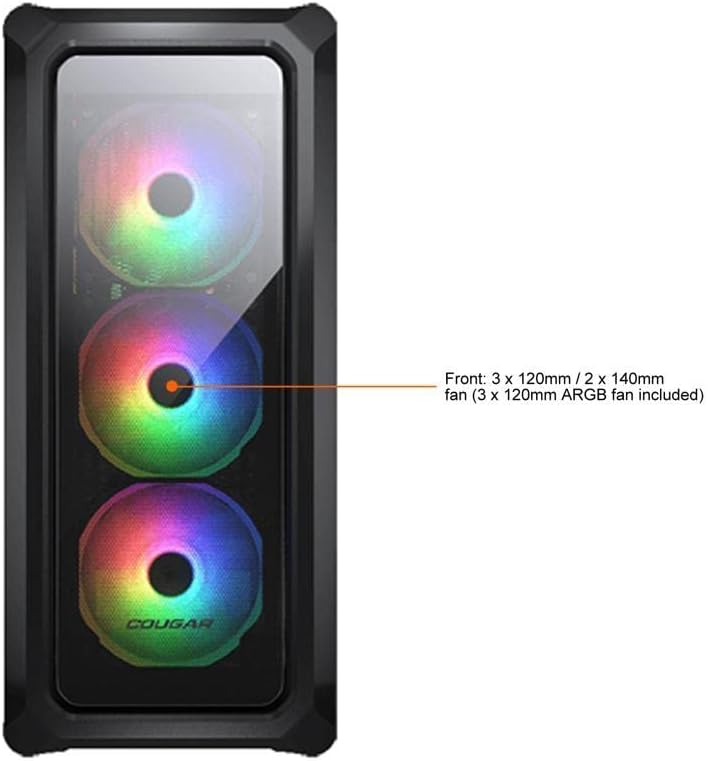
Figure 7.1: Front panel fan configuration and size options for the COUGAR Archon 2 RGB case.
8. Garantie und Support
Informationen zur Garantie und zum technischen Support finden Sie auf der offiziellen COUGAR-Website. webBesuchen Sie die Website oder kontaktieren Sie den Kundendienst. Bewahren Sie Ihren Kaufbeleg für Garantieansprüche auf.
COUGAR Official WebWebsite: cougargaming.com


