Einführung
Thank you for choosing the JBL Cinema SB190 Soundbar. This manual provides essential information for setting up, operating, and maintaining your soundbar system. Please read it thoroughly to ensure proper use and optimal performance.
Wichtige Sicherheitsinformationen
Always follow these basic safety precautions when using your soundbar system:
- Lesen Sie diese Anweisungen sorgfältig durch.
- Bewahren Sie diese Anleitung zum späteren Nachschlagen auf.
- Beachten Sie alle Warnungen.
- Befolgen Sie alle Anweisungen.
- Verwenden Sie dieses Gerät nicht in der Nähe von Wasser.
- Nur mit trockenem Tuch reinigen.
- Die Lüftungsöffnungen dürfen nicht blockiert werden. Die Installation muss gemäß den Anweisungen des Herstellers erfolgen.
- Installieren Sie das Gerät nicht in der Nähe von Wärmequellen wie Heizkörpern, Heizregistern, Öfen oder anderen Geräten (einschließlich ampKonverter (Lüfter), die Wärme erzeugen.
- Schützen Sie das Netzkabel vor Beschädigungen oder Beschädigungen durch Fußgänger, insbesondere an den Steckern, Steckdosen und an der Stelle, an der es aus dem Gerät austritt.
- Verwenden Sie nur vom Hersteller angegebene Zusatzgeräte/Zubehör.
- Trennen Sie das Gerät bei Gewitter oder längerer Nichtbenutzung vom Stromnetz.
- Überlassen Sie alle Wartungsarbeiten qualifiziertem Servicepersonal. Eine Wartung ist erforderlich, wenn das Gerät auf irgendeine Weise beschädigt wurde, z. B. wenn das Netzkabel oder der Stecker beschädigt sind, Flüssigkeit in das Gerät verschüttet wurde oder Gegenstände hineingefallen sind, das Gerät Regen oder Feuchtigkeit ausgesetzt war, nicht normal funktioniert oder fallengelassen wurde.
Lieferumfang
Your JBL Cinema SB190 package includes the following components:
- Soundbar
- Kabelloser Subwoofer
- Fernbedienung mit Batterien
- Power cords (region specific)
- HDMI-Kabel
- Wandhalterungssatz mit Schrauben
- Kurzanleitung
- Garantiekarte
- Sicherheitsdatenblatt

Image: Included accessories for the JBL Cinema SB190, featuring the remote control, HDMI cable, power cords, and wall-mount hardware.
Produkt überview
Soundbar Front and Top Panel

Bild: Vorderseite view of the JBL Cinema SB190 Soundbar, showcasing sein elegantes Design.
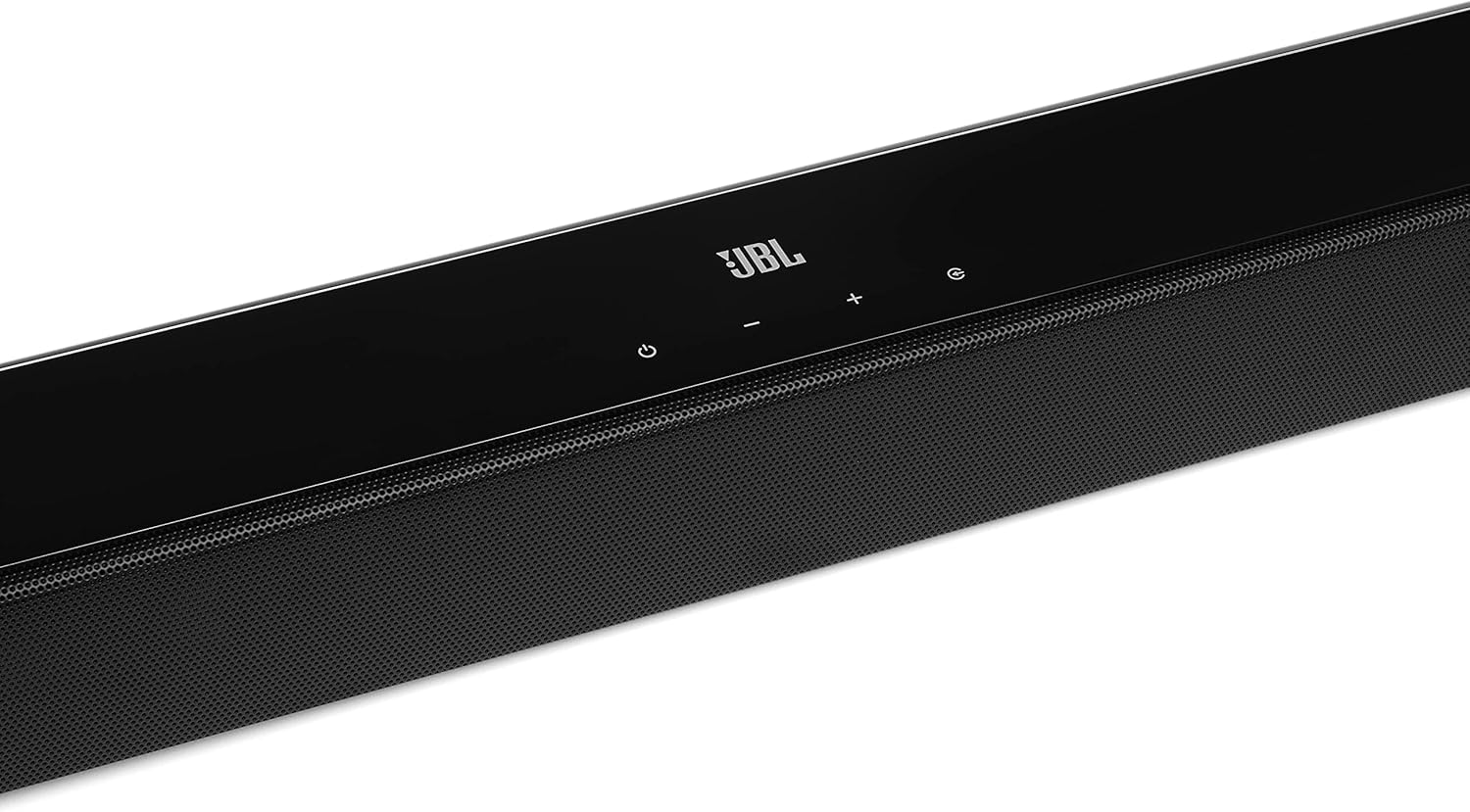
Image: Close-up of the top panel controls on the JBL Cinema SB190 Soundbar, including power, volume, and source selection buttons.
The soundbar features a minimalist design with essential controls located on the top panel for easy access. These include power, volume up/down, and input selection.
Anschlüsse auf der Rückseite der Soundbar

Image: Rear panel of the JBL Cinema SB190 Soundbar, showing the power input, HDMI eARC, HDMI In, and Optical In ports.
The rear panel provides various connection options for your audio sources and TV, including HDMI eARC, HDMI In, and Optical In. A power input is also located here.
Kabelloser Subwoofer

Bild: Vorderseite view of the JBL Cinema SB190 Wireless Subwoofer, featuring the JBL logo at the bottom.

Bild: Rückseite view of the JBL Cinema SB190 Wireless Subwoofer, showing the power input and pairing button.
The wireless subwoofer provides deep bass and connects automatically to the soundbar. Its rear panel includes the power input and a pairing button if manual pairing is required.
Fernbedienung
The included remote control allows full command over your soundbar system, including power, volume, input selection, sound modes (Music, Movie, News), Voice enhancement, and Bass level adjustment.
Aufstellen
1. Platzierung
Soundbar: Place the soundbar on a flat surface directly in front of your TV, centered. Ensure no objects obstruct the front of the soundbar. Alternatively, you can wall-mount the soundbar using the provided bracket kit.
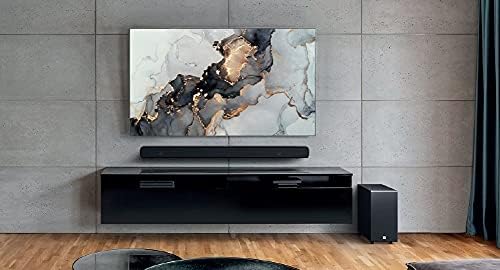
Image: The JBL Cinema SB190 Soundbar positioned below a television, with the wireless subwoofer to the side.
Subwoofer: The wireless subwoofer can be placed anywhere in the room, ideally within 50 feet (15 meters) of the soundbar, for optimal bass distribution. Avoid placing it in a corner directly, as this can sometimes lead to boomy bass.
2. Verbindungen
Choose one of the following connection methods to connect your soundbar to your TV:
- HDMI eARC (Empfohlen): For the highest quality audio, connect an HDMI cable (included) from the HDMI eARC port on your soundbar to the HDMI eARC port on your TV. This connection supports Virtual Dolby Atmos and allows for TV remote control of the soundbar volume.

Image: HDMI icon, representing the HDMI eARC connection.
- Optischer Eingang: If your TV does not have an HDMI eARC port, connect an optical cable (not included) from the OPTICAL IN port on your soundbar to the optical output on your TV.

Image: TV icon, indicating connection to a television.
- HDMI-Eingang: You can also connect an external device (e.g., Blu-ray player, game console) directly to the HDMI IN port on the soundbar. The video signal will pass through to your TV via the HDMI eARC/ARC connection.
3. Stromanschluss
- Connect the power cords to the soundbar and subwoofer.
- Plug the power cords into an AC outlet.
- The soundbar and subwoofer will automatically power on and attempt to pair. The subwoofer's LED indicator will turn solid white once successfully paired.
Bedienung Ihrer Soundbar
Ein-/Ausschalten
Drücken Sie die Leistung Drücken Sie eine Taste an der Soundbar oder an der Fernbedienung, um das System ein- oder auszuschalten.
Lautstärkeregelung
Verwenden Sie die Volume + or Lautstärke - Die Lautstärke kann über Tasten an der Soundbar oder der Fernbedienung eingestellt werden.
Eingangsauswahl
Drücken Sie die Quelle button on the soundbar or the dedicated input buttons (HDMI IN, HDMI ARC, OPT, BT) on the remote control to switch between audio sources.
Klangmodi
The remote control features dedicated buttons for optimizing audio for different content types:
- MUSIK: Enhances audio for music playback.
- FILM: Optimizes sound for cinematic experiences, including Virtual Dolby Atmos effects.
- NACHRICHT: Enhances vocal clarity for news and dialogue-heavy content.
Voice and Bass Adjustment
The remote control allows for fine-tuning of voice clarity and bass levels:
- STIMME: Press the VOICE button repeatedly to cycle through different levels of voice enhancement. This helps make dialogue clearer.
- BASS: Press the BASS button repeatedly to adjust the subwoofer's bass output level.
Bluetooth-Kopplung
So streamen Sie Audio drahtlos von Ihrem Mobilgerät:
- Drücken Sie die BT button on the remote control or soundbar. The soundbar's indicator will flash, indicating pairing mode.
- Aktivieren Sie auf Ihrem Mobilgerät Bluetooth und wählen Sie „JBL Cinema SB190“ aus der Liste der verfügbaren Geräte aus.
- Once connected, the indicator on the soundbar will turn solid. You can now stream audio from your device.

Image: Bluetooth icon, representing wireless audio streaming.
Wartung
To ensure the longevity and optimal performance of your JBL Cinema SB190 Soundbar:
- Reinigung: Reinigen Sie die Oberflächen der Soundbar und des Subwoofers mit einem weichen, trockenen Tuch. Verwenden Sie keine flüssigen Reiniger oder Scheuermittel, da diese die Oberfläche beschädigen können.
- Belüftung: Ensure that the ventilation openings on the soundbar and subwoofer are not blocked to prevent overheating.
- Lagerung: Wenn Sie das Gerät über einen längeren Zeitraum lagern, ziehen Sie den Netzstecker und bewahren Sie es an einem kühlen, trockenen Ort auf.
Fehlerbehebung
Sollten Sie Probleme mit Ihrer Soundbar haben, beachten Sie bitte die folgenden häufig auftretenden Probleme und Lösungen:
Kein Ton von der Soundbar
- Ensure the soundbar is powered on and the volume is not muted or set too low.
- Vergewissern Sie sich, dass an der Soundbar die richtige Eingangsquelle ausgewählt ist (z. B. HDMI ARC, Optisch, Bluetooth).
- Check all cable connections (HDMI, Optical) between the soundbar and your TV/source device. Ensure they are securely plugged in.
- If using HDMI ARC/eARC, ensure your TV's HDMI ARC/eARC feature is enabled in its settings.
- Try restarting both the soundbar and your TV.
Kein Ton vom Subwoofer
- Ensure the subwoofer is plugged into a power outlet and powered on.
- Check the LED indicator on the subwoofer. If it's not solid white, it may not be paired with the soundbar.
- So koppeln Sie den Subwoofer manuell:
- Press and hold the pairing button on the back of the subwoofer until the LED flashes rapidly.
- On the soundbar, press and hold the Leistung button for 5 seconds. The soundbar will enter pairing mode.
- Sobald die Kopplung abgeschlossen ist, leuchtet die LED am Subwoofer durchgehend weiß.
Audio/Video Sync Issues
- If using HDMI eARC, this feature is designed to minimize sync issues. Ensure your TV's firmware is up to date.
- Some TVs have an audio delay setting (lip-sync) that can be adjusted. Consult your TV's manual.
- If connecting via Optical, audio lag can sometimes occur. Try connecting via HDMI eARC if available.
Probleme mit der Bluetooth-Verbindung
- Ensure Bluetooth is enabled on your mobile device and the soundbar is in pairing mode.
- Bringen Sie Ihr Gerät näher an die Soundbar heran.
- Löschen Sie die Bluetooth-Kopplungsliste auf Ihrem Gerät und versuchen Sie es erneut.
- Stellen Sie sicher, dass keine anderen Bluetooth-Geräte Störungen verursachen.
Technische Daten
| Besonderheit | Detail |
|---|---|
| Modellname | Kino SB190 |
| Lautsprechertyp | Soundbar |
| Surround Sound-Kanalkonfiguration | 2.1 |
| Total Speaker Power Output | 380 Watt |
| Subwoofer-Durchmesser | 6.5 Zoll |
| Besondere Merkmale | Bluetooth 5.1 streaming, Dedicated sound mode to enhance voice clarity, HDMI In and Optical In connection, HDMI eARC capable, Virtual Dolby Atmos technology |
| Konnektivitätstechnologie | Bluetooth, Wired (HDMI, Optical) |
| Kontrollmethode | Fernbedienung |
| Produktabmessungen (Soundbar) | 89.9 cm (B) x 6.2 cm (T) x 6.6 cm (H) |
| Artikelgewicht | 7.5 Kilograms (Total system) |
| Material | Plastik |
| Farbe | Schwarz |
| Im Lieferumfang enthaltene Komponenten | Soundbar, Wireless subwoofer, Remote control with batteries, Power cords, HDMI cable, Wall-mount bracket kit with screws, Quick start guide, Warranty card, Safety sheet |
Garantie und Support
For detailed warranty information, please refer to the warranty card included in your product package. For technical support, product registration, or further assistance, please visit the official JBL support webWebsite oder wenden Sie sich an den Kundendienst.
Weitere Informationen und Unterstützungsangebote finden Sie auf der JBL Store auf Amazon.


