Einführung
Vielen Dank für Ihren Einkauf.asing the SDRD SD-306 Portable Karaoke Machine. This device combines a powerful Bluetooth speaker with two wireless microphones, offering a versatile solution for karaoke, music playback, and public speaking. Please read this manual carefully before use to ensure proper operation and to maximize your enjoyment of the product.
Sicherheitshinweise
- Setzen Sie das Gerät nicht Wasser oder übermäßiger Feuchtigkeit aus.
- Vermeiden Sie extreme Temperaturen und direkte Sonneneinstrahlung.
- Das Gerät darf nicht selbst zerlegt oder repariert werden. Alle Wartungsarbeiten dürfen nur von qualifiziertem Fachpersonal durchgeführt werden.
- Außerhalb der Reichweite von Kindern aufbewahren.
- Verwenden Sie ausschließlich das mitgelieferte Ladekabel und den Adapter.
Packungsinhalt
- SDRD SD-306 Karaoke Speaker Unit
- 2 x drahtlose Mikrofone
- USB-Ladekabel
- Bedienungsanleitung
Produkt überview

Image: The SDRD SD-306 main speaker unit with two wireless microphones docked on top.

Bild: Oben view of the karaoke machine, highlighting the slot for a smartphone or tablet and the microphone controls.
Main Unit Controls (Top Panel)
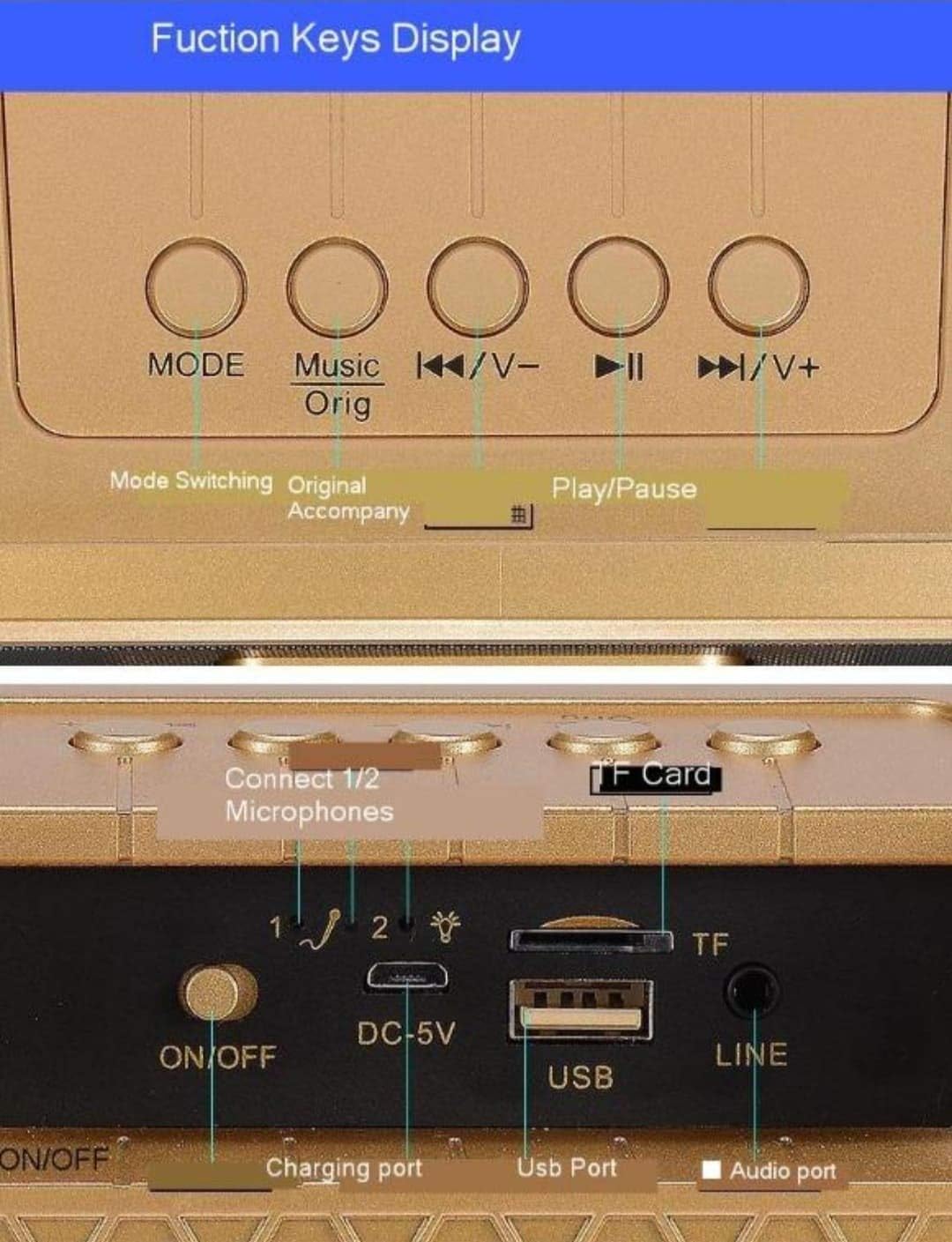
Bild: Detailliert view of the main unit's top panel buttons, including Mode, Music Original, Previous/Volume Down, Play/Pause, and Next/Volume Up.
- MODUS: Short press to switch between input modes (Bluetooth, USB, TF Card, AUX, FM Radio).
- Music Orig: Short press to cancel the original vocal track of a song (karaoke mode).
- ◀◀/V-: Kurz drücken für vorherigen Titel; lange drücken zum Verringern der Lautstärke.
- ►►/V+: Kurz drücken für nächsten Titel; lange drücken zur Lautstärkeerhöhung.
- ►██: Play/Pause-Taste.
- EQ-Modus: Short press to cycle through six different EQ effects.
Main Unit Ports (Rear Panel)

Bild: Detailliert view of the main unit's rear panel, showing the ON/OFF switch, DC-5V charging port, USB port, TF Card slot, and LINE (AUX) input.
- EIN/AUS: Netzschalter für das Hauptgerät.
- DC-5V: Charging port for the main unit.
- USB: USB-Anschluss zum Abspielen von Musik von einem USB-Stick.
- TF-Karte: Slot for playing music from a TF (Micro SD) card.
- LINE (AUX): 3.5-mm-Audioeingang zum Anschluss externer Audiogeräte.
- Connect 1/2 Microphones: Indicators for microphone connection status.
Mikrofonsteuerung
- Reverberation Intensity Regulation: Passt den Echoeffekt an.
- Human Voice Volume Regulation: Controls the microphone's vocal volume.
- Ein-/Ausschalten: Schaltet das Mikrofon ein oder aus.
- Funny: Activates voice changing effects.
- Buh-Rufe: Activates a cheering sound effect.
- Beifall: Activates an applause sound effect.
- Lachen: Activates a laughter sound effect.
Aufstellen
1. Aufladen des Geräts
Before first use, fully charge the main unit and both microphones. Connect the USB charging cable to the DC-5V port on the main unit and to a standard 5V USB power adapter (not included). The microphones also have charging ports; use their respective cables if separate. An indicator light will show charging status and turn off when fully charged.
2. Einschalten
Flip the ON/OFF switch on the rear of the main unit to the 'ON' position. The unit will power on and indicate its current mode.
For each microphone, slide its power switch to the 'ON' position. The microphones will automatically attempt to pair with the main unit.
3. Mikrofonkopplung
The wireless microphones are designed to automatically pair with the main unit upon power-on. If pairing fails, ensure both the main unit and microphones are charged and within range. Power cycle both devices if necessary.
Bedienungsanleitung
1. Bluetooth-Verbindung

Image: Diagram illustrating the wireless Bluetooth connection process between a smartphone and the karaoke machine, showing a 10-meter transmission distance.
- Ensure the main unit is powered on and in Bluetooth mode (press MODE button until 'Bluetooth' is announced or indicated).
- Aktivieren Sie auf Ihrem Smartphone oder Tablet Bluetooth und suchen Sie nach verfügbaren Geräten.
- Select "SDRD SD-306" from the list of devices.
- Sobald die Verbindung hergestellt ist, können Sie Musik von Ihrem Gerät über die Karaoke-Maschine abspielen.
2. Playing Music from Other Sources
- USB-/TF-Karte: Insert a USB flash drive or TF card into the respective port. The unit will automatically switch to the corresponding mode and begin playing music. Use the ◀◀/V- and ►►/V+ buttons to navigate tracks.
- AUX-Eingang: Connect an external audio device (e.g., MP3 player, computer) to the LINE (AUX) port using a 3.5mm audio cable. Press the MODE button until AUX mode is selected.
- FM Radio: Press the MODE button to switch to FM Radio mode. The unit will automatically scan and tune into available radio stations.
3. Karaoke-Funktion
- Originale Geräuschunterdrückung: While playing a song, short press the "Music Orig" button on the main unit to reduce or cancel the original vocal track, allowing you to sing along. Press again to restore the original vocal.
- EQ-Effekte: Short press the "EQ Mode" button on the main unit to cycle through various sound equalization effects, enhancing your listening or singing experience.
- Mikrofonlautstärke: Use the "Human Voice Volume Regulation" control on the microphone to adjust your vocal volume.
- Echo/Hall: Adjust the "Reverberation Intensity Regulation" control on the microphone to add or reduce echo effect to your voice.
- Spezialeffekte: Use the "Funny", "Boos", "Applause", and "Laughter" buttons on the microphone to add sound effects during your performance.
Wartung
- Reinigen Sie das Gerät mit einem weichen, trockenen Tuch. Verwenden Sie keine Scheuermittel oder Lösungsmittel.
- Bewahren Sie das Gerät bei Nichtgebrauch an einem kühlen, trockenen Ort auf.
- Avoid dropping the unit or microphones, as this can cause internal damage.
Fehlerbehebung
| Problem | Mögliche Ursache | Lösung |
|---|---|---|
| Kein Strom | Battery drained; Power switch off | Charge the unit/microphones; Turn on the power switch. |
| Kein Ton vom Lautsprecher | Lautstärke zu niedrig; Falscher Modus; Gerät nicht angeschlossen | Increase volume; Select correct input mode (Bluetooth, USB, AUX); Ensure device is paired/connected. |
| Mikrofon funktioniert nicht | Microphone off; Battery drained; Not paired | Turn on microphone; Charge microphone; Power cycle microphone and main unit to re-pair. |
| Bluetooth-Verbindung instabil | Zu weit vom Gerät entfernt; Störungen | Move closer to the speaker (within 10m); Avoid obstacles or other wireless devices. |
| Sound cutting off (especially high notes) | Microphone signal interference; Low battery | Ensure microphones are fully charged; Reduce distance between microphones and speaker; Check for other wireless interference. |
Technische Daten
| Besonderheit | Detail |
|---|---|
| Marke | SDRD |
| Modell | SD-306 |
| Technische Daten | 10 x 10 x 10 cm |
| Artikelgewicht | 450 g |
| Konnektivitätstechnologie | Bluetooth, USB, AUX, Micro SD (TF-Karte) |
| Farbe | Schwarz |
| Kompatible Geräte | Radio, Smartphone |
| Mikrofone im Lieferumfang enthalten | 2 drahtlose Mikrofone |
Garantie und Support
This product comes with a standard manufacturer's warranty. For specific warranty terms and conditions, please refer to the documentation provided with your purchase or contact your retailer. For technical support or service inquiries, please contact the SDRD customer service department through the contact information provided on the product packaging or the official SDRD webWebsite.