1. Einleitung
Welcome to your JBL J777 Wireless In-Ear Headphones. This manual provides detailed instructions to help you get the most out of your device, ensuring proper setup, operation, and maintenance. Please read this manual thoroughly before using your headphones.
2. Produktüberschreitungview
The JBL J777 headphones are designed for wireless audio playback and hands-free calling, offering convenience and quality sound.
2.1 Komponenten
- In-ear earbuds with silicone tips
- Flexible neckband cable
- Inline remote control with integrated microphone
- USB charging port (typically located on the remote)
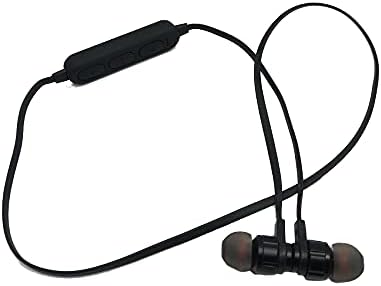
This image displays the complete JBL J777 wireless in-ear headphones. It features two black earbuds connected by a flexible cable, with an inline remote control positioned on the cable. The design is intended for comfortable wear around the neck.
2.2 Bedienelemente
The inline remote control provides easy access to various functions:
- Ein-/Ausschalter/Multifunktionstaste: Used for powering on/off, play/pause music, and answering/ending calls.
- Lauter-Taste: Increases volume, also used for skipping to the next track.
- Leiser-Taste: Decreases volume, also used for skipping to the previous track.

Eine detaillierte view of the inline remote control for the JBL J777 headphones. It shows three distinct buttons for power/multi-function, volume up, and volume down, along with a small microphone opening for hands-free calls.
3. Einrichtung
3.1 Aufladen der Kopfhörer
- Connect the micro-USB charging cable to the charging port on the inline remote control.
- Verbinden Sie das andere Ende des Kabels mit einer USB-Stromquelle (z. B. einem USB-Anschluss am Computer oder einem USB-Netzteil).
- The LED indicator will typically show red during charging and turn off or blue when fully charged.
- The integrated 90mAh lithium battery provides wireless operation.
3.2 Bluetooth-Kopplung
To connect your JBL J777 headphones to a Bluetooth-enabled device:
- Stellen Sie sicher, dass die Kopfhörer ausgeschaltet sind.
- Halten Sie die Power/Multi-function button for approximately 5-7 seconds until the LED indicator flashes red and blue alternately. This indicates the headphones are in pairing mode.
- On your mobile phone or Bluetooth-enabled device, go to the Bluetooth settings and enable Bluetooth.
- Suchen nach available devices and select "JBL J777" from the list.
- Once paired, the LED indicator will typically flash blue slowly or remain solid blue.
- The headphones have an operation distance of up to 10 meters (33 feet) in an open environment.
4. Bedienungsanleitung
4.1 Ein-/Ausschalten
- So schalten Sie das Gerät ein: Halten Sie die Power/Multi-function button for 3 seconds. The LED will flash blue.
- So schalten Sie das Gerät aus: Halten Sie die Power/Multi-function button for 3 seconds. The LED will flash red and then turn off.
4.2 Musikwiedergabe
- Abspielen/Pause: Drücken Sie die Power/Multi-function einmal die Taste.
- Nächster Titel: Halten Sie die Lautstärke erhöhen Taste.
- Vorheriges Lied: Halten Sie die Lautstärke verringern Taste.
- Lautstärke erhöhen: Drücken Sie die Lautstärke erhöhen Taste kurz drücken.
- Lautstärke runter: Drücken Sie die Lautstärke verringern Taste kurz drücken.
4.3 Anrufmanagement
- Anruf annehmen/beenden: Drücken Sie die Power/Multi-function einmal die Taste.
- Anruf ablehnen: Halten Sie die Power/Multi-function -Taste 2 Sekunden lang gedrückt.
- Wahlwiederholung letzte Nummer: Drücken Sie zweimal die Power/Multi-function Taste.
4.4 Aktive Geräuschunterdrückung
The JBL J777 headphones feature active noise cancellation to reduce ambient noise for a more immersive listening experience. This feature operates automatically or is controlled via the multi-function button, depending on the specific model variant.
5. Wartung
Proper care ensures the longevity and optimal performance of your headphones.
- Reinigung: Wischen Sie die Ohrhörer und das Kabel vorsichtig mit einem weichen, trockenen Tuch ab. Verwenden Sie keine scharfen Chemikalien oder Scheuermittel.
- Lagerung: Bewahren Sie die Kopfhörer an einem kühlen, trockenen Ort, geschützt vor direkter Sonneneinstrahlung und extremen Temperaturen, auf. Achten Sie darauf, dass sich das Kabel nicht verheddert.
- Batteriepflege: Um die Akkulaufzeit zu verlängern, vermeiden Sie häufiges vollständiges Entladen des Akkus. Laden Sie die Kopfhörer regelmäßig auf, auch wenn Sie sie längere Zeit nicht benutzen.
6. Fehlerbehebung
If you encounter any issues with your JBL J777 headphones, refer to the following common problems and solutions:
- Kopfhörer schalten sich nicht ein: Stellen Sie sicher, dass der Akku geladen ist. Schließen Sie das Gerät an eine Stromquelle an und versuchen Sie es erneut.
- Kopplung mit dem Gerät nicht möglich:
- Ensure the headphones are in pairing mode (flashing red and blue).
- Stellen Sie sicher, dass Bluetooth auf Ihrem Gerät aktiviert ist.
- Bringen Sie die Kopfhörer näher an Ihr Gerät heran.
- Schalten Sie sowohl die Kopfhörer als auch Ihr Gerät aus und wieder ein und versuchen Sie dann erneut, die Kopplung herzustellen.
- Kein Ton:
- Überprüfen Sie die Lautstärke sowohl an den Kopfhörern als auch an Ihrem angeschlossenen Gerät.
- Stellen Sie sicher, dass die Kopfhörer ordnungsgemäß gekoppelt und angeschlossen sind.
- Versuchen Sie, die Audiowiedergabe über eine andere Anwendung oder Quelle zu starten.
- Schlechte Tonqualität oder zeitweise Verbindungsabbrüche:
- Stellen Sie sicher, dass sich keine Hindernisse zwischen den Kopfhörern und Ihrem Gerät befinden.
- Halten Sie Abstand zu anderen drahtlosen Geräten, die Störungen verursachen könnten.
- Koppeln Sie die Kopfhörer erneut mit Ihrem Gerät.
7. Spezifikationen
Detailed technical specifications for the JBL J777 Wireless In-Ear Headphones:
| Marke | JBL |
| Modellnummer | J777 |
| Typ | Kabellose In-Ear-Kopfhörer |
| Konnektivität | Kabellos (Bluetooth 4.2) |
| Bluetooth Profiles | HFP, A2DP, AVCTP, AVDTP, AVRCP |
| Betriebsentfernung | Bis zu 10 Meter (33 Fuß) |
| Sendeleistung | Klasse 2 |
| Frequenzbereich | 2.402 - 2.480 GHz |
| Lautsprecherdurchmesser | Ø15 mm |
| Impedanz | 32 Ω |
| Mikrofon | Integriert |
| Lärmschutz | Aktive Geräuschunterdrückung |
| Batterie | Rechargeable Lithium, 90mAh |
| Kompatibel mit | Mobiltelefone |
| TF-Karten-Unterstützung | 128MB - 32GB |
| Im Lieferumfang enthaltene Komponenten | Ohrpolster |

This image shows the rear side of the JBL J777 product packaging. It clearly lists technical specifications such as Bluetooth version, supported profiles, operation distance, transmitting power, frequency range, speaker size, impedance, and battery capacity. It also indicates TF card support.
8. Garantie und Support
For warranty information regarding your JBL J777 Wireless In-Ear Headphones, please refer to the documentation provided at the time of purchase. This information is typically included in the product packaging or available on the official JBL webWebsite.
For further assistance, technical support, or to inquire about service, please visit the official JBL support page or contact their customer service department directly. Keep your proof of purchase handy for any warranty claims.


