1. Produktüberschreitungview
The Sony BDZ-FBW2100 is a 2TB 2-tuner 4K Blu-ray Recorder designed for high-definition recording and playback. This 2021 model features dual BS4K/110-degree CS4K tuners, allowing you to record and watch two 4K broadcasts simultaneously. It incorporates advanced recording functions to ensure you never miss your favorite programs and offers seamless integration with smartphones for remote control and content transfer.

Abbildung 1.1: Vorderseite view of the Sony BDZ-FBW2100 Blu-ray Recorder, showing its compact design and key dimensions (430.2mm width, 56.4mm height).
Experience superior picture quality with 4K resolution. The device is equipped with a 4K Intelligent Encoder for clear recordings even in long-time modes. Its smart features extend to mobile devices, allowing you to schedule recordings, play back content, and transfer programs to your smartphone for on-the-go viewing.
Video: Understanding 4K Picture Quality
This video demonstrates the difference in detail and clarity between 4K and 2K picture quality, highlighting the enhanced visual experience offered by 4K broadcasts and content on the BDZ-FBW2100.
2. Ersteinrichtung
2.1 Unpacking and Connections
Before using your Blu-ray recorder, carefully unpack all components and ensure you have the following accessories:
- Sony BDZ-FBW2100 Main Unit
- Fernbedienung
- AAA-Batterien für die Fernbedienung
- Netzkabel (1.5 m)
- Antenna Cable (1.5m)
Connect the recorder to your television and antenna using the provided cables. For optimal 4K viewing, use a high-speed HDMI cable (sold separately) to connect to a 4K compatible TV.

Figure 2.1: Rear panel of the BDZ-FBW2100, illustrating ports for HDMI, antenna input/output, Ethernet, and USB connections.
2.2 Ersteinrichtungsassistent
Upon first power-on, the unit will guide you through an initial setup wizard. Follow the on-screen instructions to:
- Wählen Sie Ihre Sprache.
- Perform channel tuning for BS4K/110-degree CS4K and terrestrial/BS/CS digital broadcasts.
- Set up network connections (Wi-Fi or Ethernet).
- Konfigurieren Sie Datums- und Uhrzeiteinstellungen.
Ensure your internet connection is active for software updates and access to online features.
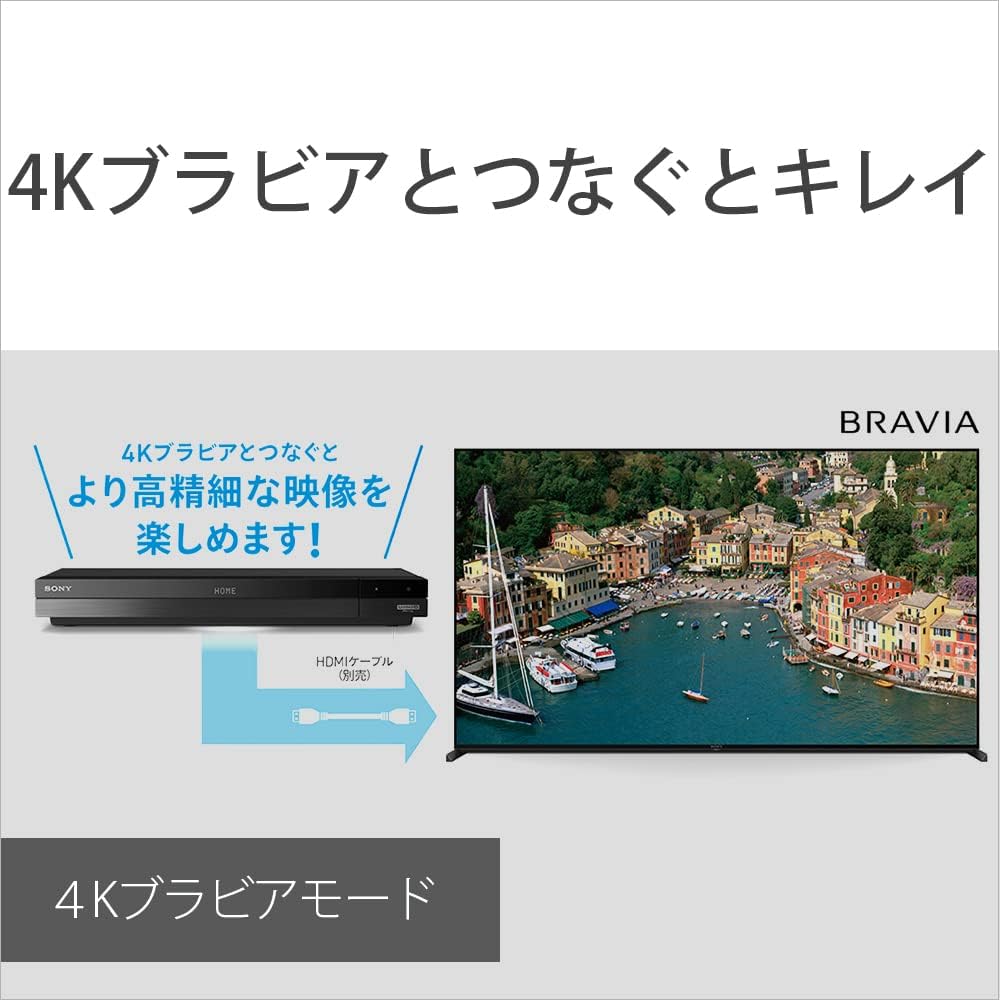
Figure 2.2: The BDZ-FBW2100 connected to a Sony BRAVIA 4K TV, demonstrating enhanced image quality when paired with compatible displays.
3. Bedienungsanleitung
3.1 Grundlegende Aufnahmefunktionen
The BDZ-FBW2100 allows for various recording methods:
- Manuelle Aufnahme: Press the 'Record' button on the remote control during a broadcast to start recording.
- Program Guide Recording: Navigate to the electronic program guide (EPG), select your desired program, and choose 'Record'.
- Zeiterfassung: Set a specific time and channel for recording through the menu.
With two 4K tuners, you can record two 4K programs simultaneously without interruption.

Figure 3.1: The BDZ-FBW2100 supports simultaneous recording of two 4K broadcasts, ensuring you don't miss any content.
3.2 Intelligente Aufnahmefunktionen
Leverage the smart recording functions to optimize your viewErfahrung:
- New Drama/Anime Guide (Pre-recording): This feature allows you to pre-reserve new drama and anime series up to one month in advance, ensuring you catch the first episode.
- Omakase Maru-roku (Automatic Recording): Register keywords such as talent names or genres, and the recorder will automatically search for and record relevant programs.
- Program Name Reservation: Set a reservation by program name, and the recorder will track and record the series even if broadcast times change.
Video: Smart Recording Features
This video demonstrates how the BDZ-FBW2100's intelligent recording features, such as pre-recording new series and automatic recording by keyword, help users avoid missing desired programs.
3.3 Playback and Content Management
Access and manage your recorded content with ease:
- Genre-specific Recording List: Recorded programs are automatically categorized by genre, making it simple to find and watch specific types of content.
- 4K Fast Playback: During 4K broadcast playback, press the yellow button on the remote control to play content at approximately 1.3x speed with audio.
- Disc-Wiedergabe: Insert a Blu-ray or DVD disc into the front tray for playback.

Figure 3.2: The BDZ-FBW2100 with its disc tray open, ready for Blu-ray or DVD disc insertion.
Video: Genre-Specific Recording List
This video illustrates how the BDZ-FBW2100 automatically organizes recorded programs into genre-specific lists, simplifying content navigation and selection.
3.4 Smartphone Integration (Video & TV SideView)
The free Video & TV SideView app enhances your experience:
- Remote Recording: Schedule recordings from your smartphone, even when away from home.
- Fernwiedergabe: Watch live broadcasts or recorded programs on your smartphone or tablet.
- Content Transfer: Transfer recorded programs to your smartphone to watch offline without worrying about data usage.
Video: Watch Anywhere with Smartphone
This video demonstrates the convenience of the Video & TV SideView app, allowing users to watch live TV or recorded content on their smartphone or tablet from any location.
4. Wartung
4.1 Reinigung
Um optimale Leistung und ein ansprechendes Erscheinungsbild zu gewährleisten:
- Wischen Sie die Außenseite des Geräts mit einem weichen, trockenen Tuch ab.
- Verwenden Sie keine Scheuermittel, Lösungsmittel oder Alkohol, da diese die Oberfläche beschädigen können.
- Halten Sie die Lüftungsöffnungen frei von Staub und Verstopfungen.
4.2 Firmware-Updates
Periodically check for firmware updates to ensure your recorder has the latest features and bug fixes. Updates can typically be performed via the network connection through the system settings menu. Follow the on-screen prompts carefully during the update process.
5. Fehlerbehebung
If you encounter issues with your BDZ-FBW2100, refer to the following common solutions:
| Problem | Mögliche Lösung |
|---|---|
| Kein Strom | Check if the power cord is securely connected. Ensure the power outlet is functional. |
| Kein Bild/Ton | Verify HDMI cable connections. Ensure the correct input is selected on your TV. Check antenna connections. |
| Fernbedienung funktioniert nicht | Replace the AAA batteries. Ensure there are no obstructions between the remote and the unit. |
| Programme können nicht aufgezeichnet werden | Check available HDD space. Ensure tuners are properly configured and receiving a signal. Verify recording settings. |
| Netzwerkverbindungsprobleme | Restart your router/modem. Reconfigure network settings on the recorder. Ensure Wi-Fi password is correct. |
For more complex issues, consult the comprehensive help guide accessible through the unit's menu or contact Sony customer support.
6. Spezifikationen
| Besonderheit | Detail |
|---|---|
| Modellnummer | BDZ-FBW2100 |
| Speicherkapazität | Festplatte mit 2 TB |
| Tuner | 2 x BS4K/110-degree CS4K, 2 x Terrestrial/BS/CS Digital |
| Recording Compatibility | 4K Broadcast Long-Time Recording, W Recording |
| Auflösung | 3840 x 2160 (4K) |
| Konnektivität | HDMI, WLAN, Ethernet |
| Audio-Ausgabemodi | Stereo, Surround |
| Abmessungen (B x T x H) | 43.02 x 22.45 x 5.64 cm |
| Gewicht | 3.7 kg |
| Mitgeliefertes Zubehör | Power cord (1.5m), Antenna cable (1.5m), Remote control, AAA batteries for remote |
| Besondere Merkmale | 4K Intelligent Encoder, New Drama/Anime Guide (Pre-recording), Omakase Maru-roku, Program Name Reservation, Genre-specific Recording List, 4K Broadcast Fast Playback |
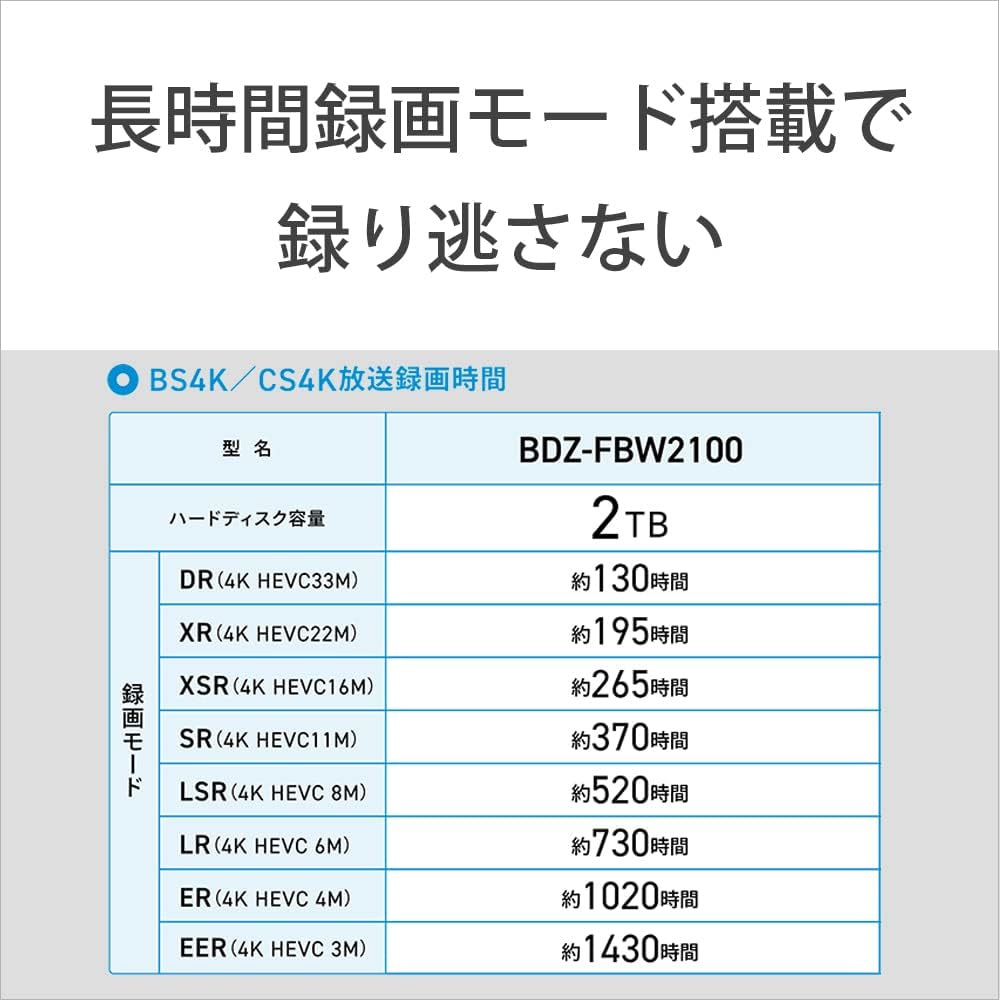
Figure 6.1: Detailed table outlining the approximate recording durations for 4K BS/CS broadcasts across various recording modes on the BDZ-FBW2100 2TB model.
7. Garantie und Support
Your Sony BDZ-FBW2100 Blu-ray Recorder comes with a standard manufacturer's warranty. Please refer to the warranty card included with your product for specific terms and conditions, including coverage period and service procedures.
For technical support, product registration, or additional information, please visit the official Sony support website or contact your local Sony customer service center. Keep your purchase receipt and product serial number handy when seeking support.