1. Einleitung
This manual provides essential information for the safe and efficient operation of your Spektrum S2200 G2 AC 2x200W Smart Charger. Please read this entire manual before use to ensure proper setup and functionality.

Image 1.1: The Spektrum S2200 G2 AC 2x200W Smart Charger, a dual-port charger designed for various RC battery types.
2. Sicherheitshinweise
WARNUNG: Lesen Sie die gesamte Bedienungsanleitung, um sich vor der Inbetriebnahme mit den Funktionen des Produkts vertraut zu machen. Eine unsachgemäße Bedienung kann zu Schäden am Produkt und an persönlichen Gegenständen sowie zu schweren Verletzungen führen.
This is a sophisticated hobby product. It must be operated with caution and common sense and requires some basic mechanical ability. Failure to operate this Product in a safe and responsible manner could result in injury or damage to the product or other property. This product is not intended for use by children without direct adult supervision. Do not attempt disassembly, use with incompatible components, or augment the product in any way without the approval of Horizon Hobby, LLC. This manual contains instructions for safety, operation, and maintenance. It is essential to read and follow all the instructions and warnings in the manual, prior to assembly, setup, or use, in order to operate correctly and avoid damage or serious injury.
3. Hauptmerkmale
- Hohe Ausgangsleistung: Up to 200W per channel, or 380W on a single channel for rapid charging.
- Smart G2 Battery Compatibility: Charges and balances Smart G2 batteries with a single IC3 or IC5 connection, eliminating the need for a separate balance lead.
- Auto Charge Function: Automatically recognizes Smart battery charging parameters and initiates safe, accurate charging.
- Datenverfolgung: Smart software tracks and stores various battery data for monitoring battery health.
- Integrierte Anschlüsse: Includes both IC3 and IC5 charging output ports, removing the need for external adapters.
- Vielseitige Akkuunterstützung: Supports various RC battery types including LiFe, LiIon, NiMH, and LiHV, in addition to Smart batteries.

Image 3.1: Visual representation of the charger's hassle-free charging, automatic storage, and data display capabilities.

Bild 3.2: Nahaufnahme view of the integrated IC3 and IC5 charging ports on the Spektrum S2200 G2 charger, highlighting the convenience of not needing adapters.
4. Einrichtung
4.1 Auspacken und Prüfen
Carefully remove the charger from its packaging. Inspect the unit for any signs of damage during transit. If any damage is observed, contact your retailer immediately.
4.2 Stromanschluss
- Ensure the charger's power switch is in the OFF position.
- Schließen Sie das Netzkabel an den Stromeingang des Ladegeräts an.
- Stecken Sie das Netzkabel in eine geeignete Wandsteckdose (100-240 V Wechselstrom).
- Flip the power switch to the ON position. The charger display should illuminate.

Image 4.1: The rear panel of the charger, illustrating the AC power input and the main power switch.
4.3 Grundeinstellungen
Upon first power-up, you may be prompted to set language or other basic preferences. Follow the on-screen instructions using the navigation buttons.
5. Bedienung
5.1 Charging Smart G2 Batteries
- Stellen Sie sicher, dass das Ladegerät eingeschaltet ist.
- Connect your Spektrum Smart G2 battery to either the IC3 or IC5 port on the charger. The charger will automatically detect the battery type and its parameters.
- The "Auto Charge" feature will initiate safe and accurate charging without manual input.
- Monitor the charging progress on the display. The screen will show charge rate, capacity charged, and estimated time remaining.
- Once charging is complete, the charger will indicate "Charge Complete". Disconnect the battery.
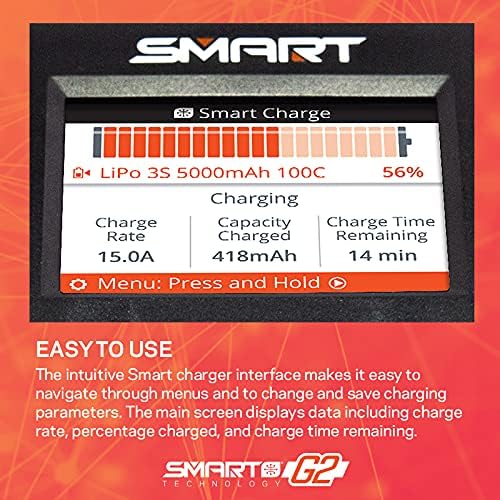
Image 5.1: The charger's intuitive display interface, showing real-time charging data such as charge rate, capacity, and remaining time.
5.2 Charging Non-Smart Batteries
For non-Smart batteries, manual settings may be required. Refer to the battery manufacturer's specifications for appropriate charging parameters (e.g., cell count, charge rate, battery chemistry). Use the charger's menu and navigation buttons to adjust settings before connecting the battery.
5.3 Automatic Storage Function
The Smart G2 charger can automatically discharge or charge Smart batteries to a safe storage voltage, prolonging battery life. This feature is typically activated through the charger's menu system when a Smart battery is connected.
5.4 Battery Data and History
The Smart software tracks and stores various data points for connected Smart batteries, including cycle count, temperature, and fault history. This information can be accessed through the charger's menu to monitor battery health and performance.

Image 5.2: The charger's display showing detailed battery history, including cycle count, temperature, and fault logs.
6. Wartung
- Halten Sie das Ladegerät sauber und frei von Staub und Schmutz. Verwenden Sie zum Reinigen ein weiches, trockenes Tuch.
- Sorgen Sie während des Betriebs für ausreichende Belüftung rund um das Ladegerät, um eine Überhitzung zu vermeiden.
- Regularly inspect cables and connectors for wear or damage. Replace any damaged components immediately.
- Bewahren Sie das Ladegerät an einem kühlen, trockenen Ort ohne direkte Sonneneinstrahlung und extreme Temperaturen auf.
7. Fehlerbehebung
| Problem | Mögliche Ursache | Lösung |
|---|---|---|
| Das Ladegerät lässt sich nicht einschalten. | Power cord not connected, power switch off, no AC power. | Check power cord connection, ensure switch is ON, verify wall outlet has power. |
| Akku lädt nicht. | Incorrect battery connection, incompatible battery type, charger error. | Ensure secure connection, verify battery compatibility, check charger display for error messages. |
| Langsamer Ladevorgang. | Low power input, high internal resistance of battery, charger settings. | Ensure adequate power supply, check battery health, adjust charge rate settings if applicable. |
| Ladegerät überhitzt. | Schlechte Belüftung, Überlastung. | Ensure clear airflow around the charger, reduce charge rate or charge fewer batteries if possible. |
8. Spezifikationen
| Besonderheit | Detail |
|---|---|
| Technische Daten | 8.3 x 6.3 x 4.5 Zoll (21.08 x 16.00 x 11.43 cm) |
| Artikelgewicht | 3.45 Pfund (1.56 kg) |
| Modellnummer | SPMXC2010 |
| Marke | Spektrum |
| Farbe | Schwarz |
| Ausgangsvolumentage | 12 Volt |
| Vom Hersteller empfohlenes Alter | Ab 14 Jahren |
9. Garantie und Support
For warranty information, technical support, or service inquiries, please refer to the official Spektrum website or contact your authorized Spektrum dealer. Keep your proof of purchase for warranty claims.
Hersteller: Spektrum


