1. Einleitung
Thank you for choosing the FREETOO Portable Digital Hanging Luggage Scale. This manual provides essential information for the safe and effective use of your new scale. Please read it thoroughly before operation and retain it for future reference.

Image 1: The FREETOO Portable Digital Hanging Luggage Scale, black in color, featuring a digital display and a strap for weighing.
2. Sicherheitshinweise
- Do not overload the scale beyond its maximum capacity of 110 lb (50 kg).
- Halten Sie die Schuppen von Wasser und extremen Temperaturen fern.
- Vermeiden Sie es, die Waage fallen zu lassen oder starken Stößen auszusetzen.
- This device is for weighing luggage and similar items; do not use it for weighing people or animals.
- Bewahren Sie Batterien außerhalb der Reichweite von Kindern auf.
3. Produktüberschreitungview
The FREETOO Portable Digital Hanging Luggage Scale is designed for convenience and accuracy. Key features include:
- Hohe Genauigkeit: Measures up to 110 lb (50 kg) with a deviation of no more than 0.1 lb.
- Gut lesbares Display: Backlit LCD for clear visibility in various lighting conditions.
- Mehrere Einheiten: Switch between pounds (lb), kilograms (kg), grams (g), and ounces (oz).
- Intelligente Funktionen: Tare function, weight lock, auto-off, low battery indicator, and overload indicator.
- Tragbares Design: Kompakt und leicht für einfachen Transport.

Image 2: The FREETOO scale displaying a weight of 8.50 lb, highlighting its maximum capacity of 110 lb and accuracy of 0.1 lb.
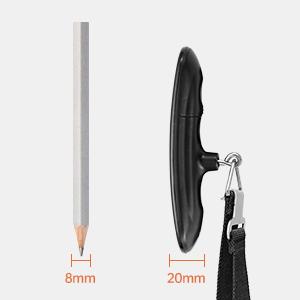
Image 3: A size comparison of the FREETOO scale next to a pencil, illustrating its compact and portable design.
4. Einrichtung
4.1 Einlegen der Batterie
- Suchen Sie das Batteriefach auf der Rückseite der Waage.
- Öffnen Sie die Batterieabdeckung.
- Insert one CR2032 lithium button cell battery, ensuring the positive (+) side faces upwards. If there is a plastic insulator tab, remove it before inserting the battery.
- Schließen Sie die Batterieabdeckung fest.

Image 4: A hand inserting a CR2032 battery into the FREETOO scale's battery compartment.
5. Bedienungsanleitung
5.1 Ein-/Ausschalten
- Zum Einschalten: Drücken Sie den Netzschalter (U) once. The display will show '8888' and then '0.00' or '0.0' with the current unit.
- To turn off: Press and hold the power button for 3 seconds. The scale will also automatically turn off after 60 seconds of inactivity to conserve battery.
5.2 Änderung der Gewichtseinheiten
- With the scale powered on and displaying '0.00', press the power button (U) repeatedly to cycle through the available units: lb (pounds), kg (kilograms), g (grams), and oz (ounces).
- Select your desired unit before weighing.

Image 5: The FREETOO scale's HD LCD display showing the four selectable weight units: grams (g), ounces (oz), kilograms (kg), and pounds (lb).
5.3 Weighing Luggage
- Ensure the scale is powered on and displaying '0.00' in your preferred unit.
- Attach the strap to the handle of your luggage.
- Lift the scale by its handle, holding it steady and horizontally.
- Wait for the weight reading to stabilize. The display will flash three times and then show 'HOLD' to indicate the weight has been locked.
- Lower the luggage to read the final weight. The weight will remain displayed for a few seconds before resetting or turning off automatically.

Image 6: A FREETOO scale being used to weigh a blue suitcase, demonstrating the secure hook and strap mechanism.

Image 7: A close-up of the FREETOO scale's display, showing the 'HOLD' indicator after a stable weight reading has been captured.
5.4 Tara-Funktion
- The tare function allows you to subtract the weight of a container or attachment.
- Attach the empty container or accessory to the scale.
- Drücke den Power Knopf (U) once while the empty item is hanging. The display will reset to '0.00'.
- Now, add the items you wish to weigh to the container. The display will show only the net weight of the added items.

Image 8: An illustration of the FREETOO scale's key functions, including Tare, Weight Hold, Auto On/Off, Low Battery Indicator, and Overload Indicator.
6. Wartung
- Reinigen Sie die Waage mit einem weichen, damp Mit einem Tuch abwischen. Keine Scheuermittel verwenden und die Kalkablagerungen nicht in Wasser einweichen.
- Bewahren Sie die Waage bei Nichtgebrauch an einem kühlen, trockenen Ort auf.
- Remove the battery if the scale will not be used for an extended period to prevent leakage.
7. Fehlerbehebung
| Problem | Mögliche Ursache | Lösung |
|---|---|---|
| Waage lässt sich nicht einschalten | Low or dead battery; battery incorrectly installed; plastic insulator tab not removed. | Replace battery; ensure correct polarity; remove plastic tab. |
| Ungenaue Messwerte | Scale not held steady; item touching other surfaces; scale overloaded. | Hold scale steady and horizontally; ensure item hangs freely; do not exceed 110 lb (50 kg). |
| Anzeige zeigt „Lo“ an | Schwache Batterie. | Ersetzen Sie die CR2032-Batterie. |
| Das Display zeigt „O-Ld“ an. | Überlast. | Remove some weight from the item. Do not exceed 110 lb (50 kg). |
8. Spezifikationen
- Marke: KOSTENLOS
- Modell: Portable Digital Hanging Scale
- Kapazität: 110 kg
- Genauigkeit: 0.1 g
- Einheit: lb, kg, g, oz
- Anzeige: LCD mit Hintergrundbeleuchtung
- Energiequelle: 1 x CR2032 Batterie (im Lieferumfang enthalten)
- Produktabmessungen: Ungefähr 5 x 2 x 1.5 Zoll
9. Garantie und Support
FREETOO provides the following services for this product:
- Garantie: 30 Days Replacement
- Service: Lebenslanger Service
- Kundendienst: 24-Hour Support
For any inquiries or assistance, please contact FREETOO customer support through the retailer's platform or the official FREETOO webWebsite.


