Einführung
Vielen Dank für Ihren Einkauf.asing the Leelbox T2 DVB-T2 Digital Terrestrial Decoder. This device is designed to receive digital terrestrial television broadcasts, converting them for display on your analog or digital television. It supports Full HD 1080p resolution, HEVC 10-bit H.265 decoding, and offers various multimedia functions including PVR recording and USB media playback. Please read this manual carefully before operating the device to ensure proper use and to maximize its features.
Hauptmerkmale
- DVB-T2 Digital TV Reception: Receives free local digital TV channels, supporting channels 100 and 200.
- Full HD 1080p-Ausgabe: Delivers high-definition video output for a clear viewErfahrung.
- HEVC 10-bit H.265 Decoding: Advanced video compression support for efficient broadcasting.
- PVR-Funktion (Personal Video Recorder): Allows recording of TV programs to a USB storage device.
- USB-Medienwiedergabe: Supports playback of photos, MP3 music files, and recorded videos from a USB drive.
- EPG (Elektronischer Programmführer): Provides program information for upcoming broadcasts.
- Mehrsprachige Unterstützung: Includes support for various languages and subtitles.
- Zeitverschiebungsfunktion: Pause live TV and resume later.
- Fernbedienung lernen: A remote control with learning capabilities for convenience.
- Internetdienste: Compatible with YouTube via network connection (USB Wi-Fi or Ethernet).
Packungsinhalt
Bitte kreuzen Sie das Kästchen für die folgenden Elemente an:
- Leelbox T2 DVB-T2 Digital Terrestrial Decoder
- Fernbedienung
- Bedienungsanleitung
- Stromkabel
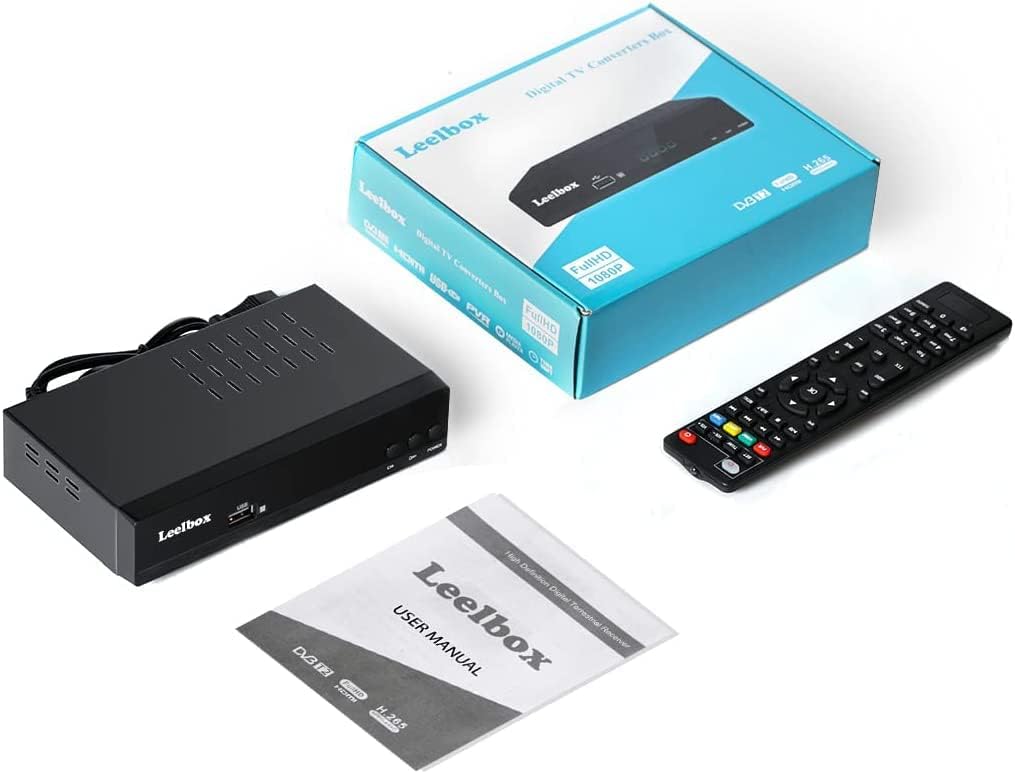
Image: Leelbox T2 package contents, showing the decoder unit, remote control, user manual, and product box.
Installationshandbuch
1. Anschließen des Decoders
Ensure your television and the decoder are powered off before making any connections.
- Antennenanschluss: Schließen Sie Ihr terrestrisches Antennenkabel an die ANT IN port on the back of the Leelbox T2 decoder.
- TV-Anschluss:
- Für HD-Fernseher, connect an HDMI cable from the HDMI port on the decoder to an HDMI input on your TV.
- Für Analog TVs or TVs without HDMI, connect a SCART cable from the Fernseher (SCART) port on the decoder to the SCART input on your TV.
- For audio output to an external sound system, use the KOAXIAL or S/PDIF Hafen.
- Stromanschluss: Schließen Sie das Netzkabel an den STROMKABEL input on the decoder and then plug it into a power outlet.
- Netzwerkverbindung (optional):
- For wired internet, connect an Ethernet cable to the ETHERNET Hafen.
- For wireless internet, insert a compatible USB Wi-Fi dongle (not included) into the USB Hafen.

Image: Rear panel of the Leelbox T2 decoder, highlighting various connection ports including antenna input, HDMI, Ethernet, and SCART.

Image: Detailed connection diagram for the Leelbox T2, illustrating how to connect the antenna, TV (via HDMI or SCART), and network (via LAN or optional USB Wi-Fi).
2. Erstes Einschalten und Kanalsuche
- Power on your television and select the correct input source (HDMI or AV/SCART) corresponding to the connection you made with the decoder.
- Power on the Leelbox T2 decoder using the POWER button on the front panel or the remote control.
- Upon first use, the decoder will guide you through an initial setup wizard. Follow the on-screen prompts to select your language, country, and perform an automatic channel scan.
- The channel scan process may take several minutes. Once complete, the decoder will save the found channels, and you can begin watching TV.

Image: Signal flow diagram showing how digital broadcast signals are received by the Leelbox T2 converter box and then output to an analog television, demonstrating HEVC Main10 compatibility.
Bedienungsanleitung
Basisfernsehen Viewing
- Verwenden Sie die CH+ Und CH- buttons on the remote control or the front panel to change channels.
- Drücken Sie die OK Taste, um view the channel list and select a channel directly.
- Drücken Sie die INFO Schaltfläche zur Anzeige der aktuellen Programminformationen.
- Drücken Sie die EPG button to access the Electronic Program Guide for detailed program schedules.
PVR (Recording) Function
The PVR function allows you to record live TV programs to an external USB storage device (e.g., USB hard drive). USB flash drives are generally not recommended for recording due to potential performance limitations.
- Connect a formatted USB hard drive to the USB port on the front of the decoder.
- To record instantly, press the AUFNAHME button on the remote control while watching a program. Press AUFNAHME erneut, um die Aufnahme zu stoppen.
- To schedule a recording, go to the EPG, select the desired program, and press the AUFNAHME button to set a timer.
- To play back recorded programs, press the PVR button or access the multimedia menu and navigate to the recorded files.

Image: Illustration of the PVR function, demonstrating how to record TV programs to a USB drive for later viewing.
USB-Medienwiedergabe
The Leelbox T2 supports playback of various media files von einem USB-Speichergerät.
- Insert a USB drive containing your media files (photos, music, videos) into the USB port.
- Access the multimedia menu (usually via a dedicated button or through the main menu).
- Select the type of media you wish to play (Photo, Music, Movie) and browse your files.

Image: The Leelbox T2 connected to a USB drive, demonstrating its capability to play back various media files directly on your television.
Internet Services (YouTube)
If connected to the internet via Ethernet or USB Wi-Fi, the decoder supports certain internet services, such as YouTube.
- Ensure your decoder is connected to a stable internet connection.
- Navigate to the "Internet" or "Applications" section in the main menu.
- Select the YouTube application to access its content.
Fernbedienung
The included remote control provides full functionality for the Leelbox T2. It also features a learning function, allowing you to program certain buttons to control your TV (e.g., Power, Volume, Input).
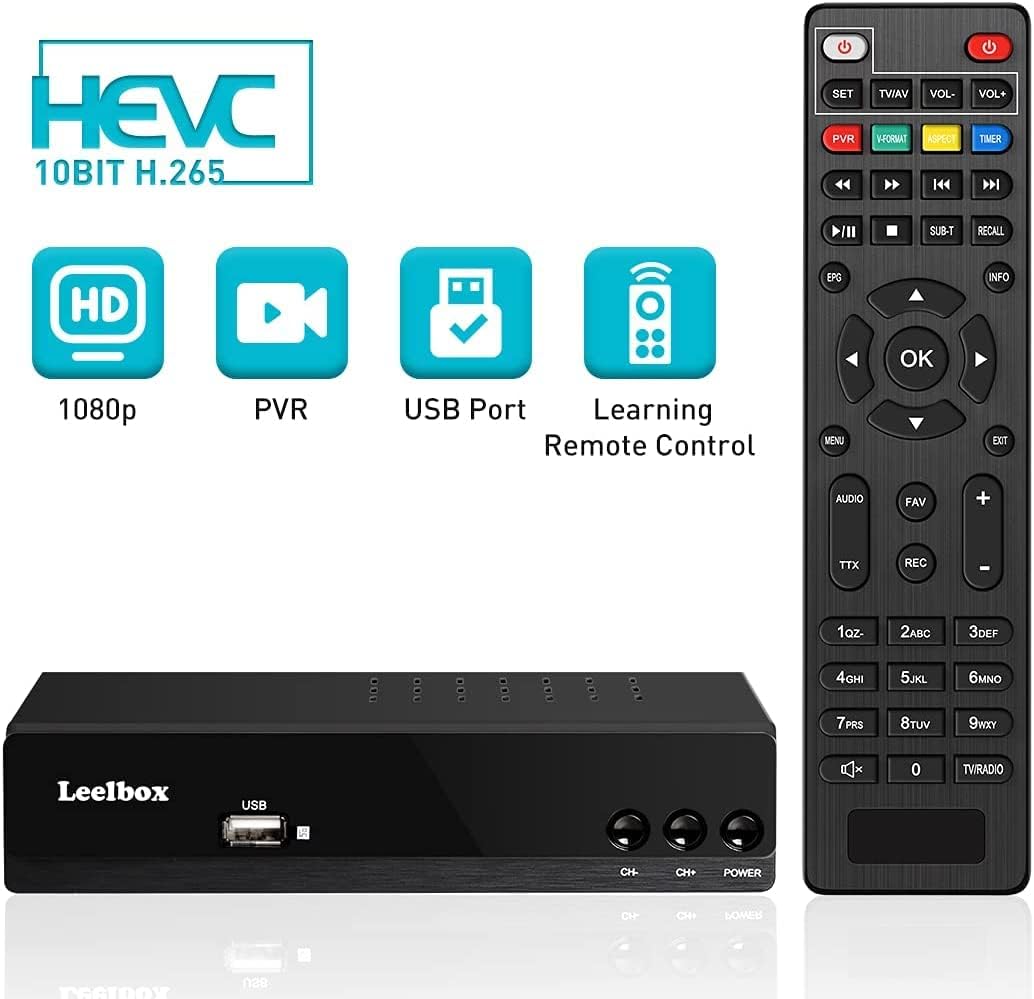
Image: The Leelbox T2 decoder alongside its remote control, illustrating the device's main capabilities.
Wartung
To ensure the longevity and optimal performance of your Leelbox T2 decoder, follow these maintenance guidelines:
- Reinigung: Reinigen Sie die Außenseite des Geräts mit einem weichen, trockenen Tuch. Verwenden Sie keine flüssigen Reinigungsmittel oder Scheuermittel.
- Belüftung: Ensure the decoder is placed in a well-ventilated area. Do not block the ventilation holes on the top or sides of the unit.
- Umfeld: Das Gerät sollte nicht direkter Sonneneinstrahlung, Wärmequellen oder übermäßiger Feuchtigkeit ausgesetzt werden.
- Ausschalten: Wenn das Gerät längere Zeit nicht benutzt wird, ziehen Sie den Netzstecker.
Fehlerbehebung
If you encounter issues with your Leelbox T2 decoder, please refer to the following common problems and solutions:
| Problem | Mögliche Ursache | Lösung |
|---|---|---|
| Kein Bild oder Ton | Incorrect TV input selected; loose cables; decoder not powered on. | Check TV input source (HDMI/AV). Ensure all cables are securely connected. Verify decoder is powered on. |
| Meldung „Kein Signal“ | Antenna not connected or poor signal; no channels scanned. | Check antenna connection. Adjust antenna position. Perform a new channel scan. |
| Fernbedienung funktioniert nicht | Batteries are dead or inserted incorrectly; obstruction between remote and decoder. | Replace batteries. Ensure correct polarity. Remove any obstructions. Point remote directly at the decoder. |
| Aufnahme auf USB nicht möglich | USB drive not formatted correctly; insufficient space; USB drive not compatible. | Ensure USB drive is formatted to FAT32 or NTFS. Check available space. Try a different USB hard drive (flash drives may not be suitable). |
| Internet services not working | No network connection; incorrect network settings. | Verify Ethernet cable is connected or USB Wi-Fi dongle is inserted. Check network settings in the decoder menu. Ensure your router is working. |
Technische Daten
| Besonderheit | Detail |
|---|---|
| Marke | Leelbox |
| Modellnummer | T2 |
| Farbe | Schwarz |
| Konnektivitätstechnologie | USB, Wi-Fi (via dongle), Ethernet |
| Kompatible Geräte | Fernsehen |
| HDMI-Anschlüsse | 1 |
| Audioausgabemodus | Stereo, 5.1 Surround Sound (via Coaxial/S/PDIF) |
| Ausgangsleistung | 5 Watt |
| Unterstützte Internetdienste | YouTube |
| Videodekodierung | HEVC 10-bit H.265, MPEG-2/4 |
| Ausgabeauflösung | Bis zu 1080p Full HD |
Garantie und Support
For information regarding warranty, technical support, or service, please refer to the official Leelbox website or contact their customer support directly. Details can typically be found on the product packaging or the manufacturer's official online resources.


