Einführung
The Epson EpiqVision Mini EF11 Laser Projector delivers a versatile and immersive viewing experience. Designed for portability and ease of use, this projector features advanced 3LCD technology for vibrant Full HD 1080p images up to 150 inches. With 1000 lumens of color and white brightness, a built-in dual-speaker audio system, and flexible connectivity options, it's ideal for various entertainment and presentation needs.
Zu den Hauptmerkmalen gehören:
- Atemberaubende Bildqualität: Enjoy immersive Full HD 1080p images up to 150 inches.
- Hohe Helligkeit: Delivers 1000 lumens of color and white brightness for clear visuals.
- Integrated Dual-Speaker Audio System: Features a high-quality internal speaker system for rich audio.
- Elegantes, kompaktes Design: Portable and modern design allows for easy placement and transport.
- Epson MicroLaser Array Technology: Provides exceptional brightness and enhanced black density.
- Advanced Scene Adaptive Color Correction: Automatically adjusts color for a natural picture.
- Echtes 3-Chip-Projektordesign: Ensures outstanding color accuracy and brightness without "rainbowing."
- Automatische Bildverzerrungskorrektur: Automatically corrects vertical image geometry for optimal viewing.
- Single HDMI Input: Standard HDMI port for video and audio connections.
Lieferumfang
Upon unboxing your Epson EpiqVision Mini EF11 Laser Projector, ensure all the following items are present:
- Epson EF-11 Laser Projector
- Netzkabel
- Remote Control with AAA Batteries
- Quick Setup Guide

Image: Contents of the Epson EpiqVision Mini EF11 box, including the projector, remote, power cord, and quick setup guide.
Aufstellen
- Platzierung: Position the projector on a stable, flat surface. Ensure there is adequate space around the projector for ventilation. The projector can be placed in front of the screen or wall, or mounted on a ceiling.
- Stromanschluss: Connect the provided power cord to the projector's power input and then to an electrical outlet.
- Anschließen von Geräten:
- HDMI: Connect your streaming device (e.g., Apple TV, Roku, Amazon Fire TV, Android TV, game console) to the projector's HDMI port using an HDMI cable.
- USB: The projector features a USB Type-A port (5V/2A power supply) for connecting compatible devices.
- Einschalten: Press the power button on the projector or the remote control to turn on the device. The projector will automatically perform initial setup and image adjustments.
- Bildanpassung: The projector features Auto Picture Skew Correction to automatically adjust the vertical geometry of the picture. Manual adjustments for focus and keystone can be made via the projector's settings menu if needed.

Image: The Epson EpiqVision Mini EF11 Projector showcasing its compact design and projected image quality.
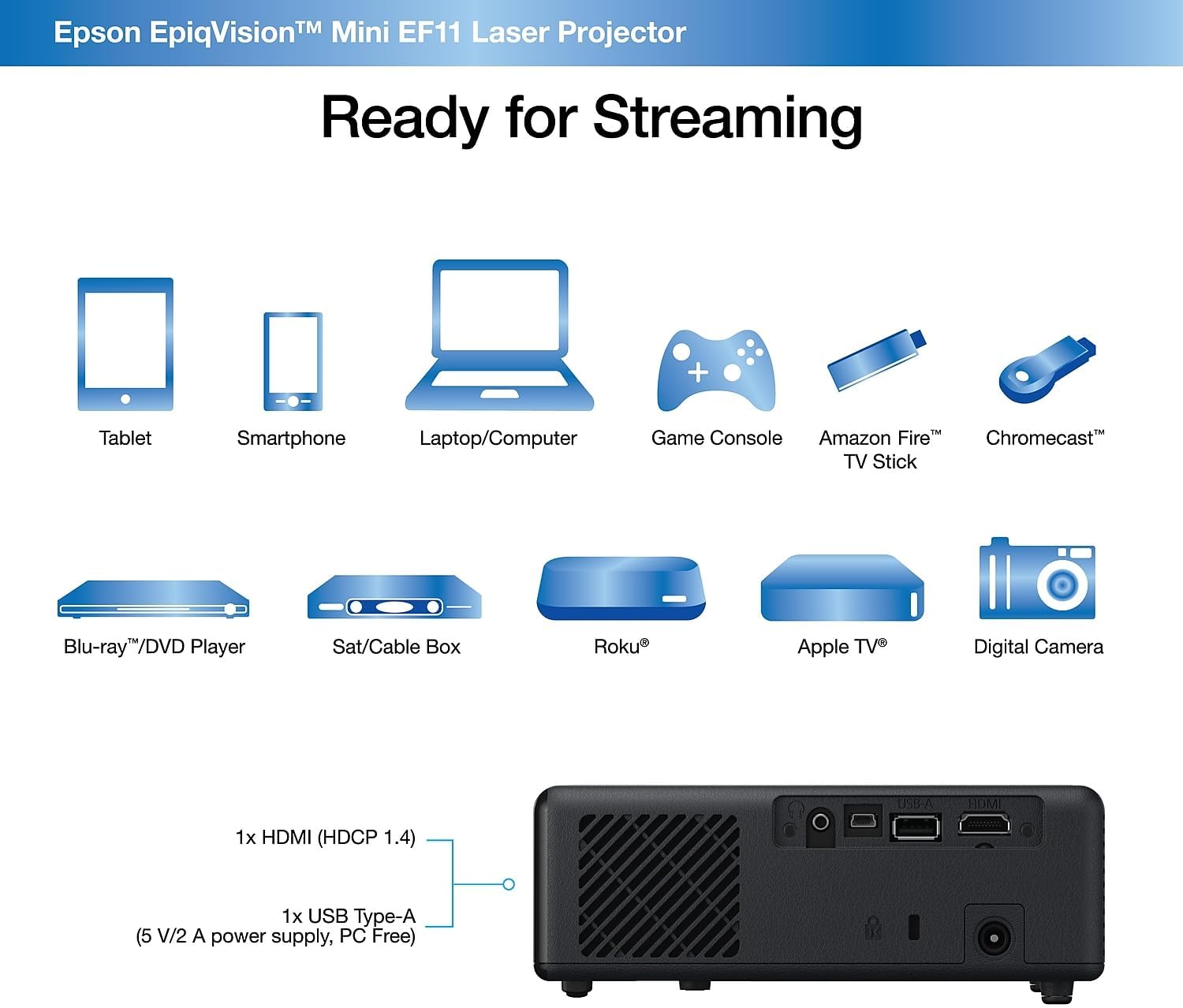
Bild: Rückseite view of the Epson EpiqVision Mini EF11 Projector, highlighting the HDMI and USB ports for connecting various devices.
Betrieb
- Ein-/Ausschalten: Drücken Sie den Netzschalter auf der Oberseite des Projektors oder auf der Fernbedienung, um das Gerät einzuschalten.
- Quellenauswahl: Use the "Source" button on the remote or projector to cycle through available input sources (e.g., HDMI).
- Lautstärkeregelung: Adjust the volume using the '+' and '-' buttons on the remote control or the projector's top panel.
- Zugriff auf Inhalte:
- If using an external streaming device, navigate its interface using its remote.
- The projector is compatible with various streaming solutions like Apple TV, Roku, Amazon Fire TV, or Android TV.
- Bildeinstellungen: Access the projector's menu to adjust picture settings such as color mode, light output, scene adaptive gamma, color temperature, dynamic contrast, and noise reduction.
- Toneinstellungen: Customize your audio experience through sound settings, including sound mode (e.g., Theatre, TV, Studio), virtual surround, clear voice, auto loudness, and bass extension.

Image: The Epson EpiqVision Mini EF11 Laser Projector displaying a high-quality, vibrant image on a wall.

Image: A visual representation of the Epson EpiqVision Mini EF11 Projector's capability to project images at different sizes, from 70 inches to 150 inches.
Medienintegration
Official Product Video: EF12 Plug and Play
Video: This official video from Epson America Inc. demonstrates the "Plug and Play" functionality of the EpiqVision Mini EF12 (similar to EF11), highlighting its ease of setup and immediate use for various media content.
Technische Daten
| Besonderheit | Detail |
|---|---|
| Technische Daten | 6.89 x 6.89 x 2.28 Zoll |
| Artikelgewicht | 2.7 Pfund |
| Artikelmodellnummer | EF11 |
| Marke | Epson |
| Empfohlene Verwendung | Spiele |
| Besondere Merkmale | Eingebauter Lautsprecher, Leichtgewicht |
| Konnektivitätstechnologie | HDMI |
| Bildschirmauflösung | 1920 x 1080 (Full HD) |
| Helligkeit | 1000 Lumen (Farb- und Weißhelligkeit) |
| Projektionstechnik | 3LCD, Laser |
Wartung
Durch sachgemäße Wartung wird die Langlebigkeit und optimale Leistung Ihres Projektors gewährleistet:
- Reinigung der Linse: Use a soft, dry, lint-free cloth to gently wipe the projector lens. Avoid using abrasive cleaners or solvents.
- Reinigung der Lüftungsschlitze: Regularly check and clean the air vents to prevent dust buildup, which can lead to overheating. Use a soft brush or a vacuum cleaner with a brush attachment.
- Lagerung: Wenn Sie den Projektor längere Zeit nicht verwenden, lagern Sie ihn an einem kühlen, trockenen Ort, geschützt vor direkter Sonneneinstrahlung und extremen Temperaturen.
Fehlerbehebung
Sollten Sie Probleme mit Ihrem Projektor haben, versuchen Sie die folgenden gängigen Schritte zur Fehlerbehebung:
- Kein Strom:
- Ensure the power cord is securely connected to both the projector and the electrical outlet.
- Überprüfen Sie die Funktionsfähigkeit der Steckdose, indem Sie ein anderes Gerät anschließen.
- Kein Bild:
- Prüfen Sie, ob am Projektor die richtige Eingangsquelle ausgewählt ist.
- Ensure the HDMI cable (or other video cable) is securely connected to both the projector and the source device.
- Prüfen Sie, ob das Quellgerät eingeschaltet ist und ein Signal ausgibt.
- Verschwommenes Bild:
- Adjust the focus using the projector's settings menu.
- Ensure the projector is placed at an appropriate distance from the screen or wall.
- Check for any obstructions in front of the lens.
- Kein Ton:
- Erhöhen Sie die Lautstärke sowohl am Projektor als auch am Quellgerät.
- Überprüfen Sie die Audioausgabeeinstellungen Ihres Quellgeräts, um sicherzustellen, dass der Ton über HDMI ausgegeben wird.
- Wenn Sie externe Lautsprecher verwenden, vergewissern Sie sich, dass diese ordnungsgemäß angeschlossen und eingeschaltet sind.
Garantie und Support
The Epson EpiqVision Mini EF11 Laser Projector comes with a standard 2-year limited warranty, including full-unit replacement. Free technical phone support is available for the life of the product.
For further assistance or to explore other Epson products, please visit the Epson Store.


