1. Einleitung
The YABER V3 Mini Bluetooth Projector is designed to provide a versatile and high-quality viewing experience for home entertainment and outdoor use. Featuring native 1280x720p resolution with 1080P support, a 6000:1 contrast ratio, and an advanced German LED light source, it delivers clear and accurate images. This projector also includes Bluetooth 5.0 for wireless audio connectivity and supports wireless screen mirroring via Anycast or Chromecast (adapters sold separately).
2. Lieferumfang
- YABER V3 Mini Bluetooth Projector
- HDMI-Kabel
- Netzkabel
- Bedienungsanleitung
- AV-Kabel
- Objektiv-Reinigungstuch
- Fernbedienung (Batterien nicht im Lieferumfang enthalten)
3. Produktmerkmale
- Native 720P & 1080P Supported: Offers a native resolution of 1280x720 pixels, supporting up to 1080P input for clear images.
- Hohes Kontrastverhältnis: Features a 6000:1 contrast ratio for enhanced image depth and detail.
- Bluetooth 5.0-Konnektivität: Allows wireless connection to Bluetooth headsets, speakers, and Airpods for enhanced audio.
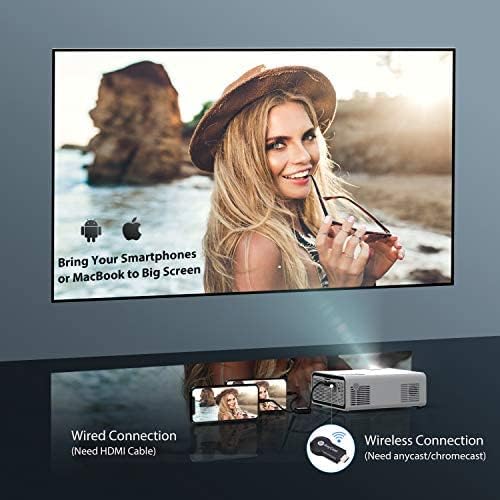
- Drahtlose Bildschirmspiegelung: Supports Anycast and Chromecast for mirroring content from smartphones and other devices (adapters required).
- Zoomfunktion: Adjusts image size from 100% to 50% using the remote control without moving the projector.
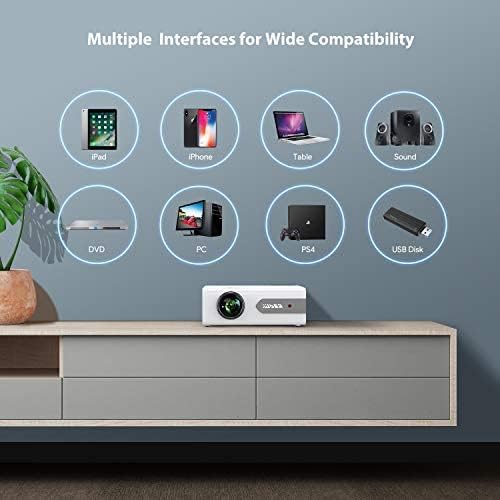
- Mehrere Schnittstellen: Equipped with HDMI, USB, VGA, AV, and Audio ports for wide compatibility with various devices.
- HiFi-Stereo-Sound: Built-in dual stereo speakers with an SRS sound system provide a good auditory experience.
- Fortschrittliches Kühlsystem: Designed to minimize lamp power consumption and extend lamp Lebensdauer bis zu 100,000 Stunden.


4. Einrichtung
4.1 Erstplatzierung
Place the projector on a stable, flat surface or mount it to the ceiling. Ensure there is adequate ventilation around the projector to prevent overheating. The projection distance and screen size can be adjusted based on your viewing-Umgebung.

4.2 Stromanschluss
Schließen Sie das Netzkabel an den Stromeingang des Projektors an und stecken Sie es dann in eine Steckdose.
4.3 Ein-/Ausschalten
Drücken Sie den Netzschalter am Projektor oder auf der Fernbedienung, um das Gerät ein- oder auszuschalten.
5. Bedienungsanleitung
5.1 Fokus- und Trapezkorrektur
Adjust the focus ring on the projector lens until the image is clear. Use the keystone correction feature (manual or digital, if available) to correct any trapezoidal distortion of the image.
5.2 Auswahl der Eingangsquelle
Use the 'Source' button on the remote or projector to select the desired input source (HDMI, USB, VGA, AV).
5.3 Bluetooth-Verbindung
To connect to a Bluetooth audio device:
- Ensure your Bluetooth speaker or headset is in pairing mode.
- Navigieren Sie zu den Bluetooth-Einstellungen des Projektors.
- Wählen Sie Ihr Gerät aus der Liste der verfügbaren Geräte zum Koppeln aus.
- Sobald die Verbindung hergestellt ist, wird der Ton über das Bluetooth-Gerät wiedergegeben.
Notiz: The V3 mini projector supports Bluetooth output devices (speakers, headphones) but does not connect to phones/pads via Bluetooth for mirroring. Turn off Bluetooth when not in use to avoid potential issues.
5.4 Drahtlose Bildschirmspiegelung
The YABER V3 supports wireless screen mirroring from iOS and Android devices using an external Anycast or Chromecast dongle (purchased separately). Connect the dongle to an HDMI port and follow the dongle's instructions for mirroring.
5.5 Zoomfunktion
To adjust the image size without moving the projector, use the zoom function via the remote control. This allows you to shrink the image from 100% down to 50%.
5.6 Nutzungsszenarien
The YABER V3 projector is suitable for various applications:
- Heimkino: Enjoy movies and shows on a large screen.
- Spielen: Verbinde deine Spielkonsolen für ein immersives Erlebnis.
- Outdoor Movies: Perfect for backyard movie nights in dark environments.

6. Wartung
6.1 Linsenreinigung
Regularly clean the projector lens using the provided lens cleaning cloth or a soft, lint-free cloth. Avoid using abrasive cleaners or harsh chemicals.
6.2 Luftfilterreinigung
Check and clean the air filter periodically to ensure proper airflow and prevent dust buildup, which can affect performance and lamp Leben.
6.3 Literamp Leben
Die LED l des Projektorsamp has a lifespan of up to 100,000 hours. Proper maintenance, including adequate ventilation and cleaning, helps maximize its longevity.
7. Fehlerbehebung
- Kein Bild:
- Prüfen Sie, ob das Stromkabel fest angeschlossen ist.
- Stellen Sie sicher, dass die richtige Eingangsquelle ausgewählt ist.
- Verify that the connected device (e.g., TV Stick, PC) is powered on and outputting a signal.
- Fokus und Trapezkorrektur einstellen.
- Kein Ton:
- Überprüfen Sie die Lautstärkeeinstellungen sowohl am Projektor als auch am angeschlossenen Gerät.
- Wenn Sie Bluetooth verwenden, stellen Sie sicher, dass das Gerät ordnungsgemäß gekoppelt und verbunden ist.
- If using an external speaker via AUX, ensure the cable is fully inserted.
- Some content (e.g., certain streaming services) may have audio format incompatibilities; try a different source or content.
- Verschwommenes Bild:
- Stellen Sie den Fokusring am Objektiv ein.
- Stellen Sie sicher, dass die Projektionsfläche eben ist und der Projektor stabil steht.
- Reinigen Sie die Projektorlinse.
- Fernbedienung funktioniert nicht:
- Ersetzen Sie die Batterien in der Fernbedienung.
- Stellen Sie sicher, dass sich keine Hindernisse zwischen der Fernbedienung und dem Infrarotempfänger des Projektors befinden.
- Überhitzung:
- Sorgen Sie für ausreichende Belüftung rund um den Projektor.
- Clean the air filter and vents to remove dust.
- Avoid operating in excessively hot environments.
8. Spezifikationen
| Modellnummer | V3 |
| Bildschirmauflösung | Native 1280 x 720 (Supports 1080P) |
| Kontrastverhältnis | 6000:1 |
| Seitenverhältnis | 16:9 / 4:3 |
| Lichtquelle | LED |
| Lamp Leben | Bis zu 100,000 Stunden |
| Konnektivitätstechnologie | 3.5mm Jack, Bluetooth, HDMI, USB, VGA, AV |
| Bluetooth-Version | 5.0 |
| Technische Daten | 8.19 x 6.61 x 3.07 Zoll |
| Artikelgewicht | 2.2 Pfund |
| Empfohlene Verwendung | Home Cinema, Gaming, Business (not recommended for professional presentations) |
9. Garantie und Support
YABER provides a 6-month return policy and 3-year repair service for the V3 Mini Bluetooth Projector. Lifetime professional technical support is also available. For any issues or inquiries, please contact YABER customer service.


