1. Einleitung
This manual provides detailed instructions for the installation, operation, and maintenance of your JVC KD-TD71BT CD Receiver. The KD-TD71BT is a versatile car audio system featuring CD playback, AM/FM tuner, built-in Bluetooth for hands-free calling and audio streaming, front USB and AUX inputs, and integrated Amazon Alexa functionality. It also includes advanced audio processing technologies like a 13-band equalizer, K2 Technology, Time Alignment, Space Enhancement, and Sound Lift for an optimized listening experience. Please read this manual thoroughly before using the product to ensure correct operation and to prevent damage.
2. Sicherheitshinweise
- Fahrsicherheit: Always operate the unit safely. Do not perform any operations that distract you from driving.
- Lautstärkeregelung: Stellen Sie die Lautstärke so ein, dass Sie Außengeräusche wie beispielsweise Einsatzfahrzeuge noch hören können.
- Stromversorgung: Dieses Gerät ist für elektrische Systeme mit 12 V Gleichstrom und negativer Masse ausgelegt.
- Installation: Ensure proper installation to prevent fire, electric shock, or other injuries. Consult a qualified technician if unsure.
- Feuchtigkeit vermeiden: Um Brände oder Stromschläge zu vermeiden, setzen Sie das Gerät weder Regen noch Feuchtigkeit aus.
- Belüftung: Sorgen Sie für ausreichende Belüftung rund um das Gerät, um eine Überhitzung zu vermeiden.
3. Packungsinhalt
Überprüfen Sie, ob alle Artikel im Paket vorhanden sind:
- JVC KD-TD71BT CD Receiver Unit
- Wired Microphone (for Bluetooth hands-free calling)
- Kabelbaum
- Montagezubehör
- Bedienungsanleitung (dieses Dokument)
4. Einrichtung und Installation
Proper installation is crucial for optimal performance and safety. If you are unsure about any part of the installation process, it is recommended to consult a professional car audio installer.
4.1. Vor der Installation
- Disconnect the negative terminal of the car battery to prevent short circuits.
- Ensure you have all necessary tools and mounting accessories.
- Review your vehicle's wiring diagram.
4.2. Kabelverbindungen
Connect the wiring harness provided with the unit to your vehicle's wiring. Pay close attention to the color codes and functions of each wire.
- Gelb: Konstante 12 V (Batterie)
- Rot: Geschaltete 12V (Zündung/Zubehör)
- Schwarz: Boden
- Blau Weiss: Ferneinschaltung (für ampVerstärker/Leistungsantenne)
- Lautsprecherkabel: Schließen Sie die entsprechenden Fahrzeuglautsprecher an (z. B. Weiß/Weiß-Schwarz für vorne links, Grau/Grau-Schwarz für vorne rechts, Grün/Grün-Schwarz für hinten links, Lila/Lila-Schwarz für hinten rechts).
- Mikrofoneingang: Connect the supplied wired microphone to the dedicated input jack for Bluetooth hands-free calling.

Bild: Hinteren view of the JVC KD-TD71BT CD Receiver. This image displays the various connection ports, including the main wiring harness connector on the left, RCA pre-outs for external amplifiers, and the antenna input on the right. The heat sink is also visible in the center.
4.3. Montage der Einheit
Secure the unit into the dashboard opening using the provided mounting sleeve and brackets. Ensure the unit is firmly seated and does not obstruct any vehicle controls.
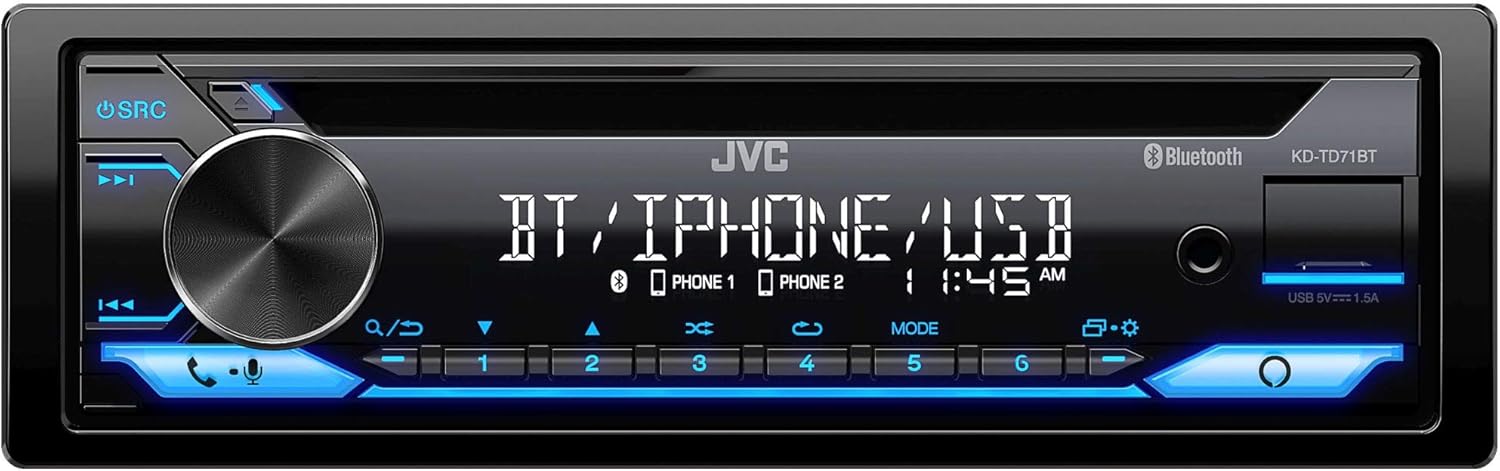
Bild: Front view of the JVC KD-TD71BT CD Receiver. This image shows the main display, the large rotary volume knob, source button, track controls, and the CD slot. The front USB and AUX inputs are also visible on the right side of the faceplate.
5. Bedienungsanleitung
5.1. Grundlegende Bedienung
- Ein-/Ausschalten: Drücken Sie die SRC Taste zum Einschalten des Geräts. Die Taste gedrückt halten. SRC Taste, um es auszuschalten.
- Lautstärkeregelung: Durch Drehen des großen Drehknopfes kann die Lautstärke eingestellt werden.
- Quellenauswahl: Drücken Sie die SRC Durch wiederholtes Drücken der Taste können die verfügbaren Quellen durchgeschaltet werden (CD, Tuner, Bluetooth-Audio, USB, AUX).
- Menü/Einstellungen: Drücken Sie die SPEISEKARTE button (often integrated with the volume knob press) to access system settings.
5.2. Bluetooth-Funktionen
The KD-TD71BT features Bluetooth for hands-free calling and wireless audio streaming.
- Koppeln eines Geräts:
- Schalten Sie Bluetooth auf Ihrem Mobilgerät ein.
- Select "KD-TD71BT" from the list of available devices.
- Confirm the pairing on both devices if prompted. The unit supports Bluetooth Automatic Pairing.
- Freisprechen:
- Answer/End Call: Press the ANRUF button (often a dedicated button or part of the volume knob function).
- Dialing: Use the unit's controls or your phone to dial.
- Audio-Streaming: Select Bluetooth Audio as the source. Play music from your paired device. The unit supports Streaming DJ, allowing up to 5 Bluetooth devices to be connected simultaneously for music streaming.
- 2-Phones Full-Time Connection: The unit can maintain a full-time connection with two Bluetooth-enabled phones simultaneously, allowing for seamless switching between devices for calls or music.
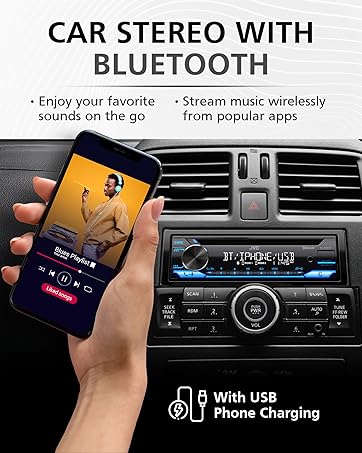
Bild: A hand holding a smartphone displaying a music playlist, positioned next to a car stereo. The car stereo's display shows "BT / IPHONE / USB", indicating its Bluetooth and USB capabilities. This illustrates the unit's ability to connect with smartphones for audio playback.
5.3. USB and AUX Inputs
- USB-Wiedergabe: Connect a USB storage device to the front USB port. The unit supports MP3, WMA, WAV, AAC, and FLAC audio file playback. Use the track controls to navigate. The USB port also provides 1.5A charging for compatible devices.
- AUX-Eingang: Connect an external audio player to the front 3.5mm AUX input using a stereo mini-jack cable. Select AUX as the source.
5.4. CD-Wiedergabe
- Legen Sie eine CD in den CD-Schacht ein. Das Gerät schaltet automatisch auf CD-Wiedergabe um und beginnt mit der Wiedergabe.
- Verwenden Sie die TRACK AUF/AB Tasten zum Überspringen von Titeln.
- Drücken Sie die PAUSE/WIEDERGABE Taste, um die Wiedergabe anzuhalten oder fortzusetzen.
5.5. AM/FM-Tuner
- Select Tuner as the source.
- Verwenden Sie die SUCHEN Tasten zum Auffinden von Radiosendern.
- Drücken und halten SUCHEN for automatic station search.
- Store favorite stations using the preset buttons (1-6).
5.6. Amazon Alexa-Integration
The KD-TD71BT features built-in Amazon Alexa.
- Aktivierung: Connect your smartphone via Bluetooth and ensure the JVC Remote App is installed and configured with your Amazon Alexa account.
- Sprachbefehle: Press the dedicated Alexa button (or activate via the JVC Remote App) and speak your commands, such as "Alexa, play music," "Alexa, get directions," or "Alexa, check the weather."
6. Audioeinstellungen
Customize your listening experience using the advanced audio settings. Access these settings through the unit's menu.
- 13-Band-Grafik-EQ: Adjust specific frequency bands to tailor the sound to your preference. Eleven preset EQ settings are also available.
- Zeitliche Ausrichtung: Adjust the delay of individual speaker outputs to ensure sound from all speakers reaches the listener at the same time, creating a more focused soundstage.
- Space Enhancement: Digitally expands the sound field to create a larger, more immersive listening environment.
- Schalllift: Virtually adjusts the height of the sound image, making it appear as if the sound is coming from the dashboard rather than the floor.
- K2 Technology: JVC's proprietary technology that reproduces the original master sound by expanding the bit rate and frequency range.
7. Wartung
- Reinigung des Geräts: Verwenden Sie ein weiches, trockenes Tuch, um die Frontplatte abzuwischen. Bei hartnäckigem Schmutz dampwischen Sie das Tuch mit Wasser ab. Verwenden Sie niemals Scheuermittel oder Lösungsmittel.
- Pflegehinweise für CD-Player: Use only standard, round CDs. Avoid using irregularly shaped discs or discs with labels that may peel off. Keep the disc tray clean.
- Sicherungswechsel: If the unit does not power on, check the fuse located on the rear of the unit. Replace it with a fuse of the same ampAltersbewertung.
8. Fehlerbehebung
If you encounter issues with your KD-TD71BT, refer to the following common problems and solutions.
| Problem | Mögliche Ursache | Lösung |
|---|---|---|
| Kein Strom | Durchgebrannte Sicherung; fehlerhafte Verkabelung; Problem mit der Fahrzeugbatterie. | Check and replace fuse; verify wiring connections; check car battery. |
| Kein Ton | Lautstärke zu niedrig; Stummschaltung aktiviert; Problem mit der Lautsprecherverkabelung; falsche Quelle ausgewählt. | Lautstärke erhöhen; Stummschaltung deaktivieren; Lautsprecheranschlüsse prüfen; richtige Quelle auswählen. |
| Bluetooth stellt keine Verbindung her | Bluetooth off on phone/unit; device not paired; interference. | Ensure Bluetooth is on; re-pair device; move closer to unit; restart phone/unit. |
| CD springt oder spielt nicht ab | Dirty or scratched disc; unit vibration; foreign object in slot. | Clean disc; ensure stable mounting; check for obstructions. |
| Schlechter Radioempfang | Antenne nicht angeschlossen; Antenne beschädigt; Gebiet mit schwachem Signal. | Check antenna connection; replace antenna if damaged; try a different location. |
9. Spezifikationen
Key technical specifications for the JVC KD-TD71BT CD Receiver:
- Modellnummer: KD-TD71BT (also referred to as KD-T710BT in some documentation)
- Stromversorgung: 12V DC (negative Masse)
- Konnektivität: Bluetooth, Front USB, Front AUX (3.5mm Jack)
- USB-Aufladung: 1.5 A
- Audioausgabemodus: Stereo
- Konfiguration der Surround-Sound-Kanäle: 2
- Equalizer: 13-Band Graphic EQ with 11 Presets
- Unterstützte Audioformate (USB/CD): MP3, WMA, WAV, AAC, FLAC
- Besondere Merkmale: Amazon Alexa Compatible, K2 Technology, Time Alignment, Space Enhancement, Sound Lift, Streaming DJ, 2-Phones Full-Time Connection, Steering Wheel Remote Ready
- Produktabmessungen: Ungefähr 10 x 9 x 4 Zoll (25.4 x 22.86 x 10.16 cm)
- Artikelgewicht: 3.19 Pfund (1.45 kg)
- Hersteller: JVC
10. Garantieinformationen
JVC products are manufactured to high-quality standards. For specific warranty terms and conditions, please refer to the warranty card included with your product or visit the official JVC website. Warranty coverage typically includes defects in materials and workmanship for a specified period from the date of purchase. Keep your proof of purchase for warranty claims.
11. Kundendienst
If you require further assistance or have questions not covered in this manual, please contact JVC customer support.
- JVC-Offizieller WebWebsite: www.jvc.com (for product information, FAQs, and support contact details)
- Online-Ressourcen: Check the support section of the JVC website for updated manuals, firmware, and troubleshooting guides.


