1. Einleitung
Thank you for choosing the Omars Portable Charger 10000mAh. This compact and powerful device is designed to keep your electronic devices charged on the go. Please read this manual carefully before using the product to ensure safe and optimal performance.

Image: The Omars Portable Charger, a sleek black device, is shown next to a credit card, highlighting its compact and portable design.
2. Produktmerkmale
- Hohe Kapazität: 10000mAh battery provides multiple charges for smartphones and other devices.
- Kompaktes und leichtes Design: Easily fits into pockets or bags, ideal for travel.
- Mehrere Ausgangsports: Equipped with USB-A (x2) and USB-C ports for versatile charging.
- Duale Eingabeoptionen: Recharge the power bank via USB-C or Micro USB.
- LED-Betriebsanzeige: Four LED lights clearly show the remaining battery capacity.
- Universelle Kompatibilität: Charges a wide range of USB-powered devices including smartphones, tablets, and more.
- Erweiterter Sicherheitsschutz: Built-in safeguards against overcurrent, short circuit, over-temperature, and over-discharge.

Image: The Omars Portable Charger is depicted on a balance scale, counterbalanced by three eggs, emphasizing its ultra-compact size and lightweight nature, making it airline compliant.

Image: The Omars Portable Charger is shown alongside a variety of smartphones, tablets, and an e-reader, demonstrating its universal compatibility with different USB-powered devices.
3. Packungsinhalt
- Omars Portable Charger 10000mAh
- USB-Ladekabel (USB-A auf USB-C/Micro-USB)
- Bedienungsanleitung
4. Einrichtung
4.1 Erstgebühr
Before first use, it is recommended to fully charge your Omars Portable Charger. Connect the provided USB charging cable to the power bank's USB-C or Micro USB input port and plug the other end into a USB wall charger (not included) or a computer's USB port.
4.2 LED-Anzeigen verstehen
The power bank features four LED indicator lights that display the remaining battery capacity:
- 1 LEDs: 0 % - 25 % Kapazität
- 2 LEDs: 26 % - 50 % Kapazität
- 3 LEDs: 51 % - 75 % Kapazität
- 4 LEDs: 76 % - 100 % Kapazität
When charging the power bank, the LEDs will blink to indicate charging progress and remain solid when fully charged.

Image: A detailed diagram of the Omars Portable Charger highlights its three output ports (USB-A1, USB-A2, USB-C) and two recharge options (USB-C, Micro USB). The LED indicator system for battery capacity is also clearly explained.
5. Bedienungsanleitung
5.1 Aufladen der Powerbank
- Connect the charging cable to either the USB-C input port or the Micro USB input port on the power bank.
- Stecken Sie das andere Ende des Kabels in eine USB-Stromquelle (z. B. Netzteil, USB-Anschluss am Computer).
- The LED indicators will light up and blink to show charging status. All four LEDs will remain solid when fully charged.
5.2 Laden Ihrer Geräte
- Connect your device's charging cable to one of the output ports on the power bank (USB-A1, USB-A2, or USB-C).
- Verbinden Sie das andere Ende des Kabels mit Ihrem Gerät.
- Die Powerbank beginnt automatisch mit dem Laden Ihres Geräts. Falls nicht, drücken Sie einmal den Ein-/Ausschalter, um den Ladevorgang zu starten.
- The LED indicators will show the remaining power bank battery level during discharge.
5.3 Laden mehrerer Geräte
The Omars Portable Charger can charge up to three devices simultaneously using its multiple output ports.
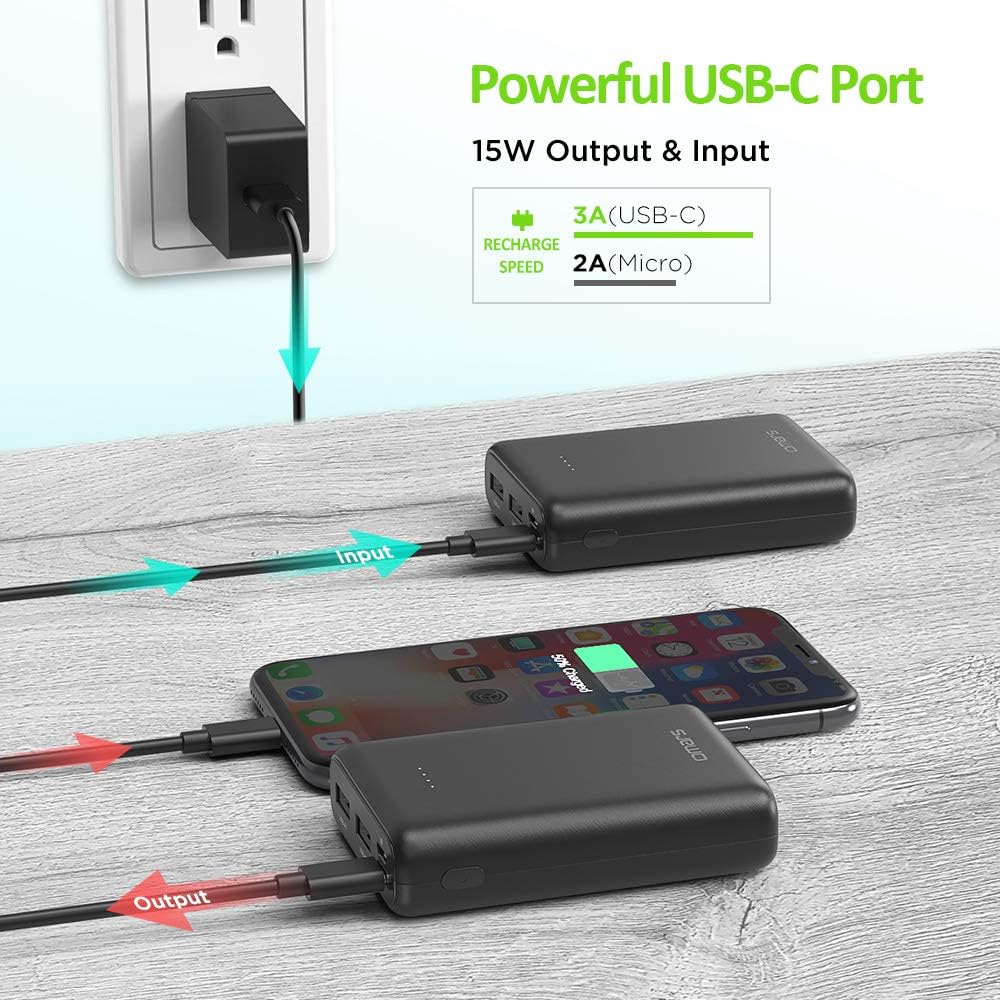
Image: The Omars Portable Charger is shown connected to a wall outlet via its USB-C input for recharging, while simultaneously providing power to a smartphone through its output port.

Image: The Omars Portable Charger is actively charging three different devices—two smartphones and a tablet—demonstrating its capability to power multiple gadgets at once.
6. Wartung
- Keep the power bank dry and away from moisture and corrosive materials.
- Setzen Sie die Powerbank keinen extremen Temperaturen (Hitze oder Kälte) aus.
- Reinigen Sie die Powerbank mit einem weichen, trockenen Tuch. Verwenden Sie keine scharfen Chemikalien oder Scheuermittel.
- Store the power bank in a cool, dry place when not in use. For long-term storage, charge it to about 50% every three months to preserve battery life.
7. Fehlerbehebung
7.1 Powerbank lädt nicht
- Stellen Sie sicher, dass das Ladekabel sowohl mit dem Eingangsanschluss der Powerbank als auch mit der Stromquelle fest verbunden ist.
- Versuchen Sie es mit einem anderen Ladekabel oder Netzteil.
- Prüfen Sie, ob die Stromquelle aktiv ist.
7.2 Gerät lädt nicht über Powerbank
- Stellen Sie sicher, dass die Powerbank ausreichend geladen ist (prüfen Sie die LED-Anzeigen).
- Drücken Sie den Ein-/Ausschalter an der Powerbank, um den Ladevorgang zu aktivieren.
- Versuchen Sie einen anderen Ausgangsanschluss an der Powerbank.
- Versuchen Sie es mit einem anderen Ladekabel für Ihr Gerät.
- Stellen Sie sicher, dass Ihr Gerät mit den Ausgangsspezifikationen der Powerbank kompatibel ist.
8. Spezifikationen
| Besonderheit | Detail |
|---|---|
| Modellnummer | OMPBPW1810BKWTB |
| Batteriekapazität | 10000 Milliamp Stunden (mAh) |
| Technische Daten | 5.51 x 2.83 x 0.61 Zoll |
| Artikelgewicht | 6.7 Unzen |
| Eingang (USB-C) | Gleichstrom 5 V, 3 A |
| Eingang (Micro-USB) | Gleichstrom 5 V, 2.0 A |
| Output (USB-A1, USB-A2) | Gleichstrom 5 V, 2.4 A |
| Ausgang (USB-C) | Gleichstrom 5 V, 3 A |
| Bandtage | 5 Volt |
9. Sicherheitshinweise
Um einen sicheren Betrieb zu gewährleisten und Schäden zu vermeiden, beachten Sie bitte die folgenden Sicherheitsvorkehrungen:
- Das Batteriefach darf nicht auseinandergenommen, geöffnet oder zerkleinert werden.
- Setzen Sie die Powerbank keiner Hitze oder Feuer aus. Vermeiden Sie die Lagerung in direktem Sonnenlicht.
- Schließen Sie die Powerbank nicht kurz.
- Do not drop or subject the power bank to strong mechanical shock.
- Außerhalb der Reichweite von Kindern aufbewahren.
- Verwenden Sie die Powerbank nicht, wenn sie beschädigt oder verändert wurde.
- Entsorgen Sie die Powerbank gemäß den örtlichen Vorschriften. Werfen Sie sie nicht in den Hausmüll.

Abbildung: Ein interner view of the Omars Portable Charger highlights its multiple safety protection features, including safeguards against overcurrent, short circuit, temperature fluctuations, and over-discharge.
10. Garantie und Support
Omars products typically come with a manufacturer's warranty. Please refer to the product packaging or the official Omars website for specific warranty terms and conditions. For technical support or customer service inquiries, please contact Omars customer support through their official channels.
