Einführung
The NICREW Single Channel LED Light Timer is designed to automate the lighting cycle for your aquarium, simulating natural sunrise and sunset effects. It also functions as a dimmer, allowing brightness adjustment from 1% to 100%. This device is compatible with various NICREW LED lights and other lights utilizing standard 2.5mm/2.1mm power connectors.

Image: The NICREW Single Channel LED Light Timer, a compact black device with a digital display and control buttons, connected by cables.
Produkteigenschaften
- Simulates sunrise and sunset to provide a natural day and night cycle for your fish.
- Automatically turns your aquarium lamps on and off for you by setting it once.
- Internal memory stores your pre-programmed settings in case of power failure.
- Can also be used as a dimmer, the brightness can be adjusted from 1% to 100%.
- Suitable for NICREW ClassicLED, ClassicLED Plus, BrightLED and other lights with standard 2.5mm/2.1mm power connectors.

Bild: Eine Draufsicht view of the NICREW LED Light Timer, showing its compact size (2.7 inches wide, 1.5 inches high) and listing key features such as 24/7 LED light timer, program on/off times, manual dimmer, and sunrise/sunset simulation.
Setup und Installation
Follow these steps to correctly install your NICREW Single Channel LED Light Timer:
- Ensure your aquarium light is compatible with 2.1mm or 2.5mm x 5.5mm barrel plugs.
- Connect the power adapter of your LED light to the input side of the timer.
- Connect the output side of the timer to your LED light.
- If necessary, use the provided adapter cables (2.5mm female to 2.1mm male or 2.1mm female to 2.5mm male) to ensure proper connection.
- Plug the power adapter into a power outlet. The timer display should illuminate.
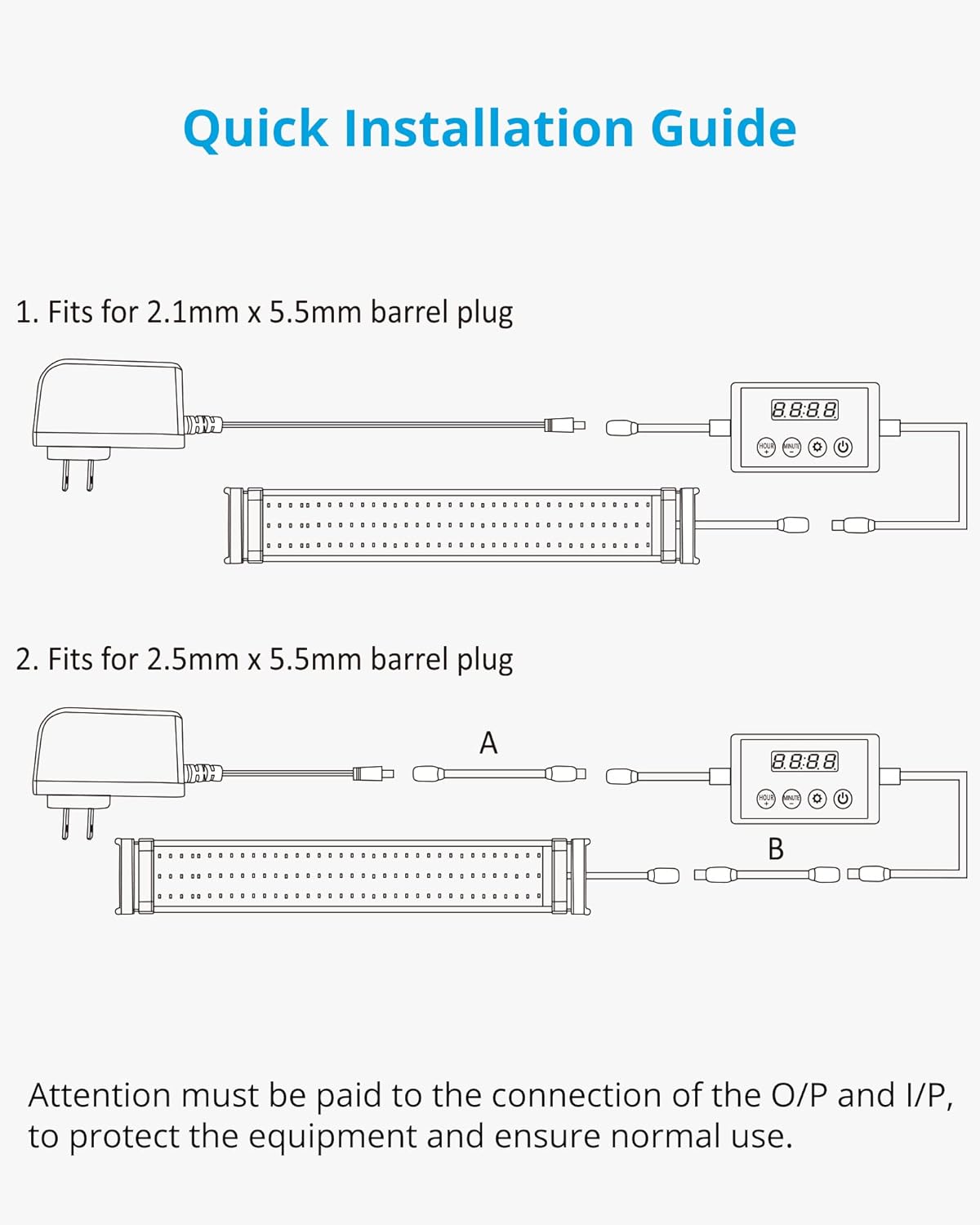
Image: A diagram illustrating the quick installation guide for the timer, showing connections for both 2.1mm and 2.5mm x 5.5mm barrel plugs between a power adapter, the timer, and an LED light. It emphasizes the importance of correct input/output connections.

Image: Two adapter cables are shown: one for 2.5mm female to 2.1mm male connection, and another for 2.1mm female to 2.5mm male connection, used to ensure compatibility with various power connectors.
Bedienungsanleitung
The timer features four buttons for control and programming:

Image: A close-up of the NICREW LED Light Timer's control panel, detailing the functions of each button: "HOUR +" for setting hours and increasing brightness, "MINUTE -" for setting minutes and decreasing brightness, "SET" for confirming settings, and "POWER" for manually turning lights on/off and entering brightness settings.
Aktuelle Uhrzeit einstellen
- Halten Sie die SATZ Drücken Sie die Taste so lange, bis die Stundenziffern blinken.
- Verwenden Sie die HOUR + Und MINUTE - Tasten zum Einstellen der Stunde.
- Drücken SATZ Um dann wieder zur Feinjustierung überzugehen.
- Verwenden Sie die HOUR + Und MINUTE - Tasten zum Einstellen der Minuten.
- Drücken SATZ to confirm the current time.
Programming On/Off Times and Dimming (F1 Mode)
The F1 mode allows for gradual sunrise and sunset simulation.
- Drücken Sie die SATZ button repeatedly to cycle through programming modes (F1, F2, etc.). Select F1.
- Follow the on-screen prompts to set the desired "ON" time (sunrise start) and "OFF" time (sunset end).
- Adjust the maximum brightness level for the daytime period using the HOUR + Und MINUTE - Schaltflächen.
- The timer will gradually ramp up to the set brightness at "ON" time and gradually dim down to off at "OFF" time.

Image: A graph illustrating a typical 24-hour light cycle with simulated sunrise (ramp up) and sunset (dim down) phases, showing how brightness changes over time between "ON" and "OFF" periods.
Straight On/Off Mode (F2 Mode)
The F2 mode provides a simple on/off schedule without dimming.
- Drücken Sie die SATZ button repeatedly to cycle through programming modes. Select F2.
- Set the desired "ON" time and "OFF" time. The light will turn on and off instantly at these times.
Manual Dimmer Option
To manually adjust brightness:
- Drücken Sie die LEISTUNG Taste zum Einschalten des Lichts.
- Halten Sie die LEISTUNG button until the brightness percentage blinkt.
- Verwenden Sie die HOUR + Und MINUTE - buttons to adjust the brightness from 1% to 100%.
- Drücken LEISTUNG again to confirm and exit manual dimming.
Kompatibilität
This timer is designed for single-channel LED lights. It is compatible with:
- NICREW ClassicLED Lights
- NICREW SlimLED Lights
- NICREW Submersible Lights
- Other lights with standard 2.5mm/2.1mm power connectors.
Notiz: This timer cannot control two independent lighting channels simultaneously. SkyLED is not dimmable and can only be used in F2 (Straight On/Off) mode. Not all LED lamps are dimmable; ensure your light supports dimming for full functionality.

Image: A compatibility chart showing various NICREW LED lights. It indicates compatibility with ClassicLED, SlimLED, and Submersible Lights, and explicitly states non-compatibility with HyperReef Lights. A note clarifies that SkyLED is not dimmable.
Wartung
The NICREW Single Channel LED Light Timer requires minimal maintenance. Keep the device clean and dry. Avoid exposing it to excessive moisture or extreme temperatures. Do not attempt to open or repair the device yourself, as this will void the warranty.
Fehlerbehebung
- Timer display is off: Check all power connections to ensure they are secure. Verify the power adapter is plugged into a working outlet.
- Time reset after power outage: The timer's internal memory saves programmed settings but not the current time. After a power interruption, you will need to reset the current time manually. Programmed on/off cycles will remain saved.
- Lichter dimmen nicht: Ensure your specific LED light fixture supports dimming. Some lights, like SkyLED, are not dimmable and will only operate in F2 (straight on/off) mode.
- Incorrect time display or running fast/slow: Ensure the timer is not connected in-line with another remote receiver or dimmer that might interfere with its voltage supply, as this can affect clock accuracy.
Technische Daten
| Besonderheit | Detail |
|---|---|
| Marke | NICREW |
| Modellnummer | N12890 |
| Artikelgewicht | 2.89 Unzen |
| Abmessungen des Artikelpakets | 5.87 x 3.19 x 0.71 Zoll |
| Stromquelle | Kabelgebundene Elektrik |
| Bandtage | 30 Volt |
| Kontrollmethode | Tasten am Gerät |
| Besonderheit | Dimmable, Timer, Sunrise/Sunset Simulation |
| Steckertyp | Standard 2.5mm/2.1mm barrel connectors |
Garantie und Support
NICREW offers a hassle-free 12-month warranty for this product. For any questions, technical assistance, or warranty claims, please contact NICREW customer service. They provide 24-hour friendly customer service to assist you.
For more information and support, please visit the official NICREW webBesuchen Sie die Website oder beachten Sie die Kontaktdaten, die Ihrer Produktverpackung beiliegen.


