1. Einleitung
Welcome to the user manual for your new Finder BLISS WiFi NEXT Digital Connected Thermostat. This manual provides comprehensive instructions for the installation, operation, maintenance, and troubleshooting of your device. Please read this manual carefully before using the product to ensure safe and efficient operation.
The Finder BLISS WiFi NEXT is designed to offer precise temperature control and smart home integration, allowing you to manage your heating system remotely via a dedicated app or through voice commands. Its sleek design and intuitive interface make it a valuable addition to any modern home.
2. Produktüberschreitungview
The Finder BLISS WiFi NEXT thermostat features a minimalist LED display and capacitive touch buttons for manual control. It offers flexible power options, either via batteries or an optional power supply.

Abbildung 2.1: Vorderseite view of the Finder BLISS WiFi NEXT Thermostat.
Zu den Hauptmerkmalen gehören:
- Essential LED Display: Clear and easy-to-read temperature display.
- Kapazitive Touch-Tasten: Responsive controls for manual adjustments.
- Flexible Energieoptionen: Can be powered by 4 AAA batteries or an optional Type 01C.02.8.230.0300 power supply.
- Kein Gateway erforderlich: Connects directly to your Wi-Fi network for internet functionality.
- Intelligente Funktionen: Remote control, geofencing (auto-away), consumption history, and voice control via Amazon Alexa and Google Home.

Figure 2.2: The thermostat mounted, showcasing its modern display and energy efficiency.
3. Einrichtung
3.1 Montage des Thermostats
The thermostat can be mounted on a wall. Ensure the mounting location is away from direct sunlight, drafts, or heat sources that could affect temperature readings.

Figure 3.1: Product dimensions and mounting hole specifications.
3.2 Stromversorgungsoptionen
The BLISS WiFi NEXT can be powered by 4 AAA batteries or an optional Type 01C.02.8.230.0300 power supply.
- Batterieleistung: Insert 4 AAA batteries into the designated compartment. Ensure correct polarity.
- Optionales Netzteil: If using the optional power supply, connect it according to the wiring diagram provided.
3.3 Wiring (for Boiler Connection)
Connect the thermostat to your boiler using the appropriate wiring. The BLISS WiFi NEXT does not require a separate gateway for internet connectivity.
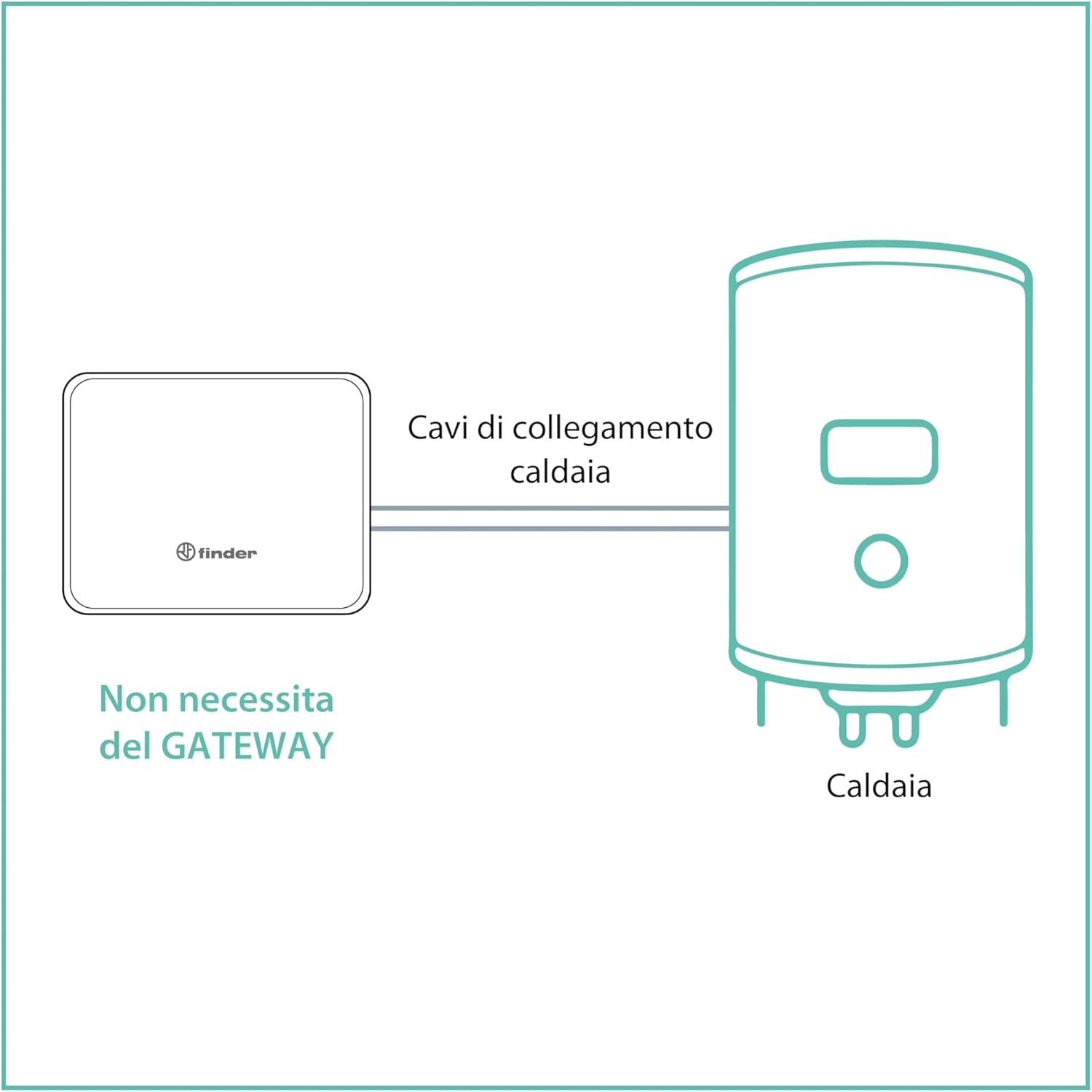
Figure 3.2: Direct connection to boiler, no gateway required.
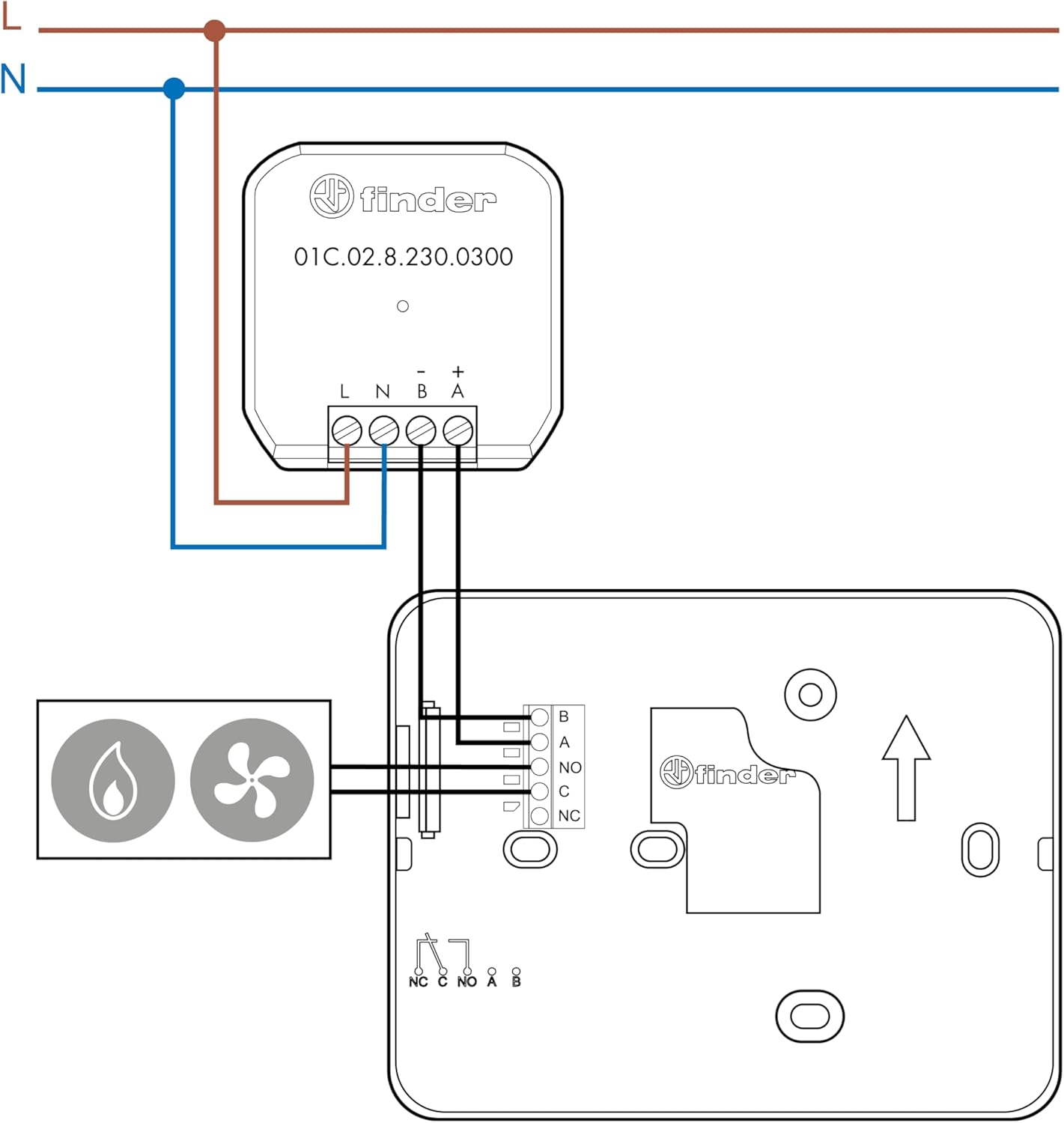
Figure 3.3: Detailed wiring connections for the thermostat.
3.4 App-Installation und erste Kopplung
Download the official Finder app from your device's app store (Google Play or Apple App Store). Follow the in-app instructions to pair your thermostat with your Wi-Fi network and complete the initial setup.

Figure 3.4: The thermostat supports integration with Google Assistant and Amazon Alexa.
4. Bedienung des Thermostats
4.1 Manuelle Steuerung
You can adjust the temperature directly on the thermostat using the capacitive touch buttons. The LED display will show the current temperature and settings.
4.2 App Control and Programming
The Finder app provides comprehensive control and programming options for your thermostat. You can set schedules, adjust temperatures, and monitor consumption from anywhere.

Figure 4.1: The Finder app interface for remote control and scheduling.
- Manual or Guided Programming: Create custom heating schedules or use guided programming for quick setup.
- Fernbedienung: Adjust settings and monitor your home's temperature from anywhere with an internet connection.
- Geofencing (Auto-Away): Automatically adjust temperature based on your proximity to home.
- Verbrauchshistorie: Track your energy usage to optimize efficiency.
4.3 Sprachsteuerung
The thermostat is compatible with Amazon Alexa and Google Home. Link your Finder account to your voice assistant app to enable voice commands for temperature adjustments and status checks.

Figure 4.2: System diagram illustrating smart home integration.
5. Wartung
5.1 Batteriewechsel
If powered by batteries, the thermostat will indicate when the battery level is low. Replace all 4 AAA batteries simultaneously to ensure optimal performance. Use high-quality alkaline batteries.
Notiz: Frequent Wi-Fi communication can increase battery consumption. Adjust the synchronization frequency in the app to balance battery life and responsiveness.
5.2 Reinigung
Clean the thermostat's surface with a soft, dry cloth. Do not use abrasive cleaners or solvents, as they may damage the display or casing.
6. Fehlerbehebung
6.1 Verbindungsprobleme
- Thermostat verbindet sich nicht mit dem WLAN: Ensure your Wi-Fi network is 2.4 GHz. The thermostat does not support 5 GHz networks.
- Unterbrechungsverbindung: Check your Wi-Fi signal strength at the thermostat's location. If weak, consider a Wi-Fi extender or repositioning your router.
- Nach dem Ausschaltentage/router reset: The thermostat should automatically reconnect. If not, try restarting your router.
- App synchronisiert nicht: Ensure the thermostat has fresh batteries (if applicable) and a stable Wi-Fi connection. Check the synchronization frequency setting in the app.
6.2 Batterieentladung
- Kurze Akkulaufzeit: This can be caused by frequent Wi-Fi communication. Adjust the synchronization interval in the app to a higher value (e.g., from minutes to hours) to conserve battery life.
- Consider optional power supply: For continuous operation without battery concerns, especially in secondary homes, consider installing the optional Type 01C.02.8.230.0300 power supply.
6.3 Ungenaue Temperaturmesswerte
- Platzierung prüfen: Stellen Sie sicher, dass der Thermostat nicht direkter Sonneneinstrahlung, Zugluft durch Fenster/Türen oder Wärmequellen (z. B. Heizung) ausgesetzt ist.amps, appliances) that could skew readings.
7. Spezifikationen
| Besonderheit | Spezifikation |
|---|---|
| Modellnummer | 1C.91.9.003.0W07 |
| Abmessungen (L x B x H) | 12.59 x 9.89 x 1.95 cm |
| Gewicht | 120 Gramm |
| Stromversorgung | 4 x AA batteries (not included) or optional Type 01C.02.8.230.0300 power supply |
| Bandtage | 3 Volt (battery) |
| Farbe | Weiß |
| Anzeigetyp | Touch screen (LED) |
| Montagetyp | Wandhalterung |
| Controllertyp | iOS, Android |
| Besondere Merkmale | Adjustable, Remote Control, Geofencing, Consumption History, Voice Control (Alexa, Google Home) |
| Verwendung | Kesselsteuerung |
8. Garantie und Support
For detailed warranty information and technical support, please refer to the official Finder website or contact Finder customer service. You can also find additional technical details and the full instruction manual (PDF) by scrolling to the "Safety and Product Resources" section on the product's online listing and clicking on "Instructions for Use (PDF)".
Bewahren Sie Ihren Kaufbeleg unbedingt für eventuelle Garantieansprüche auf.


