Einführung
This manual provides detailed instructions for the setup, operation, maintenance, and troubleshooting of your Jaycar Composite AV to HDMI Converter (Model AC-1722). Please read this manual thoroughly before using the device to ensure proper functionality and to prevent damage.
Hauptmerkmale
- Converts Composite Video and Stereo Audio (RCA) to HDMI output.
- Supports HDMI 1080p or 720p output resolutions.
- Compatible with NTSC and PAL video systems.
- Plug-and-Play-Betrieb.
Packungsinhalt
Bitte überprüfen Sie, ob alle Artikel in Ihrem Paket vorhanden sind:
- Jaycar Composite AV to HDMI Converter (AC-1722)
- Netzteil (5 V DC)
- Benutzerhandbuch (dieses Dokument)
Produkt überview
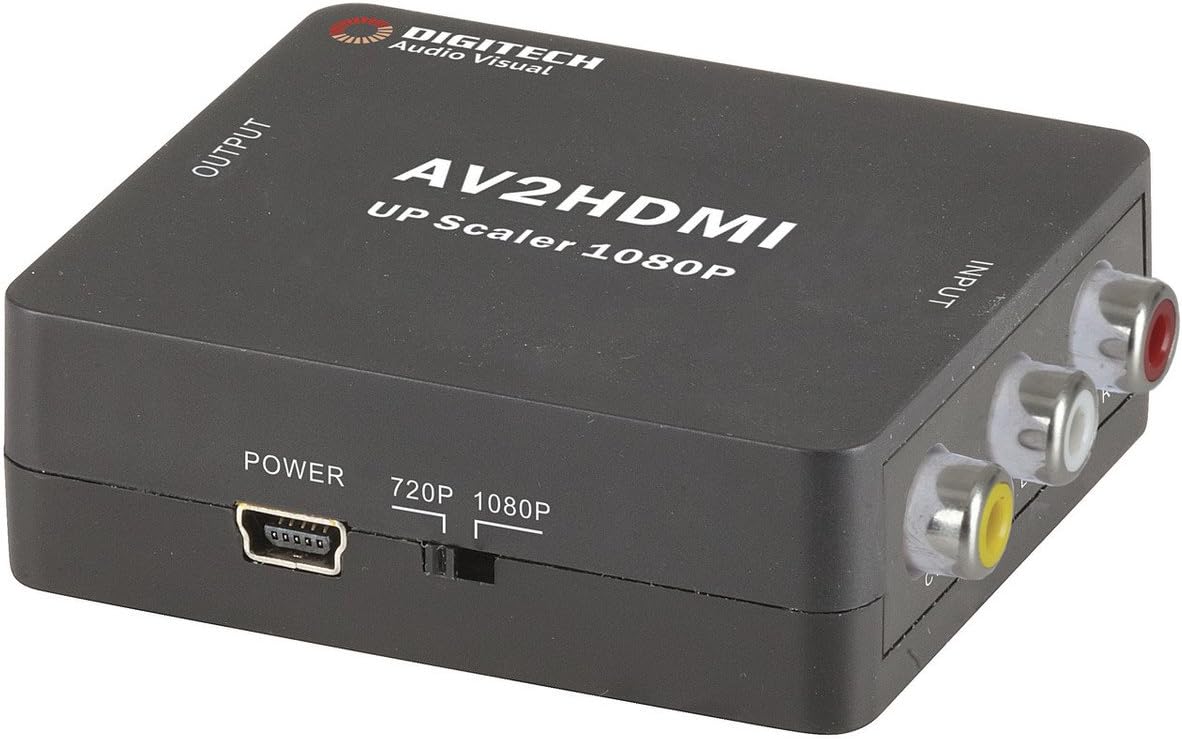
Bild 1: Front view of the Jaycar Composite AV to HDMI Converter. This image displays the top and front of the converter, showing the "AV2HDMI UP Scaler 1080P" label, "OUTPUT" and "INPUT" indicators, the power input, and the 720p/1080p resolution switch. The Composite AV input ports (yellow, white, red) are visible on the right side.

Bild 2: Seite view of the converter showing the HDMI output port. This port is labeled "HDMI" and is where the HDMI cable connects to your display device.

Bild 3: Seite view of the converter showing the Composite AV input ports. These ports are labeled "CVBS" (yellow for video), "L" (white for left audio), and "R" (red for right audio).

Bild 4: Seite view of the converter showing the power input port and the 720p/1080p resolution switch. The power port is a mini-USB type, and the switch allows selection between 720p and 1080p output resolutions.
Installationsanweisungen
- Quellgerät anschließen: Connect your Composite AV source device (e.g., DVD player, VCR, game console) to the converter's input ports. Match the yellow RCA cable to the "CVBS" port, the white RCA cable to the "L" (Left Audio) port, and the red RCA cable to the "R" (Right Audio) port.
- Anzeigegerät anschließen: Connect an HDMI cable from the converter's "HDMI" output port to an available HDMI input on your display device (e.g., TV, monitor, projector).
- Select Output Resolution: Use the 720p/1080p switch on the converter to select your desired output resolution. For most modern displays, 1080p is recommended. If you experience issues, try 720p.
- Strom anschließen: Connect the provided 5V DC power adapter to the converter's "POWER" input port, then plug the adapter into a wall outlet. The converter will power on automatically.
- Eingang auf dem Display auswählen: Turn on your display device and select the corresponding HDMI input channel to view the converted signal.
Bedienungsanleitung
The Jaycar Composite AV to HDMI Converter is designed for plug-and-play operation. Once all connections are made and power is supplied, the converter will automatically scale the analog AV signal to the selected HDMI output resolution (720p or 1080p).
- Ensure your source device is powered on and outputting a Composite AV signal.
- Verify your display device is set to the correct HDMI input.
- If no image appears, check all cable connections and the power supply.
- Experiment with the 720p/1080p switch if the image is distorted or not displayed correctly.
Wartung
The converter requires minimal maintenance. Follow these guidelines to ensure longevity:
- Keep the device in a dry, well-ventilated area, away from direct sunlight, high temperatures, and humidity.
- Lassen Sie das Gerät nicht fallen und setzen Sie es keinen starken Stößen aus.
- Reinigen Sie die Außenseite mit einem weichen, trockenen Tuch. Verwenden Sie keine flüssigen Reiniger oder Lösungsmittel.
- Stellen Sie sicher, dass alle Kabel fest angeschlossen sind, aber ziehen Sie sie nicht mit Gewalt fest.
Fehlerbehebung
| Problem | Mögliche Ursache | Lösung |
|---|---|---|
| Keine Video- oder Audioausgabe. |
|
|
| Distorted or flickering image. |
|
|
| No audio, but video is present. |
|
|
Technische Daten
| Eingabetyp | Composite Video and Audio (3 RCA) |
| Ausgabetyp | HDMI-Typ-A |
| Unterstützte Auflösungen | 1080p (1920 x 1080), 720p |
| Videosysteme | NTSC, PAL |
| Strombedarf | 5 V Gleichstrom (Netzteil im Lieferumfang enthalten) |
| Produktabmessungen (L x B x H) | 54 mm x 60 mm x 20 mm (ca. 2.13" x 2.36" x 0.79") |
| Produktgewicht | 80g |
Garantieinformationen
This Jaycar product comes with a 1 Jahr Garantie Diese Garantie gilt ab Kaufdatum und deckt Material- und Verarbeitungsfehler bei normalem Gebrauch ab. Sie deckt keine Schäden ab, die durch Missbrauch, Unfälle, unbefugte Änderungen oder unsachgemäße Installation verursacht wurden.
For warranty claims, please retain your proof of purchase and contact Jaycar customer support.
Kundenservice
If you require further assistance or have questions not covered in this manual, please contact Jaycar customer support through their official webWebsite oder der Einzelhändler, bei dem Sie das Produkt gekauft haben.
For the latest support information, please visit the official Jaycar webWebsite: www.jaycar.com.au


