1. Produktüberschreitungview
The Sharp EL-531TG-GY is a scientific calculator designed for students and professionals requiring advanced mathematical functions. It features a 2-line display and Multi-Line Playback, facilitating the input and review of complex equations. This model is suitable for general math, algebra, geometry, trigonometry, statistics, biology, chemistry, and general science applications.
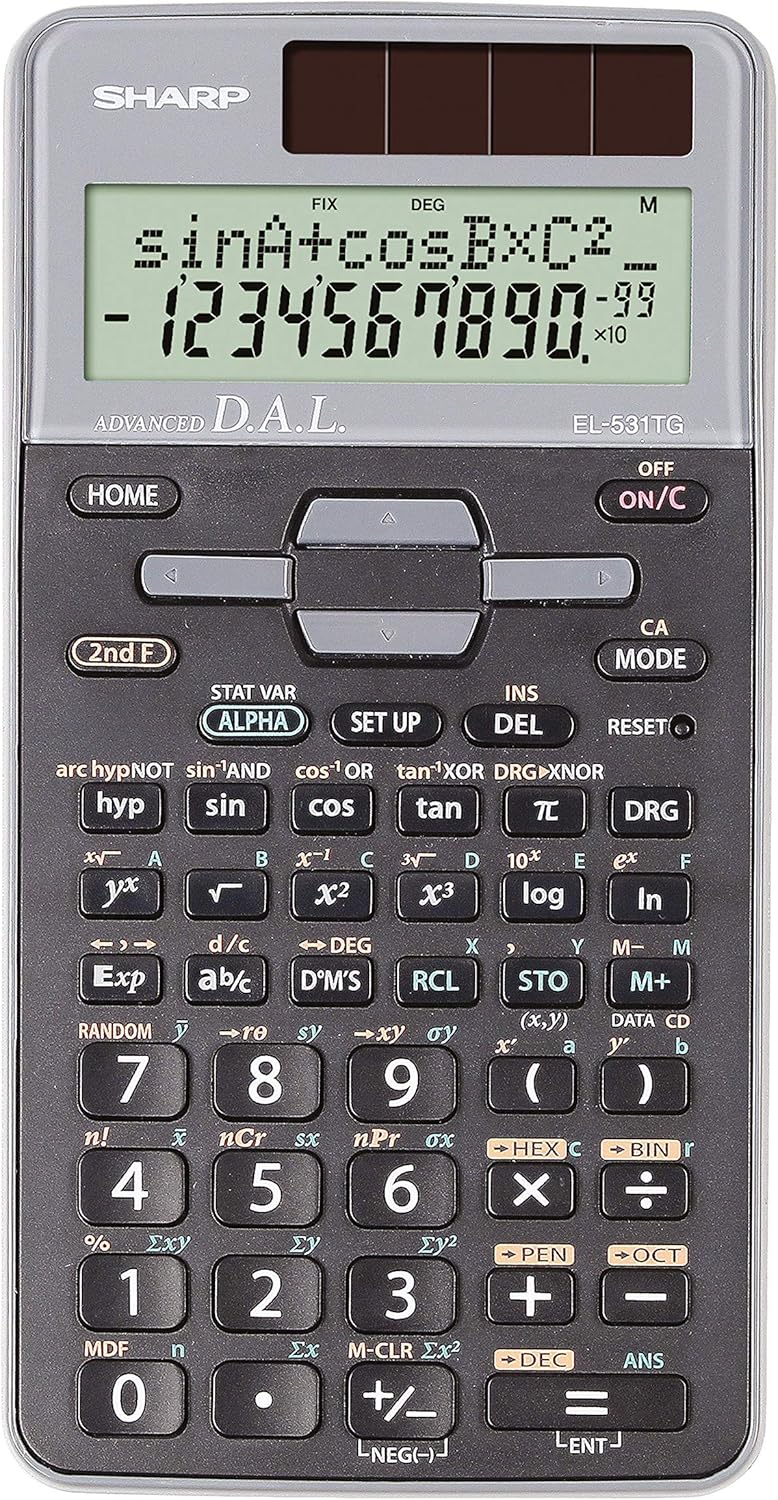
Abbildung 1: Vorderseite view of the Sharp EL-531TG-GY Scientific Calculator, showing the display, keypad, and solar panel.
2. Einrichtung und Erstgebrauch
2.1 Stromquelle
The EL-531TG-GY calculator operates using both solar power and a single LR44 button cell battery. The solar panel provides power in well-lit environments, while the battery ensures operation in low-light conditions or when solar power is insufficient. An LR44 battery is included with the calculator.
2.2 Ein-/Ausschalten
- Um den Taschenrechner umzuschalten ON, drücken Sie die EIN/C Schlüssel.
- Um den Taschenrechner umzuschalten AUS, drücken Sie die 2. F Taste gefolgt von der AUS key (which is typically the same as EIN/C).
2.3 Erste Anzeigeeinstellungen
Upon first use or after a reset, the calculator will typically default to certain settings (e.g., DEG for angle units). Refer to Section 3.3 for details on changing mode settings.
3. Bedienungsanleitung
3.1 Grundlegende Rechenoperationen
Geben Sie Zahlen über den Ziffernblock ein. Verwenden Sie den +, -, ×, Und ÷ keys for addition, subtraction, multiplication, and division, respectively. Press = to obtain the result.
3.2 Wissenschaftliche Funktionen
The calculator performs over 273 advanced scientific functions. Many functions are accessed by pressing the 2. F Drücken Sie die Taste vor der gewünschten Funktionstaste.
- Trigonometrische Funktionen: Verwenden Sünde, cos, bräunen. Inverse functions (sin⁻¹, cos⁻¹, tan⁻¹) werden aufgerufen über 2. F.
- Logarithmische Funktionen: Verwenden Protokoll (Basis 10) und ln (natürlicher Logarithmus).
- Kräfte und Wurzeln: Verwenden x², √, x³, ³√.
- Brüche: Verwenden Sie die d/c Schlüssel für die Eingabe und Umrechnung von Brüchen.
3.3 Mode Settings (DEG/RAD/GRAD)
To change the angle unit mode (Degrees, Radians, Gradians):
- Drücken Sie die DRG Schlüssel.
- Drücken Sie wiederholt DRG to cycle through DEG (Degrees), RAD (Radians), and GRAD (Gradians). The current mode is indicated on the display.
3.4 Speicherfunktionen
The calculator includes memory functions for storing and recalling values.
- STO (Lager): Drücken STO followed by a variable key (e.g., A, B) to store the displayed value.
- RCL (Rückruf): Drücken RCL followed by the variable key to recall the stored value.
- M+ (Speicher Plus): Addiert den angezeigten Wert zum unabhängigen Speicher.
- M- (Speicher Minus): Subtrahiert den angezeigten Wert vom unabhängigen Speicher.
3.5 Multi-Line Playback
The 2-line display allows for Multi-Line Playback, enabling users to review previous calculations and expressions. Use the directional arrow keys (up/down) to scroll through past entries and results. This feature is useful for checking work or re-using parts of previous calculations.
4. Wartung
4.1 Reinigung
To clean the calculator, wipe the surface gently with a soft, dry cloth. Do not use abrasive cleaners, solvents, or excessive moisture, as these can damage the display or internal components.
4.2 Batteriewechsel
The calculator uses one LR44 button cell battery. If the display becomes dim or erratic in low-light conditions, the battery may need replacement. To replace the battery:
- Stellen Sie sicher, dass der Taschenrechner ausgeschaltet ist.
- Suchen Sie das Batteriefach auf der Rückseite des Taschenrechners.
- Öffnen Sie vorsichtig den Fachdeckel.
- Nehmen Sie die alte LR44-Batterie heraus und setzen Sie eine neue ein. Achten Sie dabei auf die richtige Polarität (+/-).
- Schließen Sie den Batteriefachdeckel fest.
4.3 Speicherung
When not in use, store the calculator in a cool, dry place away from direct sunlight and extreme temperatures. The hard cover included with the calculator provides protection from scratches and minor impacts.
5. Fehlerbehebung
5.1 Anzeigeprobleme
- Leeres oder abgedunkeltes Display: Ensure sufficient light for the solar panel. If the issue persists, replace the LR44 battery.
- Unregelmäßige Anzeige: Dies kann auf eine schwache Batterie hinweisen. Tauschen Sie die LR44-Batterie aus.
5.2 Falsche Ergebnisse
- Check Mode Settings: Verify that the angle unit (DEG, RAD, GRAD) is set correctly for trigonometric calculations.
- Eingabefehler: Review your input using the Multi-Line Playback feature to ensure the expression was entered correctly.
- Memory Contents: If using memory functions, ensure the stored values are correct.
5.3 Taschenrechner reagiert nicht
Wenn der Taschenrechner nicht mehr reagiert, versuchen Sie, ihn zurückzusetzen. Suchen Sie den/die/das ZURÜCKSETZEN button (often a small recessed button requiring a thin object like a paperclip to press). Pressing this button will clear all memory and return the calculator to its factory default settings.
6. Spezifikationen

Abbildung 2: Vorderseite view of the Sharp EL-531TG-GY Scientific Calculator, illustrating its dimensions.
| Besonderheit | Beschreibung |
|---|---|
| Modellnummer | SH-EL531TGGY |
| Anzeigetyp | 2-line LCD with Multi-Line Playback |
| Funktionen | Over 273 advanced scientific functions |
| Stromquelle | Solar und 1 x LR44-Batterie (im Lieferumfang enthalten) |
| Material | Plastik |
| Abmessungen (L x B x H) | 16.1 x 8 x 1.5 cm (ca.) |
| Gewicht | 100 g (ca.) |

Abbildung 3: Seite view of the Sharp EL-531TG-GY Scientific Calculator, showing its slim profile.
7. Garantie und Support
7.1 Garantieinformationen
This product is covered by a manufacturer's warranty. Please refer to the warranty card included with your purchase or visit the official Sharp webAuf der Website finden Sie detaillierte Garantiebedingungen speziell für Ihre Region.
7.2 Kundendienst
For technical assistance, troubleshooting not covered in this manual, or service inquiries, please contact Sharp customer support. Contact information can typically be found on the Sharp official webauf der Website oder auf der Produktverpackung.


