1. Einleitung
Vielen Dank für Ihren Einkauf.asing the Sony Signature Series Audio Component Amplifier TA-ZH1ES. This high-resolution headphone amplifier is designed to deliver exceptional audio quality, featuring advanced technologies such as Sony's enhanced S-Master HX digital amplifier and DSD Remastering Engine. This manual provides essential information for the proper setup, operation, and maintenance of your device.
2. Sicherheitshinweise
Bitte lesen Sie vor der Benutzung alle Sicherheitshinweise sorgfältig durch. amplifier. Bewahren Sie dieses Handbuch zum späteren Nachschlagen auf.
- Energiequelle: Connect the unit only to the AC power outlet specified in the specifications.
- Belüftung: Sorgen Sie für ausreichende Belüftung rund um das Gerät, um eine Überhitzung zu vermeiden. Blockieren Sie die Belüftungsöffnungen nicht.
- Feuchtigkeit: Setzen Sie das Gerät weder Regen noch Feuchtigkeit aus, um die Gefahr von Feuer oder Stromschlag zu verringern.
- Fremdkörper: Führen Sie keine Gegenstände in die Öffnungen des Geräts ein.
- Wartung: Überlassen Sie alle Wartungsarbeiten qualifiziertem Fachpersonal. Versuchen Sie nicht, das Gerät selbst zu öffnen oder zu reparieren.
- Platzierung: Stellen Sie das Gerät auf eine stabile, ebene Fläche, fern von direkter Sonneneinstrahlung, Wärmequellen und übermäßigem Staub oder Vibrationen.
3. Produktüberschreitungview
3.1 Frontplatte
The front panel provides various headphone output connections and essential controls for operation.

Abbildung 3.1: Layout der Frontplatte
This image displays the front panel of the TA-ZH1ES amplifier, highlighting the various headphone output jacks and the volume control knob. From left to right, you can see the XLR4 balanced output, multiple 4.4mm and 3.5mm balanced outputs, and 6.3mm and 3.5mm unbalanced outputs. The large rotary knob on the right is for volume control, and a Walkman/Xperia USB input is also visible.
- Netzschalter: Schaltet das Gerät ein oder aus.
- Eingangsauswahl: Durchläuft die verfügbaren Eingangsquellen.
- Ausgangsauswahl: Selects the desired output mode.
- Anzeige: Zeigt die aktuellen Einstellungen und den Status an.
- Menü-/Zurück-Taste: Navigates menu options or returns to the previous screen.
- Eingabetaste: Bestätigt die Auswahl.
- Gain Button: Adjusts the output gain for different headphone impedances.
- Lautstärkeregler: Steuert die Ausgangslautstärke.
- Kopfhörerausgänge:
- Balanced Connections: 4.4mm, 3.5mm x 2, XLR4
- Unbalanced Connections: 6.3mm, 3.5mm
- Walkman/Xperia USB Input: For connecting compatible portable devices.
3.2 Rückseite
The rear panel houses various input and output terminals for connecting to other audio components and the power supply.
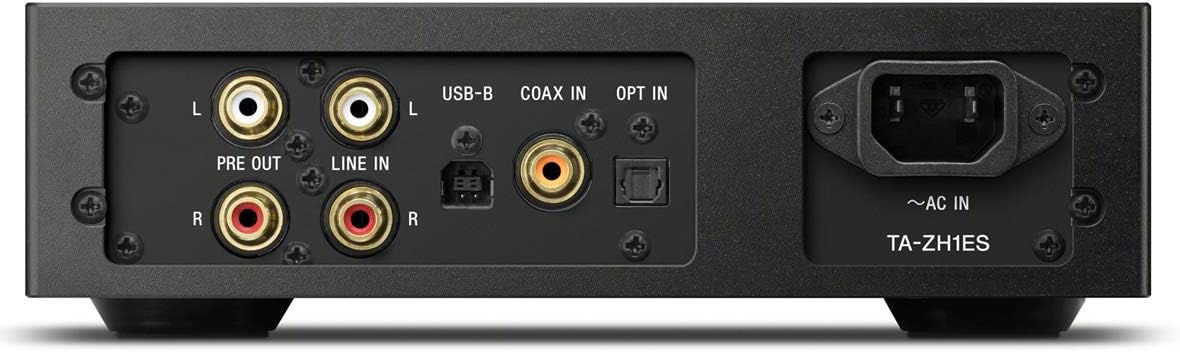
Abbildung 3.2: Layout der Rückseite
This image illustrates the rear panel of the TA-ZH1ES amplifier, detailing the various connectivity options. Visible ports include RCA Line In (L/R), RCA Pre Out (L/R), USB-B input, Coaxial input, Optical input, and the AC power inlet. Each port is clearly labeled for easy identification.
- LINE IN (RCA L/R): Analog audio input for connecting external devices.
- PRE OUT (RCA L/R): Analog audio output for connecting to a power ampVerstärker oder Aktivlautsprecher.
- USB-B-Eingang: Zum Anschluss an einen Computer oder andere digitale Audioquellen.
- COAX IN: Koaxialer digitaler Audioeingang.
- ANMELDEN: Optischer digitaler Audioeingang.
- ~AC IN: Power input for the AC power cord.
4. Einrichtung
Follow these steps to set up your TA-ZH1ES ampschwerer.
4.1 Platzierung
Platzieren Sie die amplifier on a flat, stable surface with adequate space for ventilation. Avoid placing it near heat sources or in direct sunlight.

Abbildung 4.1: AmpLifier-Platzierung
This image shows the Sony TA-ZH1ES amplifier positioned on a flat surface, demonstrating a typical setup environment. Ensure the unit has sufficient space around it for proper airflow.
4.2 Anschließen von Audioquellen
Connect your audio sources to the appropriate input terminals on the rear panel.
- Digital Sources (Computer, CD Player, etc.):
- For a computer, connect a USB-B cable from your computer to the USB-B-Eingang.
- For a CD player or other digital audio device, use a coaxial cable for the KOAX-EINGANG or an optical cable for the ANMELDEN.
- Analog Sources (Turntable with pre-amp, etc.): Connect RCA cables from your analog source to the LINE IN (RCA L/R) Klemmen.
- Portable Devices (Walkman/Xperia): Connect compatible portable devices to the Walkman/Xperia USB Input on the front panel. This input also supports charging for Walkman devices.
4.3 Anschließen von Kopfhörern oder externen Geräten Ampschwerer
- Kopfhörer: Connect your headphones to the appropriate balanced (4.4mm, 3.5mm x 2, XLR4) or unbalanced (6.3mm, 3.5mm) output jacks on the front panel.
- Externe Stromversorgung AmpVerstärker/Aktivlautsprecher: If using the TA-ZH1ES as a DAC or pre-amplifier, connect RCA cables from the PRE OUT (RCA L/R) terminals on the rear panel to your power ampVerstärker oder Aktivlautsprecher.
4.4 Stromanschluss
Schließen Sie das mitgelieferte Netzkabel an das Gerät an. ~AC IN terminal on the rear panel, then plug the other end into a wall outlet.
5. Bedienungsanleitung
5.1 Grundlegende Bedienung
- Einschalten: Press the Power button on the front panel.
- Eingabe auswählen: Use the Input Selector button to choose the desired audio source (e.g., USB-B, COAX, OPT, LINE IN).
- Kopfhörer anschließen: Plug your headphones into the appropriate jack.
- Lautstärke anpassen: Slowly turn the Volume knob clockwise to increase the volume to a comfortable listening level.

Abbildung 5.1: Bedienelemente der Oberseite
Dieses Bild bietet eine Draufsicht view of the TA-ZH1ES amplifier, clearly showing the power button, input/output selectors, display screen, menu navigation buttons (Menu/Back, Enter), and the Gain button. These controls are used for basic operation and feature adjustments.
5.2 DSD Remastering Engine
The DSD Remastering Engine converts all PCM audio sources to DSD 11.2MHz, aiming to provide a more natural and analog-like sound experience. This feature can be enabled or disabled through the unit's menu settings.
5.3 DSEE HX
DSEE HX (Digital Sound Enhancement Engine HX) upscales compressed audio files to near high-resolution quality. This feature is particularly effective for improving the sound of lower-resolution files, such as those from streaming services or older recordings. Access DSEE HX settings via the unit's menu.
5.4 Verstärkungseinstellungen
Der amplifier features adjustable gain settings to optimize performance with various headphone impedances. Press the Gewinnen button on the front panel to cycle through available gain levels (e.g., Low, Mid, High). Select the setting that provides sufficient volume without distortion for your specific headphones.
6. Wartung
Die richtige Pflege gewährleistet die Langlebigkeit und optimale Leistung Ihres Geräts ampschwerer.
- Reinigung: Wipe the unit with a soft, dry cloth. Do not use abrasive pads, scouring powder, or solvents such as alcohol or benzene.
- Belüftung: Überprüfen Sie regelmäßig, ob die Lüftungsöffnungen frei von Staub und Verstopfungen sind.
- Lagerung: If storing the unit for an extended period, disconnect it from the power outlet and store it in a clean, dry place.
7. Fehlerbehebung
Wenn Sie Probleme mit Ihrem amplifier, beachten Sie die folgenden häufigen Probleme und Lösungen.
| Problem | Mögliche Ursache/Lösung |
|---|---|
| Kein Strom | Ensure the AC power cord is securely connected to both the unit and the wall outlet. Check if the power outlet is functional. |
| Kein Ton |
|
| Verzerrter Ton |
|
| Unit becomes hot | Ensure adequate ventilation around the unit. Do not block the ventilation openings. If overheating persists, discontinue use and contact service. |
Sollte das Problem nach Anwendung dieser Lösungsansätze weiterhin bestehen, wenden Sie sich bitte an den Sony-Kundendienst.
8. Spezifikationen
| Besonderheit | Detail |
|---|---|
| Modellnummer | TA-ZH1ES |
| Produktabmessungen (B x H x T) | 2.56 x 12.36 x 8.27 Zoll (ca. 65 x 314 x 210 mm) |
| Artikelgewicht | 1 Pfund (ca. 0.45 kg) |
| Kopfhörerimpedanz | 12-600 Ohm |
| Kopfhörerausgänge | Balanced: 4.4mm, 3.5mm x 2, XLR4 Unbalanced: 6.3mm, 3.5mm |
| Digitale Eingänge | USB-B, Coaxial, Optical, Walkman/Xperia USB |
| Analoge Eingänge | RCA Line In (L/R) |
| Analoge Ausgänge | RCA Pre Out (L/R) |
| Hersteller | Sony |
| Datum der ersten Verfügbarkeit | 1. September 2016 |
Hinweis: Technische Daten können ohne vorherige Ankündigung geändert werden.
9. Garantie und Support
Detaillierte Garantieinformationen finden Sie auf der Ihrem Produkt beiliegenden Garantiekarte oder auf der offiziellen Sony-Supportseite. website for your region. For technical assistance, product registration, or service inquiries, please contact Sony customer support.
Sony-Support WebWebsite: https://www.sony.com/electronics/support


