1. Einleitung
The AJA V2Analog is a compact, high-quality mini-converter designed to convert HD/SD-SDI signals to analog component or composite video. This device is engineered for professional video workflows, providing reliable signal conversion for various applications.
Its versatility allows for complete integration into any workflow, making it a valuable asset in any video production environment.

Abbildung 1: Vorder- und Seitenansicht view of the AJA V2Analog Mini-Converter, highlighting input and output ports.
2. Sicherheitshinweise
Bitte lesen Sie vor der Inbetriebnahme des Geräts alle Sicherheitshinweise sorgfältig durch. Bewahren Sie diese Bedienungsanleitung zum späteren Nachschlagen auf.
- Das Gerät darf weder Regen, Feuchtigkeit noch extremen Temperaturen ausgesetzt werden.
- Sorgen Sie für ausreichende Belüftung, um eine Überhitzung zu vermeiden.
- Use only the specified power supply (5-20 VDC).
- Avoid dropping or subjecting the unit to severe impacts.
- Überlassen Sie sämtliche Wartungsarbeiten qualifiziertem Servicepersonal.
3. Einrichtung und Anschlüsse
Follow these steps to set up your AJA V2Analog converter:
- Stromanschluss: Connect the appropriate power supply (5-20 VDC) to the "POWER" input on the converter.
- SDI-Eingang: Connect your HD/SD-SDI source to the "SDI IN" BNC connector.
- Analogausgang: Connect the Y/G, Pb/B, and Pr/R BNC outputs to your analog component or composite display/device. Ensure correct color component matching (Y/G for Luminance/Green, Pb/B for Blue Difference, Pr/R for Red Difference).
- USB-Anschluss (optional): For firmware updates or configuration, connect a USB cable from the "USB" port on the converter to your computer.
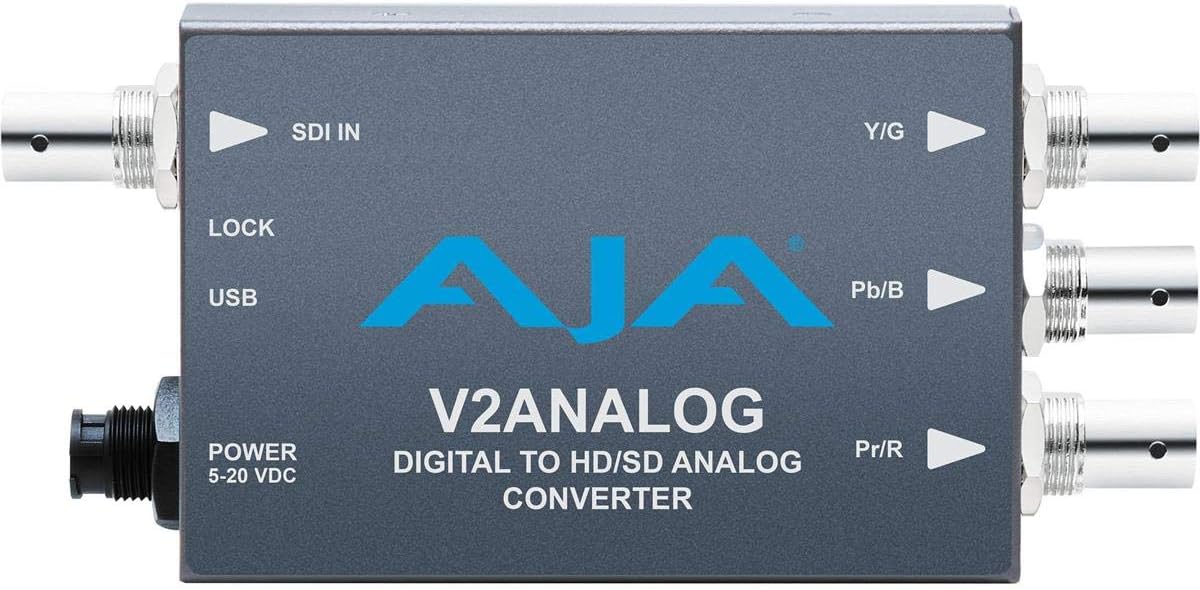
Abbildung 2: Oben view of the AJA V2Analog Mini-Converter, illustrating port labels for connection.
4. Bedienungsanleitung
Once all connections are made, power on the device. The V2Analog will automatically detect the incoming SDI signal format and convert it to the appropriate analog output. The "LOCK" LED indicator will illuminate when a stable SDI signal is detected and locked.
4.1. Signal Compatibility
The V2Analog supports various HD and SD SDI formats. It is designed to convert these digital signals to standard analog component (YPbPr) or composite (CVBS) outputs.
4.2. Configuration (Advanced)
Advanced configuration options, such as output format selection or color space adjustments, may be available via AJA's Mini-Config software, accessible through the USB port. Refer to the AJA webWebsite für die neueste Software und detaillierte Konfigurationsanleitungen.
5. Wartung
The AJA V2Analog is designed for reliable operation with minimal maintenance. Follow these guidelines:
- Reinigung: Reinigen Sie die Außenseite des Geräts mit einem weichen, trockenen Tuch. Verwenden Sie keine flüssigen oder Aerosolreiniger.
- Firmware-Updates: Periodically check the AJA website for firmware updates. Keeping the firmware current ensures optimal performance and compatibility.
- Lagerung: Bei längerer Nichtbenutzung sollte das Gerät an einem kühlen, trockenen Ort, fern von direkter Sonneneinstrahlung und extremen Temperaturen aufbewahrt werden.
6. Fehlerbehebung
If you encounter issues with your V2Analog, refer to the following common problems and solutions:
| Problem | Mögliche Ursache | Lösung |
|---|---|---|
| Kein Videoausgang | No power; Incorrect SDI input; Incorrect analog output connection; No signal lock. | Check power supply; Verify SDI source is active and connected to "SDI IN"; Ensure Y/G, Pb/B, Pr/R are connected correctly to display; Check "LOCK" LED. |
| Distorted or colored video | Incorrect analog output format; Loose connections. | Ensure display is set to correct input type (component/composite); Tighten all BNC connections. |
| "LOCK" LED not illuminated | No valid SDI input signal. | Verify SDI source is active and sending a compatible signal. Check SDI cable integrity. |
If the problem persists, contact AJA Technical Support for further assistance.
7. Spezifikationen
| Besonderheit | Detail |
|---|---|
| Modell | V2ANALOG |
| Marke | AJA |
| Eingang | HD/SD-SDI (BNC) |
| Ausgabe | Component (Y/G, Pb/B, Pr/R BNC), Composite (selectable) |
| Schnittstellentyp | USB, SDI, Component |
| Leistung | 5-20 VDC |
| Abmessungen (L x B x H) | 7.2 x 5.7 x 4.2 Zoll |
| Gewicht | 1.35 Pfund |
| UPC | 091131246023 |
8. Support und Garantie
For technical support, product registration, or warranty information, please visit the official AJA website or contact their customer service department. Specific warranty terms and conditions may vary by region and purchase date.
AJA WebWebsite: Www.aja.com


