1. Einführung und Endeview
The Sony MEX-N5300BT is a versatile car receiver designed to enhance your in-car audio experience. It features dual Bluetooth connectivity for hands-free calling and audio streaming, allowing you to connect two smartphones simultaneously. Enjoy your favorite music from CDs, USB devices, or streaming services with support for MP3, WMA, and FLAC files. The unit also includes an AM/FM tuner with RDS and customizable dual-zone variable color illumination to match your vehicle's interior.
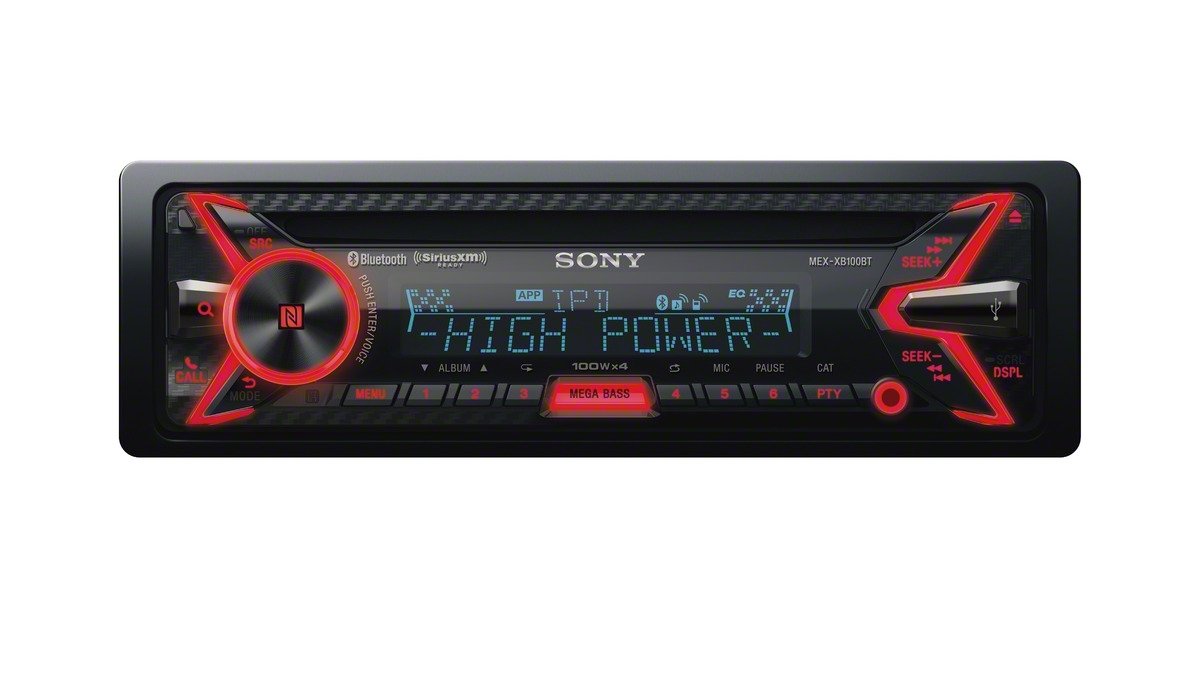
Abbildung 1.1: Vorderseite view of the Sony MEX-N5300BT car receiver with orange illumination, showcasing its display and controls.
Hauptmerkmale:
- Duale Bluetooth-Konnektivität: Connect two smartphones simultaneously for hands-free calls and audio streaming.
- Hohe Ausgangsleistung: Eingebaut amplifier delivers enhanced audio performance.
- Vielseitige Medienwiedergabe: Supports CDs, CD-Rs, CD-RWs, and digital files (MP3, WMA, FLAC) via USB.
- AM/FM Tuner with RDS: Access a wide range of radio stations with Radio Data System information.
- Anpassbare Beleuchtung: Dual-zone variable color illumination allows personalization of the display and button lighting.
- Smartphone-Steuerung: Compatible with the Sony SongPal app for advanced control and sound settings.
2. Einrichtung und Installation
Proper installation is crucial for optimal performance and safety. It is highly recommended to have this unit installed by a qualified professional. Ensure your vehicle's battery is disconnected before beginning any wiring work.
2.1 Kabelverbindungen
The receiver comes with an ISO connector for standard vehicle wiring. Connect the power, ground, speaker, and remote turn-on wires according to your vehicle's wiring diagram and the receiver's manual. Ensure all connections are secure and properly insulated.

Abbildung 2.1: Rückseite view of the Sony MEX-N5300BT car receiver, illustrating the various wiring harnesses and RCA outputs for external ampVerstärker oder Subwoofer.
2.2 Montage der Einheit
Install the receiver into your vehicle's dashboard using the provided mounting hardware and trim ring. Ensure the unit is securely fastened to prevent movement during driving.
2.3 Erstes Einschalten
After all connections are made and verified, reconnect your vehicle's battery. Turn on the ignition and then power on the receiver. Follow any on-screen prompts for initial setup, such as language selection or clock setting.
3. Bedienungsanleitung
3.1 Ein-/Ausschalten und Quellenauswahl
Drücken Sie die SRC button to turn the unit on or off. Repeatedly press SRC to cycle through available audio sources such as Tuner, CD, USB, Bluetooth Audio, and AUX.
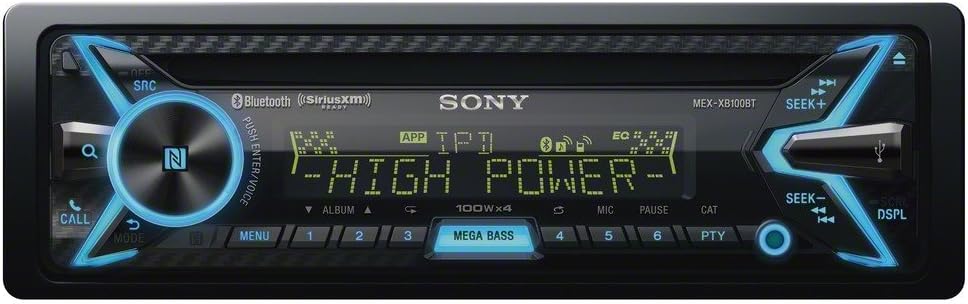
Figure 3.1: The Sony MEX-N5300BT car receiver displaying blue illumination, showing the main control knob and source selection buttons.
3.2 Bluetooth Pairing and Functions
To pair a device, ensure Bluetooth is enabled on your smartphone and on the receiver. Select 'Bluetooth' as the source and follow the pairing instructions on the receiver's display. The MEX-N5300BT supports dual Bluetooth, allowing two phones to be connected simultaneously for hands-free calling and audio streaming (A2DP). Use the ANRUF button for call management.
3.3 CD/USB-Wiedergabe
Insert a CD into the disc slot for playback. Connect a USB device to the front USB port to play digital audio files. The unit supports MP3, WMA, and FLAC formats. Use the SEEK+ Und SUCHEN- buttons to navigate tracks or folders.
3.4 AM/FM-Radio
Select 'Tuner' as the source. Use the SEEK+ Und SUCHEN- buttons to tune into radio stations. The Radio Data System (RDS) provides additional information such as station name and program type where available.
3.5 Sound Settings and Equalizer
Drücken Sie die SPEISEKARTE button to access sound settings. Adjust bass, treble, balance, and fader. The Mega-Bass button provides an instant bass boost. Further sound customization is available through the equalizer settings.
3.6 SongPal App Control
Download the Sony SongPal app (available on Google Play and the App Store) to your smartphone. Once connected via Bluetooth, the app allows you to control various receiver functions, stream music, adjust sound settings, and use voice commands directly from your phone.
Video 3.1: Official product video demonstrating the key features and functionalities of the Sony MEX-N5300BT car receiver, including dual Bluetooth connectivity, voice command, CD/MP3 playback, AM/FM radio, USB, AUX input, and Pandora integration.
4. Wartung
4.1 Reinigung des Geräts
Wischen Sie die Frontplatte mit einem weichen, trockenen Tuch ab. Bei hartnäckigem Schmutz dampen the cloth with a mild detergent solution and wipe gently. Avoid using abrasive cleaners or solvents, as these can damage the finish.
4.2 CD-Pflege
Handle CDs by their edges to prevent fingerprints and scratches. Store CDs in their cases when not in use. If a CD is dirty, wipe it gently from the center outwards with a soft, lint-free cloth.
4.3 Allgemeine Pflege
Setzen Sie das Gerät keinen extremen Temperaturen, direkter Sonneneinstrahlung über längere Zeiträume oder übermäßiger Feuchtigkeit aus. Sorgen Sie für ausreichende Belüftung um das Gerät herum, um eine Überhitzung zu vermeiden.
5. Fehlerbehebung
If you encounter issues with your Sony MEX-N5300BT, refer to the following common troubleshooting steps:
- Kein Strom: Check all power connections, including the main power wire and ground. Verify that the vehicle's ignition is on and the fuse is not blown.
- Kein Ton: Ensure the volume is not muted or set too low. Check speaker connections and verify that the correct audio source is selected.
- Probleme mit der Bluetooth-Verbindung: Ensure Bluetooth is enabled on both the receiver and your smartphone. Delete previous pairings and attempt to re-pair the devices. Move the smartphone closer to the receiver.
- Wiedergabefehler der Disc: Ensure the CD is clean and free of scratches. Try a different CD to rule out disc-specific issues.
- USB-Gerät nicht erkannt: Ensure the USB device is formatted correctly (e.g., FAT32) and contains supported audio files. Versuchen Sie es mit einem anderen USB-Gerät.
- Gerät friert ein oder weist Fehlfunktionen auf: Perform a soft reset by pressing the reset button (usually a small pinhole) or by disconnecting the vehicle's battery for a few minutes. Check for available firmware updates on the Sony support website, as outdated firmware can sometimes cause operational issues.
If problems persist after attempting these steps, contact Sony customer support or a qualified service technician.
6. Spezifikationen
| Besonderheit | Spezifikation |
|---|---|
| Artikelgewicht | 2.86 Pfund |
| Technische Daten | 10.13 x 8.88 x 3.88 Zoll |
| Gehäusegröße | Single-DIN |
| Voramp Bandtage | 5 Volt |
| Anzeigetyp | LCD |
| Drahtlose Fernbedienung | Ja |
| Speicherkartensteckplatz | CD+RW, CD-R, MP3 |
| Medienwiedergabe unterstützt | MP3/WMA/WAV/AAC/FLAC |
| Konnektivitätstechnologie | Bluetooth, USB |
| Controllertyp | Android |
| Besonderheit | Bluetooth, Farbwechsel, Pandora, Sirius XM, Lenkradfernbedienung |
| Kompatible Geräte | Smartphone, Lautsprecher, Tablet |
| Steckertyp | 3.5-mm-Klinke, USB |
| Audiokodierung | Stereo |
| Audioausgabemodus | Stereo |
| Surround Sound-Kanalkonfiguration | 4 Kanal |
| Farbe | Schwarz |
7. Lieferumfang
The following items are included with your Sony MEX-N5300BT car receiver:
- ISO-Anschluss
- Trim Ring (Black)
8. Garantie und Support
Dieses Produkt ist abgedeckt durch a 90-day Limited Hardware Warranty. For detailed terms and conditions, please refer to the warranty document. For further support, product registration, or to check for firmware updates, please visit the official Sony support webWebsite.