1. Einleitung
This user manual provides essential information for the proper setup, operation, maintenance, and troubleshooting of your Ozone OES-BAS-22 Electronic Safe-Core. Please read this manual thoroughly before using the safe to ensure optimal performance and security. This electronic safe is designed to provide secure storage for your valuables.
2. Produktüberschreitungview
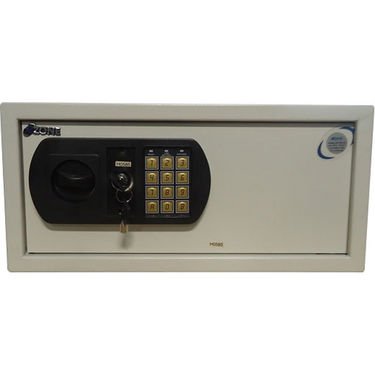
This image displays the front panel of the Ozone OES-BAS-22 Electronic Safe-Core, highlighting the electronic keypad, key override lock, and the overall compact design. The keypad allows for digital code entry, while the key provides an alternative access method.
3. Einrichtung
3.1. Einlegen der Batterie
- Suchen Sie das Batteriefach, das sich normalerweise an der Innenseite der Tresortür befindet.
- Öffnen Sie die Batterieabdeckung.
- Insert the required number of batteries (usually AA or AAA, refer to the compartment label) ensuring correct polarity (+/-).
- Schließen Sie die Batterieabdeckung fest.
3.2. Initialisierung des Codes
- With the safe door open, locate the reset button (often a small red or green button) on the inside of the door or near the battery compartment.
- Press the reset button. You should hear a beep or see an indicator light.
- On the keypad, enter your desired new code (typically 3-8 digits).
- Confirm the code by pressing the 'E' or '#' button.
- Test the new code with the door open to ensure it works correctly before closing the safe.
4. Bedienungsanleitung
4.1. Öffnen des Safes mit dem elektronischen Code
- Enter your personal code on the keypad.
- Press the 'E' or '#' button.
- Within 5 seconds of a successful code entry, turn the handle clockwise (or counter-clockwise, depending on model) to open the door.
4.2. Opening the Safe with Override Key
- Locate the keyhole, usually hidden behind a small cover on the keypad panel.
- Insert the override key and turn it.
- While holding the key turned, rotate the handle to open the safe door.
4.3. Schließen und Verriegeln des Tresors
- Schließen Sie die Tresortür fest.
- Turn the handle counter-clockwise (or clockwise) until the bolts are fully extended and the door is securely locked.
4.4. Ändern Ihres persönlichen Codes
- With the safe door open, press the reset button.
- Geben Sie Ihren gewünschten neuen Code (3-8 Ziffern) über das Tastenfeld ein.
- Press the 'E' or '#' button to confirm.
- Verify the new code by entering it with the door open before closing.
5. Wartung
- Batteriewechsel: Replace batteries annually or when the low battery indicator (if present) illuminates. Always use new, high-quality batteries of the specified type.
- Reinigung: Reinigen Sie die Außenseite des Tresors mit einem weichen, fusselfreien Tuch.amp cloth. Avoid abrasive cleaners or solvents that could damage the finish or keypad.
- Schlüsselspeicher: Store override keys in a secure location away from the safe itself. Do not store them inside the safe.
- Mechanismusprüfung: Periodically check the locking bolts and door hinges for smooth operation. Do not lubricate the electronic lock mechanism.
6. Fehlerbehebung
| Problem | Lösung |
|---|---|
| Der Tresor lässt sich nicht mit dem Code öffnen. | Ensure batteries are fresh and correctly installed. Re-enter code carefully. Try the override key. |
| Die Tastatur reagiert nicht. | Check battery power. Replace batteries if necessary. Ensure no foreign objects are obstructing buttons. |
| Der Alarm ertönt unerwartet. | This safe features a visual alarm. Ensure the safe is not being tampered with. If persistent, contact customer support. |
| Die Tür schließt oder verriegelt nicht richtig. | Check for any obstructions inside the safe or around the door frame. Ensure the handle is fully turned to engage bolts. |
7. Spezifikationen
| Besonderheit | Detail |
|---|---|
| Marke | Ozon |
| Modell | OES-BAS-22 |
| Sperrtyp | Elektronisch |
| Besonderheit | Tragbar |
| Artikelgewicht | 12.2 kg (26.9 Pfund) |
| Alarm | Visuell |
| Wasserbeständigkeit | Nicht wasserfest |
| UPC | 783942612165 |
| Verpackungsabmessungen | 42.9 x 38 x 20 cm |


