Einführung
This manual provides essential information for the safe and efficient operation of your Sony KDL-55W900A 55-Inch 3D Internet LED HDTV. Please read these instructions thoroughly before using the television and retain them for future reference.
The Sony KDL-55W900A features a 55-inch display with 1080p resolution, 240Hz refresh rate, 3D capabilities, and integrated internet connectivity. It incorporates X-Reality PRO for enhanced detail and a TRILUMINOS display for brilliant colors.

Bild: Front view of the Sony KDL-55W900A 55-Inch 3D Internet LED HDTV, showcasing sein schlankes Design und Display.
Lieferumfang
Vergewissern Sie sich, dass alle folgenden Artikel im Lieferumfang Ihres Fernsehers enthalten sind:
- Television Unit (Sony KDL-55W900A)
- Fernbedienung
- Fernsehtisch
- Netzkabel
- Active 3D Glasses (quantity may vary, typically 4 pairs)
- AA Batteries (2 for remote control)
- Documentation (Quick Setup Guide, Safety Information)
Aufstellen
1. Anbringen des TV-Ständers
Place the TV screen face down on a soft, clean surface to prevent damage. Align the stand with the mounting holes on the bottom of the TV and secure it using the provided screws. Ensure the stand is firmly attached before proceeding.

Bild: Diagram showing the dimensions of the Sony KDL-55W900A TV, including width, height, and depth.

Bild: Seite view of the Sony KDL-55W900A TV, highlighting its slim profile.
2. Peripheriegeräte anschließen
Connect your external devices such as Blu-ray players, gaming consoles, or cable/satellite boxes to the appropriate input ports (HDMI, USB, etc.) on the rear of the TV.
- HDMI: Für hochauflösendes Audio und Video.
- USB: Zum Anschließen von USB-Speichergeräten.
- Ethernet: Für eine kabelgebundene Internetverbindung.
- RF: Für Antennen- oder Kabelanschlüsse.
3. Stromanschluss
Stecken Sie das Netzkabel in den Stromanschluss des Fernsehers und anschließend in eine Wandsteckdose.
4. Ersteinrichtungsassistent
Upon first power-on, the TV will guide you through an initial setup process. This includes language selection, time zone, channel scanning, and network configuration.

Bild: A person interacting with a tablet displaying a program guide, with the Sony TV visible in the background, demonstrating smart TV control.
Bedienungsanleitung
1. Grundlegende TV-Funktionen
- Leistung: Drücken Sie die Ein-/Aus-Taste auf der Fernbedienung oder am Fernseher, um das Gerät ein- bzw. auszuschalten.
- Eingangsauswahl: Use the "Input" or "Source" button on the remote to switch between connected devices (HDMI 1, HDMI 2, TV, etc.).
- Volumen: Adjust using the Volume Up/Down buttons.
- Kanal: Change channels using the Channel Up/Down buttons or number pad.
2. Smart TV Features and Internet Connectivity
Your TV can connect to the internet via Wi-Fi or Ethernet. Access various online services and applications through the Smart TV interface.
- Navigate the Smart TV menu using the remote's directional pad.
- Select apps like Netflix, Hulu, or Amazon Prime Video for streaming content.
- Nutzen Sie die integrierte web browser for internet surfing.

Bild: A family enjoying content on the Sony TV, with a smartphone mirroring its display to the TV, illustrating connectivity features.
3. Bild- und Toneinstellungen
Access the "Picture" and "Sound" menus to customize your viewHör- und Hörerlebnis.
- Bildmodi: Choose from Standard, Vivid, Cinema, Game, etc.
- Helligkeit, Kontrast, Farbe: Passen Sie diese Einstellungen Ihren Wünschen an.
- X-Reality PRO: This feature enhances detail and texture.
- TRILUMINOS-Display: Provides a wider spectrum of colors.
- Motionflow XR 960: Verbessert die Bewegungsdarstellung bei schnell wechselnden Szenen.

Bild: A split-screen comparison demonstrating the enhanced detail and clarity provided by X-Reality PRO technology on the Sony TV.
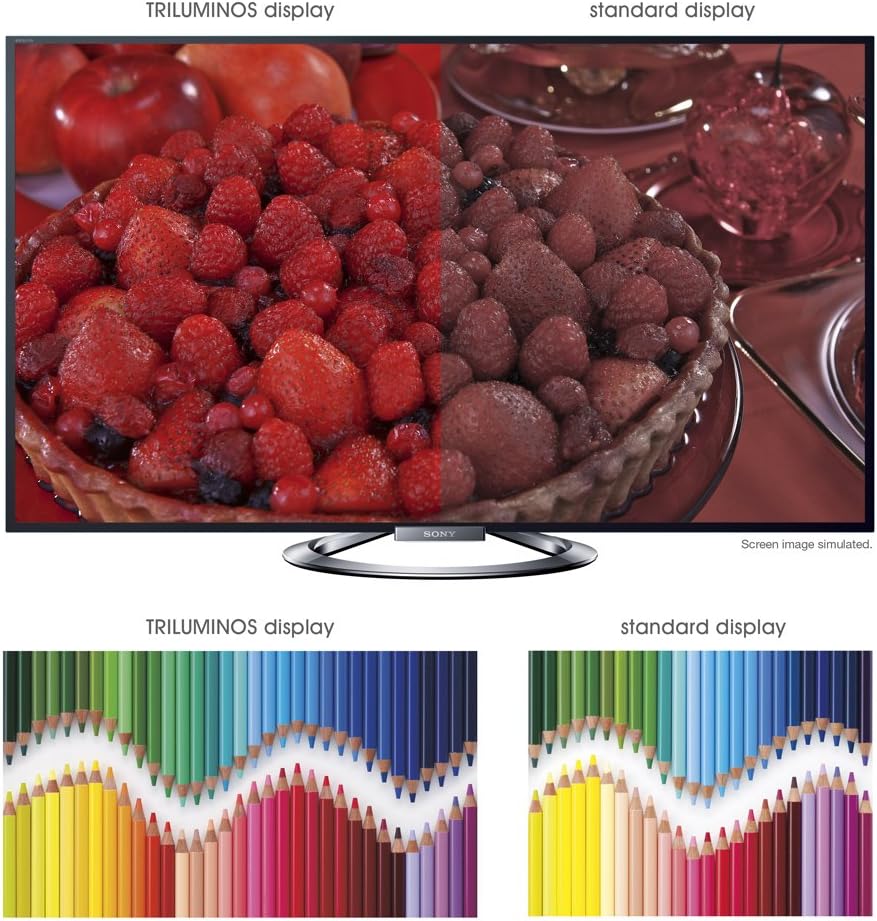
Bild: A split-screen comparison illustrating the vibrant and expanded color palette of the TRILUMINOS display versus a standard display.
4D Viewing
To enjoy 3D content, ensure you have active 3D glasses and a 3D-compatible source (e.g., 3D Blu-ray player).
- Put on the active 3D glasses.
- Play 3D content from a connected source. The TV should automatically detect and switch to 3D mode.
- If 3D mode does not activate automatically, check the TV's picture settings for 3D options.
- Ensure 3D glasses are charged or have fresh batteries.
Wartung
1. Reinigung des Fernsehers
- Bildschirm: Wischen Sie den Bildschirm vorsichtig mit einem weichen, trockenen Mikrofasertuch ab. Bei hartnäckigen Flecken leicht andrücken.ampBefeuchten Sie das Tuch mit Wasser oder einem speziellen Bildschirmreiniger (sprühen Sie nicht direkt auf den Bildschirm).
- Kabinett: Wischen Sie den Fernsehschrank mit einem weichen, trockenen Tuch ab. Vermeiden Sie die Verwendung von Scheuermitteln, Wachsen oder Lösungsmitteln.
- Vor der Reinigung immer den Netzstecker des Fernsehers ziehen.
2. Software-Updates
Prüfen Sie regelmäßig, ob Software-Updates verfügbar sind, um eine optimale Leistung und den Zugriff auf die neuesten Funktionen zu gewährleisten.
- Navigate to the "Settings" menu on your TV.
- Look for "System Software Update" or similar options.
- Follow the on-screen instructions to download and install updates. Ensure the TV remains powered on during the update process.
3. 3D Glasses Care
- Clean lenses with a soft, dry cloth.
- Store glasses in a protective case when not in use.
- Replace batteries as needed (typically AA batteries).
Fehlerbehebung
| Problem | Mögliche Ursache/Lösung |
|---|---|
| Kein Strom |
|
| Kein Bild / Schwarzer Bildschirm |
|
| Kein Ton |
|
| Probleme mit der Netzwerkverbindung |
|
| 3D Image is Blurry or Not Working |
|
Sollte das Problem nach dem Ausprobieren dieser Lösungsansätze weiterhin bestehen, wenden Sie sich bitte an den Supportbereich, um weitere Hilfe zu erhalten.
Technische Daten
| Besonderheit | Detail |
|---|---|
| Marke | Sony |
| Modellnummer | KDL-55W900A |
| Bildschirmgröße | 55 Zoll |
| Display-Technologie | LED |
| Auflösung | 1080p |
| Bildwiederholrate | 240 Hz (Motionflow XR 960) |
| Seitenverhältnis | 16:9 |
| Besondere Merkmale | Flat, 3D Capable, Internet TV, X-Reality PRO, TRILUMINOS Display, Dynamic Edge LED Backlight |
| Konnektivitätstechnologie | Ethernet, HDMI, RF, USB, WLAN |
| Produktabmessungen (mit Ständer) | 48.9 Zoll B x 29.9 Zoll H x 11.8 Zoll T |
| Produktabmessungen (ohne Standfuß) | 48.9 Zoll B x 28.5 Zoll H x 2.5 Zoll T |
| Artikelgewicht | 48.5 Pfund |
| Batterien erforderlich | 2 AA-Batterien (für die Fernbedienung) |
| Datum der ersten Verfügbarkeit | 7. Januar 2013 |
Garantieinformationen
Your Sony KDL-55W900A television is covered by a limited warranty. The specific terms and duration of the warranty may vary by region and purchase date. Please refer to the warranty card included with your product or visit the official Sony support webAuf der Website finden Sie detaillierte Informationen zu Garantieumfang, Bedingungen und Konditionen.
Bewahren Sie Ihren Kaufbeleg (Quittung) auf, da dieser für eventuelle Garantieansprüche benötigt wird.
Kundenservice
For further assistance, technical support, or service inquiries regarding your Sony KDL-55W900A, please contact Sony customer support.
- Online-Hilfe: Besuchen Sie den offiziellen Sony-Support. website for FAQs, troubleshooting guides, software downloads, and contact options.
- Telefonische Betreuung: Refer to the contact information provided in your product documentation or on the Sony support website for regional telephone numbers.
When contacting support, please have your TV model number (KDL-55W900A) and serial number ready.