Einführung
This manual provides essential information for the safe and effective use of your Sony Cyber-shot DSC-WX50 digital camera. Please read it thoroughly before operating the camera and retain it for future reference. The DSC-WX50 is a compact digital camera featuring a 16.2 MP Exmor R CMOS sensor, 5x optical zoom, and Full HD 1080/60i video recording capabilities.
Lieferumfang
Carefully unpack your camera and ensure all items are present. The standard package contents include:
- Sony Cyber-shot DSC-WX50 Digital Camera
- Wiederaufladbarer Akku
- Netzteil
- USB-Verbindungskabel
- Handschlaufe
- Bedienungsanleitungen und Dokumentation
- HDMI Cable (Built-in Media)

Image: All contents of the Sony Cyber-shot DSC-WX50 package, including the camera, cables, and documentation, laid out.

Bild: Eine Nahaufnahme view of the included accessories, such as the charger and USB cable, within their packaging.
Aufstellen
1. Laden des Akkus
Before first use, fully charge the supplied battery pack. Connect the camera to the AC adaptor using the USB cable, then plug the AC adaptor into a wall outlet. The charge lamp Leuchtet während des Ladevorgangs auf und schaltet sich nach Abschluss des Ladevorgangs wieder aus.
2. Einlegen des Akkus und der Speicherkarte
Open the battery/memory card cover on the bottom of the camera. Insert the charged battery pack firmly until it locks into place. Insert a compatible memory card (SD/SDHC/SDXC or Memory Stick Duo/Pro Duo/Pro-HG Duo) into the memory card slot until it clicks. Close the cover securely.

Bild: Vorderseite view of the Sony Cyber-shot DSC-WX50 camera, showing the lens and flash.
3. Grundeinstellungen
When you turn on the camera for the first time, you will be prompted to set the date, time, and time zone. Follow the on-screen instructions to complete these settings.
Bedienung der Kamera
Ein-/Ausschalten
Drücken Sie die LEISTUNG Knopf zum Ein- und Ausschalten der Kamera. Das Objektiv fährt beim Einschalten aus.
Basic Still Image Shooting (Intelligent Auto Mode)
- Schalten Sie die Kamera ein.
- Stellen Sie den Moduswähler auf Intelligentes Auto (green camera icon).
- Frame your subject on the 2.7-inch LCD screen.
- Drücken Sie den Auslöser halb durch, um zu fokussieren. Die Fokusanzeige leuchtet grün, sobald der Fokus erreicht ist.
- Drücken Sie den Auslöser vollständig durch, um das Foto aufzunehmen.
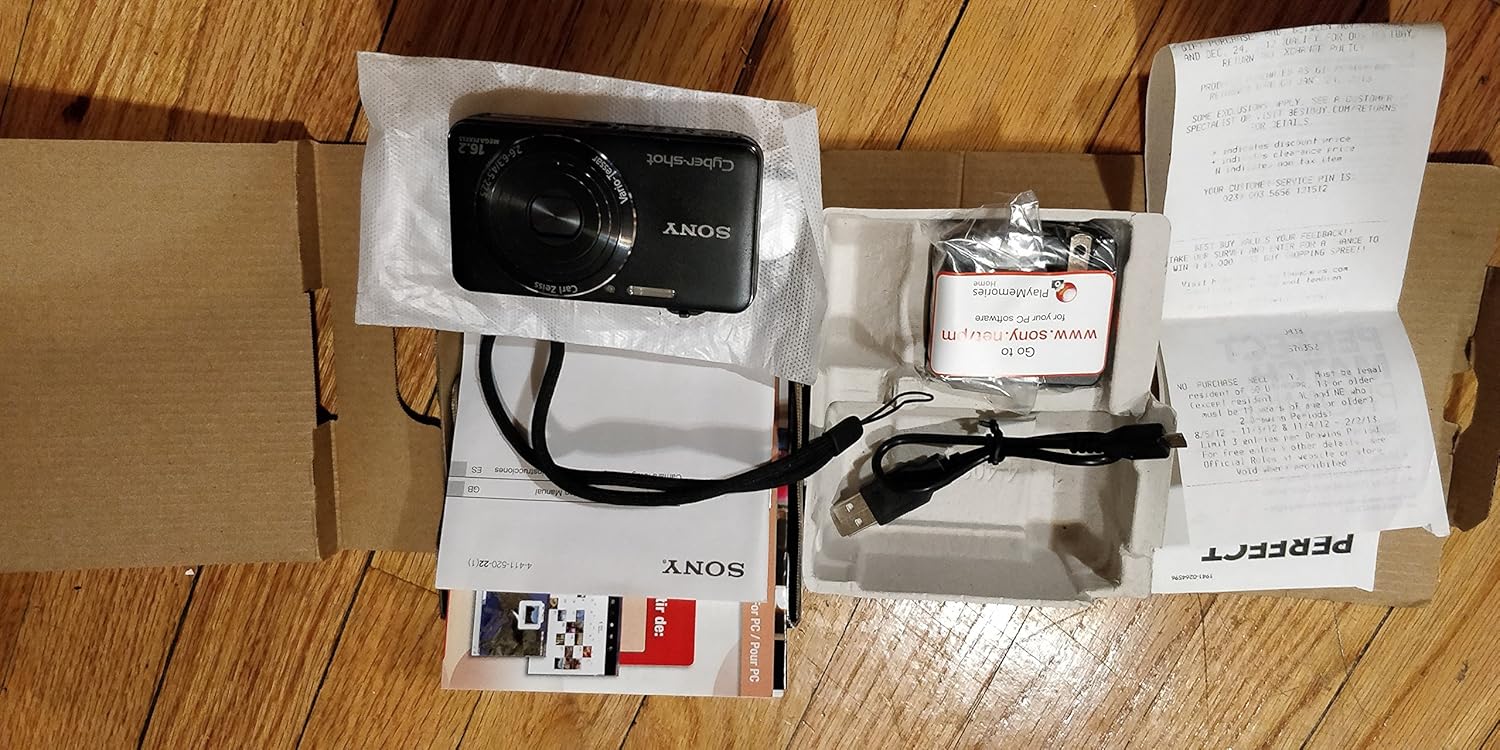
Bild: Rückseite view of the Sony Cyber-shot DSC-WX50, highlighting the 2.7-inch LCD screen and control buttons.
Zoomfunktion
Use the zoom lever around the shutter button to adjust the focal length. The camera features 5x optical zoom and Clear Image Zoom for enhanced magnification without significant quality loss.
Video Recording (Full HD 1080/60i)
To record movies, press the dedicated FILM button. Press it again to stop recording. The camera supports Full HD 1080/60i video in AVCHD format, allowing for high-quality video capture with Optical SteadyShot Active Mode for reduced blur.
Special Shooting Modes and Features
- Überlegener Automatikmodus: Automatically detects 33 scenes and optimizes settings for dynamic pictures with reduced noise and improved clarity.
- Intelligent Sweep Panorama HR: Capture wide panoramic images by sweeping the camera. The camera stitches multiple frames automatically.
- 3D Still Image & 3D Sweep Panorama: Create 3D images for viewing on compatible 3D displays.
- Bildeffekt: Apply creative filters to your photos, such as Toy Camera, Pop Color, Partial Color, and more.
- Hintergrundunschärfe: Blurs the background to emphasize your subject, similar to DSLR effects.
- Weichhautmodus: Verbessert Porträts, indem das Erscheinungsbild von Hautunreinheiten und Falten reduziert wird.
- Face Detection & Smile Shutter: Automatically detects faces and can trigger the shutter when a smile is detected.
- Antiblinkfunktion: Helps prevent photos with subjects blinking by capturing multiple shots.
- Natürlicher Blitz: Corrects colors for more lifelike images when using flash.
- Bewegungserkennung: Passt ISO und Verschlusszeit an, um Bewegungsunschärfe zu reduzieren.
- Schwenkmodus mit mehreren Winkeln: Captures 15 images at different angles to create a 3D-like view auf dem LCD-Bildschirm der Kamera, wenn diese geneigt wird.
Wartung
Reinigen der Kamera
- Kameragehäuse: Mit einem weichen, trockenen Tuch abwischen. Bei hartnäckigem Schmutz ein Tuch leicht andrücken.ampMit Wasser oder einem milden Reinigungsmittel abspülen und anschließend trocken wischen.
- Linse: Verwenden Sie einen Objektivpinsel, um Staub zu entfernen, und wischen Sie anschließend vorsichtig mit einem Objektivreinigungstuch nach. Vermeiden Sie es, die Objektivoberfläche mit den Fingern zu berühren.
- LCD Bildschirm: Wischen Sie vorsichtig mit einem weichen, trockenen Tuch ab. Vermeiden Sie starken Druck auf den Bildschirm.
Batteriepflege
To prolong battery life, avoid exposing it to extreme temperatures. Store the battery in a cool, dry place when not in use. If the camera will not be used for an extended period, remove the battery.
Pflege von Speicherkarten
Always format new memory cards in the camera before first use. Avoid removing the memory card while the camera is writing data (indicated by a flashing access lamp) to prevent data corruption.
Fehlerbehebung
Sollten Sie Probleme mit Ihrer Kamera haben, beachten Sie bitte die folgenden gängigen Lösungsansätze:
| Problem | Lösung |
|---|---|
| Die Kamera lässt sich nicht einschalten. |
|
| "Writing to Memory card was incomplete" error. |
|
| Bilder sind verschwommen. |
|
| Der Blitz löst nicht aus. |
|
For further assistance, please contact Sony customer support.
Technische Daten
| Besonderheit | Detail |
|---|---|
| Effektive Standbildauflösung | 16.2 Megapixel |
| Fotosensor-Technologie | BSI CMOS |
| Optischer Zoom | 5x |
| Digital Zoom | 20x |
| Bildschirmgröße | 2.7 Zoll |
| Anzeigetyp | LCD |
| Bildstabilisierung | Optischer SteadyShot |
| Videoauflösung | Full HD 1080p (1080/60i AVCHD) |
| Unterstützt File Format | JPEG (Exif 2.3), 3D: MPF, Video: MPEG-4, AVCHD |
| Kompatibilität mit Speicherkarten | SD/SDHC/SDXC, Memory Stick Duo/Pro Duo/Pro-HG Duo |
| Konnektivität | HDMI, USB |
| Minimale Brennweite | 25 Millimeter |
| Maximale Brennweite | 125 Millimeter |
| Maximale Blendenöffnung | f/6.3 |
| Minimale Verschlusszeit | 4 Sekunden |
| Maximale Verschlusszeit | 1/1600 Sekunde |
| Artikelgewicht | 0.26 Pfund |
Garantie und Support
Informationen zur Garantie und zum Kundendienst finden Sie in der Ihrem Produkt beiliegenden Dokumentation oder auf der offiziellen Sony-Supportseite. webBewahren Sie Ihren Kaufbeleg für Garantieansprüche auf.
Offizieller Sony-Support: www.sony.com/electronics/support


